
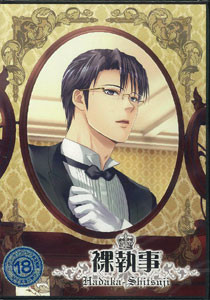
Tomoaki is your average university student, however one day he receives a strange flyer which said that there was an easy job which anyone could do and it was offering a 30,000 yen wage per day. So, Tomoaki went to the address on the flyer since he really needed to money. The address actually led Tomoaki to a beautiful big house with lots of stewards. It turns out that the owner of the residence would be away so Tomoaki would have to act as head steward and keep everything under control in the owner’s absence. Tomoaki was also told that he needed to find a husband, and so he started his work as head steward, however being around all these butlers and trying to complete the almost impossible request from the boss has awakened his sadistic side. What will happen to him now?
















Quick question for anyone who has played the game and used the guide provided in the English Patch; some of the routes have “—” in them instead of actual instructions. Do those mean it doesn’t matter what you do, or that you should do nothing…? It’s really unclear, and I looked through the whole English patch folder trying to find an answer and am simply at a loss. Any assistance anyone can give me would be greatly appreciated.
My problem with the game is that when I run it after installation it doesn’t run and I get a message in Japanese saying that a file called d3dx9_943.dll is missing. Can you please help me run the game?
It says I’m missing the same thing (d3dx9_943.dll) and it won’t let me run it either….
I think it’s something related to the Directx, you have to download the newest version.
I cant save my game ;n; I tried restarting it but it still doesnt save! ;n; now I’m sad D: plz help mee~~
Alrighty. Everything is in order, all you have to do is run the game as Administrator and you’ll be able to save the game.
Yes, I must ask the same thing. For some reason the game won’t let me make save files.
I’m planning on making that folder myself and see if that works, though.
Why does this have cannibalism?
I guess its a yaoi-thing. Try playing DRAMAtical Murder. It has it as well…
hi i have a problem when i opened the game the title page is in japanese but the game itself is in english but as i tried to click the menu button the options are in japanese and i could not save my game. if there is something wrong that i did, could please tell me? thank you!!
This was an awesome game!! I really enjoyed it. Thank you so much, admin, for uploading! <3
i cant seem to install the game properly:( i have joined and extracted the 7 parts, set up the program with the weird language, and copied the DAT files from the patch folder into the data folder. I also copied the hadaka_en into the other —‡Ž·Ž– folder. Did i do something wrong? i keep getting the 666-SYSTEM error. someone help please:(
i finish the sakuma route but and got the cg
but when i exit the game and open it again all the cg is fucking gone ._.
help…
This is a late reply, but if anyone is having the same problem remember to keep the game running while you’re in the credits. Don’t close it. In some games, like DRAMAtical Murder, if you don’t watch the credits you don’t get the CGs in the gallery.
The full download of the game file isn’t there anymore (the 1.3 GB one). Any chance you could reupload it to 4shared or something? Thanks for uploading these things in the first placE!
For Part 3 and part 6 the website tells me \This webpage is not found. I’ve tried refreshing and just re-doing it again and again yet it still gives me the same thing? Is it perhaps my PC’s fault or the site? I mean all the other parts I can download…And like someone else mentioned the 1click version isn’t there anymore. Help me please? Should I just keep on trying (I’ve tried for about an hour)? I really want to play this game! Thank you in advance.
link dead reupload please
can someone please guide or help me download this link?
If you play komine light route,tomoaki will tied him up in a storage.after a few days, he will go check komine’s condition and find out that komine ecaped and is right behind him holdin knife and fork.after that he will ask tomoaki ” knife or fork?” if tomoaki choose knife komine will cut his throat until he dies and eat him
Does anyone else have the problem of the letters being spaced incorrectly? It makes it really hard to read…
If anyone is still having trouble with the spacing of the letters, remember to always, always run the game as an administrator. That will fix the spacing issue, and enable you to save your game.
Ah, I see. I’ll try that then. Thanks.
im new to this so when i downloaded it i included the english patch but the game is still in japanese i have no idea what i did wrong please help.
I don’t know if anyone goes on this page anymore, but I REALLY need help! I download the game but I can never play it, there is always an error and I don’t what it is or how to fix it! This game looks amazing but I’ve never even got to see the title screen 🙁 Please, it’s killing me
what does the error say?
what does the error say? i might help.
In the guide for this game that is included with the patch, there are a bunch of dashes — in certain options. What do they mean? Some routes have nothing BUT dashes, and then it says what ending you get…I have no idea what that means it expects me to do.
if someone could pls tell me how to get this game to work for me it would be much appreciated. i dont understand what most of it means in the instructions.
Instructions:
1. Extract the files
2. Copy ‘Hadaka_en.exe’ into the main installation directory ( —‡Ž·Ž– ).
3. Copy ‘msg.dat’ and ‘snr.dat’ into the data directory ( —‡Ž·Ž–/data ).
4. To play click ‘Hadaka_en.exe’.
5. Enjoy the greatest love story ever!
how do i put’Hadaka_en.exe’ into the main installation directory?
what is the main installation directery?
furthermore what is the data directery? im so confuse man 🙁
go to C://Program_files(x86)/裸執事, that’s the main installation directory
Hello! I managed to get the text into English, and everything is working perfectly except for the fact that the text keeps adding bigger and bigger spaces between the letters as I keep progressing through the game! At first I thought it was no big deal, but by now it’s completely unreadable. Is there any way to fix this?
And the opening video has turned upside down
Thank you so much. I love BL games ^^
Whenever I try to copy the msg.dat to the data file it says there’s not enough on Hadaka . Does anyone know how to fix this ?
are you sure you are pasting it on the right folder? go to C://Program_files(x86)/裸執事/data
Hi, sorry, but it doesn´t let me download part 2
So I downloaded all of the parts to the game and the English plug in but I am really confused on how to set up the English. I read the instructions from the English plug in but they don’t really make sense to me. What is the main installation directory and how do I put the msg and srn into the data folder? Also I do not see a folder called \—‡Ž·Ž\ or \–C://Program_files(x86)/裸執事\ at all in any of the folders. The game plays fine in Japanese but I just can not figure out how to set up this English plug in. Can somebody please help me.
I was able to download all of the parts accept for some reason the 4th part does not download correctly. Is there any way that it can be re-uploaded.
My problem with the game is that when I run it after installation it doesn’t run and I get a message saying that a file called d3dx9_43.dll is missing.
I have no idea what i did wrong please help. >_<
You’re missing DirectX – get it from microsoft’s website.
The only problem is , when I clicked on setup I don’t put the folder into program files, but into another map out of C:
Then I click on the hadaka_en.ex
The main menu is japanese but the text is english. Is this normal? (I already did what the instructions told me)
Yup, the menu is supposed to be in English
I mean Japanese XD
Guys, I need help. I’ve done everything like the instructions tell me to but when I click on it to play it says “0040156E CreateProcess Loader Error”. Why can’t I access the game? And does it have anything to do with the fact that the glink file in my data file says corrupt.glink.dat? How do I fix that??
help! i already followed all the guide and the game works but the alphabet is all square, what the heck is actually happened this? D:
Sorry, if this seems like a stupid question or if this isn’t the right way to go about asking a question, but if anyone sees this and can answer it I’d be grateful. I’m trying to download this game and I’m not sure what the 2 yaoi game download tabs mean. Which of the two do I download? Or do I download both or something?
How do I apply the english patch?The game works fin in Japanese but I don’t really understand the instructions no matter how much I try please help?? I don’t see where C://Program_files(x86)/裸執事 is at all??? And when I try to paste msg into the data folder it said it doesn’t have enough space???? Please help!
I know I’m computer dumb but I don’t really know how to use the English Patch… I really need a very detailed instruction to make it work pretty please? and I don’t know where the C://Program_files(x86)/裸執事 is at?
I followed the instructions and the menu was in japanese but the game was in english!
guys, don’t do the first step, it’ll give you an error.
I+Have+encountered+some+of+the+errors+mentioned+before.+This+game+is+now+fully+working+on+my+computer+and+I+love+it.+I+already+finish+the+toudou-true+route
Here’s+the+step+by+step+procedure+that+I+have+done+in+order+to+install+this+game
1.Download+all+the+.rar+file+from+Part+1+to+7+including+the+english+patch+download
2.+Once+you+finished+downloading,+If+you+have+WinRaR+in+your+PC+just+select+all+the+.rar+file+that+you+download+(Part1-7+and+english+patch)+then+select+”Extract+Here”
3.+After+extracting+you+will+see+2+folders.+one+for+the+english+patch+and+one+named+under+”HadakaShitsuji”
4.+Click+the+HadakaShitsuji+folder+and+you+will+see+a+file+”hadaka.iso”
5.+Right+click+that+file+and+”Extract”+it+once+again
6.+After+extracting+the+hadaka.iso+file,+go+back+and+click+the+folder+of+the+english+patch.+you+should+see+the+original+instruction+there+as+”Instructions.txt”
——-+O+R+I+G+I+N+A+L+–+I+N+S+T+R+U+C+T+I+O+N+S+—————
Instructions:
1.+Extract+the+files
2.+Copy+’Hadaka_en.exe’+into+the+main+installation+directory+(+ââ¡Å½Â·Å½â+).
3.+Copy+’msg.dat’+and+’snr.dat’+into+the+data+directory+(+ââ¡Å½Â·Å½â/data+).
4.+To+play+click+’Hadaka_en.exe’.
5.+Enjoy+the+greatest+love+story+ever!
NOTE:
*main+installation+directory+—>+”setupdata”+folder+(you+can+see+that+folder+after+you+have+extracted+the+hadaka.iso+file)+so+copy+the+’Hadaka_en.exe’+into+that+folder
*data+directory+—->+”data”+folder+located+inside+the+”setupdata”+folder.+so+copy+the+’msg.dat’+and++’snr.dat’+into+that+folder
Last+Step+=+After+you+follow+the+original+instructions+and+copy+all+the+necessary+files+into+their+respective+directory+you+can+now+run+the+game+by+executing+the+’Hadaka_en.exe’
Now+you+can+now+become+a+master+enjoy+this+game+to+your+hearts+content+
Tips:
*The+main+menu+is+permanently+japanese+but+the+story+is+in+english.+just+search+for+the+translation+with+google-sensei+and+just+get+the+copy+of+the+image+and+you+can+eventually+memorize+it+while+playing+throughout+the+game
*There+are+like+28++endings+(Bad+ending,+Normal+Ending,+True+Ending)+so+I+suggest+check+out+the+guide+once+in+a+while,+It+really+helps.
*+The+game+crashes+randomly+sometimes+(+I+don’t+know+if+it+is+just+for+my+case)+so+occasionally+click+the+Q.save+=+Quick+Save.+The+game+has+a+Quick+Save+and+Quick+Load+feature.
I appreciate your help, but unfortunately I still have problems. In fact, when I try to copy the ‘msg.dat’ and ‘snr.dat’ into the “data” folder, it said it does not have enough space. Same thing when I copy “Hadaka_en.exe” into the “SetupData” folder. Please, help me! I lost an afternoon
Hello!! I’m typing this to perhaps help anyone who is confused. After all 7 parts have been downloaded, including the English patch, please switch to Japanese locale! Then extract all files (not including the english patch!) into a folder of your choosing. Now, in order to get the game in English, you will need to set-up your game. This is where the program titled ‘set up’ is needed alongside the locale change. When you click on it, a box with Japanese text will pop up. No need to be worried, just press the button called ’光へ’ and continue on. After downloading, this will start the game. As you can see, it’s still in Japanese. Exit it out of it and open the Eng patch file. Now you will be able to find the main directory, it is located in your program x86 folder or wherever you decided to extract the files to. Follow the instructions on the note. All should work. (Note* Always click on the program and choose ‘run as administrator’ to be able to save.) Hope this helps!!
Also, ‘hadaka_en.exe’ should ONLY be extracted to the main folder “裸執事” DO NOT put it in SaveData or Data!! msg.dat and snr.dat are the only files being moved to Data. Hope this helps!
Hey, Admin. Could you please upload the mangagamer version of this game? It has uncensored CGs and translated menus, so it’d be great to get it. ^__^
also requesting an upload of the new mangagamer edition that has a better translation and uncensor
I’m recommend the MangaGamer with new English translation and uncensored version.
Maybe “the uncensored MangaGamer version with new English translation” everybody is talking about has already uploaded as Naked Butlers (erogedownload.com/downloads/naked-butlers).
If that’s the case, it would be better if the admin deletes this version or at least put a clarification or link to the newer version. That would be nice.
Thanks for the uploads though.
You’re like my BL dealer.
God bless.. XD