
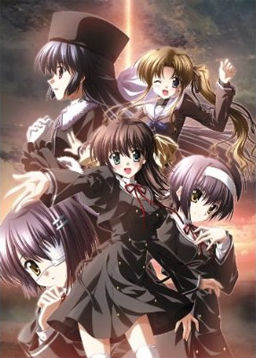
Yuuko Amamiya, a mysterious girl dressed like a nun, and Yu Himura, a mysterious gentleman who is somehow attached to the church where Yuuko first appears, are having a reunion in a church during Christmas time. Despite her attire, Yuuko is not affiliated with the church. She always appears generally out of no where, and disappears just as quickly in various places throughout the story to talk with Hiro or other characters and give them advice.
















Hello,
I downloaded all the six files and installed it, but when launching the game, I have only a black screen (but the right-click does seems to work because it shows the menu). ='(
Any idea of what’s happening there, and a way to help me ?
Problem solved… It was Daemon Tools wasn’t it ? Cause it works now that I installed it… ^^’
But, there’s still no BGM. Seems that I’m not the only one, but I didn’t see any solution there…
Help please ?
Set your default location Japan and your non-unicode language Japanese ?
Don’t worry: all of the introduction has no music
I downloaded it all but it errors when I extract it …
Hey on the first choice there appears two choices with some letters not english, japanese, or russian. What does these characters mean? One is a box, another like a sun giving light next to a triangle, a couple of circles, one little another big… what’s that language? Help!
There are no strange letters: you should set japanese localization language on your pc.
First choice is “Continue talking”; second one is “Follow Miyamura”.
You damn minori… you made me CRY!!
Works perfect.
Fantastic history, one of the better vns i ever played.
is there a walkthrough
Is this in english?
Hey..they said there r options to skip the “exciting scenes” but i did’nt find any . It just skipped on its own . WHAT THE HELL
I am completely unable to download the 2nd part of this game. The file sharing website keeps telling me that it is no longer available. Please help!
It works fine for me.
I tried over 10 times =[ Part 2 is the only one i cannot download. The filesharing website just keeps telling me its no longer available. Might i know what browser your using? I’m currently on Mozilla Firefox. If changing doesn’t work, i’ll try to install it from a different computer =\
I tried both opera and firefox. Download starts without problem for me.
Probably a temporary (regional?) fileserve problem. Downloading starts fine for me. BTW, I’ve torrented it the same day NNL released it but haven’t run it, I’m waiting for an official release.
Are there subtitles in this game? I can only hear the voices.
I have the exact same problem, and guess what, it was solved by changing my ISP. May be you should ask your friend to help you download it.
Btw nobody answered me yet, is this in english?
Every game posted here is in English.
Thank you, and sorry. Every other game here are either I have or I was following the translator, but ef from what I heard sometimes ago is still being translated. It’s looked like I get the wrong info though. lol.
are this files found here covers all the ef stories?? PLS reply asap
I’m having problems. I unziped it but all the file had was a .cnd and install file. When i try to run the Exe I get a program isn’t responding message.
Any thoughts?
Does this include the latter tale? i only see a .exe for the 1st tale
Yes, it’s both first tale and later tale.
cool. i tried downloading latter tale alone from somewhere but it’s raw. i tried googling but every site is saying latter tale hasnt been translated yet
How can I uninstall this game? Or is this just a translated folder rip where I can just manually delete the whole folder?
I downloaded it all and it says it’s not in the directory…
um may i ask how to open .cnd file?
hey admin are you going to add any more vn’s?
Does this install the latest patched version, or is it unpatched?
are you sure these files aren’t corrupt? i used the program winrar and no matter what i did, it wouldn’t work! i can download the files but i can’t find any way to play them! please help!
Is there any way to completely uninstall the game?
It was working perfectly, but somehow, I lost all the sounds ingame. Therefore, I wanted to uninstall the game and then install it from square one.
Have already tried reinstalling with ef_lite_installer, but no luck so far.
Thanks in advance.
You have to delete the file that is named ef and contains all the game files, then you will be able to reinstall it.
I have a problem. The first time I ran it there weren’t any problems, but after that day there was no voice!! Can anybody help me?? Oh, and I didn’t press any of the buttons in the configuration as well. I even tried reinstalling it, but it didn’t work. 🙁
You have to delete the folder named ef, that contains the game files before you reinstall it.
I did that, but it still doesn’t work. I even deleted the ef folder in the appdata as well.
Same problem. Been messing around a bit with different uninstalling tools, but no luck so far. I’m guessing some archives still remain in the system, even after I manually delete the game’s folder, hence, the problem keeping on even after reintalling.
The first time you played it did you have sound? The problem must be with the pc, not with the files, everyone is installing the same files. Install the k-lite codec pack if you don’t have it (http://www.free-codecs.com/download/k_lite_mega_codec_pack.htm), it might help with the sound.
I tried installing the files on the link you had, but there is still no sound. To answer your question, I did have sound when I first installed it, but the sound vanished the next day.
Could you please help??
If you go now at the configuration what does it say? I know you didn’t press any buttons. At the voices area there are some boxes that say mute, are they checked or unchecked and what about tne volume level? Did you go at the configuration before you close the game? Because there is an area there that says if you change something here you will lose the voices, maybe something changed there by accident before you close the game?
I know how to read. I didn’t change the are about the voices, but I did change the volume levels for BGM, voices, and Sound effects. I never muted the sounds either.
i’m having the same issue
are the games on this site with english subtitles or english voices?
There’s only one game of this kind with english voices that was ever made.
what game is that i havent found one with english voices yet
i got the sound problem too
is there a solution for this?
I wish there was, but nobody seems to know.
i’ve got a solution but not everybody wil be able to use it.
I was playing on a mac on bootcamp before. When i tried to play it on the mac via parallel desktop the sound was there.
If like me you’re on Win 7 64 bits, the sound problem can be fixed by moving the ef folder from Programe Files x86. Apparently, DirectSound problems can appear if it’s not directly in C:\
I don’t know why though nor I know if it’ll work with another OS.
Thanks for the info. Just tried it, and it’s working fine so far. You’re really a lifesaver.
after installing i get an error, and when i try to open the game it says that i have a missing file.
sry.. it worked after reinstalling it. .. but now i get a fatal error before i start chapter 1 .. hope someone can help me.
Mr.ADMIN I have problem when install this game,..
I wait very long but the installation not have any progress,what should I do ????
i have a problem here, when i finish instalation and run the game it instantly comes up saying the program isnt responding, any idea’s whats wrong?
i cant tell whether to get this game or not this is the 2010 version? ef lite? i cant tell this is really confusing me ill just buy it when manga gamer releases it
just found out cant get the pairings i wanted for this every girl has thier protoganast ….shame..
noooooo!!!..
I got part5 corrupted!!, admin please reupload the exact file, pleaaase..it took me 3 days to complete them..*sob*
any chance this will be re-uploaded admin? this sound like a very good VN. 😀
I downloaded and installed the game, and the fonts, but when I try to open the game I get an error message saying that the game encountered a problem and needs to close. Please advise what can be done to fix this. Thanks.
YES!! I finally figured out why the game kept crashing halfway through – right the end of Kei arc. For those who have MPC HC and LAV filters, you need to go back and reinstall ffdshow, or the game will crash when it tries to play the movie.
Just in case anyone else was getting very frustrated like i was. now..on to the latter tale
can anyone tell me how to download this game?every time i click select it just refreshes the page
Just hit show then copy/paste all the links into your browser. Or you can do what I do and highlight them and right-click and choose the option open link in new tab.
Is it normal that I can’t run the installer ?
I try with 7 and XP,with or without the admin right, he doesn’t want to launch –‘
Can someone tell me what should I do please ? ^^
Thanks in advance
By the way : thanks for the links =)
It said when I installed it didn’t detect ffdshow on my computer, but I definitely am using it, well I’m using the MadVR codec with MPC-HC, which is ffdshow-based. I should be right for the sequences in this right, because I didn’t see any “video” when I started a new game.
i can’t download part 3…
it’s not moving at all…
like there’s no downloading occurs…
link 9 is broken
please reupload it…
pls reupload part 11 admin..
download stops at 129-133 MB
I really want to play this..
i hope reuploading wont be hard ryt?
oh nevermind that..
thanks for the game!
I tried to download part 05 but it says “Corrupted Content Error”
How do I fix that please. Thank you very much. 🙂
Part 11 doesn’t fully download…seems to stop around 48-60MB range…
Seems part 11 is corrupt. please reupload! this game seems to be interesting.
after multiple times checking it part 1 seems to be corrupt
C:\EF\Ef.part3.rar: CRC failed in Ef\ef_Lite_Data_[nnl].cnd. The file is corrupt
please help me… 🙁
Can someone reupload part 11 i will be very happy since i have been waiting for someone to reupload like 2 weeks D;
Same here… tried to download part 11 several times… it always stops at 50-80 MB… would be nice if you could fix that, Admin…
This visual novel is soo sad 🙁 But it’s still amazing.
Is there no music in this version? =(
got the same issue. its not that i cant play it w/o music, but w/o it the mood weakens. 😛