English visual novel downloads

YU-NO - The Girl that Chants Love at the Edge of the World
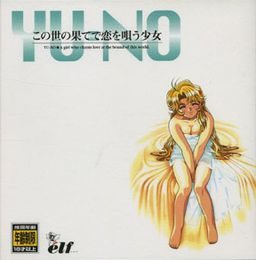
YU-NO - The Girl that Chants Love at the Edge of the World
Takuya Arima is a young student whose father, a historian who has conducted various researches, disappeared recently. During a summer vacation Takuya receives a peculiar package from his missing father, along with a letter containing information about the existence of various parallel worlds. At first Takuya doesn’t take it seriously, but soon he realizes that he possesses a device that allows him to travel to alternate dimensions. Is his father alive, after all? If so, where is he?

202 comments

tachiReply
great
lofterReply
on earth
lofterReply
what happened
peacefireReply
SH1/2 are different games bundled with the cd. They're kind of a hentai version of Langrisser or Fire Emblem. Completely in Japanese.

Can you hear the regular background music/sound effects? Either way you don't have the voice pack installed since there's no ai5eng_voice exe. It comes separately. There's a link for it up there.

And no, there is no way to 'improve' the graphics, short of redrawing them from scratch. There is probably a way to force a new resolution, but even if you did it would likely make the game look worse, not better.

FRAPS won't work because it's a really old game. Screencast software should work if you're trying to record the gameplay.
KrReply
Not able to run game in Windows 8.1 Bing edition. It tells "Failed to initialize window" no matter what compatibility settings used. Any way to fix that?
peacefireReply
I have it running on Windows 10, so there should be some way to get it to work. Try reinstalling or messing with compatibility settings.
kirbysecondReply
I installed this and patched it on Windows 10 X64 and it works fine except for the in-game text. The text is displayed longer than the text window and when text is too long the right part will go out of screen (doesn't stop at right margin) and I can't watch what it says. I tried messing with compatibility settings of windows but I get the same.
DistortionReply
i have trouble with the AI5ENG_VOICE.exe file i disabled my antivir and re unzipped everything game and patch but cant find the file Pease help
peacefireReply
Have you downloaded the voice patch? You need to download voices separately if you want them. Otherwise, just run AI5ENG.exe instead.
cihanReply
i downloaded it long time aga. it worked. and nice game

a good chance oor learning english and japanease.
roshinkyoReply
Hello,I'm a chinese translater of YUNO.I have some problem in crack the game and I can not contact our creaker.So do you have any tools to help me to compression and decompression the text?
I’m sorry to trouble you.
fondlyReply
Hi.
Do you have any tool to extract the MES.ARC(many mes)?
And how to packet the MES to MES.ARC?
Because I need some tools for translation.
Thank you.
KainReply
I was able to install the game, patch it with the english patch and run it well. However, for whatever reason the game is mute. I can't hear any music at all. Is there a way to fix this? Any help would be greatly appreciated.
LALALALAReply
I had this same problem. What I did was copy the one of the MUSIC.ARC file from the ISO into the main game folder on my computer, it worked for me.
corrupted saveReply
I seem to repeatedly get corrupted save bugs and stack overflow even when I exit the game correctly. Searched around on google and apparently no one else has this issue?
LALALALAReply
Admin, after I installed the voice patch I would get "buffer overflow" whenever I tried to load my game. How is this fixed?
shaviReply
same here, stack buffer overflow error every time i load previous save, what i can do?
KojiReply
I tried your method to change SCREEN=1 to SCREEN=0
but it didnt work :<
peacefireReply
Are you trying to run Ai5Eng.exe or Ai5Win.exe? If you're running AI5WIN (the original japanese version) you'll want to edit the AI5WIN.ini file instead.

That's the only thing I can think of.
HuckleMyBerriesReply
Hey you guys just a general question. How do you go about playing this?

I can tell this is a HUGE branching vn but is it really hard to keep track of the story/choices/routes? I ask because I looked at the walkthrough and I audibly yelled out holy shit at the sheer number of different possibilities. Did you guys go in blind and enjoy the ride?
1111Reply
I absolutely did. I didn't even look at the walkthrough. Just keep track in your head. You'll miss a few important spots, which will lead to sucky endings, but next time you'll know better.
benjReply
hello i have installed the game using daemons tools and when i run the patch i have a yellow screen and a black screen and the game doesn't load !!!! do you have an explication ?
rishReply
Heard they were going to release a re-make of this soon. Gonna play this before the re-make just to experience the delight of the original. I just opened this for a bit and already, I think it's really cool. Just have to download the English patch, and I'm going in for a great ride. Thanks admin! <3
:(Reply
Just done talking to eriko-sensei and about to save but it says "failed to read files". Well when I exited to main menu there's no continue button. "Failed to read files" also appears when starting a new game and trigger ing the demo.
EmilyReply
Someone PLEASE PLEASE help me!! I'm new to installing games and thus I'm really bad at stuff like this the only game I installed and played was 999.. I installed the 3 parts and I mounted the classics image but the install.exe didn't work?? It seems after I read all the comments that a file called (AI5ENG.exe) is missing from what I downloaded.. what can be the problem? Someone please help :c
CornphiseReply
I downloaded the music pack for this game and now it seems a weird error happens. I was on eriko/mitsuki route, close to end, I use jewel save, game gives "file error failure to open/close file" When I try to reload the jewel save, I get numorous "failure to open/close file errors", the game quits, deletes my save data and I have to start the bloody game over.
NotkoudaiReply
HELLO! thanks this game is wonderful.
I finished the game and just want to know one thing, idk if a i misread something or the game just never tell u who made the message/code at the twin stones (sword cape).
Does anybody knows this?

and if someone want to share relate info about the story that game doesn't directly tell us. thank u great game!
RandomReply
Can someone tell me pls on how to install this game?
ChrisReply
I just watch this anime very recently and it reminds of Steins Gate. By I was informed that Pink Pineapple produced and released a four-episode hentai anime original video animation series during 1998-1999. Maybe someone has that file here. Pls share. (^_^)
ChrisReply
If anyone has the four-episode hentai anime original video animation series released on 1998-1999 please kindly share.
ChrisReply
After I extract the files, I ended up having a folder with 2 files inside. CLASSICS.bin and CLASSICS.cue

Please help.
XaviReply
you can use ISOLOADER
ChrisReply
ISOLOADER. I give it a shot. Thanks.
ThankfulReply
Hey, I installed and I only get voices in AI5ENG_VOICE.exe
I want to play with voices in the original japanese AI5WIN.exe (simply renaming it to AI5WIN_VOICE.exe didn't work lol). Does anyone know how can I do it? Thanks
onlyoneReply
As soon as I start the game in between every line of text I get an error pop up that says nothing but "open.mes" in it. I'm assuming it's not detecting the voice files correctly, but I can't find anyone else that's had this problem so I have no clue how to fix it. Anyone?
yuno window 10Reply
I've seen multiple comments about not being able to run the install.exe file from the mounted image on WINDOWS 10. The solution is very simple, just extract the mounted image contents to a desired file on your hard drive. After extracting all the files, you can launch the English patch exe, there it will ask you to direct it to where you installed the game. Simply choose the YUNO file (its after the SH1 SH2 files) and voila you can play patched YUNO on windows 10.
Hope I helped some of you to experience the game, cheers.
Windows 10 replyReply
Okay I've noticed a weird bug. If you try to play the game through the shortcut the English patch made on your desktop- an error message will pop up indicating something along the lines of "something something missing 256 bit colors". All you have to do is to launch the game through the directory you've extracted it to ("installed"), meaning launching through:
(the file where you extracted all the contents of the disc)\YUNO(under the SH1 SH2 files)\AI5ENG.EXE
From here the game will boot up correctly without any problems.
final replyReply
Just run the game through compatibility setting (WINDOWS XP PACK 3), and run as ADMINISTRATOR. Trust me it will work 100% of the time.
icarusdReply
Hello, im havin this text, can i have some help pls?

"This game only works with at least a 256-color..."

im using windows 10, thanks
Imouto HunterReply
Admin, would it be possible to update to use the voice patch (from the Saturn version) or include it as a separate link. Similarly like the Kanon visual novel with voice patch.

The game file size together with it would be 2.4 GB. The game itself would be over 700 MB unlike this one that says it's 500+ MB. Seems out of date.
TReply
I'm pretty sure that when I downloaded YU-NO years ago from this site it had voice. Or maybe I got it from somewhere else, or I am mistaken. Isn't there another way you can find those files and use them with the PC version? Is there any proof that it works?

Damn, this version is the most beautiful one. I love old timey graphics like this. The OST is excellent. RIP Ryu Umemoto.


I really need to read this one properly - it kind of intimidates me because of the huge amount of choices.
ZeptReply
Game crashes on windows 10 1902,but it works on windwos xp,tried everything,tried all the compatibility modes,8 and 16 bit and 256 colors the registry thing,run as admin and disable antivirus and still crashes on windows 10
AYYYYYYYYReply
How does one install this game? Every time I try to download the site tells me I input the wrong captcha when no captcha even appears in the first place. I tried making an account to solve the issue, but the same thing happened. Any idea what's wrong?
jubReply
Any chance I could run this through Wine on mac? I was able to run the installer and patch, but when I try to open the AI5ENG.exe nothing happens.
LoliconXDReply
When will the admin release the remastered version
adminReply
Remaster is all-ages, unlike this one that contains 18+ scenes. I have both versions, but there's not much point in posting remastered one - you sacrifice high resolution, but you gain added content.
diegReply
Can someone post a guide on how to install, because I have all the files but no matter what I do when I click on AI5ENG_VOICE it just keeps telling me to install the game, PLEASE!
raxgamerReply
Can someone help me?

i am trying to play the original version of the game called YU-NO (a Visual Novel,the original version) for windows but i am having problems to install the game and run the game with english patch.Can someone help me with a guide? is very dificult to install this patch and work,and dont have nothing on the internet as a guide to install.if can someone help me i will be glad.And no i dont want play the remake.

Leave a comment