English visual novel downloads

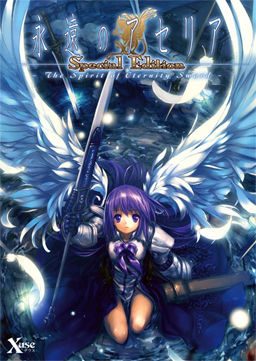
Aselia the Eternal

Aselia the Eternal

Yuuto has been taking care of his step-sister Kaori since the passing of both of their parents. Their life is hard, but they are happy together - at least until the day they are transported to a parallel world that they will later come to call Phantasmagoria…

In this world where he can’t even understand a single spoken word, his sister is taken prisoner and her captors, calling him an ‘Etranger’, force him to fight wielding a sword that tries to control his mind instead…

Although he first accepts this fate only to protect Kaori, with passing time Yuuto starts to care for the fate of the ‘spirits’, the girls that fight alongside him, and other inhabitants of this world as well…

270 comments

zackReply
i click on the link and it say that i don't have permission to access this page and i have a user account you have a clue way?
adminReply
My bad. Fixed now.
zackReply
thanks
ZeroReply
so this game dosnt have any h-scenes? and how many versions are out therE?
zackReply
not to far in the game yet but is the versions in the link that you put up the one with h-scenes or not?
fearReply
T_T the files have been removed on the other site can you please fix them i really want to play this game T_T
AnonymousReply
The Uncensor patch has been removed. Think you could reupload it?
Kami-yuuiReply
Uncensored patch file is removed. Kindly reupload it? domo. :)
ACReply
:( THE H-scenes.... only a simple FS

Adm, please, if you can get the original version would be better. This game contains the H scenes, but only 5 endings.
But HAVE the H-scenes.

Is a good game, but may be better with the H-scenes.

I appreciate if you can get the english version of Sekai seifuku Kanojo

Thanks for all admin
BlutsaugerReply
the first one i think they don't have a h scene.
maybe you talk about the second game of aselia.
SnehvideReply
Does any1 know when Eien no Aselia 2 will be up in english :/?
Can't find it anywhere :S?
anonymouseReply
Downloaded. Working, but... When the official release, is... Well, released... Will it be uploaded here?
adminReply
Yes.
anonymouseReply
Ah, and forgive me for bothering you, but while we're at it... Apparently, an almoust complete Little Busters patch was released. Only the epilogue is out. Is it going to be posted here?
adminReply
Since it's "almost" complete it won't be posted. I upload only 100% english translations.
TresviriReply
I am having problems.
When i click on the the fill that opens the instilation i only get a strange menu with lots of "?" and other random letters.
I have already tried fiddling with the options there but they do nothing.
Pleaase help!
adminReply
You need to change locale to japanese to install this game. Check out "F.A.Q" section for instructions.
megamiReply
do the voice change to japanese voice later?
adminReply
Yes, during prologue character doesn't know proper language in new world so everyone seems to speak gibberish - all goes back to english text/japanese voice once character learns language. After you complete the game and start it again there's additional option to translate everything that is said in unknown language.
megamiReply
thank!
MurReply
I get an error after selecting an install location as well during the installation process. This is with the system in japanese mode.

Is it possible it just doesn't work with windows 7?
RyusukeReply
Greetings
I have a problem, well I am not sure if its a problem or not. So I installed the game and everything is working fine except one thing, I am still at the begging Prologue but there seems to be no voice overs for the characters only bgms and such. Any help regarding this would be appreciated
RyusukeReply
Ok so never mind I fixed the problem, All i had to do was run the game with applocal to allow the voices to appear
NFHReply
Actually, I had the same problem while running the game with Applocal (If I don't use Applocal the game won't even start) and the problem was that I changed the original Japanese name of the installation folder into English because the English patch was unable to work until I did so and I forgot to change it back.
I found that you can indeed change the name of the installation folder to anything you want but you need to change the two registry in Hkey_Local_machine/Software/Xuse_corp/AseliaCs/install to the place where you installed Aselia in order for the voices to work.
PTReply
Having problem downloading part 4,keeps on failing each time i try to download it.
DuckReply
It's a problem with fileserve, it does that a lot.
adminReply
I'm adding filesonic interchangeable mirrors to every download, but it takes time. I'm currently at 61th upload, while this game is 174th.
GalesReply
i mounted the image and installed, but for some reason it stops install right at the beginning of the process. does anyone have any advice?
consolgodReply
once i mount the iso and trt to start installing a mesenge box tells me to restart my pc cuse there was a mistake while extractin i did it but it keeps poping what do i do?
ps:im sorry if i made any mistake in this comment im not user to writing in english.
paulieReply
Set your language system to Japanese.
Or install Applocale and use this useful program for all your Japanese games. You can google the way to install this on Windows Vista & Windows 7 (as it is a program designed for Windows Server 2003). I've tried this and it worked like a charm.
amadoReply
I have a problem.
I extracted the 4 of them using 7-zip and then theres a folder with its name.
I opened it and it only has these 2:
ASELIACS.ISO
ASELIACS.MDS

how do I install it? I tried clicking either of them and extracting but it does work.
do I need something else?
amadoReply
nevermind got it.
now a new problem:
I think its the same as the guy above me.
I cant read the installation and I tried pressing all the buttons but still doesnt work.
beginnerReply
there is a problem in my game that is turn off the computer randomly in the gameplay
fakeadminReply
i downloaded all 4 part and when i run the iso with daemontools and try to install the game it gives me an unreadable error message (just a punch of ?'s) and does not install i have change my coomps language to japanese plz help.
adminReply
If you did change the locale to japanese you wouldn't be getting the "????" errors...
ZweiReply
Thanks was having the same prob myself:P
moopsReply
me too,thanks admin , i wouldn't figure it out without you,cheers.
idiotReply
do you need the patch to play?
adminReply
Kind of. This patch translates game from Japanese to English, so if you know Japanese you can play without it :)
Guy who NEEDS HELP!Reply
hey I changed my location and formate to japanese in the control panel under -Clock,Language, and Region- but every time I click the -Xuse_inst- it still pops-up as jumbled keys, though i know how to get to the installation part from there non of the buttons will let it download. Also the application to start the game -aseliacs- also doesn't work so I know the game isn't installed already and I burned the ISO to a disk.
ANYWAY thats my problem if anyone can tell me how to play this game it'd be alot of help.
A guy who wanted to helpReply
Did you only change the format? If you look in the FAQ on this site you will notice that you have to go to the administer section and change the system locale. Take a look for yourself...
http://erogedownload.com/faq/installing-japanese-support-for-windows-vista/
Guy who NEEDS HELP!Reply
thanks that made it instal... buuut it just brought up stuff that was already there and the -aseliacs- keeps saying that it has stopped working everytime I click it, i've tried both; the one I had before and the new one that popped-up with the instal.
sorry for the trouble
Guy who NEEDS HELP!Reply
AHHH! Sorry I just found how to make it work!
So anyone having the same problem just instal then run the patch!
And sorry again sorry causing trouble
ZephirothReply
OK, i downloaded it, i mount it, installed eastern asian lenguage and app locale, and the registry i put it on C:\

then on F:\ theres aseliacs, aseliaconfig 2 folders and Xuse.

But when i click on aseliacs y comes with "error extracting reset ur computer" even when i opend it with applocal

And the Xuse simply dont open.

Sooooooo, what should i do'??????
ZephirothReply
and i use xp
guy who wants to helpReply
I searched your problem on google and i'v heard that if you drag and drop the aseliacs to "Xuse_inst" here is the sight is found it on....
http://dakkodango.com/forums/viewtopic.php?f=5&t=77&start=10
ZephirothReply
OOOOOhhhh!!!!!
Thanks, im installing it now! :D
BoyaReply
admin. i have a question. do you Seinarukana here uploaded? i read that it's one of the sequel of this game and was wondering where i could get it? and if it have a english patch? it would be my pleasure if you could help us play it. thank you. \m/(^.^)\m/
EremReply
seinarukana currently has no full english translation. Dakkandango is working on one and I think they're about 40% of the way there
VLaDOSReply
Actually, according to VNDB, there is an English version. However, I can't seem to find it anywhere online.

Leave a comment