
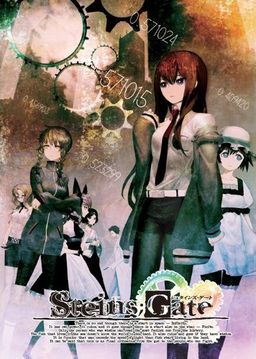
The story of Steins;Gate takes place in Akihabara and is about a group of friends who have customized their microwave into a device that can send text messages to the past. As they perform different experiments, an organization named SERN who has been doing their own research on time travel tracks them down and now the characters have to find a way to avoid being captured by them.

















I’m not sure if its a bug or something i just cant manage. I’m currently in chapter 1, around the beginning. My problem is that Rintarou looks at his phone every few scenes even after i put it back since the prologue. I can’t do anything with the phone, it wont do anything when selecting the names, but it keeps appearing that its annoying to be honest.
So i would like a solution what to do here if anyone knows 🙁
And another thing: Is it possible to have the “Tips” translated that appear on top of the screen?
every time you move your mouse to the right the cell phone appears, it’s not a bug, just stop moving your mouse xD
Ahah i hope thats the case ==> goes to check out (truly never noticed that, coz that also happened when it was on auto read many times).
But thanks for the reply <3
This is probably one of the best VN/Eroge I’ve ever played. If you get a chance, be sure to try it out! There is also an anime out, and it actually does a decent job of capturing the story without cutting anything essential.
Not an eroge, there is no porn.
may i know how to use the Steins;Gate 1.20 Update:
(3,5 MB) file ???
after i updated to 1.20 version my save file gone?
Sometimes my mouse goes haywire and starts selecting everything when im trying to save or if im on the menu screen, how can i stop this stupid problem? 🙁
this is an all-ages right?
yes, Steins;Gate is All-Ages
I would say 13+ since there are scenes of violence, not that it matters.
Does anyone know where the save files are located?
In chapter 1, shortly after Suzuhas first appeareance, Okabe uses his cellphone to look up something about John Titor. On the screen is the cellphone and some comments. I tried everything but the game don’t continue. Does anybody have the same problem or know how to solve it? q__q
I don’t remember that part but I think you just have to scroll down
Thanks ^^
During chapter 1, When Okabe looks at John Titor posts I can’t get on with the story, he just stares at the posts. Any fix? Do I just wait forever or something?
you just have to scroll down with your mouse
Thanks, I was using a touchpad on my laptop, so it wouldn’t scroll right so I plugged in a mouse!
i can’t scroll down with the touchpad… doesn’t it has a button config
i am having a problem with the movies.none of them will play but i can skip them…can someone tell me what the problem is?
I have Win7 and the latest cccp but still nothing…
i am having a problem with the movies.none of them will play but i can skip them…can someone tell me what the problem is?
I have Win7 and the latest cccp but still nothing…
Installed VN and patched to 1.20. Copied in the nss.npa and the patch .exe. When I run the program it works fine and goes to start menu. but when start is selected, the screen turns black and in a couple of seconds it returns to the start menu. Tried reinstalling multiple times and running with or without copying the cg.npa and the nss.npa so neither of those are the problem and I’ve tried installing in program folder and elsewhere. Any advice or perhaps corrupted image I was mounting?
i have the same problem.
did u solve your’s
That error happens if you don’t have the Japanese installed in your PC
the fileserve links are dead. please re-post
fileserve links are down
filesonic not working for me
pls reupload on fileserve or uploadstation
thx in advance
thankyou very much, all of them are downloaded, i hope theres nothin wrong that would be happen when i play this game, once again, thankyou.
Which one is better? The anime or the visual novel?
I’ve read so many, I’m getting a little tired of reading but on the other hand books are always better than movies… so? 😀
obviously the VN is 100 times better.. the anime is just a summary
both are good, but the VN goes in a lot more detail and by the end draws you in so deep, that you’ll become an emotional wreck by the time you reach true end.
This is missing the Cosplay Addon.
Hello,
I successfully installed the game, but when I try to launch the patch executable, I have this error : http://s4.noelshack.com/uploads/images/8251897667706_steinsgate_patch_erreur.jpg
I already tried to execute it as administrator, but it doesn’t work either…
Could anyone help me to solve my problem ? Thank you !
This is an .npa file I edited. It contains the latest translation scripts (the ones here), but also contains the translated Tips that were released a while ago, but were never compiled. The names of the Tips are untranslated, but their content is translated.
http://www.mediafire.com/?zd3igci9hywzffx
Simply copy it to your game folder to replace the older file (make a backup just in case, although, I’ve tested it. You can also continue from your save, it doesn’t crash).
In addition to this, you should also use the patched .exe in this .rar:
http://www.mediafire.com/?5sycu16nyah6rcf
With this, your game won’t crash when you go into the Tips Menu (it might also fix that late game crash, but I haven’t been able to confirm that one yet).
Finding the sgtools to perform this was annoying as shit because, surprise surprise, the links were all taken down. But alas, it’s done.
Enjoy. Hopefully it fixes the late game crash problem, as well, for those unable to complete the True End.
Still crashes on me when Kurisu is about to turn around during the True End >.>
I can read the Tips section now though.
why does the game crash at chapter 1 around when okabe mets kurisu
why does the game at chapter 1 around when okabe mets kurisu
I’m having trouble downloading part 4. It keeps saying that I cannot access the page directly. I downloaded all the other parts just fine though.
Part 1 seems to be broken. I can get to the site but can’t actually download it. The website says I cant access it. Also, screw the new internet bills, I hope it never passes. Thanks for the great website.
I’m in the same situation. FileServe pretty much raped that file to me, as I get a “use website to download it” error regardless of what browser do I use (and I tried 4 different ones, deleting enough cookies to drive myself crazy), and every download manager I tried gives me a plugin error.
Tfu, FileSonic. Darn, I hate both of those servers…
The 4th part for Filesonic is damaged… can someone upload it again?
Can someone reupload filesonic 4th part?
hey is the link broken or something i cant seem to download it???
I just finished the true ending…. hnnngh goddammit i love kurisu
One of my favourite visual novels next to G senjou no Mao, Fate/Stay & Ever 17.
There are rumors that they will release the “official” translation (game) on steam. If so i’d advice anyone to buy it to show there’s a market in the west for visual novels.
If they notice that they get enough sales like this maybe we won’t have to wait X years anymore for fantranslations and get more VN’s translated into english. The only reason i “pirate” visual novels is because a. I do all y online transactions with paypal, and notable translation groups like mangagamer only accept credit card (which i don’t use). b. Not understanding any japanese/can’t buy and support the japanese version. c. The difficulty to obtain visuel novels “legally” & translated. If steam would open up to all ages visual novels (don’t think they will ever release +18 visuel novels) i do think there would be a significant market for it.
Anyhows thanks admin for this fantranslated version, i hope we get more (and faster) translated visual novels in the future.
end rant/
Hi admin,
Just a heads up for Steins;Gate 1.20 Update, both links lead to MF, no RS.
Thanks again for all the games.
Is it recommended to DL the English message/menu patch?
yes
I can make it to the Mayuri part in the beginning, but when she begins to speak the text is still in Japanese. I’ve downloaded/installed/placed everything available. I noticed that in the English patch section it says “Part2”, which leads me to believe there’s an un-posted Part1.
I’ve installed the game and all the patches, and it seems to be more or less working fine, but the intro bit has no picture, no subtitles, nothing, just a sort of upset sounding guy speaking japanese, then eventually a still image of some stars, and then finally the game kicks in.
Is that just how it is or did the CG patch not work right?
Also, the intro scene that plays when you idle on the game menu long enough doesn’t seem to work, as I imagine it’s supposed to be a cutscene and instead I just get a still image..
why after i start the game the opening scenes subtitles aren’t in english
I’m sorry but may I ask how I can use Patch..there looks so many..
by the way,the English is much quicker than Chinese。
的确,中文版才汉化到第六章呢。
你也是我大命运石之门贴吧的么XD
是呀,不过英文版的好像下不了。是网关的问题吗?
theres an update patch version 1.3 at vn-meido,which i suppose they pick up from the original translation project. correct me if im wrong.
fyi,they also have a cosplay patch
Hello!
Thank you for this awesome upload but i have one problem.
I installed game and it working good but when i want to save nothing happen, and when i want quicksave game just crash… I have win7, i run patch and game as administrator. I reinstalled game, doesnt help too.
Please help me, and sorry for my bad eanglish ^^’
How can i get rid of vorbis_window….
???
hye all..i just want to ask..did any of you have application hang problem at the part okarin suppose to see kurisu dead body??
hye all..do any of you having app hang at the part okarin suppose to see kurisu dead body??can u help me please..
Hey can anyone please write down full instruction on how to install and play it on Window 7??
Hi guys It’s my first game of that kind so I don’t really know what to do???what sould I do when the hinds are appearing on the top of the screen, the worst is that the always appears in japanese which I don’t know. So I’m just clicking next text, do I have some choice in the game???because I didn’t find one???I’m just clicking the next text!!!hepl me plz!!!
those aren’t hints, those are just the glossary (which is untranslated) the choices are the mails you send and receive(depending you answer or not the mail and calls that affect the route you will take)
in that part when he uses the cellphone to see the john titors posts i can’t scroll down with the touchpad (i don’t have a mouse)…doesn’t it has a button config or something???(sorry for the bad english XD)
Could anyone tell me how to install this? I’ve downloaded everything and installed it, patched to 1.20 and the english patches too, but when i hit start in the main menu the screen gets black for like 3 seconds and then returns to the main menu –‘ I really want to play this so any help would be much apreciated XD
A Million thanks to ErogeDownload.com!!
Beautiful game, I must say.
Um..Do I have to download EVERYTHING ? :\ I’ve downloaded the whole game,patch and update.What about the English movie thingy?
English movie and system menu patches are optional.
I installed according to the instrucions and its was running well until I get to the part when Okarin sends and email to Daru telling about Kurisu being stabbed, then the game freezes and nothing happens, what should I do?
Same problem here. Please, someone help me. ;A;
Same problem here
did you guys uploaded to 1.20 version?
yep it is uploaded and the problem still
Same problem here, does anybody know any solution to this problem?
I found the problem, in my case were the video codecs, try to update your codecs
Whenever I try to go to the glossary by pressing “h”, the game crashes.
the Glossary is not translated anyway
It is translated and working with the v1.3 S;G patch out there…
Im in Chapter One and Okarin just searches his phone. The problem is he always repeats himself and looks through his pocket. Afterwards a japanese message is shown and it loops from there on. I donÄt get what I have to do.
Got it. I just had to click at the right side of the screen and make the call.
MediaFire Links are down D: Plz fix
Ive installed everything following the installation guide but i get a black screen for about 3 seconds when i try to start the game and then it returns back to the home menu, how do i fix this??
I;m getting the exact same issue please if any admins know how to fix this do tell
it needs east asian language supported becuase its only partly translated. go to control panel > regional and language options > language tab > check the box that says “install east asian language”. if you dont have a language pack installed you need your windows installer cd or just download it.
then you need to run applocale > select the .exe > set to japanese 🙂 hope it works for you
well i do that but… The problem now is the game stays in a permanent black screen