
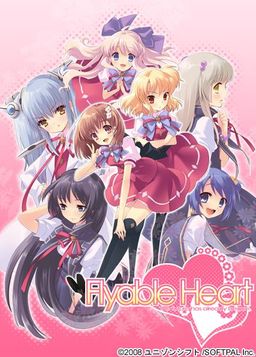
One day, Shou, who is always hungry, receives a letter. It contains a student ID issued by a famous school and the ID says “All school restaurants are free of charge.” He immediately decides to transfer to this school. The school, however, is divided into two groups…. Also, what welcome him are a strange fortuneteller, a huge explosion of fire works, and his room at school dormitory for girls…. What will happen to Shou? What will happen to love romance between Shou and six female students? His new school life now starts….
“Watch out, boy. Various misfortunes will happen to you….”

















wow.. in Yui’s route i feel like everything is about suzuno… suzuno sure has lots of impact
wait machine translation means.. wait what does that means?
machine translation means the patch’s creator used some kind of software to translate the text, which results in horrible syntax and grammar due to the differences in how the languages order their phrasing. Quite often you end up with Yoda-speak.
this download is not right…
the real one is around 4.2gb
is this the real flyable hearts the future has begun
or is it just the fandisk?
though the translation patch is right….
Well the downloads are .rar so it’s probably compressed from 4.2gb to around
Is it possible to re-upload the patch? I would be grateful.
could admin please reupload to 4shared n mediafire…it seems that filesonic need to be login for some reason…~~
please can you upload this game on mediafire?please!!!!
It take time to repair all the broken link (mediafire upload speed is slow). I hope you can upload to mediafire as soon as possible 🙂
Thank you and Good work 🙂
Having trouble installing the game. It simply wont install, it tells me the directory it’s going to create then gives me a message in gibberish with an OK button. Clicking that simply closes the installation.
I have Applocale but it wont allow me to run the Setup.exe with it, I can however run the game from the disc but I cant add the translation patches then which defeats the point.
Any help as I see others have had similar problems?
Is it just a problem with the installer?
I don’t know if this will work for you but have you tried mounting the game disc then opening a folder under “my computer” and directly copy pasting the files into your own folder? That’s how I installed it and it seems to work fine.
I tried copy pasting it into the Program Files directly but when I did that and tried applying the patch, it said there was no install despite the fact that I told it where I copy pasted the files.
Hmm… all that I can think of is that maybe you didn’t have the FH.exe application selected? Although I doubt that’s the case…
Maybe placing the patch in the same folder as the game and then excluding the specific program folder from your antivirus program will help? I’ve heard some of the files in the english translation patch are read as viruses and immediately blocked by antivirus programs.
Hope this helps… I’ll try to think up some other things in the meantime.
I have it installed now…somehow placing it in the Root of the C: instead of Program Files seemed to work which is bizarre.
However I’m getting a new problem, that being that the game crashes on the first scene with Shou’s Dad so I’m not getting anywhere. It also crashes when trying to view the CG menu.
Has there been any solutions to this problem yet as I see I’m not the only one having it with this game?
In response to your comment below, is the text all weird and spaced randomly in a vertical sense? If so I might just have the solution. At first it didn’t work for me but then I downloaded this font:
http://www.ank.com.ar/fonts/MISCFS__.TTF
everything worked fine after that.
Hope it helps.
Thanks mate, thats it all sorted now.
Really thanks for your patience!! =)
Can’t believe it crashed because of font errors, Thanks man.
how exactly do you download it
yeah cause i need that info relly badly to play this game. so please let me know how to download it
how do i download that or can u put it in a different type of download? cause i absolutely dont understand torrents
Can you tell us how to download it, seems im not the only one with the problem.
Also how do i get rid of Shou’s wierd voice?
My AVG Resident Shield picks up the executable files in the English translation pack as containing viruses (Win32/Heri). As interested as I am in this visual novel, I’m not too sure about installing this one.
i finally got this game but shou’s voice is in a weird robotic monotone voice how do i fix it ??
@vnlover there should be an application called shouvctl that comes with the english patch, put it in the folder that has the FH start up application, run it as admin and click “unvoiced shou”
thanks !!!
the game runs fine without the english patch but when i install the patch i get errors popping up shutting down the game when i try to play it or view the cg and i cant read japanese help please
I get the same error too. Please help >_<
Idiot PC is blocking the patch files because it thinks it’s a virus. I’ve already tried unblocking it by putting it in the “Allowed list” but it just ignores it.
running windows xp and it isnt antivirus that is causing it. windows shuts it down something about the pol.dll file is causing it to shutdown
Able to patch it here, but the game lags a lot and it crashes as soon as I try to save… The game looked interesting, but it’s unplayable for me :1
same problem
how did u fix that problem?
same problem here… =__=
Game and aptch installed fine.
But text is so small any ideas to make it larger?
@rjhei you can simply install the patch in the safe mode, but you need to turn off your antivirus from windows task manager
For those having trouble with the patch,I would recommend using ATLAS. From what I read, the patch uses a machine translation anyway, so you don’t really lose that much by ACTUALLY machine translating the text as you play.
You say dont lose much but u dont gain much either from the patch or machine translation.
When all the characters speak like yoda it may be amusing for a while but it begins to get annoying after a while.
I’ve played untranslated games for many years using ATLAS and I’ve never really been annoyed at it. Guess I’ve got a knack for it. Of course, I do have some understand of the japanese language, which also helps a lot.
When ATLAS isn’t enough, bring in Mecab. That helps a lot.
As someone who has up to now almost exclusively read/played translated games using machine translation feels like a major step-down.
Of course this was only possible through all the efforts of many hard working translators and admin for bringing all the games together.
But my point is once you have gotten used to properly translated games this level of translation just doesnt cut it.
HELP ME,I HAVE INSTALLED THE GAME AND ALSO THE ENGLISH PATCH THE GAME WORK FINE,BUT I CANT SAVE THE GAME
admin, can you post “Fortune Arterial” later?
i heard it’s english patch is already 99%.
okay so i mounted it and it says it’s not compatible with my windows 7. What do i do now? And hopefully i get a reply from someone, it’s pretty damn rude to leave people hanging. PLEASE HELP
okay. nevermind. i got it to work :DDDDDD
IVE BEEN WANTING TO PLAY THIS GAME FOR 3 YEARS!! SO HAPPY!!!
How do you install i can’t get it past setup
I can’t get past the english patch installment!!
this keeps coming up:
Error occurred during upgrade
bgm.pac
dll\PAL.dll
WTH please can someone help me?
This is bullshit -__-
idk if you still need help with this, but your getting those errors because your firwall and or antivirus program is recognizing these are viruses (they’re not ofc) all you need to do is allow the fhinst(application file) to pass through your anti-virus and firewall and you should be able to patch the game without any trouble
I have Norton. I click “Norton Insight” to make it trust the files, but it still ends up with PAL or whatever.
Run it as administrator
I’ve been enjoying this game for a while now and got two of the routes down on my own. Amane <3 and Kururi <3 but I can't find a Walkthrough anywhere for this on the Internet.
Is there just not one to be found as I cant even find anything except for other people asking where to find one.
I ask because this site is normally really good for getting walkthroughs up, even on stuff thats newly translated.
Anyone with a workable one should post it here for the rest of us.
I got a dll problem with this it stay’s at 0.9.0.0 after patch and wont let me play game. any solutions?
Is anyone getting some noticeable lags during the transition of certain dialogue/scenes? Is this normal or is it just me?
With just basic japanese knowledge and TA/Mecabing the words I was missing, I swear, I understood the game a million times better than this shitty translation, with a hell of a lot less trouble.
here is the walk through
Yui
(Save 1)Yes
Leave it alone
(Save 2)To the dining room of course
Go to the student council room
(Save 3)Look towards Yui
(Save 4)For now…now, what time is it?
Look towards Kururi
Protect the base
Don’t pursue too far
He can be defeated anytime. Leave him alone.
Go to the school building with Inaba
Find him and challenge him to a duel
It may be better to stay still in the classroom
Join in beach volleyball
Receive with full strength
Go to the Ryouran Committee
Escape straight ahead through the corridor
Escape through the dining room area
Return towards the classroom
Yes
Go towards the stairs
Leave as is. Leave her alone.
After all, leave it
Hide in a classroom just to be sure
Return a reply
Accompany together
Yes
Act Alone
Temporarily take refuge in a classroom somewhere
Don’t choose any
~Yui End~
Amane
(Load from Save 1)No
Go check with student council
Leave the student council room
Go to the student council room
Look toward Amane
(Save 5)For now…now, what time is it?
Look towards Amane
Protect the base
Don’t pursue too far
He can be defeated anytime. Leave him alone.
Go with Amane and the others to exterminate the chairman
Serve as rear guard
Challenge with teamwork
In any case, escape somewhere?!
Look for Amane
Go to the Ryouran Committee
Escape straight ahead through the corridor
Go towards the stairs
Leave as is. Leave her alone.
After all, leave it
Hide in a classroom just to be sure
Return a reply
Act Alone
Temporarily take refuge in a classroom somewhere
Amane’s cake
~Amane End~
Sakurako
(Load from Save 2)Take a detour
Go to the student council room
Look toward Sakurako
Doesn’t anyone help me?
Look towards Sakurako
Attack is the greatest defense
Run away from here
When it has to be done, it must be done.
Skillfully coax
Skillfully coax
It may be better to stay still in the classroom
Look for Sakurako
Ask Sakurako
Go to the Ryouran Committee
Escape straight ahead through the corridor
Go towards the stairs
Leave as is. Leave her alone.
After all, leave it
Hide in a classroom just to be sure
Return a reply
Act Alone
Temporarily take refuge in a classroom somewhere
Sakurako’s cake
Go outside the school building
~Sakurako End~
Mayuri
(Load from Save 5)Doesn’t anyone help me?
Look toward Sakurako
Independent regiment
Pull out from here at once
When it has to be done, it must be done.
Cry for help
Ask for help
Find him and challenge him to a duel
Try to hide in the student council room?
Join in the beach volleyball
Block with full strength
Ask Mayuri
Go to the student council
Escape straight ahead through the corridor
Go towards the stairs
Leave as is. Leave her alone.
After all, leave it
Hide in a classroom just to be sure
Return a reply
Act Alone
I don’t know. I should run away quickly here.
Escape to another level
Mayuki’s cake
Go to the exhibition classroom
~Mayuri End~
Kukuri
(Load from Save 3)Look towards Kukuri
For now…now, what time is it?
Look towards Kururi
Protect the base
Chase and certainly bring down
Protect Inaba first
Present a united front
Challenge with teamwork
Try to hide in the student council room?
Go see the state of Kujo and Gumi-chan
Go to the Ryouran Committee
Escape to the entrance
Force through without minding
Escape to the dining room area
The donut is right! Advance.
Aproach and look
Silently tolerate this
Hide in a classroom just to be sure
Return a reply
Act Alone
Drag and take to another place.
Kukuri’s cake
~Kukuri End~
Suzuno
**Suzuno’s path can only be attempted when all the other endings have been done.**
(Load from Save 4)What were those sounds?
Look towards Sakurako
Independent regiment
Challenge from the front
Go to the school building with Inaba
Find him and challenge him to a duel
Try to hide in the student council room?
Go see the state of Kujo and Gumi-chan
Help up
Go to the Ryouran Committee
Fight with copper sword equipment
Hide in a classroom just to be sure
Return a reply
Act Alone
Just run away in the corridor
Don’t choose any
~Suzuno End~
***After the credits, choose “Die zukunft hat schon begonnen” from the menu to view Suzuno’s epilogue.***
woho thnx
thanks a lot.. saving me
I am having a problem with the playing the game after english patch installation. I installed the game and worked fine without the patch. However, once installed, the game window merely comes up but immediately stops working. So the game cannot launch. Any ideas?
Saw one other person mention this but they got no replies: is there any way to increase the font size?
ello is this h game? or for all gendre?
prob w/ installing patch it stopped after checking 2 things and said an errorhas occured what should i do
running the patcher as admin cleared the errors for me.
is the patcher called fhinst
btw how does the shou voice control work?
also it wont let me save the game and when i try to the game shuts down y is that?
also the game shuts down after a certain part when i start the game so whats wrong w/ it?
i urgently need help because i’ve been waiting to play this game for awhile and it wont even let me actually play the game at all. if any1 could help me i would b very grateful
I’m having problems installing the patch.
I had issues with the game but i got around that by just opening it and copying the files to program files.
Every time i click on the patch my antivirus comes up and I can’t directly copy the files to the folder the game is in, can some help me please?
Got everything working just had to turn off avg. c:
how did u fix the problem w/ the game shutting down around the begining of the game?
I never had a problem with it shutting off.
I couldn’t get it installed to begin with at first. I had to open it and copy all the files then so install the patch I had to turn off my virus protection. After all of that the game has been working fine for me.
hey, i downloaded everything already, but what do i do with the patch?
game crashes when i try to save the game… how can i fix this??
i have the same problem and no 1 told me how to fix it
someone help after i installed the game with Daemon i removed the VCD The Drive then tried to run the game but when i started it up it said something about needing some sort of dvd file or something
Apparently i cant run the game if the VCD is active someone help me fix this problem
I need help i want the game to run without having the BD Rom Drive running when i eject the BD Rom and start the game a pop up shows up that says DVD Flyable heart and i keep and if you click yes nothing happens when i click no it closes the game
having problem with part 3 keeps saying is corrupt
I remove that strange voice when he speaks shou?
Okay, i’ve had every single problem possible with this game. Installing, patching, crashing … so i’m just writing to say: Thank you all! The various answers here helped me a lot! (and the walkthrough up there will help even more, i guess ^^).
COOKIES FOR YOU ALL! HURRAY!
how did u fix the crashing problem please tell me it imperitive for me to know
now im getting message about part 9 being damaged or an unknown format lol sorry to bug ya with these
ok game works even with that last message i sent now i gotta patch it and play it lol
now i have same prob as this guy
Anon says:
December 1, 2011 at 5:21 am
Already solve this…..
Now my problem is it won’t install the program…. There’s some weird message that I ,of course, can’t read when I try to install it.
I reached to the point where I choose where to install the program, after that this message appears :
C:\Program Files\???????\FlyableHeart
YES/NO(I selected YES because if i selected NO it closes)
then
The weird message appears with an OK button….
when I click OK it closes.
The weird thing is that I can run the program without installing it by opening the installation disk…
When I unmount the installation disk, it won’t run.
PLEASE HELP ME!!!!!!
I have the same problem here )=
system locale japanese?
The link of part07 is broken )= please can you fix it?
Oh I’m sorry I tried with Internet explorer and it worked =D
how do u combine all this rar together ?? i know how to do the rest
Just extract one of them, the rest will extract itself after that (if you keep all rars in one folder).
Doesn’t work for me, i get some error when i pick a place to install it D: