
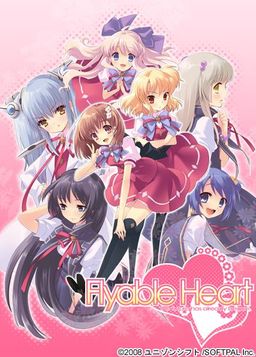
One day, Shou, who is always hungry, receives a letter. It contains a student ID issued by a famous school and the ID says “All school restaurants are free of charge.” He immediately decides to transfer to this school. The school, however, is divided into two groups…. Also, what welcome him are a strange fortuneteller, a huge explosion of fire works, and his room at school dormitory for girls…. What will happen to Shou? What will happen to love romance between Shou and six female students? His new school life now starts….
“Watch out, boy. Various misfortunes will happen to you….”












it’s impossible to finish .. the game crashes at too many scenes, is it because of the patch or my PC?
did you install the build 1152 or 1151 or something else? 1152 fix a few crash problem, download from translator’s site.
when i played this game, it never crash maybe there’s something wrong with your installation or maybe your pc.
aww cmonn . . seriously??? have u played past the zombie event?
I have played passed the zombie event… i have completed 2 paths already and now i’m on my third. How are you playing it? did you install the font it requires? because i am playing it with applocale *i got win 7 64x* and it hasn’t given me any problems *also dled the FONT it needs but i wish i could increase the size of the words since they are a bit tiny with it*
Well, I have windows 7 ultimate 64 bit. I used the following installation notes and it works just fine. But the problem is the font. If you make it bigger, the game will crash.
fine fine , i will download flyable heart from here , maybe it was because i downloaded it from hongfire ( from a long time) and i will see if it works
hey just wondering the patch is a machine translation is it worth playing and does it make sense cause this game sounds interesting but i’ve seen some pretty bad translation by machines before
it’s readable but it just get worse and worse the more u play but still , better than Atlas and TA crappy translation
Does get worse the farther you play … “I throb” “Are you vigorous?” hurts my brain sometimes and also either some1 edited some words but as far as i know “okasa” means mother/mom etc not Motherf*cker and i found a few “UMAD” “O RLY” “YA RLY” “MOAR” wich kinda made me wanna quit the game right there and then.. Honestly wish this game would get a proper translation since i really enjoyd the comedy aspect of it.
i found most of the cussing to either be out of context or out of charector
When i try to patch the game i get a “fatal error” something with bgm.pac and it says i schould reinstall…
i tried it many times but it still won’t patch…
what schould i do? : /
1. install it to C:\Program Files\Flyableheart
It will install to C:\Program Files\Flyableheart\ユニゾンシフト\FlyableHeart
2. Put the folder C:\Program Files\Flyableheart in the exclution list of your antivirus
3. MOVE C:\Program Files\Flyableheart\ユニゾンシフト\FlyableHeart < folder to C:\Program Files\Flyableheart\FlyableHeart
4. Run the patch in admin mode…. it should work *also if you are using vista/win7 make the go to the security tab of the folder and "Allow all" for your user*.. basically its the folder "ユニゾンシフト" that screws with the patch…*also download the font*
i just dont get it, i installed the fonts and patch , start the game fine but it still crashes randomly . wtf?
wtf is the voice supppose to be the monotone computer voice? or is it just me ?
is there a way to remove the irritating mono-tone voice that speaks the main character’s thoughts/dialogues?
found out, seems you have to move the shouvctl patch file in the program folder, run it and select unvoiced shou.
But now it crashes when i try to save T_T
umm.. where is the program folder? is it the dll one and when i just start up the shouvctl patch file it saids voice and unvoice but when i clikc app it says could not open FH.exe wat should i do the monotone voice is killing me T.T!!
Run it as admin
LOL ..WTH that was really easy THANKS!!!!!!!!!!!!!!!!!!!!!!!!!!!!!!!!!!!!!!!!!!!!!!!!!!!!!!!!!!!!!!!!!!!!!!!!!!!!!!!!!!!!!!!!!!!!!!!!!!!!!!!!!!!!!!!!!!!!!!!!!!!!!!!!!!!!!!!!!!!!!!!!!!!!!!!!!!
O.O WHY can’t i save T.T?????????? i just finally got everything working right T.T ! HOW DO I SAVE? IS THERE ANY WAY??
Now its not letting me pass the conversation after the dad says he on a stakeout for a week and h hurriley woke up shou-kun then my computer freezes .is there a solution for this?
download latest version of patch and font from translator’s site, install it
can you give me link?i cant find it 🙁
I patched it and all but whenever I try to open the game now, it crashes?
did u do it right the first time cause after trying a few times it started crashing when i opened it but i deleted everything (unistall) and installed everything again and apply patch perfeectly then it worked
Ok, I’ll try this later !!!
I uninstalled and installed it again two more times and it finally wants to work for me! Thanks a lot! 😀
now only if the stupid voice would go away -.-“
Always sam problem, I have delate, download, instal the game, instal the patch, but Windows detect a problem and close the game…
have you tried turning your firewall off?
I have turning my anti-virus off, it is the same !!!
is anyone having difficulties playing the game?? is it crashing for u guys too at a certain part or is it just me?
where do you download the font that everybody’s talking about??????????????????????
i got it to work found the font from the website and applyed it 😀 ITS ALL GOOD NOW!!!!!!!!!!!
is there a walkthrough?
Yeah, I mounted the image and when I double click the Flyable Heart dvd image, it says some words in black and some in red, then I try to install but it keeps saying all these symbols and stuff, I cant explain it very well, but after it says “put in C:/Program Files/ Flyable Heart and I continue it says something and I cant install!!!
you problaby need to add the lanugauage japanese in ur control panel language thing
Crap, but I dont have the Cd to do so, i tried with other games before, but I need the Japanese Locale which is impossible to get!
Ok, I did everything, now my problem is….. The stupid save then crash thing, is there any way to stop that!
get the font from website and put in font folder
Finally got it to work by installing the font from the translation website flyabletrans.megabyet.net. Now I just have to see how bad the translation is…
I need a hand here, want to see this translation, however bad it may be, but after hours of trying to get it to work, several installs later, I find myself unable to go past the beginning of the game, due to crashes. Installed the 1152 patch, but not the FONT, because the website flyabletrans.megabyet.net doesn’t open here. Is that the reason for the crashes?
to download the font from website u right click the download here botton and choose to save as and to desktop then u just move it to ur font floder in control panel and if u did all the translation right it should work and if it doesnt u should uninstall it and install it again fresh then it sould work
Wow fail on my part thanks i didn’t do the fronts. Thanks to the admin you do alot of work to keep this site running thanks for all the hard work you do.
just wondering if anyone has a way too remove that stupid computer voice
go up and look around the older messages post there is a turtorial there
solution
1. problem with installation(setup) use “Microsoft AppLocale” to help install.
2. problem with patch (fatal error when patching)
you must change the name of game folder ユニゾンシフto “FlyableHeart” i think japanese language is the cause of patching problem.
i dont know bout changing the folder name cause i didnt need to do it idk about u but the solution to the crashing u just need to go to the translator website and download the font and put in control panel langauge font or something like that
Tried too download but said “The specified installation could not be verified [E=2].Please consult the release notes for supported upgrade paths. What do i do ????
Hey Luke,
I had the same problem as you, took me a while to figure out.
There are two solutions I believe.
First you should try making the directory to C:\Program Files\Flyable Heart\FlyableHeart then click on the FH.exe
The default for the installation makes the “Flyable Heart” part a Japanese name, therefore the installation for the patch cannot access it.
Second, you can open the fhinst.exe file using AppLocale. To do this search AppLocale in the start menu. However, before you click it hold ctrl+shift first(this is very important, it took me quite some time to figure out that I had to do this). The second way will for sure work. The first way will make it so you don’t have to use AppLocale to open FH.exe.
I suggest you do both.
Excuse me, i wanna ask about my error, i can play the game normally but everytime i turn it close the game and open it again, nothing happen, i even cannot delete it, the message says that the program is running, but still nothing happen…. help me please??
Anyone, please help me!!!
I finished downloading all of the files…
When I extract them, at 96 – 100%, it says: Data error in ‘FlyableHeart/FLYABLE_HEART.mdf’. File is broken.
Please Help Me…
Already solve this…..
Now my problem is it won’t install the program…. There’s some weird message that I ,of course, can’t read when I try to install it.
I reached to the point where I choose where to install the program, after that this message appears :
C:\Program Files\???????\FlyableHeart
YES/NO(I selected YES because if i selected NO it closes)
then
The weird message appears with an OK button….
when I click OK it closes.
The weird thing is that I can run the program without installing it by opening the installation disk…
When I unmount the installation disk, it won’t run.
PLEASE HELP ME!!!!!!
Problem solve!….
helo. i’m new here. can someono please help me. what do i do after download the file
Extract the files…. then run the extracted FILE(mount image) using Deamon tools… then, there you go… the installation begins…
is it all the files? but i keep get the file corruot and volume corrupt
What do you mean?
Hm… Yes all of it..
When you finished extracting the files, there should be TWO files there…. One that has .mdf file extension and one that has .mds file extension…
Is there a crack for this game?
honto ni arigatou
Doitashimashite
anon. really i’ve been extract it but. it said corrupt
hmm…. Did you check the file size of the files?
1 – 7 should have 257.49 mb
8 should have 60.97 mb
@had
When does the error occur?
During the extracting process or the installation process?
Excuse me admin, will there be FLyable Candy Heart?
can someone post the latest patch here? cause my net cant seem to browse the original site…
i got stuck at where Souryu and Kei having conversation about the main character just after the zombie event. font goes all crazy with “4763847$#^@#%” letters then crashes when souryu talks
Admin. just for some clarifications. my pc recognizes the patch as a trojan and malware. Is it a false positive? I use Avira Antivirus.
Yes, every upload is checked before being posted.
Send the detected file to your antivirus vendor so they can verify it and remove warning from database.
Um, when I extract the English patch its some unusable file, how do I patch this game to english?
ive just installed the game successfully but as the computer monotone is ridiculously annoying i really need help i getting to turn it off. I’ve put the shouvctl application in the same directory(the folder which has FH.exe) and when i try to apply unvoiced shou it keeps saying could not open FH.exe. I have tried with FH open and closed to no avail. Any help is greatly appreciated thanks.
omg i just figured it out. apparently you have to run it as administrator…AGAIN. what the hell is up with having to run these programs as administrator? I am the owner of the computer wtf…
Hey guys, do you also have problems with the cg viewer?
My game crashes as soon as I try to go there? Any ideas what is wrong there? I dont have any other problems but this <_<
I don’t know what’s wrong with it, but you can always get the CG’s from an image website, like Zerochan or Danbooru.
Part 5 of Mirror #1 is not working. It downloads to 16 bytes and then it stops, saying it’s broken or something. I’ve tried twice and same thing.
I’ve tried 3 times now, even with new unzip software. Can anyone please help?
Is it not possible to conquer Akira?
No, only available Amane Sakurako Yui Mayuri Kururi and Suzuno after all the others.
is the translation patch full? 100 %?
coz in vndb it say partial patch mean not completed yet?
aya.. experienced so many crashes..
when i want to open cg viewer, when saving, in certain scene so cant continue..
must mount the cd image while playing also eat much memory ==a
ah never mind..
after install the font file the game run just fine..
maybe you can upload the font file admin..?
the problem leave is i can’t found nodvd patch that work with the translation..
are not the CG, each to be displayed a the picture becomes black
what is the problem?
I was going to try this game but people seem to be going through a LOT of technicaly difficulties so I’ll pass this one for now.
Do i need change locale to Japanness for this game ????
i’m very pissed with the translators admin i suggest u remove this game from ur site till someone else does the job, so we don’t have many problems
When I reject the CD in the driver it ask to insert the CD. Can someone help me how to run the game witthout the CD game on the driver for FlyableHeart.
I could do it with the other without the deamon tool or other software.
Hey I finally found a way to continue with the translation. 😀 I even installed it in a personalized or configured path. First, you can change the folder that was in japanese and change it into something like “FlyableHeart” or any other you like. Then disable your antivirus for a while as you install the translation files. The font can be downloaded from ank.com.ar/fonts/MISCFS__.TTF since the flyabletrans.megabyte.net don’t work for me. Then put the FONT into C:\WINDOWS\Fonts (a popup shows up that the font is being installed to your system) After that check your game and you can now pass at crashes 🙂
no offense but… honestly the baddest translation I’ve ever read… *sigh* well, its better than nothing.. anyway thanks for the game admin… btw, is there any walkthrough in this?
help admin the game crash every time I put the English patch in to it
Hello, can someone help me? It’s still crashing whenever I try to save and at some part where Shou’s dad starts to talk, I’ve been reading some replies saying to install a font but the website is one of those random google websites so I don’t really understand what to do
I’ve tried copy pasting the ank.com.ar/fonts/MISCFS__.TTF but it’s only showing me a IE window with the letters from the font and it’s not downloading or anything, Do I have to have something to download the font and install it?
successful extract, but it turned out to be an .mds or .mdf w/e … how do you open this .mdf or mds file??? D:
thanks in advance
http://erogedownload.com/faq/mounting-cd-images-with-daemon-tools/
download an iso file like ultra iso then click file search the disc or the in name mds or mdf then the file will appear if it will not work do the same in the power iso
Try Alcohol 120%
where’s the crack of this game?