
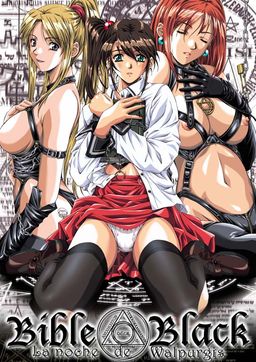
There is a legend on campus of an underground room where debaucherous orgies and magic rituals once took place. The room was supposedly sealed off after a human sacrifice was performed there. As the thirteenth anniversary of this grizzly event draws near, someone is plotting for history to repeat itself. Is it the sweet, beautiful class president, Shiraki? The kinky Saeki, whose obsessed with the occult? The innocent Imari? The well-endowed art professor, Miss Takashiro, or the sexy campus doctor, Miss Kitami?
Minase was a mild-mannered junior who never thought twice about magic or campus legends. But then he found the mysterious “Bible Black,” the book of spells that started it all thirteen years ago. Minase now has the power to control others and get any girl he wants, any way he wants. Will he be tempted by the dark path of debauchery, or will he use his power to stop the upcoming sacrifice?













I’m new to this ok? download the files then extract them and them mount them? are they done seperately?
Here are the steps that worked for me:
1) Make sure you have daemon tools or something equivalent.
2) Download files
3) Extract them with 7zip or equivalent
4) Mount them with daemon tools
5) If autorun does not kick in go to your explorer, click on the mounted CD and find the application called setup and click it.
6) Follow the installation steps and put the game files where you wish, easier if you install them in the same place you extracted your download files but to each is own.
7) I’m not sure why but sometimes just clicking the application to start the game itself will cause the game to not have music and not let you save, even though all the files are present. To solve this go back to the mounted CD and copy and paste the setup application and start the game using that instead of the default startup application. This may be a problem specific to win 64 operating system but I’m not 100% sure. Hope this helps and enjoy the novel as it is awesome.
Finally someone who understands how things are done. Thumbs up for your step 7 man. You are a boss.(Although I prefer to mount the cd and play the game with it mounted, starting of course from its setup. :))
I’m having problem playing the game , I’ll download both 1 and 2 files and clicked the 500mb. I get to the start screen and press play and it say it cannot execute main program.
due your luck mine dosnt start up at all
I’ve watched all the Bible Black series so I’m really excited to play the actual game, thank you so much
same here man i watched the series a while back to also watched it dubbed
ovo Just finished up the game.
I cant save my Game. A message will appear “writing the date failed” then another one “unable to write data” Help!
“writing the data failed”*
this did not play at all can somebody help me
also i am new at this
You have to run this program in compatibility mode for win95. I found out the hard way.
gotta use daemon tools ? oh man , why won’t this game just like CGA or sono hanabira , can be played after extracted . but still , this is pretty good game
does this game have the voices of the characters???
The game doesnt save, how do I fix this?
What does daemon tools exactly do?
Is there other programs that does the same thing it does?
Dont want to download it if there is a chance i allready have a program that could do the exact same thing it does
Part 2 doesn’t seem to want to extract. It keeps saying that the iso file is corrupted.
Fun fact: This game was named after the King Crimson album of the same name.
Admin Sorry to ask but
Do you Know a Way on How To Change
The Directory of The Save File
more like editing the place where the save file
located
Im more like the type of guy that simply
edit the registry of the save file location
I do this so i can just simply extract the game
then play with out installing the game
but bible black seems no registry im in trouble
how do i edit the save file directory
i do install the game first so i can get the registry
of the games then edit then create a rar wala instant game
more like after uninstalling it then wanting to play it again in the future but looks like doesnt work on bible black cant find registry
well anyway anyone do you know how to do it
sorry and thanks for those people who can help me
sorry admin for posting a long one
please could let me play
The game saves normally, but everytime I try to load a save file it crashes (\BBLACK stopped working\).
I tried reinstalling, fiddling with the .exe properties (run as administrator, compatibilty modes, etc) but had no luck.
Does anyone know how to fix it?
I have a problem where whenever I let intro or the first cutscene continue without skipping it, it will all the sudden crash with this “error cannot open the file [V00201.WAV] excute from CD-ROM startup screen,Retry?”
I don’t know what to do please help
I can’t see any of the subtitles neither the menu options so I blindly click things. Any ideas of how to fix this?
It works and I can play it just fine. I currently try to finished Imari route but ended up drugged to death by Kitami, can someone help? I tried to following some walktrough but failed.. sorry for my english
I have recently tried to play this on my laptop and since it worked without a problem on my desktop I didn’t expect the trouble I got.
My findings:
1. If the game is installed on the system drive(C:) then the game has to be started with the setup.exe from the disc.
2. If it is installed on an other partition then compatibility has to be set to XP SP2/3.
3. Saves made before you open your eyes can’t be loaded!
I hope it’ll help someone.
Here’s a tip: If your game doesn’t run, go to the
.exe of the game click with the right mouse button, chose “properties”, “compatibility ” and click on “run this program in compatibility mode for:”
and select windows xp service pack 3 if you want you can try
the windows xp service pack 2 but I recommend the 3. Hope it helped!
And one more thing… If you want to extract the iso file you don’t need daemon tools winrar will open the iso for you, just do the same you do extracting a zip or rar(note: there are some isos that winrar can’t open, I use magic iso I find it more easy to work with, but you can have daemon tools too, just have one of these programs if winrar can’t open that iso, you have always a program that can.) Hope it helped… Again!
Got it to run and extracted it using Winrar but the bottom part of my screen that’s supposed to be a text box over the bottom half of the current scene is just the top of the screen again with text on it. So I’m seeing double images and its driving me crazy. I didn’t mount the files just extracted them with winrar is that the cause of the problem?
A new confusing development my text is just the spoken audio with text. The actual thoughts of the protagonist/narrator can’t be seen on screen. But if I click backlog I can see them all fine. What is going on?
To make the saving work ensure that the install path doesn’t contain any directory names longer than 8 chars (or funny characters i.e only A-Z or a-z).
For instance installing the game in C:VNBBLACK works but C:VNibleblack doesn’t as \bibleblack\ is more than 8 chars (and use capitals if possible).
Original DOS had 8 char limits on all files and directories and guess what? bible black is ancient and suffers from DOS limitations …
For those who have problems like: “writing the data failed”, ensure that the install path doesn´t contain any directory name longer than 8 chars(like the comment above)
Awesome game, ’tis all I could say.
If anyone wants a few comparable movies that come to mind when it comes to this game, I will offer this extreme analogy:
Think “Donnie Darko” meets “The Crucible,” “The Blair Witch Project,” “The Scarlet Letter,” Stanley Kubrick’s “Eyes Wide Shut” (based on the classic Arthur Schnitzler book “Traumnovelle”) Tony Scott’s vampire thriller “The Hunger” (1983), and with tidbits of humor reminiscent of Nick Frost and Simon Pegg’s “Shaun of the Dead.”
Hi
I have just changed my hard disk, so i only have the c system drive, and when any start my game either from the installation or the game file it does work and and the game can save files and i get no errors.
There’s just the fact that i cannot see any text whatsoever, not in the menu and not in the dialogue.
What’s the problem?