
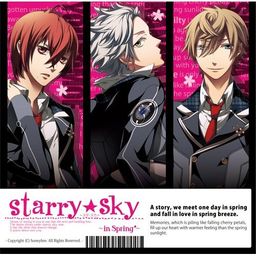
The first of the four Starry Sky games starring the characters from the drama CD’s of the same name.
Starry Sky takes place at Seigetsu Gakuen, a school which specializes in horoscopes, astronomy and other related topics. The main characters are all based on horoscopes.
Starry Sky Spring features Suzuya Tohzuki (Cancer), Kanata Nanami (Pisces) and Yoh Tomoe (Capricorn).

![[VR] Super Crowded Train - Secretly Teasing That Cute Girl I Found at the Station](https://i.erogedownload.com/wp-content/uploads/2025/10/VR-Super-Crowded-Train-%E2%80%93-Secretly-Teasing-That-Cute-Girl-I-Found-at-the-Station-480x360.jpg)















uh… otome games?
What about them?
I wonder if the other ones are in english?
No, this is only one out of 4 that got translated.
Do you have more instructions as to how to install the English patch?
help the English patch doesn’t seem to work totally new to this and just want to play I really like Otome games and this one looks like fun please help
I’m also having a lot of trouble getting the game to work, idiot-guide anyone? 😛 P.S. Thank you for uploading another otome game!!
It’s impossible trying to install this game. It seems an English patch won’t work until the game is already installed, and the installer is impossible to figure out. It has three options, the first of which is greyed out, the second which is pre-highlighted, and the third of which closes the installer. When you choose the second option it asks you “Richedit???” and brings up some text editing program and a field of text that cannot be edited. The next button doesn’t work, the only button that works is “exit.” Since I can’t read the text, and I can’t patch it, I can’t do the install.
If you can’t figure out how to install basic japanese games you *really* shoudln’t be messing with warez downloads, you don’t have enough skills not to do something stupid to your computer.
Stick to english games.
Please, I work in tech support and have installed all sorts of warez, cracked and hacked games. This is the first thing I’ve come across that I can’t install. Who are you to tell me what I should be downloading? Oh, that’s right…no one.
If you can’t figure out how to be a decent, respectful person when someone asks a question, you *really* shouldn’t be attempting to answer.
Stick to being alone.
Well, I’m not into Otome so I didn’t download this, however I will go over some basics.
-First off, you will need the Japanese language package installed on your computer, it will be on your Windows OS disc.
-Go to your Control Panel > Regional and Language Options > Advanced(tab) > From the drop-down menu select Japanese then restart your computer. Now it will be in Japanese Locale.
-If the Game is a CD/DVD, mount it on a virtual drive using Daemon Tools Lite, just search for it on the web.
-After you mount it, if it doesn’t automatically run, go to My Computer > “The virtual drive with the cd/DVD”, Right Click to auto-play or open it up and run the setup program.
-Everything will be in Japanese, just guess your way through by clicking “Next” and accept any agreements, just keep the installation path as the default it suggests. The game should now be installed but you’ll need the english patch.
-The patch can come in couple forms, if it’s a setup type, it will usually have a preset installation destination, you’ll want to install the files where you installed the game(Generally it’s in C:/Program Files/”whatever the folder name is”). If it’s just a bunch of files, you can drag and drop them in there as well. Typically put it in the same folder as where the game .exe file is, or in corresponding folders. Sometimes, it wants you to replace the current .exe, go ahead and do that and create a brand new shortcut of it and put on your desktop. Delete any old shortcut that was automatically created prior, because those won’t work.
Thank you for your kind and intelligent reply.
Thank’s a lot.
Without you, I could install this game.
Your rock! <3
Sorry if my english is bad, but I'm french ^^'
Hope you'll can understand me…
I really really wish there were more Otome games available in English.
The game itself works fine for me, but I can’t seem to unrar the English patch. Are these all the parts?
Try and re-download the patches. If that fails, try downloading 7zip, and use that to extract.
Thank you for the links:)
uhm, do you need a Nintendo DS ROM or something?
No
Hello 😀
I need your help about the patch … when I try to install it, it asks me to give a directory : I’ve tried all the possibilities but it doesn’t work ! I’ve got messages like “invalid directory ” and “This program cannot update the installed version of Starry Sky ~ In Spring ~ because the following reason :
The destination directory doesn’t contain any files to update.”
I’ve tried the directory of the game (in program files, asgard …), the directory where is the patch …
But there are some things in english when I launch the game … but the text are not readable : not in japanese, not in english ^^’
Can you help me ?
Thanks a lot 😀
I feel retarded for not seeing your post. I believe we have the same problem, so let’s wait for some help.
i have the same pb TwT did u fix it ?
Uhm, I think I also experienced that problem. Try checking if you have DirectX installed. If not, make sure that the version is compatible to the video card and OS. I’m not sure if it is needed but I also installed Java. It can’t hurt. I’m not sure if that will solve your problems but I do hope. 🙂
Hello, i have a problem with the english patch. I have the game installed and it runs successfully (in japanese) and everytime i try to install the patch i can’t save it in the game folder, this message, “Invalid directory”, keeps appearing and i don’t know what to do.
If someone knows what is the problem i would appreciate some help.
Thanks in advance
I think I may have a solution to your problem I just figured it out myself however I discovered another problem after it.
To finish the English installation you need to go into your Asgard folder and rename Your Starry Sky folder to only have English characters, meaning you need to take out the TM and any other characters. I simply renamed mine “Starry Sky in Spring”.
However upon starting up the game it does not seem to load it correctly and I’m still trying to figure out a solution to that.
yeah, I think I know what the problem is. I also did it and it turned out to be one of my biggest regret in life. We only changed the folder that affected various files within it and because of that, Windows (or whatever your OS is) can’t find it because it changed location. Adding another problem to that, WE WON’T BE ABLE TO UNINSTALL IT. The only solution to that is to reformat the computer. And when you do, be prepared to lose ANY files you have not stored properly.
Stupidly, I think we should have installed the Japanese language first and changed the settings in the Regional and Language settings to that of Japan’s and then, proceed with the installation of the game so the Japanese characters would turn out correctly and not into meaningless symbols. After that, I think we can proceed to the English Patch.
I wrote “I think”s because I haven’t tried it yet. I don’t want to reformat my computer—–!
I don’t know how I did it but when I replaced the folder name back to its original name and patched it, it worked. The game is working but it’s not completely in English. Yes, the translation of every dialogue is there but it’s mixed with weird characters.
Can anybody tell me how to solve this?
Never mind, I found the solution to my own problem.
Admin, thank you for the links 🙂
Eto… Is this Otome Game?
Yes. 🙂
So I downloaded all the files including the English patch, the Japanese version runs just fine but when I use the Install Wizard to change it to English I get to the part where it asks me to find the Original Starry Sky in my Program files. I click on the correct directory and it says Invalid. Is there a way to fix this? I would really appreciate any help.
It says there isn’t enough space for the english patch XD can someone please help me?
i feel gay cause i’m a guy and im playing this
you shouldn’t feel gay otome games are awsome
I think it’s a wonderful thing that you are guy yet with a mind broad enough to accept girly things. It actually makes you more manly! ♥
I’m either retarded, or I’m missing a step. I downloaded this on my old laptop that ran Vista, and it ran just fine without any hiccups. I got a new laptop which runs 7, and when I try to run the english patch, it tells me the directory is invalid, regardless of the fact that it -should- be the right directory. D: And I never got to finish it on my laptop, so I’m kind of obsessing over it. So, help would be ever-so loverly, please!
look at the top comments
Aaaaactually, I tried that, and to no avail. I’ll give it another shot, though. And by it, I mean renaming the file. D: …actually, I think I renamed the folder, rather than the file itself. So it’ll probably work if I do -that-, rather than what I did. Silly me. Don’t mind me!
Haaah~, and upon re-reading their comment, it did say folder. …regardless, I’ll try again. D: Sorry, it’s late and I was about to go to bed, but decided to check and see if anyone said anything about my problem, and am just confusing myself. 🙁 So really, please don’t mind me!
So my problem was, I believe, because I only deleted the foreign characters, rather than deleting it entirely and retyping in the entire thing. Silly me. It worked, and I humbly thank you and the person with the solution, and beg pardon for talking to myself and spamming comments. XD Aheh.
Part2 of the Eng patch will not DL. It says file sharing is not allowed.
Please re-upload the english patch TT TT. MU ruined it all. thx alot :’D :’D
You can’t download the original game. The site were you placed the download disabled sharing…
can u refresh link for the english patch please? :'(
using MF will work i think
Is that the English patch could be refresh? Thanks a lot.
Yay! I didn’t realize the Starry Sky series was getting translated.
Hopefully you can start hosting some more Otome games on here. Don’t get me wrong, I love games like Higurashi, Umineko and such, but sometimes nothing can beat a great Otome game. =3
I was surprised to see Starry Sky was out, yay ^^
The only missing games are Hakuoki and Togainu no Chi… I’d love to play those too. Hope we’ll see them here soon!
I also vote for more Otome games!!
Hi! The english version of Hakuoki came out for the PSP in english on Feb 15th. It was localized by Aksys. 🙂
all mf links are dead
reupload mf links please ):
what happened to the rapishare files?
the first download link for the main game won’t work 🙁 can you fix it?
I’m glad I’m not the only one with the first download link issues.
Please let us know when you can update this, admin, thank you~♥
Hi there ~
As usual, thank you very much for your work ~
I would like to join those people just before me in asking you to reupload the mf link for the part1.rar please ~
Thank you !
Hey There!
Just wanna say thanks for your great work~
All the links worked for me 🙂
Oooh links do work again. <3
Links are lovely 🙂
Although I seem to have broken the game. I ran the english patch, and anytime I try to start the game it gives me a pop up with a red X, and the game closes.. 🙁 If anyone can help me, please let me know what I’m doing wrong.
also, I did read the other comments, but none give a definite solution that has worked for me 🙁
To make the english patch work, you have to rename the files, I believe you have done that. After the game patched, simply rename the files again to its original name (the one with “tm” symbol and foreign character).
It works perfectly for me. Sorry if my english sounds bad.
hi i did every thing that you guys did but my is half english half japanese and i dont have that asgard folder in my drive c what should i do now T_T pls HELP
nvm it worked thx alot guys >.<
And also if you don’t remember the original name just go to C:\Documents and Settings\*your user name*\Start Menu\Programs\Starry Sky
There’s a shortcut of the game in that folder. copy the shortcut’s name.
Do we have to download both the game download and the english patch to make it translated? Or do we just have to download the english patch?
u need to download both the game and the patch
Hey, ive read all the comments and have tried installing the english patch – got it to install fine. I have tried to rename the folder but i cant get it to stop it coming up with the red x. I cant find the old filename through the method anon gave. Does anyone have the old filename handy?
heyy,, the truth is,, i cant play the game coz no matter how i tried to installed the game it only says “invalid directory” though I already put the name of the folder “asgard”…. Could u pls give me step-by-step instructions from start till the beginning so that I can get through w/this… Your help will be much appreciated!! thank u!! by the way my comp is windows 7.. my only problem is during the installation of the patch..Ive already read the comments above but still didnt work..
thanks!!!!!!
Your site’s awesome!!!
Thanks a lot for sharing otome x3
MediaFire never downloads otome games for me so…either I really don’t know anything or somethings wrong…
hen it says “the directory is invalid, ”
It also helps if you have
1)cpu’s non unicode settings on Japanese.
2)the CD in the drive (virtual of physical) when you download the patches (or play the game)
Umm Help? When I download each part of the actual game there is an iso file in the first part, but the 3 other parts only have an empty folder named “StarrySkySpring” inside… Am I doing something wrong or is this supposed to happen?
Umm…I can’t play it. It says: Starry Sky ~In Spring~ files will be patched in the following directory: ……I don’t know what to do? Help? I’m using Windows xP and sorry for my bad english xD
Concerning otome games I was wonder if there was anyway you can get the “under the moon” and “wand of fortune” downloadable onto the site. Cause there’s so little otome games =/
Hello
I have installed the game (I think) and the english patch (with no problem, thanks to all of you) but… when I try to run it I got a window saying : DirectDraw kanji-something ni kanji-something shimashita. Is there anyone who can help me please ?
By the way : thanks for all your work !! I really love this website !!
Oh yes, I know what’s the problem. It means that your computer does not meet the system requirements. Also, don’t forget to install DirectX. It’s a must.
It wooooooooooooork !! Thank you so much !
I’ve installed many games from this lovely site and never had an issue. This game, however, proves to be another matter…
I installed the game in Japanese and played it beforehand to make sure it worked. It did, and I guessed my way through the first bit of the game just to make sure nothing crashed. After feeling satisfied that everything was okay, I stumbled along through the installation of the English patch – that, also, worked out in the end. Now I am trying to play the game but, like others, I am faced with a pop-up box with a red X on it and Japanese characters that I can’t read (I have a screenshot of this, if it will help). I doubt it’s a DirectX problem, since the game worked fine in Japanese, and so I’m left scratching my head. If someone can assist, it would be greatly appreciated!
Actually, I’ll just upload the screenshot here:
http://i174.photobucket.com/albums/w85/mysterious_silence/Untitled-2.png
same problem as Kay, tried renaming the files and everything, JPN version worked fine, most other games ?I have work besides this one.
Cool !! I like this game. X3
i wonder could you please to add more season of Staryy Sky ?
Like : Starry sky ~after spring~ , In Summer, In autumn , In winter ?
Anyway thanks for the download link, this web is the best (^^d)
I think that won’t do since this site is for “English visual novel downloads” and none of the other SutaSuka are translated. The other games can only be played through the use of ATLAS and AGTH/ITH.