English visual novel downloads

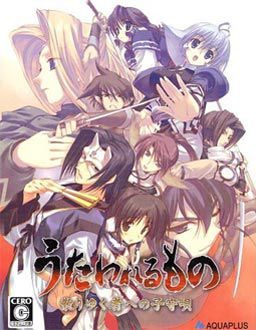
Utawarerumono

Utawarerumono

Suffering from a fatal wound, you have lost your memories and were taken back to Eruru’s village. The villagers not only gave you a place to stay, but also a new identity, Hakuoro.

To return their kindness, you helped them by farming and harvesting crops and doing small favours.

However this tiny north eastern village is under the iron clad rule of a difficult daimyo. This greedy person wants to take all of the crops you have worked so hard to harvest as taxes. Rescue the kind people who have looked after you and rise against the lord.

262 comments

SnowDaysReply
Is there a walkthrough for this game?
adminReply
There's no need for one - this game is linear.
OtakuReply
I have combined all of the files into one Utaware_DVD. I mount the ISO, I go to the english patch but when I am prompted to find the location of the "original japanese game DVD" Utaware_DVD I assume, I select the folder that is containing the file but then I get this error message... "Could not find the Japanese at the specified location. Please insert the disc into your DVD-ROM drive and enter the full path to it's root directory, for example E:\". I do not understand what the problem is. I would really like to play this game but I don't know how to install it.
NightKingReply
Epic game! can't wait for the sequel.
AaronBalckReply
Awesome game! I read on wikipedia that their is a patch to gain additional characters, is that already included?
kukiReply
hey admin are the the two filehosts interchangable because from the file sizes it doesn't appear that way.
zappcoreReply
This game does crash a lot in Win7 64bit.

I "fixed" the issue, or rather worked around it by:
- install virtual box
- set up a virtual machine WinXP (did not need to switch it to japanese region)
- play the game inside the VM

This works fine, the VM is 32bit, no more crashes.
AyaReply
I got the game and the patch installed just fine. It crashed soon after I started playing. I'm on Win 7 64 bit, so I followed your suggestions and installed the virtual box and the VM Win XP. When I try to run the game, I get an error message from the VM telling me no bootable medium found, system halted. What am I doing wrong? Any help would be much appreciated.
EllieReply
you need to install the windows XP into the box first
ZeroReply
my biggest problem is the jap. locale. cause i dont have a OS disk to do all that but im on xp and if that virtual box thing can get me around it (if needed) be very damed happy.
zappcoreReply
If you are already on WinXp, the virtual machine approach will not change anything for you. It's just a way to quickly get a WinXP running for those of us on Win7 and Vista64.
But you don't actually need japanese locale to run this game.
Just make sure you erase any japanese signs from the install path.
So instead of what the installer suggests, you type in 'C:\Utaware' for example.
XeriethReply
Hey, anyone else having the problem where the game just doesn't advance at some point in the tatokori gate fight?
zappcoreReply
You need to destroy all of the fences too. After that, enemy reenforcement should show up.
AlexReply
Okay so I downloaded the files from Mediashare, extracted the files in the 5 rars into one folder. Should I also extract the rars in the DirectX81 folder? And what is the piece update for?No matter what I did, when i run setup via the english patch, when it asked to locate disk, it could never locate the disk, and I can't completely setup. What am I doing wrong?
adminReply
You need to mount disc image. Head over to "FAQ" section of this website for instructions.
WillReply
Hey everytime i try to download Part 2, it doesnt seem to work. Every other part is fine but i only get a few Mbs for part 2
mikezReply
This game had awesome fighting parts to it... but the ending SUCKED!!! I cant figure out what the hell happened...
niblReply
Just finished this tonight. It's well worth the effort to get it up and running.

As for the ending... I'm not crying, I got some dust in my eye. ;)

Thank you for the excellent upload.
RyoichiReply
good for you.
me? oh i tried to download it, but the file has been DELETED. waaaaa...
maximorphReply
Um, the link is down for downloading the game. Could you possibly upload another link please? I lost the data on my computer and am trying to regain what I lost. I really enjoy the story of this game and would like to possess it again.
Thank you
SinSkyReply
excuse me, why is it always tha game stop or crash when Kamyu is trying to give Eruruw a Nick Name???

Help please....
adminReply
You're using voice patch? i remember some people had problems with crash in one part. play that bit without voice patch and return to it a few lines later.
SinSKyReply
Is that so< ok thanx Sir Admin, But as long as i mount Utawarerumono Dvd on daemon tools, everything is just fine... But still crashing after save but it is okay as long the data is saved....

Thanx for this Great Game, very2 good story...
MadokaReply
How do we disable the voice patch and re-enable it? i have the problem the game closes upon trying to nick name elraru and read above the patch needs disabling for a few lines.
SinXCrossReply
You can just skip the scene. It hangs at the last syllable, so you can just hold ctrl for that segment only and it should be fine.
RomdeauReply
Is there no auto-read for this game?
FernandoReply
Just click "ctrl"
danReply
I can get the game to start in japanese but when i click the english patch after installing the game it tells me i need admin priv to run this program (wich i do) so is it because of win7?
danReply
NVM solved it:)
SandremoReply
Argh! Part 4 has been deleted and is damaged...
SandremoReply
Nvm... seems that the problem was with my wireless and it lost the connection during download
SandremoReply
How do i install this? Do i need to use the english patch or install from the .ISO first and then the english patch?
SandremoReply
Sorry for another comment so suddently but the english patch seems to fail to "Extract" files when trying to install with it. D: Argh i so want to "play" this but cant get the installation to work... running windows 7 64-bit ultimate. D:
SandremoReply
Scratch that! Seems that installing in for example D:\Program files\Stuff\Visual Novels makes the install crash for me. I changed the install path to D:\Uta_Eng and it installed fine.
JWReply
I'm sorry...I'm hopeless with computers. I extracted the five parts and mounted them with daemontools but when I try to add the patch to the folder it tells me that the folder is full and nothing else can be added. What am I missing here?
JaawsReply
Have you installed the game first? It should have created a folder in program files/leaf directory. you copy the patch into there and not in the Deamon tools Virtual CD.
Help me pick a name?Reply
So I have played the game a few days now and its worked great but suddenly, upon opening the window and reloading my save the letter spacing is now irregular. K indo f l ik ethis. In some cases the letters are inside of other words. Now the whole game is doing it. Any help please?
ZholyshnergReply
Well i have the game and all but when i run it it only shows the intro. after the intro it freezes and says an error has a occured do to problems. Help?
JaawsReply
I have been looking for a guide for this game for quite a while. The only one I have found is for the PS2 version. Its helpful but there are some information that is specific to PS2 ie Special attacks, Team attacks and the skirmishes. If anyone knows a guide or can explain how to do these on this version that would be most helpful. Also besides TTT and CF2 is there any other games like this on here. I love them
Montrovant1488Reply
Been playing this game on Win7 64, however when I reach the part where Kamus, Aruruu and Yuzuha are giving each other nicknames and Aruruu calls Eruruu "Erunga" the game crashes!

Need help to resolve this issue please!

Also everytime I save the game crashes T_T
JaawsReply
Yes please read the previous posts.

Admin states that if you are playing the voice.exe version the game does crash when nicknames are given. to get past it save right before the scene run the utaware-dvd.exe version and save after the scene is done.

Also 64 bit does crash after every save but the save still takes. 32 bit does not have this problem.
quockhanh991Reply
Just turn off the sound of the game this part, then you can keep playing without this bug.
MadokaReply
This was truly a great game. Really enjoyed it, such a sad ending though :(
RyoichiReply
Whats the different for normal mode and hard mode1,2,3 ?
Will i unlock anything if i am finish playing hard mode ?
MadokaReply
The differences are simple, hard mode is of course harder, you will you need ensure playing tutorials for hard as it is notably tougher. Hard mode unlocks (after beating it) the battle data area, which opens a system sorta like Achievements from a xbox, you have several titles you earn, upon earning them all you get the final CG clip which will still be locked atm. Also hard 3 is rumored to unlock the other missing CG clip (hard mode says it unlocks it when you beat it but it doesn't, im currently on hard 3 so i will confirm this one later). My advise is have strategy on hard modes, you can keep dying and because when you fail you dont loose what exp/lvl up's you earned this is a way to slowly beat the modes but this is unskilled and will become boring, so i recommend building strategy from protecting certain people and ensure you build your soldiers well. Good luck and hope this helps.
HowdyPartnerReply
I can't even extract the iso, it just gives me an error message and quits...bad file?
General BobReply
I am wondering, but if I host this (or any other game listed here) up as a torrent, would you post it here?
I would only post a game that I have downloaded from this site so as to not have different versions, of course.
DongReply
Hi, I just have a little question about uninstalling the game? I have already played it and beat it and decided to uninstall it and delete it since it takes up quite a bit of memory, but whenever I click uninstall theres a small window that comes up that says something about the setup couldn't determine my windows version or something? It also said "Setup can continue and ignore any windows-related problems that might occur, but it cannot be guaranteed that the installation will be succesful." and it asks if I want to continue or not. Sorry if this is a stupid question but I'm not really to good with computers so I don't know if I should continue or not? The part that says that the installation might not be successful kind of worries me.
DongReply
Alright nvm, figured it out myself. Thanks anyways
SGFluttershyReply
Sorry Im new here but although I know how to install the game any chance someone could tell me where I could find the image to mount

Leave a comment