
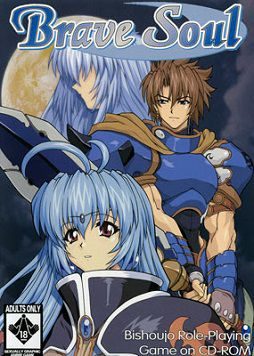
It is a world very different from ours, a world in which magic exists, a world where peasants labor under the burden of heavy taxes imposed upon them by the unfair rulers of the land. Although the commoners have a difficult lot, there are those among them with the strenth to use his sword and make a name for himself – an adventurer. To be an adventurer is the dream of every peasant.
The story details the journey of a young man who was raised in the countryside of Souvania, on the continent of Valencia. Disowned by his own father and forced to make his way in life, he chooses to become a Hunter, a mercenary who accepts jobs for a variety of adventures. Heading into town to officially join the Hunter’s Guild with his dragon Shell at his side, he happens across a mysterious girl who looks strikingly like the Moon Goddess.
The Moon Goddess… Ever since he was young, a beautiful girl appears before him on nights of a full moon. Because of the mysterious manner of her appearance, he gave her her unique name. With the mysterious girl Alicia and dragon Shell at his side, as well as new characters he will join with later, our hero embarks on many bold adventures. But will he ever be able to solve the bizarre mystery of the beautiful Moon Goddess standing in the lake…?












96 comments
Thanks admin.
I've have Windows 7 Home Premium and I have changed the compatibility from Windows XP service pack 2 to Windows 98 to Windows Service Pack 3 and back to Windows XP service pack 2 and I still can't get Brave Soul to run... All I get is a roll of white text that isn't readable, and even when I wait it out it just loops again...
Please, how do I fix this!
I heard some good things about Brave Soul so I really want to play it...
PS: I'm not very good with computers, so try to keep it simple. :p
The screen still flickers black occasionally, it's a bit annoying but it's not game breaking.
>Is also and eroge
Cooooooooooooool.
1. click start
2. type cmd Run its as Administrtor (& rightclick, select, 'Run as Administrtor'
3. type following without quotations: "cd C:\Windows\SysWOW64", then press enter
4. type following without quotations: "regsvr32 ir50_32.dll" then press enter
5. done the video should now be fixed
Now you might ask what the hell you just did?
The answer is that you enabled the Indeo 5.0 codec for your windows 7 pc
what should i do?
Other than that, this is a good game so far.
GO TO THE INN
The cursor is teleporting
Not sure about the implication behind the "flip" thing though.
That said.... Have you tried using Oracle VM VirtualBox (virtual machine)?? It is free, by the way, the games runs any older game or Japanese game perfectly. I love playing an old Date-sim called "True Love", which is one of the best date-sims ever made (and closest you will ever be to Tokimeki games *sigh*) in English. I use Oracle VirtualBox and run "emulation" inside Win 7 of Windows 98 with the True Love game inside. It runs perfectly with sound, no glitches, no headache. :)
Everyone: the best way to run old games in this awesome site is to run a VirtualMachine (emulator that runs inside Windows XP, Win Vista, Win 7, etc, and run an "emulation" of an older Windows version - like Windows 98 or whatever, so you can run old Japanese translated games).
The best FREE one is: virtualbox.org and it is easy to use. Works beautifully and much easier to use then DOS-Box, which even for a DOS pro like me, is a headache to use. My 2 cents.
Christian
Right+click+the+game+brave_s.exe+in+the+folder+where+you+installed+the+game.
Go+to+Properties.
Set+the+compatibility+mode+to+Windows+XP+(Service+Pack+2)
Set+the+game+to+start+in+640x480.
Set+the+game+to+run+as+administrator.
Launch+the+game.
In+the+config+menu+that+pops+up,+set+the+game+to+windowed+mode.
On+the+right,+set+the+graphics+to+GDI.
Play+the+game.
Even+though+you're+in+windowed+mode,+the+game+will+display+as+though+it+were+full+screen.+If+your+task+bar+is+in+the+way,+right+click+it,+go+to+settings,+and+switch+on+"auto+hide+taskbar".+
Before+I+got+to+these+settings,+the+game+would+lag+very+badly+in+full+screen+mode,+and+if+I+alt-tabbed,+the+game+would+get+tons+of+graphical+glitches+when+I+tabbed+back+in.+This+setup+fixed+all+the+problems+and+I+was+able+to+play+perfectly+without+a+virtual+machine.+Good+luck.
Right click the game brave_s.exe in the folder where you installed the game.
Go to Properties.
Set the compatibility mode to Windows XP (Service Pack 2)
Set the game to start in 640×480.
Set the game to run as administrator.
Launch the game.
In the config menu that pops up, set the game to windowed mode.
On the right, set the graphics to GDI.
Play the game.
Even though you’re in windowed mode, the game will display as though it were full screen. If your task bar is in the way, right click it, go to settings, and switch on ”auto hide taskbar”.
Before I got to these settings, the game would lag very badly in full screen mode, and if I alt-tabbed, the game would get tons of graphical glitches when I tabbed back in. This setup fixed all the problems and I was able to play perfectly without a virtual machine. Good luck