English visual novel downloads

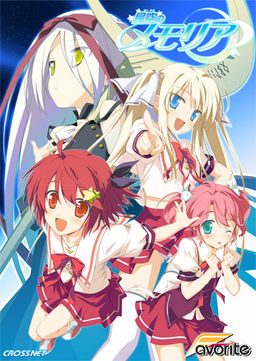
Hoshizora no Memoria -Wish upon a Shooting Star-

Hoshizora no Memoria -Wish upon a Shooting Star-

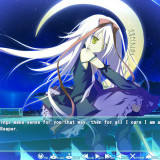
The story begins with the protagonist, Kogasaka You, moving back to his hometown, which he left behind several years ago. Upon arriving, he stumbles into an abandoned, sealed observatory, whereupon he encounters a mysterious girl who looks exactly like his childhood friend did years ago. She introduces herself as Mare, a shinigami who reaps nightmares.

Meanwhile, back at school, You ends up joining the astronomy club, which is desperate need of new members. At night, he continues to visit Mare at the observatory, all the while trying to remember a certain someone’s name…
812 comments

blurryReply
i have deleted graph_vis folder but why do i stil see dolphins??
joeReply
you must either delete the file EACH time u open the exe file, OR you can fix it permanently by create a file(not a folder, a FILE) named graph_vis in the game folder (just the root, not in any subfolders) make sure the file has no extentions (delete any .txt or anything else at the end. THEN delete the graph_vis folder, and when u run it again you shouldent have any problems (if u load a saved file that was saved on a dolphin screen, u may need to go back to a previous save and come back into the scene)
FudgenuggetReply
Can anybody tell me what the version 11 thing is for??

I can play the game fine, but I'm not sure if I'm using the right "version" as after I extracted the version 11 rar, I didn't really move/switch it with anything...
FudgenuggetReply
Am I supposed to be playing on version 1.0 or 1.1??

Because I'm on version 1.0...
FudgenuggetReply
Can somebody tell me what I'm doing wrong (or if I'm fine).

I think I did what I could... but:

1) I have Windows 7 64 bit, and I hear I'm supposed to erase the graph_vis thing? Is that correct? If so, is there anything I should do before I delete it, or is it okay to delete it and play through the whole thing like it never exited.

2) Version 1.1 thing... i did the patch thing (which was in Japanese so I have no idea if it succeeded or not). When I run the Japanese version I get ver 1.1, but the English version I still get Patch 1.0... is this correct?

3) Also, why do words look cut and stuff. I hear you have to do something about that (which I couldn't find on the game setting thingy)

4) Also when I extracted the Version 11 rar, I got 3 things, a note, a patch exe, and a folder that contains 2 files (.bin and a .hcb). What am I supposed to do with these?? Just put them in the folder and replace what I had before???


Please help plz :D
AlbertReply
here’s a quick guide for all those with trouble:

*unrar the ISO with winrar
*mount it with Daemon Tools, if you don’t have it download it
open Daemon, select virtual drive and browse for the ISO
*Once mounted, make sure you change your locale language to japanese
*to do this: start menu, control panel, language, system locale language,admin tab, change config, choose japanese.
*run Daemon tools, select the ISO you mounted and run “launch.exe”
*you can’t read most of the stuff during the instalation but nevermind that, just make sure to check the instalation directory (C:program files/CROSSNET/ ……)
*once installed, run the patch file
*it will automatically search for the folder where the game is installed and apply the media fire English patch
*go to the instalation directory and look for the exe named (memoriaEN) that’s the game in english, but don’t launch it just yet
*To get rid of the dolphins: there are 3 ways of doing so.
-disable total control of the graph_vis folder: (properties, advanced, edit….)
-replace graph_vis folder with an empty folder with the same name
-open graph_vis folder, select all files and edit them to “read only” attribute.

these methods worked for me, if they don’t work for you, just delete graph_vis folder everytime you play :/(this is the best option)

*now before you play, search for the update 1.1 patch
it’s one rar file that came along with the game
*unrar it
*DO NOT open the exe
*instead open the patch data folder, copy and replace the files there with the ones in the instalation directory.
That will solve most bugs and crashes (i know it did for me)
powerneedReply
when i go to install the game it just closes it self i mount using dameon tools i open click setup it goes to where i chose where to install i pick default location then i click the middle option then the window closes and nothing happens i am using Japanese locale
StepReply
When I try to play this, it says the following ;

____________________________________________________________________

Memoria.exe - System Error

The prgram can't start because d3dx9_29.dll is missing from your computer. Try reinstalling the program to fix this problem.

____________________________________________________________________

The problem is, I've already reinstalled it....
FudgenuggetReply
No, you have to get the Direct X 9, which is available from the screen-thingy, it should say Direct X 9 on the 4th line or something.
Miyagi TSKReply
just google with "d3dx9_29.dll" key, download-->extract and copy the file in to C:\Windows\system32\ .Simple?
NyxReply
Thanks a lot. For anyone whose having the same problems, look at Miyagi TSK's comment.
omiReply
ffffs this was a GREAT visual novel. Having a hard time finding the next one to play. I have "Sharin no Kuni, Himawari no Shoujo” lined up, hopefully the internet ratings on this one will prove correct and it will be on par with a game such as this one..
No ClueReply
Right when I get to the part at the start where he is talking about being back in his hometown and cooking, a window in japanese pops up with ok as the option and clicking that stops the game.. help?
Miyagi TSKReply
Can anyone tell me how much time did a route spend for you?
CraftmoonReply
This game is just SO EPIC.
SomeoneReply
I downloaded every single DA files (the free 200 MB ones and the patches) and I wondered if I just install them one by one like I would do to a normal 1 GB game, thanks. :)
SomeoneReply
Sooo...here's my problem, I downloaded every single file (as far as I know, I have the Memoria update and the patches as well as the bugfix I THINK) yet when I try to use any of them I get an error :/ can someone help please?
SomeoneReply
Also when I open the full english 1.0 patch setup thing it says that it can't find the instal folder :/ do I have to re-instal or something? and if so is there a site which is better than another? thanks for helping an idiot who should go outside more often :3
yuzurihaReply
its hard to install it although many times i've tried!
StarryNIghtReply
How come when I play it goes really slow, do I have to update something, how do I patch the ver 11? please help me!
AlbertReply
Can somebody plzzz post full instructions on how to install this game please.There are 17 parts so i dont know what to do and which one to open.so please someone help me about this and how to install patches i.e,before the game or after installing the game.Kindly help me
AlbertReply
Ok, I solved most of the problems i had installing this thing and I noticed no one was truly helping. I don’t care if you want for someone to browse 450 comments in order to come across a quick-written, ill explained method for installing. And not everyone has the computer skills to do so.

so here’s a quick guide for all those with trouble:

*unrar the ISO with winrar
*mount it with Daemon Tools, if you don’t have it download it
open Daemon, select virtual drive and browse for the ISO
*Once mounted, make sure you change your locale language to japanese
*to do this: start menu, control panel, language, system locale language,admin tab, change config, choose japanese.
*run Daemon tools, select the ISO you mounted and run “launch.exe”
*you can’t read most of the stuff during the instalation but nevermind that, just make sure to check the instalation directory (C:program files/CROSSNET/ ……)
*once installed, run the patch file
*it will automatically search for the folder where the game is installed and apply the patch
*go to the instalation directory and look for the exe named (memoriaEN) that’s the game in english, but don’t launch it just yet
*To get rid of the dolphins: there are 3 ways of doing so.
-disable total control of the graph_vis folder: (properties, advanced, edit….)
-replace graph_vis folder with an empty folder with the same name
-open graph_vis folder, select all files and edit them to “read only” attribute.

these methods worked for me, if they don’t work for you, just delete graph_vis folder everytime you play :/

*now before you play, search for the update 1.1 patch
it’s one rar file that came along with the game
*unrar it
*DO NOT open the exe
*instead open the patch data folder, copy and replace the files there with the ones in the instalation directory.
That will solve most bugs and crashes (i know it did for me)

BY:Helvetica Standard
AlbertReply
it is better to delete graph_vis folder everytime before playing the game and the Patch i mentioned above is the mediafire english patch:-
hoshimemo_full_english_patch_1_0.exe – 71.6 MB
AlbertReply
The patch i mentioned is mediafire:hoshimemo_full_english_patch_1_0.exe – 71.6 MB
AnonymousReply
[IMG]http://i49.tinypic.com/357mvq1.png[/IMG]

As you can see on the bottom right, it's set to JPN locale, and I downloaded the game with it.

I searched this problem, and it's saying it's not set to japanese locale, but mine is and I installed the game with the japanese locale, and am still getting this error. <_<
EvangelizeReply
I LOVED this, hope we can get the fandisc (hoshizora no memoria - eternal heart) translated as well. Arigatou!
gameReply
cleared 3 route already. Now on Kosame route. This game is very good!
BeatMyHeatReply
is there anyone know a link of hoshizora no memoria eternal heart if anyone know please post the link thank you. .
heyReply
why is mine having an error that says graph_vis YUME eventhough i already deleted graph_vis
heyReply
can anynone answer my question pls why is there an icon showing that graph_vis YUME in my game i already deleted that folder why is it popping.pls tell me how to fix it. i followed the procedure to install this but why???pls tell me
gameReply
Yep, 100% cleared. Extremely good, much better than I expected. If someone could translate eternal heart. I will salute them!
fdsaReply
eternal heart -> fandisc -> nukige -> you dont need to understand anything -> no translation needed
gameReply
Well while I don't like her route the best at least I want to know more about ***-girl(why we don't have spoiler tag already- -) since her story is pretty depressing and slightly confusing. So even it is nukige, I still want to know more.
PS: nukige is the game that focus on H scene more right?
Helvetica StandardReply
Dearest Admin:

all Mediafire links are down. Says somethign about "account suspended" please reupload, torrents would also be a good choice to avoid broken links.

many thanks for your time and effort.
:D
nisashi13Reply
Now we just need Hoshizora no memoria ~Eternal heart~ to complete this~
fdsaReply
eternal heart is a fandisc(basically nukige) not sequel
Guys!Reply
I cant seemed to download off Download Ani, I entered the captcha pressed download, then nothing happens, I downloaded D.C IF like just few hours ago, maybe server problem....this could be bad if it goes down like
bluemanReply
im having a similar problem except mine starts to download but it stops downloading or it says its done downloading and its not actually finished
R2ZeroReply
Just finished the game 100% and I gotta say, Hoshizora is the best VN I've ever had the pleasure of playing through. Favorite route has to be ???'s, even if it's confusing the first time playing through it.
XerxesReply
hey....can someone help me... i already finish komomo route, but when i see memory mode ,its missing 1 pic, and because of that i can't go to kosame route, its like i not yet finish komomo route.... any help??
bluemanReply
im having a similar problem except mine starts to download but it stops downloading or it says its done downloading and its not acctually finished
bluemanReply
sorry about the message wrong person to reply to
BakaReply
uweeee it took 5 hours for me just for 1 route @.@
CJReply
Your first visual novel or something? VN routes are meant to be long.
BakaReply
is it really have problem with skipping?? cause i don't have any :o
it didn't skip the part that i haven't read yet
BakaReply
ugh . . . but there's another problem ~~
it won't skip dialog that i have read from another route @.@
BakaReply
guess there's no helping it ~
i changed the option to skip all @.@
BakaReply
. . . and it seems now i'm attached to komomo . . i was planning to do another route but ended up in komomo's route ~~
is it because twintails???? @.@
XerxesReply
me too...but in my case, i always ended on Asuho route..
RyotaReply
when i went to play the game that moment it shows a error that it says C:\users\"myname"\\documents/FAVORITE/????????/save/ and some other weird signs
what does that mean?

Leave a comment