
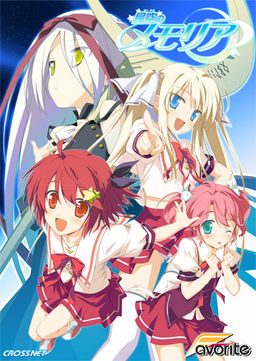
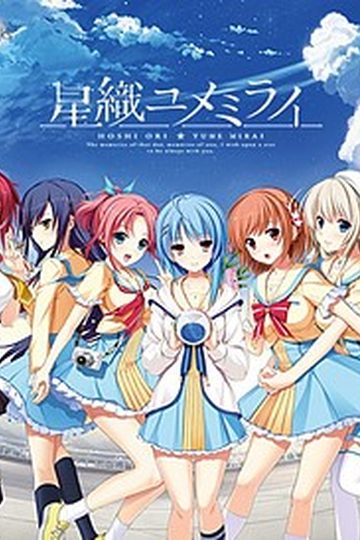
The story begins with the protagonist, Kogasaka You, moving back to his hometown, which he left behind several years ago. Upon arriving, he stumbles into an abandoned, sealed observatory, whereupon he encounters a mysterious girl who looks exactly like his childhood friend did years ago. She introduces herself as Mare, a shinigami who reaps nightmares.
Meanwhile, back at school, You ends up joining the astronomy club, which is desperate need of new members. At night, he continues to visit Mare at the observatory, all the while trying to remember a certain someone’s name…












812 comments
so here's a quick guide for all those with trouble:
*unrar the ISO with winrar
*mount it with Daemon Tools, if you don't have it download it
open Daemon, select virtual drive and browse for the ISO
*Once mounted, make sure you change your locale language to japanese
*to do this: start menu, control panel, language, system locale language,admin tab, change config, choose japanese.
*run Daemon tools, select the ISO you mounted and run "launch.exe"
*you can't read most of the stuff during the instalation but nevermind that, just make sure to check the instalation directory (C:program files/CROSSNET/ ......)
*once installed, run the patch file
*it will automatically search for the folder where the game is installed and apply the patch
*go to the instalation directory and look for the exe named (memoriaEN) that's the game in english, but don't launch it just yet
*To get rid of the dolphins: there are 3 ways of doing so.
-disable total control of the graph_vis folder: (properties, advanced, edit....)
-replace graph_vis folder with an empty folder with the same name
-open graph_vis folder, select all files and edit them to "read only" attribute.
these methods worked for me, if they don't work for you, just delete graph_vis folder everytime you play :/
*now before you play, search for the update 1.1 patch
it's one rar file that came along with the game
*unrar it
*DO NOT open the exe
*instead open the patch data folder, copy and replace the files there with the ones in the instalation directory.
That will solve most bugs and crashes (i know it did for me)
hope it helps, happy playing :D
Is really help me a lot :D
if you did it with the exe, then your best bet is to erase the graph_vis folder everytime you load the game. (after loading, leave the game window open, then go to the installation folder and erase graph_vis. Then resume playing.
If this doesn't work for you still, let me know
i might have another idea. :D
*make sure you applied patch 1.0
*run the exe "memoriaEN" when attempting to launch (nevermind other launchers)
*change to jap locale BEFORE you install, not after.
*if you installed before changing to jap locale UNINSTALL EVERYTHING including the saves folder the one named "FAVORITE"
change to jap, then REINSTALL.
*UPDATE YOUR DIRECTX
*UPDATE YOUR VIDEOCARD DRIVERS
if after doing all of the above, you still get an error
then, sorry. You are beyond any help.
Can i request 11Eyes Visual Novel,I see in the Download List but look like you don't have it.
Sorry for my Selfish request.
the program cant be startet curs d3dx9_29.dll is missing
what did i do wrong????
the programm cant be startet curse, d3dx9_29.dll is missing.
got windos 7 and im using jap loc.
If you buy a porn video you don't expect it to be censored, right?
and it's the japanese we are talking about..
effing censorship!ლ(ಠ益ಠლ)
It's not hard to get rid of if it bothers you though so nothing to complain about.
Anyways, I got the 1.1 patch and installed it. I've played and I've saved a few times now and I finally made it to Mare's route. I still get dolphins with graph_vis folder gone.
I uninstall the game and reinstall keeping my saves. Still the dolphins. I find a new patch called the untroll patch which is supposed to remove the dolphins. I install it and no go.
Do I have to delete all my saves and restart for these methods to work?
uninstall, reinstall
download the patch, yes again. (admin recently uploaded one without dolphins)
before you play, make sure you erase all fo your previous files
CG memory included (sorry)
then play normally
hope it helped :)
file were become incompleted [can be installed, yes but it crash at some point of the game] any1 else having this issues?
Thanx for uploading this Superb VN sire Admin...
looki
ng
certainl
y
Just like that, and nothing I do seems to fix it. Any ideas?
Where is the point of putting scenes like this in there if they are just going to censor it with a fkn FISH Picture -.-
If they were going to to this it would have been better to completeley cancel her H-scenes instead of this stupid joke.
But maybe there is someone who can help with this out there, i hope for it
Just looked through the troubleshooting section in the link above and there was the solution ^^
thanks
Please help me =[
I looked through the trouble shooting section and it said that this was a game bug, there's nothing at the moment you can do about it but to patiantly skip with your mouse or keyboard, hope i could help :)