

I have a little sister…
She’s cute. She’s my cute little sister Rin.
Our parents got married and we became a family.
However… Recently I started to feel strange.
Now I feel lust for Rin.
I just see your body or touch it and I got an hard on…
Haaa… Rin… You’re so cute Rin…
I think I’ve reached my limit…
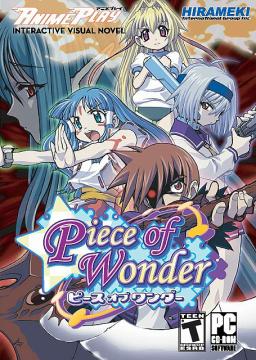



















tnx dude.. .the game is already running..
^^
I already try Isley procedure…. but the game is still translated to Japanese….
I really need some help here guys on how to change the subtitles to english
Is the name of the english patch “patch.xp3” ? And did you put it on the game’s folder and not into the “plugin” folder ?
haha what a cute game…
Well, graphics are nice 🙂
Story isn’t so great, but that’s not what you expect when downloading this game. It can be downloaded if you have ~1-2h free time to read it.
Wow. It look, really good. I like this kind of games. I hope it’s as good as i think. I’m really surprised that the patch only weight 75 kb. But the game isn’t heavier either.
how can i install this game on pc? or its not for pc?
Just unrar file you downloaded, mount it using some program like daemon tools. You can install it later. After that copy patch into game directory (same place as .exe file).
so i have unrar’ed it like you said and im using alcohol. its not working. I hope that next eroge will work xD
try using daemon or magiciso to mount
It works. U’re just not doing it right. People have been playing it already.
After i have installed it, and copyed the patch in. I still cant run it. I just get an error saying “unexpected T_SYMBOL, expected “)”)”
i got same error =( “unexpected T_SYMBOL, expected “)”)”
can you tell me what i have to do to play this game?
I has the same problem but you need activate Microsoft AppLocate and then change the name of the carpet for example
C:\Program Files\NOIR\imoizi
how do u activate microsoft locale?
You run it.
If you didn’t install it so you can just right click, then the default installation should be in C:>Windows>AppLoc or something on XP at least.
When I run the setup and it is in the middle of installing an error message come up and says something about access being denied. It gives me three options (Abort, retry, and ignore) I said ignore and it looked like it completed, but I have tried running the game and it just brings me back to the setup. What do i do?
thanks for another awsome game admin
I got error when i start the game and i can’t play. >.<
To all the people unable to install the game have you made sure you’re in Japanese Local? Not sure if that is the problem but that is one of the most common problems people have with these type of games.
What do you mean by Japanese Local?
I have found what he said. You have to change the regional configuration to install and play this game. But don’t worry, as long as you have english (Spanish in my case) as languaje to show, everything will be fine.
I’ll tell you what to do to change the regional configuration (win 7). But i’m using Spanish as languaje to show so there could be diferences in the words.
go to control panel, then Watch, idiom and region, then again give click in the same and a windows is going to appear. go to administration(or management)and change the regional configuration to japanese. Then you can install and play the game. As i say, don’t worry you should’nt have problems to use the computer if you have english as languaje to show.
I thought it could be that. But,no. I have tried a lot of things in order to make this work work, including install the japanase as a language to show (Win 7) but there isn’t any change there still show me a blue screen and it say “( “unexpected T_SYMBOL, expected “)”) It’s strange because i still can’t see japanese symbols the langueje of instalation is weird i don’t know why.
The part where I get stuck is step 5. In the middle of completing an error occurred that says something like “move file access denied” it gave me the option to ignore or abort. I said ignore and it finished, but now i can’t run the game. It just keeps bringing me back to step 3. Could you possibly help me out?
This is , umm i think 4th game or something that i cannot run always the same window
Vista 64 Business
using at this moment local language not JP.
i got same error =( “unexpected T_SYMBOL, expected “)”)”
can you tell me what i have to do to play this game ????²
Have to change the regional configuration. But don’t worry as long you don’t change the languaje to show everything should look as always (in english or spanish in my case). Maybe other programs don’t work as long you use this, but you only need this configuration as long you install and play the game, after that you should be able to change it as it was without problems.
Maybe there are some diferences bacause i use spanish as languaje to show. But i’ll tell you what to do to change the configuration. This is for win 7, i’m not sure about how it is in other windows.
Go to control panel, then Watch, idiom and region, then again give click in the same and a windows is going to appear. go to administration(or management)and change the regional configuration to japanese. Then you can install and play the game.
RLY WORKS THANKS A LOOT
(^_^)/
LIGHTDX I do what u say but don’t work i gona find another game thy
i can’t get it into english! 🙁
Where exactly do I put the patch file? I installed the game and all but can’t figure out where to put the patch T_T help please? The game runs fine for me btw
I put the patch in plugins and in the same folder that has the uninstall and run exe, nothing changes -_-
I got it nvm can’t wait to play ^_^
How’d you do it?
i can’t install it, the file is corrupted. x.x
Seems to be fine for me, you may want to redownload it…but you dont really have to install it, just extract the file and click the .exe
i installed it already. but its not working, i can’t understand the setup. how is this?
i change the system locale to japan and restart my computer, after that the game running just fine
do i need to change my win7 language or just the regional?
Just regional. If you change just the languaje it still won’t work and the image of everything in japanese could give you some problems.
what is system locale? i already change the regional language to japanese and it is still the same. =.=
Okay to get this game working, (Win7)
1) Before you install the game go to “Control Pannel”.
2) Click on “Clock, Language, and Region”.
3) Then under “Region and Language” click “Change keyboard or other input methods”.
4) This will open a pop-up, on that pop-up click on the “Administrative” tab and click the “Change system locale…” button.
5) This will open another pop-up and then chose “Japanese(Japan)” from the the list it shows.
6) After you have chosen “Japanese(Japan)” click the “OK” button another pop-up will appear to restart you PC Click the “Yes” button and your PC will be restart.
7) After you have logged back into your PC, Mount the image you have extracted from the .rar file (the .mdf one)with a software like “Deamon Tools” etc.
8) Then it will run the setup, (windows might give a pop-up just click Yes/Ok) the setup will be in Japanese but try and follow it though and install the game (correct choice to complete the setup is to click on the buttons with the blue outline)the game should pop-up after the setup and leave a shortcut on your desktop (if the game that pops up after the setup is done isnt quite right then close it and follow step 9.
9) After you have installed the game go to where the installed file was saved (usually in “Program Files” in the “OS”) the folder should be called “NOIR” open the folder, and the open the next one in the “NOIR” folder and put the Patch in the same place as the .exe file when you have done that double click the .exe file (“imoizi.exe”) and the game should run nicely. 🙂
Hope this helped 😛
thx a lot, you helped me a lot 😉
You guys are making the install WAAAY more complex than it should be.
Download Microsoft Applocale (If you are on this site you should have it already). Right-Click on properties for the applocale shortcut and make sure “run as administrator” is checked. (win7/ vista only)
1. Mount the disc image
2. Using applocale wizard run the exe on the disc image. When prompted for a language, select the very bottom one (doesn’t matter if you can read it).
3. Go through the games setup. Whenever it prompts for a path, put in a path with english characters instead. Same goes for the group name. (Don’t worry about the slashes looking funny).
4. Put the patch.xp3 in the game’s folder.
5. Run applocale again, this time point to the newly installed game exe and select the option to create a shortcut.
6. The game should run just fine now. Be sure to launch from the shortcut instead of straight from the exe.
Notice I didn’t have to do anything crazy like change the regional or language settings.
can someone tell me how I get last 4 CG ?
oh sorry I ask something dumb after play it one more time I just see it has 3 option.
thank guys now is working very well :D/
why can’t a run the game..the file format is something called mds and the other file is mdf….why?
Those are cd images. Check “FAQ” section of this website for instructions about mounting them.
aw. im using windows xp. T^T
ITT: people that expect to play VN’s without knowing about AppLocale
How can i get this to this operate on xp
I have applocale, and daemon tools lite but i can get it to operate.
i cant change my system locale, because i cant find my Xp disc
Some one please help
i cant change mine ether
Anymore games like this with some animated scenes on this site?
can someone help me when every time i click on the game it gives me an error message telling me the parameter is incorrect I have swiched my local to japanese and put the xp3 file in the game folder but it still won’t work can someone help me.
omg she is super cuteee
guys… do you have some walk through here..
Sweet baby Odin, such awesome art and the animations in path 2 as I call it (choose 2 on all the choices) are freaking epic.
Probably the best “eroge” based on the *cough* fap value.
Well about any Walkthrough
*Spoiler Tag*
For 100% CG which is not really much you just have to do:
1. Choose the first option everytime
2. Choose the seconnd option everytime
3. Choose the first than the second and the newly-found third option.
i’m so confused i dont get how to get this game to work
how to use applocale or anything i really need help
Here you go: http://www.youtube.com/watch?v=zzznOTnwjJk
quick tutorial i made how to change applocale + installation
Admin if you want you can add the link to the game’s description, so in the future no more “how do i install this” questions need to be asked.
Note: videolink is hidden on youtube so only erogedownload visitors will have acces to it. :p
thx for the tutorial it work^^
Hey Admin, I still can’t get the game to start up… I’ve installed it, but when I try open the game it doesn’t work, just a weird pop up and the system ewrror thing… can u help me around that???
sorry, I got iot working, but all the lines are in japanese… how do I fix THAT…
You tried copying patch.xp3 to the installation directory?
Hmm, makes me sad I’ll never have a kawaii imouto.
/a/ be gentle to yours.
Does it work on mac?
None of these work on mac. Get a PC.
how to save the game? not have the game folder type savegame
i dont know how peopole find this so hard to install, this is probably the most forward install on the site, so many other games on here are much more complex to install.
what i did:
install game via daemon tools lite
moved english file into folder, not any of folders within the folder
thats all. my locale is set to japan
the lang. is still in japanese i tried to download the eng. patcgh several times already
awwww >_< I already downloaded it twice but I can't seem to run it lols … tell me how please D:
just go to program file Noir change the folder name from –…‚¢‚¶‚ß to imoizi and it can be run
You know this always happens, no offense but people complaining that they cannot run.
Not only have other users given you help, but internet sites like Boy’s Love Game Headquarters, or Hongfire have help as well. If you don’t find problems listed there I understand, but otherwise please refrain from asking help so much. Lots of games on this site have these comments as well, so feel free to look through them.
Good Luck, Thanks again Admin!
There were like 3 animated scenes to 20 still pics. They seemed kind of out of place.
-must i download both mirror to play the game?
-wad should i do after downloading it?
i cant download the 2nd mirror x.x
Its say could not find the http://www.fileserve.com
What should i do?
Your ISP is probably blocking fileserve – just use filesonic instead.