
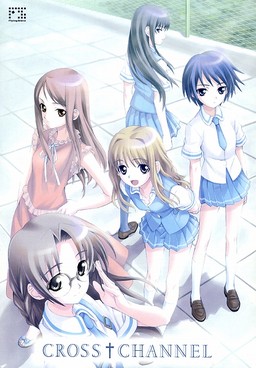
Gunjo Gakuen (Deep Blue School) is a facility designed to gather and isolate those students who got a low score on an adaptation coefficient exam (Scoring low on this exam indicates that the student is less likely to be able to be adapted to the society) mandated by the government.
After a failed summer vacation with other members of the school’s broadcasting club, Taichi Kurosu and some of the other club members return to the city, only to find that all living creatures within it except for the club members have completely vanished. In order to confirm the status of the outside world, Taichi decides to gather other club members to help Misato Miyasumi, the president of the broadcasting club, who is trying to set up a broadcasting antenna to contact any possible survivors. However, Taichi soon discovers that the world is actually repeating the week after they found the others vanished…

















I used poweriso, but the disc 2 seems 2 be not readable.
I used the bin files(1 per disc).
I’m installing it using the english patch.
What should I do to fix this?
You can’t use poweriso for japanese game images – it can’t load them properly. Use deamon tools lite.
ok, thanks
I’ll use that instead
wait,is it daemon tools or demon tools?
It is demon tools if you’re playing nukige lol.
I installed Cross Channel with the english patch and it worked fine until i rebooted my PC, now whenever i try to play it the text is messed up with all the spaces in the wrong places. Has anyone else had this problem or knows how to fix it?
I think this started when i rebooted my PC in japanese Locale, however rebooting in english locale hasnt helped at all.
I have the same Problem. If anyone finds out how to fix it PLEASE say something because this makes it hard to enjoy the visual novel.
🙁
Patch it again.
Is this a non sexual content game?
Yes, but I think there’s a all ages option
for this game during installation
Copy Inconsolata.ttf from your CC folder into C:\Windows\Fonts.
It worked for me 🙂 .
Copy the Inconsolata font file from the game’s directory into your windows/font folder (path varies depending on your OS).
Thanks man!
Your solution fixed my problem =D.
There’s a font file you need to install to correct that.
Try checking the folder you extracted the patch to.
If isn’t there, I’ll tell you what to look for:
What you need to find is the inconsolata true type font included with the patch(inconsolata.ttf). Once you install that font, the game shouldn’t have that problem anymore.
Erm,,, how can I play this on my PSP?
You can’t. I just used PSP cover of japanese version since it looks better than PC one.
Okay, I have no idea how to install. Please help, with steps please.
the game works fine when i launch it after installation, but whenever i try to run it from the desktop shortcut i get an error and it stops working. help please?
Run the game as admin, that worked for me.
how do you set it to admin?
Right click on the shortcut and run as admin is one of the top options
when i downloaded the game, i extracted it like normal and after that i got vlc files instead. is that suppose to happen and if so how do i install?
They’re iso files. Mount them in Daemon tools. Check the FAQ section on this site if you don’t know how to do that.
It’s just that VLC tends to hijack the icon for iso files, even when they aren’t actually movies.
which files should I install? the CC_DATA.bin or CC_SYSTEM.bin or the Image files
It contains h scenes?
Yes, unless you select “all ages” from when patching it.
Can Someone help me? I uninstalled this game, and i can’t reinstal it. When i start the cd the first button that launch the instalation is gray and i can’t click on it. It seems that my pc see that game installed, but it
i had solvet this problem, i just noticed that nte patch exe had function to instal full game 🙂
Eh, I can’t figure out how to install this. I got in on Japanese Locale but no matter what I press (On data or system) I can’t install it. Help, admin? 😀
dunno if ur still there but u need the daemon tools lite
I already downloaded them all, got daemon tools but the CC System won’t mount only the CC_Data mounts :\ What should I do?
How do you save the game? I pressed everything and they only hide the text box. Help please.
Anyone? The only buttons that work are F1(quit) and F2(quick save). I can’t even return to the main menu when I start playing. D:
Just Go Up To The Top Of The Screen And A Menu Drops Down
HOW DO YOU INSTALL IT!? WHY ISN’T ANYONE HELPING US!?!!?!?!
AT LEAST GIVE US A LINK OR SOMETHING TO A TUTORIAL
If I’m not mistaken, based on what I’ve read so far(since I’m still actually downloading it), you have to extract it possibly with WinRAR. Then, us the Daemon Tools Lite(http://www.daemon-tools.cc/eng/products/dtLite) To extract the .iso files 😀 Hope I helped 😛
Some guy commented this:
1
extract everything
2
mount cc_system
3
open the patch exe file and choose your game directory
4
install
5
when prompted for disc 2 mount cc_data then ok
6
play
THANKS Blaise_Blaze!
Thank You Really Helped Me Out *HUGS*
oh wow… even though i’m playing, i don’t even know how to save, i read someone said f2 then again how do you load it? help plox : <
Solved it! Just hover your mouse at the top and the menu will appear. Just found out a few minutes ago. xD
lol thanks for the reply, but today i tried to play the game again and for some reason it won’t open anymore… it just instantly crashes… guess i’ll have to give up in this one X_X.
Try to uninstall it then re-install it. That might work 😀
Why cant they just put text files in the patch i had a hard time figuring it out
heres how for those who don’t know
1
extract everything
2
mount cc_system
3
open the patch exe file and choose your game directory
4
install
5
when prompted for disc 2 mount cc_data then ok
6
play
this really helped cheers man
This may sound stupid but, how to mount the CC_system? and what does that even mean? 😛
I love you
The installer keeps telling me I don’t have permission to run it when I do. I even ran it as admin and still got the same message 🙁
Disregard my last post. I found out comodo was blocking the application from running.
Have my babies.
how can you maunt .bin file ?? daemon tools lite cant do that
Downloading it me happy huhuhu
the translation is terrible!!!!
LOL WUT
How is it terrible? Did you turn on the Translation Notes? Also, some things are intentionally bad because Taichi has awful grammar.
seriously, this is the hardest game on the website to get playing, which file is which? help here please?
ok stop, never mind that part, I can get it to play, which file is the patch file? help please.
You have to download the patch file 😀
It’s the list below the links for the game download 😀
Or are you not talking about the english patch files?? XD
Thank you so much for the upload!
I just tried to unpack the .rar files and I keep getting an error with, Cross Channel 2 of 4 CC_Data.bin keeps saying an error occured and locking up the unpack.
I am using 7-zip, and have tried both mirrors. Any suggestions?
Try winrar? Or maybe, try downloading it again.
This was good, so good it made me want to post how good it is.
It was good.
Could this work on the PSP? It’s because there’s a PSP logo up top 😀
That is the cover of the PSP version. Admin thinks it looks better.
He REALLY should have used the PC, if this is what happens.
Could somebody explain to me the importance of changing the Locale to Japanese and all programs required to do so without f*cking my computer?
I managed to play Saya no Uta without doing anything at all, but I can’t find out how to install this correctly lol.
If I DO change the Locale to Japanese, what does this to do my computer exactly? What will happen to my OTHER programs O:?
It doesn’t really affect your computer at all…. Nothing will change and you wont be able to notice anything. It will just help your computer read Japanese files.
the english patch is gone Admin oh noo!!!
Filesonic is down, please move all files to another mirror.
The english patch was removed. Admin could you reupload it ?
How the heck do you install this? Please help, Hello?
seriously guys , why ask the same question over and over and over again. It has been answered so much times already. Read comments and if its not in the first comment page press older comments. in 99% of the games listed here there is already an answer.
So its not saving.
After I exit out of the program all of the saved data and quicksave aren’t there.
Anyway to fix this?
So I got the whole error message when I tried to run it, so I ran it as admin and it worked just fine. But after a little while I tried to play it again and even when I run it as admin I get an error message in Japanese and then I get a message that says “- has stopped working” and the game shuts down. Help?
I wish Cross Channel will be turned to Shounen Anime. (No Eroge, No Hentai, No Erotic anymore!!!)
Ah-ha-ha-ha-ha… no.
Seriously? That would ruin it.
Also, how could it be a shounen anime? A shounen anime usually has an excuse plot and tons of action.
For anyone wanting to save just move your mouse to the top of the window, a menu pops up that lets you save, load, etc.
hmm first time I saw a visual novel with a storyline like this..
When I play it shows the girls pussy as big pixels. Can it be uncensored?
No, that’s how japanese law works.
If that’s the case, why is Katawa Shoujo completely uncensored?
*facepalm*
obviously you don’t know jack about katawa shoujo
BECAUSE KATAWA SHOUJO WAS MADE BY WESTERNERS YOU DOLT
because it was meant for americans
Are there any other such eroge?
I am trying to run the game on Mac using CrossOver. The installer claims that the game has installed just fine, but when I go to play it, the window remains black with the music playing in the background. Any idea how to fix this?
Looking at the walkthrough, it says that this game doesn’t have a traditional route system. Does this game have routes at all, or is it just one route/playthrough? Are there multiple endings?
It has many routes with all of them as bad endings, but it you follow the walktrough, you can reach the one and only good ending.
Or it would be more like a True Ending.
Something like that. It’ll spoil it a bit, but it involves a time loop.
is this game have H scene ?
Yes it does.
Okay, the installation for this one was quite tricky, but I did it. Thanks for the help, guys. And thanks for the VN, admin.
When I go to download the patch it says the website doesn’t exist or that it can’t find it, is it just a problem on my end or have other people had the same thing?
Dark… It’s kind of dark… This make me wonder about humanity… But overall, it’s a good VN.
The ending is rather optimistic compared to the rest of the story, I hear.
Whats with this gap among letters.its really irritating to read every word carefully!!!is it only me or has it been created this way?
The two main problems i came across with this vn were the lenght and the rough translation(especially at the beginning). As a whole this is of course a good vn. Terribly sad one but full of hope none-the-less.
ending made me cry its just so unhappy and bitter sweet
Apologies, I went to the bottom of the comments and read up. Just got to the top and realised that this issue has already been resolved!
I don’t know why but i have a problem with the font..
its really hard to read d text, can someone tell me how to fix it please…
As Anoarith said “Copy Inconsolata.ttf from your CC folder into C:\Windows\Fonts”
It completely fixed the weird spacing issue with the text!
To those having trouble with installation:
1. Create a folder in which the four RAR’s you downloaded are in.
2. Select them all and extract them (Extract Here is fine) using Win RAR.
3. Using DAEMON Tools, mount the file in the new extracted folder that’s called “CC_SYSTEM”. Do not run setup yet.
4. Run setup using the English patch. Simply run the patch when you have CC_System mounted. Be sure to have your Locale set to Japanese.
5. The setup wizard will ask for Disc 2. Unmount “CC_System” using Daemon Tools and mount “CC_Data” in it’s place. “CC_Data” should be in the same folder you found “CC_System” in (the folder with the extracted content).
6. Hit “OK” once you’ve mounted “CC_Data”.
7. Everything should go smoothly after that. Hope I helped!
Here come the messiah.. you really helped me man. thank you and for everyone who have the new directx try install d game using this step. It really works you know 😀