
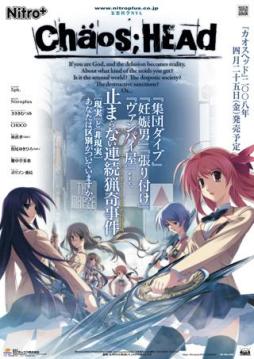
Takumi is a high school student. He is withdrawn and is not interested in 3D things. In his town, a mysterious serial murder case happens and people get panicked. One day, when he chats on the internet, a man suddenly contacts him and gives him an URL. He goes to the website and finds a blog image that suggests a next murder case…. On the next day, it really happens….
















I was having probles too, my solution is: Install and use the AppLocale and run the game with it. It worked for me.
After working on trying to get this game to work for quite a bit I think I’ve figured out a few solutions to problems people are having.
1: Patch not installing because game is not there. My guess is you didn’t copy and paste the patch into the game folder, this is so far the only thing that has ever prevented the patch from working for me.
2: Unpatched game refusing to open or patched game’s menu is just a black screen. Make sure you’re replacing the exe in the game files with the cracked version that’s in the first file.
3: The game gets past the first bit and plays the intro video only to crash when you get to the room. My guess is this might be caused by your computer being bad, I tried with all my might to get past this on my windows xp netbook, but nothing I did would fix it, my windows 7 gaming rig never ran into this issue though. That might not be the issue, but changing my computer is the only thing that fixed it, and the room seems to be rendered in 3d so that could be why it’s not as easy to run.
I should note that I got the underwear patch installed, so I don’t know if that effects anything since by the time I got the game working I was just installing each reinstall, if you really want it there’s a torrent I found using google that contains it.
To summarize installation steps:
1.Download everything (plus the underwear patch from another site if so desired)
2. Extract the first rar.
3. Set computer locale to Japanese (proabbly can run installer using aplocale if desired but I didn’t try that)
4. Run underwear patch if you have it.
5. Put English patch in game folder and run it.
6. Replace the exe with the cracked version
7. Launch game (Locale needs to still be Japanese)
I think that covers everything and I hope it helps.
where can i get the underwear patch
out of all the games in this site… this is the only one i cant seem to make work…
It appears that a fixed version of the patch has been uploaded. I have installed it and the game runs perfectly as far as I can tell so far.
Gotta say, it was worth all of this effort so that I could see the un-adulterated, not de-gored for TV version of Chaos;Head.
And with that I bid you fellows adieu. Many thanks towhoever uploaded the fixed patch.
Game crashes when I get to a certain point… Is there a way to fix this? I seem to be unable to go past this point. Game simply closes.
I’m kinda curious I recall a patch that made the female characters be in undergarments is that included in the patches link?
Links are dead. Is the english patch still buggy? I installed it a while back and I had a lot of trouble with it. For example, you couldn’t save on the 7th chapter and the patcher wouldn’t let me patch the game on win7. I had to use my old winXP to patch it and transfer the entire game file over using an USB.
Y cant they just do it like the other ones i downloaded and have it already patched for me? this is making way to many problems
mediafire links are dead! please re-up thanks 🙂
all links are dead
ive replaced the normal chaos head.exe with the one from the patch and its still in japanese, can anyone tell me what ive done or am doing wrong
never mind im an idiot
where i can download a the underwear patch
I can’t go any way beyond the menu. This never happened to me before. o.o
All the MF download parts are down, can someone please reupload this? I’d love to play this game. thx in advance.
What does the underwearpatch do?
Where is MEdiafire file plzz Upload again mediafire
the MF files were removed due to violation 🙁
please help i downloaded all
then i did english patch it
then i copied the cracked to the folder
and now i open it. it say : “please turn off debuggers then try again”
i dont have any debugger on processes. still dont work
help please T_T
I am having the Crage.exe issue with the english patch, I have read over the comments listed here and nothing posted has been able to help. During the patching it’ll tell me Crage.exe cannont be installed due to whatever issues, and then the patching goes through anyways. When I boot up the game I get the black screen when it goes to the menu, with the music playing but nothing else.
What I’ve done is:
-Installed the game
-Put english patch into game folder and ran it (this is where the error occurs)
-Put the crack into the gamefolder overwriting the previous one
I have also tried just using crack and game and the game runs fine in japanese, so it is definitly an english patch issue.
Also yes I have set Locale to Japanese. Any help would be appreciated.
To everyone that has the “Crage.exe” problem.
I had the same problem and I assume that you like me, have Windows 7?
if that is the case:
-install the game in your pc(anywhere).
-copy the crack in that folder
-copy the RC2.exe in the same folder but do not run it yet.
-copy the folder into a usb drive.
-plug the usb to a pc/laptop with windows vista.
-run the translation patch.
-when the patch finishes transfer the files back to your computer.
I only saw the prologue and OP video.When the 1st chapter started I stopped playing so I dont know if there are any errors later.
I dont know if this will work with windows XP.This is the first time I had to do something like this.(Vista work,7 dont wtf?)
I can confirm that running patch through an XP operated system then porting back to Windows 7 works as well, and thank you I didn’t even think of trying that. Just a shame there’s no fix for pure Windows 7 users. (majority of my computers are windows 7, had to use an old junker one that had XP on it to do this lol)
I’ve yet to install this game so I wouldn’t know any error but if it means anything, don’t ever install any game in the C:// drive of your computer. And I think Windows 7 doesn’t have any problems running this game except using Applocale to simulate the environment for Japanese-locale games.
Give us mediafire links please. ty.
I got it running on the first try, I just used applocale. for the translation, as the guys said above, you have to copy it to the folder you installed it in and run it from there. Oh yeah, it’s a good idea to not install it in the Program files, as for me, I installed it to my external drive.
but I do have one problem… When I got to his room, it’s all blurry, it hurts my eyes. Could it be a hardware problem or is it really like this?
The part 7 download doesn’t seem to be working properly.
(DA-Free)
ADMIN!
Make a walkthtough!! XD
Hey Admin
when I installed the patch the character’s aren’t appearing. they only appear on CGs.
It’s kind of a bother.
Can anyone fix this bug or something.
I hard patch it.
btw The only time character’s appear in dialogues is when I first met Misumu-kun.
if i download all the smalled parts…1-7, how do i put them together?
is part 1 rar working? Every time extract it gives me ” data error chaoshead\CHAOSHEAD.ISO file is broken”.
Am I doing something wrong?
i’ve followed&tried all the instruction here but i still can’t play the game….each method always ended up with a black “CHAOS;HEAD English RC2” screen and it’s stuck until i end it with task manager
someone please tell me what should i do…..
Post screenshots and tell whaat you did, step by step
how do i install the 7 parts?
I have a problem when i extract the game with Daemoon tools and start download , i not have problem but at one stage of downloading, they ask me 4 codes to 4 digits
The code is 000 702 000 114.
Hello everyone !
I had a problem with characters that dont show after dialog with the “friend” at school.
The problem comes from the “underwear” option in the game settings. The problem is that de saves got corrupted the moment you activate this option… You have to start a new game without the underwear option to be able to see characters… ( tried just a moment ago to confirm )
The other problem that ocur with this option is that there’s some random and long freeze during dialogs. Without the option the freeze time mostly disapear ( there’s always some but it’s less than 1sec and doesnt hurt the game ).
I think the problem comes from “missing links to characters CGs” in the english patch ( i’ll confirm this if i start a game without the english patch, but at the moment, i’m lazy xD )
@klekle9 You have to extract them w/ WinZip or something else to combine the files. Then mount the ISO on a virtual drive and run the set-up exe. I use Daemon Tools lite for this but there are others like Alchohol 100%. Of course make sure that after you install Daemon tools or something similar first create a virtual drive so you can mount the ISO w/c is basically a virtual DVD.
Anyone… What is the means of these download links? I’m confused~ :/
if my memory correct… isn’t there a sequel from this series??? if you could, would you upload it even if in category partial translate? thanks before
Steins;gate is the sequel. It’s fully translated and on the site already, there is basically no connection between the 2 though, beside the council of 300 or whatever they are called. Although I think Chaos;head’s protagonist Cameo’s in the spin off for Steins;gate (the 8-bit one)
There’s an issue with downloading Chaos;Head’s part 3. It says the file has been removed. Please fix this, I really want to play this VN as I really liked the anime.
If you’re not sure how to install the parts, just download WinRAR and it’ll do it for you. It took me a while to comprehend that, so I almost screwed up my Shuffle! and Higurashi no Naku Koro ni visual novels. Just download WinRAR, download all the parts then go into one of the part’s RAR files and right click the folder. You will get an option to extract everything in it, just do so and WinRAR will automatically extract all the other parts too. You’ll notice while WinRAR extracts it says “Extracting Part1.rar” or whatever then it will say “Extracting Part2.rar” or whatever.
Seriously though, please fix part 3.
Okay… so I figured out that the downloading parts problem was just I can’t download more than two of the files from that site at once… I’m an idiot… I don’t know how to add the english patch… or really I don’t know where to put it.
Once you have downloaded all the parts, extract and you’ll obtain an ISO file. Don’t forget to change your computer to Japanese in Configurations -> Regions, then you can install the game.
To do that, you need a software like Daemon Tools (you can find this one the net). Run Daemon Tools and open the ISO file with it, then you’ll be able to begin the installation.
Durng he Installation, it’ll ask you a Key. It is 000 702 000 114.
I don’t remember if the the Crack is provided with the Translation patch. If not, it’s here somewhere, move the launcher to the Folder, replace the old one and run it. You can see if the game works.
Once you did all that, next step is the Patch. Open the folder where the files are installed and extract the Winrar Translation Patch in it. Run the setup and a black screen with indications will show up. Just press enter and the patch will run (it can take a long time). The window will be totally black but no worries that doesn’t mean it froze.
Then once it’s installed, you can run the ChaosHead.exe and run the game.
If there are things you don’t understand try the readme. I remember I had problems with the patch, it didn’t want to run because it didn’t locate the game somehow but I persisted, decompressed it again, tried some random stuffs and it worked.
Don’t forget do NOT save the Game during CHAPTER 7, because the game will crash, so you’ll have to play the entire chapter 7 without closing the game. You can save again once you reach chapter 8.
Now find your Di-Sword and find your Blue. You’re (not) alone.
i read the comments above about problems with RC2 translation patch but i myself hv no issue with it.
im using windows 7.
all i need is to install the game then extract the noDVD crack.
after that i just run the RC2 translation patch, wait some minutes and done.
the game work fine and there are no Spirit/CG issue at all.
hey admin, I was wondering if you were gonna get robotics;notes when it comes out, and if it’s gonna be translated right away
on the screen I can’t see any characters when they are talking in the text box. Is that normal? I don’t see how the underwear patch will work if i can’t see the characters except for during cg. If im suppose to see the characters, is there a way to fix it because i don’t even know what the characters look like as im playing. T.T
I have a problem with chapter 3 u,u
Admin, please fix that chapter~ TTuTT
Am haveing a problem it seems that when i save on chapter 7 and try to load back i keep getting an error messegae, anyone know how to fix this?
It’s a bit annoying but I think there is no solution so far.
You must play the entire chapter without saving. Then you can save again when you reach chapter 8.
I hope you kept a save at chapter 6…
hey Ivan do you have underwear patch for this game??? only thing that is missing.
plz help me i can’t save my game and im still in cahpter 1 !!!
u need to extract part 1 to a folder.. then just play the game through the folder
Could you explain please? I don´t get it
I’ve finally figured out how to install Chaos;Head after half a year of stocking this in the far reaches of my
Hard Drive ..
You’ll need :
The game ( all six parts )
The most recent english translation
and the version of crass you can find in the comments ( just search through the past comments until you find a download link ( I’ll also
try to upload it somewhere after I learn how to do it ) )
First thing you need to do is make sure you have a ” Japanese ” locale installed .. If you don’t know what that is,
go to your ” Regional and Language ” settings and select ” Japanese (Japan) ” from the drop down box in ” System Locale ”
( Don’t confuse it with ” Formats ” and ” Current Location “, You’ll find it if you look hard enough ) ..
Now that the ” base ” is done, extract the ISO you get when you extract the 6 parts you’ve downloaded and select the CHSetup.exe
That’ll start the install wizard, just do what you normally do when installing .. For convenience’s and organizing’s sake,
choose another loaction for the game ( select ” browse ” when a C: something appears in the install screen .. )
Enter the code you activation code you’ll find at the top .. If you’re too lazy, it’s ” 000-702-000-114 “, when
that’s done, just wait for it to finish ..
Next thing you’ll need to do is put the ” English Translation RC2 ( That’s the english patch you’ve downloaded ) ”
in the folder you’ve chosen ( the default is in ” C: Program Files(x86)-Nitroplus “, just double click it, select yes
when prompted, and wait for it to extract, after it’s finished, the cmd will appear, DON’T PRESS ANYTHING !!, just leave it like that,
Go to the folder that should appear after you’ve run the English Patch named. well. ” patch ” .. Delete the ” crass ” folder ..
After doing that, extract the crass that you’ve downloaded and move the ” crass-0.4.1.4.0 ” to the ” patch ” folder
( I don’t know if it would matter, but rename the crass-0.4.1.4.0 to folder to ” crass ” ) ..
This is the nervous waiting period before the moment of truth .. Select the cmd that you’ve left untouched and press any key .. Wait until
you’re asked to press something again ..
The Moment of Truth is here .. Run the CH.exe, Pray, and if you see that the 5pb logo is gone and the disclaimer is in English,
Congratulations !! you can now play this piece of art ..
I hope I helped ..
P.S. You’ll probably want to save a copy of the whole game folder in a hard drive or something, for safety and paranoia
purposes ..
( Disclaimer : I THINK ( big emphasis on THINK, so try it without messing with your computer first )
this might not work on Windows 7 Professional unless you’ve downloaded and run the directx_Jun2010redist
from Microsoft ( which is very easy to do ), cause, well, Professional wasn’t made for games to begin with .. )
Dude of what crass are you talking about? you say: delete the crass in the folder of chaos head and copy the crass you downloaded but i dont find any crass dont you mean the crack?
Thanks Hikari, it worked. Though the cmd was stuck for me and I had to start the .exe prematurely to get it patching. Then close the .exe and reopen it after patched.
tried that.
using the newly renamed crass folder caused problems.
the one included in the RC2 patch worked just fine.
Much appreciated dude! Helped me out a bunch.
Just so your aware the needed language and region drop down is under Languages for non Unicode programs and not System Local in Win XP. It seems no one provided any information for Windows XP users so I thought I would remedy that.
The 3rd rar is not working plz fix it.
I am also having a problem with part 3.
i can’t find the crass 0.4.1.4.0 can you put the link please
well somehow i installed the game but i can’t play.
when i press the “start” button and i get in the main menu of the game … i don’t know what to do now
yeh i have the same problem, could someone help us out plz? thanks in advance