
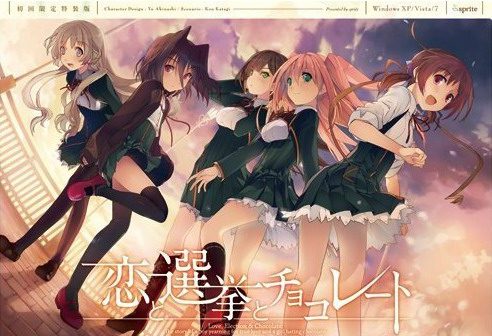
Yuuki, who wants to fall in love, and Chisato, who doesn’t like chocolates. They are lifelong friends and students of the same school. They both belong to the food club with Mifuyu, their classmate. Actually, they don’t do anything everyday, just enjoying chatting… But one day, Satsuki, president candidate of the student council, promises to close the clubs that do nothing. To stop it, they decide to run against her… But who will they send out..? Yes, Yuuki is forced to run for the election… To save the club, he will just need to be the next president!
Koi to Senkyo to Chocolate
- Koichoco.part01.rar - 200.0 MB
- Koichoco.part02.rar - 200.0 MB
- Koichoco.part03.rar - 200.0 MB
- Koichoco.part04.rar - 200.0 MB
- Koichoco.part05.rar - 200.0 MB
- Koichoco.part06.rar - 200.0 MB
- Koichoco.part07.rar - 200.0 MB
- Koichoco.part08.rar - 200.0 MB
- Koichoco.part09.rar - 200.0 MB
- Koichoco.part10.rar - 200.0 MB
- Koichoco.part11.rar - 200.0 MB
- Koichoco.part12.rar - 200.0 MB
- Koichoco.part13.rar - 200.0 MB
- Koichoco.part14.rar - 200.0 MB
- Koichoco.part15.rar - 200.0 MB
- Koichoco.part16.rar - 200.0 MB
- Koichoco.part17.rar - 162.9 MB
- Koichoco_English_Patch_1.0.exe - 33.1 MB







447 comments
http://erogedownload.com/faq/changing-to-japanese-locale-on-windows-7/
Satsuki = Isara > Chisato > Michiru > Mifuyu
you dont need to change the systemsettigns to japan...
theres a programm called "applocale" get it install it via cmd (you need to install it as admin, only way to do so is via cmd... dont worry the programm is from windows its save) then start applocale and choose the "start" file in the gamefolder
now it will start without problems .. there will be a screen popping up with some things you can click .. click the clickable thing at the top
then the game starts without problems
So I downloaded all 17 parts and the English patch but when I try to install the English patch, it won't let me? Apparently the folder that I want it to go in doesn't have "Koi to Senkyo to Chocolate"?
Any advice? Thanks.
1. Extract the folder to wherever you want it to go after downloading all the parts.
2. Install the English patch to wherever you extracted the game folder in step one BUT don't launch the game after it's patched. Just uncheck the boxes and close the patcher.
3. Run the start.exe in the game folder. When the prompt to insert DVD appears, click Yes. A box will pop up in Japanese. There should be a space where you can click to type in some letters/numbers. Don't type in anything. Below it are 2 options. Click on the top option and the game will start.
*Note: After I confirmed that it works after starting a new game, I exited the game. My desktop turned black and I couldn't access anything. I had to restart by pressing Ctrl+Alt+Delete. Once restarted, I tried to start game again by clicking on start.exe. Prompt to insert DVD appears again but after clicking Yes, game starts normally without the Japanese box appearing. Exiting works fine.
4. OR just restart your computer after patching it to English and clicking on start.exe then Yes when the prompt appears to start the game.
Hope I helped out some of you. Enjoy!
I always have my locale set to Japanese because I play a lot of visual novels but this is the first time I've had so much trouble getting one to work
I finally got it to work by using a locale emulator that I found on pooi.moe, and right clicking on the start exe and choosing "run in Japanese" only then did I get the prompt for the authentication code after saying yes once on the insert disk message.
I hope this helps someone who is having the same problem as I was
[1]
* Hit [Start] and start typing "Region & Language Settings", select that when it pops up and make sure your under [Region & Language] on the side bar
* Under [Country or region] there is a drop down, select [Japan]
* Restart computer
[2]
* Hit [Start] and start typing "Region & Language Settings", select that when it pops up and make sure your under [Region & Language] on the side bar
* Under Languages click the grey [+] button next to "Add a language", scroll until you see "Japanese" and install
* Restart computer
[3]
* Hit [Start] and start typing "Run" to open the Run command prompt and paste "Control international" without the quotes and press Enter
* Go to [Administrative] Tab and click on [Change system locale...], from the dropdown select [Japanese (Japan)], hit [OK]
* Restart computer
I'm still getting the endless [Please insert the Koichoco DVD in the DVD-ROM drive] message.
So I have Windows 10, I have changed my region to Japan in Region & Language Setting, added the language Japan in the languages, changed my system local to Japanese(Japan). I have used Locale Emulator and applocale methods as well to no avail.
It is worth mentioning that I have been able to get it to run 3 times so far, but it seems to be completely random when it want to run and move past this message.
So my start.exe is Koichoco now. Every time I go to play I delete a letter. So Koichoc then koicho then koich.... you get the idea.
Well that did it to say the least -_-
Thank you.
---------------------------
Director Player Error
---------------------------
Unable to open file "C:\Users\Nikaragua\Downloads\Koiii.tyyo.Senkyooo.to.Chocolate\Koichoco\Koichoco\KSC-MAIN.dcr" because it is already open with write permission by another user.
---------------------------
OK
---------------------------
Don't bring SJW crap like "prejudice" in mangas, it will ruin every eroge or game for you.
what makes you love the other girls that much more."
-lostmynic-
Glad i am not the only one who felt that way.
mentioned in this comment section.
-Install the game patch 1.01 to the folder you extracted the game into
-open the backup folder
-copy the contents in the backup folder (SCN folder and some .cct AKA Everything in the backup folder)
-paste into the folder with the game and patch
-when prompted select to replace everything
-extract the koichocohook.exe and its extension into the game folder
-run koichocoHook
-use the pin ( Q6ZL-HRH8-PZJF-Q2RE ) and press the top button
The game should work now! (you may need to reinstall the english patch). Hope I helped.
https://drive.google.com/file/d/0B8JmuBZ7hC7wUlhUNW5MUFkyMjg
Does anyone know how I can fix that?
I posted for nothing :3
I'm running Windows 10. First I downloaded the .rar files (a total of four of 500mb each, all the extant game files still up for downloading are probably the same by 2019, but ymmv). Extracted them using 7zip. So far so good. Double clicking on start.exe did nothing. Trying to use the icon with Japanese characters resulted in a string of errors. Just a bunch of ???????????????? on all .exe options. Deleted everything and started over.
Changed the region and language to Japanese. Tried opening start.exe again.This time I got a strange bunch of Japanese characters and a 'g.exe' error. Did more hunting and got a locale emulator. Used it on start.exe and......"Please insert DVD" FFFFFFFFFFFFFFFFFFFFFFUUUUUUUUUUUU!!!!!!! This error went on to infinity.
Did more hunting and changed the Unicode options in the Advanced/Admin Language tabs in Settings. Still no good. Downloaded the "Koichoco Hook" (an .exe and .dll combo, Ctl+F it to find it in this thread), extracted them into the Koichoco file directory...............
SWEET VICTORY IS MINE!!!!!
Thanks admin! This game is fire. Chisato is demented but I love her anyway. Satsuki is best girl, and I'm super pissed Hazuki gets no route. Enjoy, my fellow degenerates!
1-Download it all(17 parts)
2-Download the 1.1 ENG patch(google it)
3-Download the Hook(look down at the comments)
4-Extract it all
5-Install the patch and extract the hook in the game folder
6-Change the OS language to Japanese(don't reinitialize the PC)
7- Enjoy
it says:
"Unable to load movie playlist. Does the .INI file exist? It must contain a section '[Movies]' with an entry 'Movie01=Pathname.dir'. "
"This projector is stopping. "
"Application Error. This application cannot run."
1. Download all 17 game files from here, if you don't have them on your PC already.
2. Extract the Koichoco folder to a SHORT directory and don't rename it, in my case it was D:\Games. There is a limit to path length, and the game won't work if it's too long!
3. Google Koichoco 1.1. ENG patch and download it from the wordpress of the translation group. Install it and select your Koichoco folder during installation.
4. Open windows settings and click the region and language settings tab. Click the column "Region" on the left and select Japan. Click the column "Language" directly under the region column, click the grey cross and add the Japanese language pack. You don't need voice output or text recognition, just the pack. Wait for it to install. Once done, close the settings window.
5. Hit windows key and R to get into the run command prompt. Type in "Control International" (without the quote marks of course) and hit Enter. Go to the "Administrative" tab at the top and click on "Change system locale". Click Japan, hit OK and restart the computer when asked to.
6. Almost there. After restarting open your Koichoco folder, right-click start.exe, click run as administrator. The game will load a bit and then give you a Japanese text box. Enter a CD-key into the box (eg. Q6ZL-HRH8-PZJF-Q2RE). Klick the upper confirmation box directly below it, the highlighted one.
Done! Works like a charm for me. Hope that helps! BTW Satsumi best girl.