English visual novel downloads

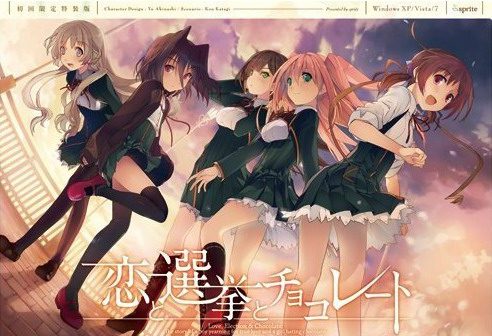
Koi to Senkyo to Chocolate

Koi to Senkyo to Chocolate

Yuuki, who wants to fall in love, and Chisato, who doesn’t like chocolates. They are lifelong friends and students of the same school. They both belong to the food club with Mifuyu, their classmate. Actually, they don’t do anything everyday, just enjoying chatting… But one day, Satsuki, president candidate of the student council, promises to close the clubs that do nothing. To stop it, they decide to run against her… But who will they send out..? Yes, Yuuki is forced to run for the election… To save the club, he will just need to be the next president!

447 comments

AriseReply
Every time I want to open the app it says to insert the disc what do I do
zeroknight05Reply
my game just stays on a black screen after the op. Is someone having the same problem? if you've fixed it, how did you? ive left is for a couple of hours already and its still a black screen. tried restarting the game and reinstalling the eng patch but does not work
BadbollReply
no crack for this game I guess?
Or is there something within the download I just can't find?
raphaelReply
hi, admin, i have a problem. when i try to start the installation, i have a choice between two application, being either start, or 恋と選挙とチョコレート. neither of them allows me to get the installer working. can you give a hand with this one please?
zeroknight05Reply
n
shinobiReply
thanks
Steve McDoubleReply
Is there a way to bypass the "Please insert DvD" message?
adminReply
Yes, start the game with start.exe file, not the と選挙とチョコレート.exe
xtrlsidmaReply
i downloaded all the parts and tried to start up but it would open game but game box would be black then comp would freeze.The patch when tried to load would say cant find the game
xtrlsidmaReply
also in the folder i have start not start.exe
adminReply
Maybe your antivirus deleted it?
xtrlsidmaReply
what should i do? everytime i pull out start.exe it changes to start
xtrlsidmaReply
could my problem be because all my downloads go through winrar
botc76Reply
none of your downloads go through winrar, since winrar is no downloader.
And as long as it works with a format, whether you use winrar or 7zip or any similar program shouldn't matter in any way.
NiigroReply
Hey admin, i'm having a problem here.
After I patched, a window of the game popped, but a message of "please insert the koichoco dvd" appeared, and if a try to tap yes, it just reload, if a tap no, the window are force-closed. How do I fix it?
OglopSlayerReply
can anyone make an installation guide for this because i am having errors involving "insert the disc", i cant do that because there is no image file that is provided after i downloaded all of these parts. not only that but i dont see the serial txt. that supposedly is in the files that i downloaded.
OglopSlayerReply
LMAO!!!!! OMG, by far one of the most entertaining VNs i have played through. thank you admin for allowing such a low life form such as i, oglop the oglop slayer, enjoy this.
GabrielReply
It say I need to put the koichoko DVD and I can't find any .iso to mount in demon tool...Please help
OglopSlayerReply
heres what i did and it fixed that problem

1. A fresh install by deleting extracted game files and not the rars. after that go to control panel and uninstall english patch there

2. Extract the rars again then follow usual procedures by running patch with admin and finding and applying it to where the folder of where the game is located

3. After you applied before you click "Finish" make sure that you delete the "Config" folder if it is empty

4. Then delete the backup folder then click "Finish"

5. If it asks you to "insert dvd" or anything similiar to this then just press ok

6. If a text box pops up asking for some type of serial code just click the the button right under it and the game should start
UthanaelReply
Thanks, this really works!!

If this helps anybody, I was following these instructions with my region in japanese.
botc76Reply
All I can say is, I absolutely understand why you have to do the Chisato route before you can play any other one. CHisato with her fucking jealousy would definitely be a candidate for me not wanting to finish a route for the very first time. So incredibly annoying.
xxwghaptxxReply
i cant seem to be able to play the game after extracting the files correctly and downloading it, when i try to open up the application i am shown a ???????? error and brought to the adobe shockwave page, is there a way to fix this or am i downloading it incorrectly?
HuevoPodridoReply
Same here, thing is I get the exactly same error using appLocale and not using it.
KarmaPierrotReply
You find a solution for it yet? I have the same problem.
Shisei no KoeReply
East Asian Language ? do you guys set your Computer Language to Japanese ? if not , go to Control Panel -> Regional and Language Options -> Languages -> Install Files for East Asian Language , after that go to Advance section and set your Language to Japanese then Apply (you need to restart your Computer to make it work)

Tutorials :

Windows XP - http://erogedownload.com/faq/installing-japanese-support-for-windows-xp/

Windows 7 - http://erogedownload.com/faq/changing-to-japanese-locale-on-windows-7/

Vista - http://erogedownload.com/faq/installing-japanese-support-for-windows-vista/

well that's how my game work ^^
rikiReply
same problem here, though i ve downloaded it from somewhere else. Actually, it was the pre-installed version of game, is it same as yours? Did you downloaded it from here, or from somewhere else as well? i am excited to play it but unable to, and apparently i'm not the only one.
uthanaelReply
I tried to run the patch but a little window appears and says

"NSIS Error Error"
"Error launching installer"

I do not know what to do... have windows 8.1
MathewReply
Thanks for putting this up! Have a problem, though, when I try to run the game the game screen shows up and does nothing.
JaddenReply
Neither "start.exe" nor "恋と選挙とチョコレート.exe" allow me to install the game.
Did I miss something or is there a missing file ? I tried on my two hard drives and before/after ibstalling the english patch (and yes I have set my local setting on Japan).
Please answer.
DwWarriorReply
Same problem..
botc76Reply
I had an issue with the patch, where the nipples on chisato's tits in the bath were censored. Read somewhere I need to replace a patched file with the original one and that removed the mist, but now I'm at the first sex scene where she wants to wank Yuu-kun off and his dick is pixel-censored. Is that regularly done, even in the 18+ version?

Fast answer would be appreciated.
molitarReply
I found the absolute fix for “Insert DVD”. Being in Japanese Locale mode is not enough. Use Locale Emulator and set it to run in Japanese mode with Administrator rights and it will run every time when you press Yes to continue.
tw547Reply
Sadly it's still not working for me, it says g.exe along with some Japanese..
molitarReply
Than you are not running start.exe or you don't have the English Patch installed there should be no Japanese window. When you run with locale emulator as I stated you will still get insert DVD but click yes and it will play.
tw547Reply
Ah, turned out I deleted the translation file when I couldn't get it to work the first time. However, now it says it couldn't find Koi to Senkyo to Chocolate, and none of the file I downloaded has that name. Do I just change one of the 恋と選挙とチョコレート to English name? Sorry about this stupid questions, and thank you.
DwWarriorReply
I have the same problem...I downloaded the amulator but it shows a black window with some Japanese.
I must have deleted it too.
So that means I have to redownload the Patch right?
Yeah I know 's a stupid question..
For your problem I think you need to install the game again.
Of course I might be wrong.
klikardoReply
did you fix this problem?? My program still say g.exe along with japanese, if you fix it pls tell me how to fix it
RyuReply
If you are still having this problem, you need to set your language for non-unicode programs (system locale) to Japanese. Had the same problem asd this fixed it.
RyuReply
As well as run the start.exe and put in the serial BEFORE running the translation
WhenlonersReply
Nah didnt work, i used locale emulator on start.exe and i have the patch installed but i still geg enter dvd in english and it keeps popping up.
280Reply
for those that have problems starting the game i started it by:
running start.exe
putting the serial:Q6ZL-HRH8-PZJF-Q2RE
only use start.exe for playing the game not the other exe
ArdianReply
thx bro with your code i can play it hahahahah i have no problem now lol that because of you
ZeroReply
Thanks bro
DanteReply
u da real mvp
nonchanReply
I have no problem instaling...pffftt...tehee...
HelpReply
How many KB is the English patch supposed to be? 33 939 KB?
Nothing at all can get this game to work on my computer.
WhenLonersReply
Is there a solution to the enter dvd thing? at first it worked but when i turned off my computer and tryied to play it didnt work anymore. I tried to find a place to buy the game so it wouldnt say dvd anymore, but i cant find it anywhere on the internet.
WhenLonersReply
dont know if censored or if its just this one scene in the the bath with the first girl but that part is censored.
tw547Reply
I need help with this. When I open the patch file, it takes me to somewhere in Program Files, but since I don't have the game there, I redirect it to the folder where I unziped the game. But when I click Start.exe, it says: ヌミ・冐ヌミノ`ノ睨Rノ蠻[ノgヌミ・冐ヌミノ`ノ睨Rノ蠻[ノg.exeヌ吝ゥヌャヌゥヌヒヌ局ヌメナB鍼・ヌオヌ局ンナB.

Anysolution?
DwWarriorReply
It's been 20 days and I tried everything
I turned off my antivirus
I located my computer on Japan
But still I can't start the game
First I wanted to point out that in the folder it doesn't write ''start.exe'' but ''start''
I reall ywant to play this game and I'm trying really hard.
Anyone can help me?

Leave a comment