
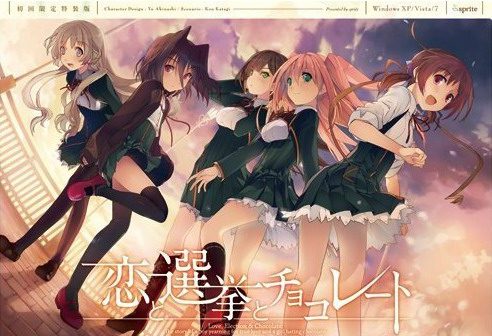
Yuuki, who wants to fall in love, and Chisato, who doesn’t like chocolates. They are lifelong friends and students of the same school. They both belong to the food club with Mifuyu, their classmate. Actually, they don’t do anything everyday, just enjoying chatting… But one day, Satsuki, president candidate of the student council, promises to close the clubs that do nothing. To stop it, they decide to run against her… But who will they send out..? Yes, Yuuki is forced to run for the election… To save the club, he will just need to be the next president!
Koi to Senkyo to Chocolate
- Koichoco.part01.rar - 200.0 MB
- Koichoco.part02.rar - 200.0 MB
- Koichoco.part03.rar - 200.0 MB
- Koichoco.part04.rar - 200.0 MB
- Koichoco.part05.rar - 200.0 MB
- Koichoco.part06.rar - 200.0 MB
- Koichoco.part07.rar - 200.0 MB
- Koichoco.part08.rar - 200.0 MB
- Koichoco.part09.rar - 200.0 MB
- Koichoco.part10.rar - 200.0 MB
- Koichoco.part11.rar - 200.0 MB
- Koichoco.part12.rar - 200.0 MB
- Koichoco.part13.rar - 200.0 MB
- Koichoco.part14.rar - 200.0 MB
- Koichoco.part15.rar - 200.0 MB
- Koichoco.part16.rar - 200.0 MB
- Koichoco.part17.rar - 162.9 MB
- Koichoco_English_Patch_1.0.exe - 33.1 MB








447 comments
Anyone have any idea why it won't work?
http://i.imgur.com/9i1ns1J.png
I can't address it if I don't even know what its trying to tell me. Can't even get to this "insert dvd" part that everybody seems to be having trouble with.
and the texts only use half the text box, any long text will just be showned half, and it's really frustrating
anyone know how to fix this?
And I have no problem running it at all.
I put the game into C:\Games
I run start.exe without administrator permission
No problem at all.
I used panda antivirus, and I didn't turn it off.
I suggest you guys download "CodecTweakTool" and use it to repair / manage your video codecs and audio codecs.
I experienced a lot of problem with games in the past because my ogg files was configured to use LAV Filters, while Windows can play ogg files by itself just fine. And the video games want that too.
I've been having problems trying to run the game, similar to many before me. I even tried running the game without the patch but I get the "Please insert DVD" prompt and pressing 'Yes' does nothing but bring it back up, while pressing 'No' closes the game. I've changed my region to Japan and I'm running it as admin.
I was wondering if anyone has figured out what could be the problem?
Thanks for any responses. I really want to play this game.
using -windows 10 home x64
first time i played (fullscreen) i could not leave the save menu and save file didnt work
had to exit the game with the windoows tab
second time (fullscreen) i could not exit as well
thirt time (windowed) i could leave it and play furhter
fourth time (fullscreen) no problems so far
have to continue observing that \buglike\ thing
the savefile did work
but the load menu did bug as well
how the hell am i supposed to finish the game if i cant rely on saveing the game
1.change locale to jap and antivirus turn off
2.extract rar
3.apply patch
4. copy back the start.exe from rar
5.already run it in admin mode and compability mode.
still not working
I don't see run.exe(or start.exe) just the regular 恋と選挙とチョコレート file.
-Try deleting the “config” folder. That made it work for me.
It’ll ask for a serial, but you can just leave it blank.
Also- Apparently, going through the actual SystemSaveData and slashing out the
KSC-Data Read got me in after doing what Anon did,
which is removing the Config folder, so if you experience the problem I recommend you
do the same.Also, the first option under the serial code is the one you need to click.
-This is for anyone who are having problems getting the insert DVD error.
First move your folder to Program Files (x86), than run the patch. Once you do that click on
run.exe not 恋と選挙とチョコレート.exe
-Disable your antivirus software before running start.exe
-delete the internet shortcut.
-hmm, I don’t know how how this worked for me but for whatever reason I have to drag the dvd
check window off the koichoco.exe window then press OK for it to work. I have been able to replicate
it multiple times, granted it did take me a few times in between each success.
using -windows 10 home x64
If it’s still not working turn off your antivirus, Plus it could also be that you didn’t put on japanese locale."
I have done all of this, and followed the various suggestions on here. I'm on Windows 7 x64. When I click "yes" on the insert dvd window it just keeps coming back. I would really appreciate it if you could upload the iso, Admin.
Second... I've tried to install the game on a W7 x64 bits VM and nothing, I've followed all the suggestions (Delete the config folder, move the game folder to C:Program Files(x86) before the patch, replace the new start.exe for the previous one, execute everything with administrative rights and even delete the internet shortcut) but the game keep asking for the dvd even if i select yes... for a hundred times.
Anyway... what i had to do was install a new W8 VM and follow the exact same method, this time... on my last try (replacing the start.exe) when it prompted asking for the dvd i select yes and voila it worked! i don't know why, i don't know how! but meh, anyway that "solve" my problem so thanks again!.
This problem has happened for weeks already.
Please help. Thanks
I am using Windows 7 x64. If you can help me, thank you in advance.
2. Install the game
3. Run the patch
4. Now there will be most likely an erroe saying that you have to put in a disk
>close the window and start with "star.exe" and not with the applicant which has an image(this solved it for me)
>set your locale to Japan(if not done yet)
-Tried your basic steps
-deleted config folder
-moved from d: to c:
-my locale is on Japanese
-used original "start.exe" and the one that's with patch
-deleted internet shortcut
-disabled antivirus
-moved the popup insert dvd outside of window then clicked yes and still nothing
-Ran in administrator mode
That's all I can remember off the top of my head, but I've literally done everything besides upgrade to windows 10 and try it
1. Extract the files
2. Install the game
3. Run the patch
4. Now there will be most likely an erroe saying that you have to put in a disk
>close the window and start with "star.exe" and not with the applicant which has an image(this solved it for me)
>You have to set your locale to Japan!!!
I'll just have to change the system locale everytime I run the VN
(can't set it on jap locale coz of reasons)