English visual novel downloads

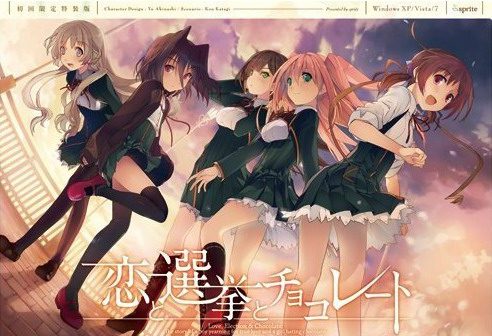
Koi to Senkyo to Chocolate

Koi to Senkyo to Chocolate

Yuuki, who wants to fall in love, and Chisato, who doesn’t like chocolates. They are lifelong friends and students of the same school. They both belong to the food club with Mifuyu, their classmate. Actually, they don’t do anything everyday, just enjoying chatting… But one day, Satsuki, president candidate of the student council, promises to close the clubs that do nothing. To stop it, they decide to run against her… But who will they send out..? Yes, Yuuki is forced to run for the election… To save the club, he will just need to be the next president!

447 comments

hekuReply
Youre the best thanks!
DyrusReply
fast as always, thank you!
anonReply
What did you use to bypass the DRM? The start.exe method?
adminReply
Yes. Ripped game files from original .iso (skips serial# prompt during setup and saves around 600MB of download from dummy file that was padding the size). start.exe spawns the game process and skips DVD check.
MinusReply
How do you do that? Sorry, I haven't heard of that method to use on a vn.
rexReply
>extract to get a folder (no need to mount yay)
>use english patch on folder
>start.exe or any exe
>ask for DVD (damn i knew no mount was too good to be true)

so uh no crack yet? or am i suppose to download something to mount so there is a "DVD".

Might be stupid questions, sorry and thanks.
adminReply
start.exe disables the DVD check. On Windows10 you might need to use compatibility mode.
rexReply
-using window 7 pro 64bit
-tried all compatibility
-tried different directory
-tried replace start.exe with one before eng patch
-tried to play without eng patch, still ask for DVD

only thing left to do now is find PC iso to mount.
VNLoverReply
if exist KSC-LICENSE.dat in Config folder, delete it, overwrite start.exe again and it will ask fr code, just click button below textbox
Th3Only1Reply
good way to start december :3
gonna download it later XD
GaporigoReply
Thanks!!! I spent about one hour trying to get the japanese version in order to use the patch and couldn't do it... x)
LidinxReply
Thanks a lot! Just got around to school days (monstrous download) so I'll download and hold off.

But you bet I'll enjoy every second of it.

Thanks again!
RevvoReply
I'll bet you wont enjoy school days though :D
sick game, somewhat a piece of art, but sick.
HokaidoReply
Thank as always , year's awaiting te release in english !!!
wyldstrykrReply
wow that was so fast!!! thanks

did you upload it beforehand?

thanks
aniReply
holy shit you got this really fast, been waiting for this translation to finish for quite some time now, thanks alot admin!!
SteveReply
Woot! Thank you.
ReplayReply
admin are there any rance like game release? i feel lonely. . .
Ak47shaysReply
Is this the "safe" version in which the H-Scenes are removed.

Thanks for fast upload.
.-.Reply
All the VN here are the +18, no safe ones. Adming, thx a lot, i've been waiting for this so bad D: since i saw the anime~
SomemanneartheSeaReply
Ever 17 & Remember 11 are not 18+.
HypknoxReply
That's because there is no 18+ versions of either game.
PotatoReply
Tags tells otherwise.

Anyway, the safe version of the patch is also available at the TL's website if you're interested on that one
QadashReply
For future reference, any all-ages VN has a tag denoting it (I think it's "no sexual content"). If the VN doesn't have that tag, there are H scenes.
TeepReply
But are there any in koichoco?
TroyReply
When I run it from the start.exe I get a message "Runtime error 217 at 500E8338". When I click okay, it starts and asks for a cd.

I'm running windows 10 x64 build 10240 and my local is set to Japanese.
nielReply
is this for psp or pc?
GaporigoReply
Can i get some help??

I get an error saying: "Please insert the Koichoco DVD in the DVD-ROM drive"

How can i fix that? Thanks!!!
John SmithReply
Could someone please make step by step instructions starting from the beginning (un zipping the folder that you can download here), I have read many visual novels before and this is the first one that I'm having immense difficulty getting to work, so any help would be greatly appreciated. It seems that I can't skip the "DVD check".
BorisReply
great
VNLoverReply
Why can't i start the game with start.exe. Tried everything but nothing happen (Windows 10 64b)
adminReply
Windows 10 issue. Try compatibility mode.
VNLoverReply
Still no luck. Waited for years for this release and now compatibility issue, this suck. Now try to play with VM, thanks for reply admin!
TroyReply
I tried to play it on a win 7 VM running on a win 10 host and it crashes the VM.
adminReply
Just tested on Win10 VM (fresh installation) and it runs without problems. Make sure you change to JP locale, no other compatibility settings needed.
TroyReply
This is the only game I've had this problem with. And I've downloaded it 4 or 5 times both 17 parts and the single download. Both do the same thing.

http://i.imgur.com/RcvCHjt.png
mnt125Reply
i had the same thing, when it says please insert disk, just hit ok. it will bring up another pop up with japanese nlettering. there will be 2 clickable buttons. dont remeber but one of them will let you play the game. hope that helps. sorry if i was not specific
azumanga89Reply
you always there (admin) when i feel lonely. thanks admin
TropicReply
Thanks as usual admin. I had a lot of vn to play now (not that I 'm complaining ^^)
frostedReply
I'm using windows 8, jap local and everything. I ran the patch and used the start.exe but it doesn't bypass the cd-rom insert screen. Help would be great if anyone can tell me whats wrong.
VNLoverReply
you may need to run start.exe with admin right
VNLoverReply
and 1 more thing, after patching u need to copy start.exe from rar and overwrite it. open and click the button below textbox and u good to go
blurqeReply
That didn't work for me. I just keep getting a message asking me to insert the DVD. I've been waiting to play this VN for years, so I really hope someone knows how I can get it to work.
NeokombatReply
I can't get the game to run. it freezes my computer when I start it.I have windows 8.1 is it just my computer
TakaJunReply
I had the freezing problem too, but instead of hard reseting my computer, I just waited a minute or two and the computer unfreezes, game started ok.

This only happened in the first time.
neokombatReply
Thanks that worked but now i have the no DVD error
VNLoverReply
After some problems, i found out how to play the game, tried on pc with win 7, 10 (dont have 8 to try ;))
1. set locale to Japanese
2. Unrar
3. Patch
4. Overwrite start.exe with the old one in rar
5. Open start.exe, if a window show up with textbox and buttons, click the button bellow textbox
6. Enjoy ur time ;)
DiabolicKReply
Finally, can play this game and actually not have to end up with worst girl! Thanks.
Aein FireboltReply
Truly, thanks for the awesome.

Leave a comment