English visual novel downloads

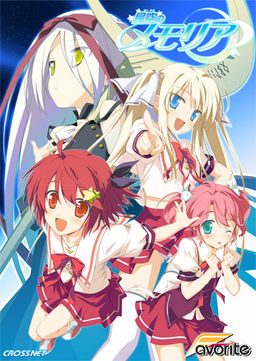
Hoshizora no Memoria -Wish upon a Shooting Star-

Hoshizora no Memoria -Wish upon a Shooting Star-

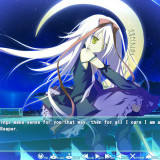
The story begins with the protagonist, Kogasaka You, moving back to his hometown, which he left behind several years ago. Upon arriving, he stumbles into an abandoned, sealed observatory, whereupon he encounters a mysterious girl who looks exactly like his childhood friend did years ago. She introduces herself as Mare, a shinigami who reaps nightmares.

Meanwhile, back at school, You ends up joining the astronomy club, which is desperate need of new members. At night, he continues to visit Mare at the observatory, all the while trying to remember a certain someone’s name…
812 comments

Name (required)Reply
Run the game in Japanese locale. It can't create the path because it contains ??????? instead of 星空のメモリア; it will have the correct path when run in Japanese locale.
IEReply
can anybody help me, i set the system to japanese local but when i try to launch memoria in english(japanese works fine though) i get an error:
Unhandled exception occured at 0x2044F13B
giray15Reply
i get ''etc/038blablabla'' error wtf :/
shinnReply
Completed and have fallen for Chinami XD. Hurray for lolis haha XD. hoped i didnt express myself to be caught.
Davey CollinsReply
Hmmm, Chinami's first line seems to kill my game. I get an etc/038 error and it closes the game.

Any suggestions?
RyryReply
Everything works fine for me. Thanks for the upload Admin.
For those who are having problems installing it, here's what I did:
1)Mount the ISO file.
2)Open the installer with AppLocale(Japanese).
3)Once installed, update the game from Version 1.0 to 1.1. (Open patcher with AppLocale also)
3)Once you have updated to version 1.1, run the English Patch normally. Upon the completion the Patcher will create a shortcut to the game at your desktop.
4)Use AppLocale to open that shortcut that was made by the English Patcher.
5)Unmount the ISO. Done.
shinnReply
Just to note if you still have problems after doing everything on the list, try uninstalling but make sure not to remove the english patched files. then reinstall. then use the english patched exe. it works for me. i played the game and so far no problems after doing what i did.
geistReply
I'm disappointed there's no torrent...
MUTSUNIReply
hey guys have problem chinamis first line appear and my game crash something about etc038something appears and the game closes what do i need to do :(
SaitoReply
Is this a VN?
smooth_riderReply
If anyone is getting the first error with chinami about etc/038, this is because you didn't patch the game itself before using the english patch. you can find the v_11 patch of the game inside the folder that you extracted from the mediafire game download link. It's where the game mds and mdf files are - I made the mistake of thinking it was an english patch update that everyone was talking about and that's why I didn't understand at first. I hope this helps anyone who may come across this error in the future.

Kindest regards and thanks to the admin,

smooth_rider
JJReply
It's pretty daft not to have a torrent up for a game this size...
CaelistasReply
Need a good ENGLISH walkthrough plz
asdasdReply
its simple. each heroine got 2 decision points, you just have pick both with positive decision to get to the route.
isuzu route unlock chinami's
komomo route unlock kosame's
you'll get another one after clearing all asuho, isuzu, chinami, komomo, and kosame route then another one after that route
CCGReply
Excuse me Admin, but most people are having a bad time fixing some errors that they don't understand.

Can you make a Torrent of this, that is already Fix, without problems and Translated in English?
ekstacyReply
"d3dx9_29 missing in your computer" damnit! i always get that error after clicking memoria.exe same goes with the jap exe to plese help me :(:(
ekstacyReply
"The program can't start because d3dx9_29.dll is missing from your computer. Try reinstalling the program to fix this problem"-Memoria.exe system error please help me with this guys i can't seem to properly install it the right and i'm growing desperate here my locale is at japanese
anonReply
Your installation files are corrupted. Re-download the ISO image again and it should fix the issue.
Name (required)Reply
It's inside Feb2006_d3dx9_29_x86.cab file located in the directx folder on the game disc. Unrar it to the game's folder.
Though it will likely complain about another DLL, so just download DirectX web installer from Microsoft and it will download the needed files itself.
ekstacyReply
thank you!!! man u helped me good though i have one more question howi cant seem to get patch 1.1 for the english patch
ekstacyReply
kay after the installation i install the english patch and then deleted the graph_viz file and then i extracted 1.1 and sent it to the directory. i tried to play the english app and it still says at the top complete 1.0 is that alryt?
pumasrevengeReply
This is alright. The patch 1.1 is only for the original (japanese language) game. The english patch (1.0) means only, that this is the first version of the english patch, which works only on patch 1.1 of the original game ... perhaps on version 1.2 of the original game (in the future), if not, there will be version 1.1 of the english patch :)
ekstacyReply
tnx man!!!:) i was just wondering though at mare's route how do u remove the dolphin troll? lol it's just getting on my nerves
pumasrevengeReply
After the installation of the english patch, delete the graph_vis-folder (not graph_vis.bin)
bakarangerReply
thnx it helped me too
midknightReply
is it just me or does sometime the characters are too big for the screen and get chopped off or is that how its supposed to look
AlucardReply
If u mean u just see the upper half of the body, that s how it s, most of the time, supposed to look like. Otherwise, try reinstalling the game.
midknightReply
no i mean like the person is in the center of the screen but it cuts off above the mouth or if their is two people one in the center and one to the right it shows half of the person standing to the right
pumasrevengeReply
Same here, but I think this is normal :)
AlucardReply
That s not normal, maybe use another Screenresolution? Otherwise like i said, reinstall the game.
birthofthecoolReply
so is this 18+ or all ages?
aweReply
It's 18+
asdasdReply
its all ages, coz mare is all ages :D
ZawxReply
why the custom font gone when I restarted my laptop?? does anyone know how to fix this?? :/
asdasdReply
got same problem.
i re-install the english patch, and everything back to normal :D
AlucardReply
Don t forget to delete the graph_vis folder after reinstalling the english patch ;)
pumasrevengeReply
True Route is really EPIC

my "Wish upon a Shooting Star": Translation of Eternal Hearts ... more from Yume :D
RenaReply
Hmm I am wondering something

Does patch 1.0 mean its "1.0 version of the patch" or "Patch for game version 1.0"

I am wondering if there will be untranslated content if you play on 1.1
pumasrevengeReply
1.0 means, that this is version 1.0 of the english patch. If there is a new patch for the original (japanese language) game, there will be probably version 1.1 of the translation patch ... if 1.0 doesn't work with newer patches :D
WalkthroughReply
Only Asuho, Isuzu and Komomo's routes are open during the first playthrough.
Requirements to unlock the others’ routes are as follow :

Finish Komomo‘s route to unlock Kosame‘s
Finish Isuzu‘s route to unlock Chinami‘s
Finish Asuho, Isuzu, Komomo, Kosame and Chinami‘s routes to unlock the Mysterious Girl‘s route.
You must complete all the routes to unlock Mare‘s route.

Choices in parantheses () might not shows up, if they don’t appear, then simply ignore them.

Minahoshi Asuho – 南星明日歩:

Stay out of it.
Tell her.
(Forget it.)
Tease her.
(Take her feelings to heart.)
Keep silent.
Grab on.
Drop the subject.
(…………)
(Stay still.)

Aoi Isuzu – 蒼衣鈴:

Cover up for her.
Don’t tell.
(Forget it.)
Tease her.
(Take her feelings to heart.)
Welcome her.
I can’t.
Drop the subject.
(…………)
(Stay still.)

Hisakaki Komomo - 姫榊こもも:

Stay out of it.
Don’t tell.
(Forget it.)
Thank her.
(Take her feelings to heart.)
Keep silent.
I can’t.
Give it a shot.
(…………)
(Stay still.)

Hisakaki Kosame – 姫榊こさめ:

※You must do Komomo’s route to unlock Kosame’s

Cover up for her.
Tell her.
Try again.
Tease her.
(Take her feelings to heart.)
Keep silent.
I can’t.
Drop the subject.
……A couple?
(Stay still.)

Kogasaka Chinami – 小河坂千波:

※You must do Isuzu’s route to unlock Chinami’s

Cover up for her.
Tell her.
(Forget it.)
Tease her.
Thank her.
Keep silent.
I can’t.
Drop the subject.
(…………)
Embrace her.

Mysterious Girl – 夢:

※You must do the 5 above routes to unlock this route

Stay out of it
Don’t tell
Forget it
Tease her
Take her feelings to heart.
Keep silent
I can’t
Drop the subject
…………
Stay still.
(……Don’t say that.)
(I can’t accept her.)

Mare – メア:

※You must do the Mysterious Girl’s route to unlock Mare’s

Stay out of it.
Don’t tell.
Forget it.
Tease her.
Take her feelings to heart.
Keep silent.
I can’t.
Drop the subject.
…………
Stay still.
…………
Respond to her feelings.
cheeseReply
Can you post full instructions for installation please(hopefully with images)? Afraid I might screw up the installation. :P
cheeseReply
nvm managed to get it working. :D
nobody11Reply
Am i the only one who gets dolphins instead of naked Mare picture on "The girl from the lookout" route?
AlucardReply
Delete the graph_vis folder in the main directory of the game, for example: C/Program Files(86x)/CROSSNET/Memoria.
cheeseReply
Help please. Can't seem to get it in English after english patch already changed the font to staircase subs. :P
AlucardReply
You r using the MemoriaEN.exe and not the japanese?
cheeseReply
I also get a graph_bs/CHR error ._.

Leave a comment