English visual novel downloads

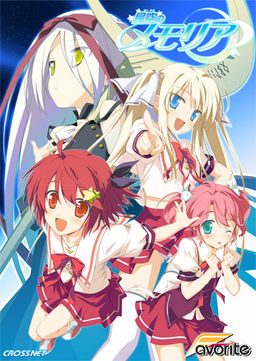
Hoshizora no Memoria -Wish upon a Shooting Star-

Hoshizora no Memoria -Wish upon a Shooting Star-

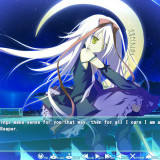
The story begins with the protagonist, Kogasaka You, moving back to his hometown, which he left behind several years ago. Upon arriving, he stumbles into an abandoned, sealed observatory, whereupon he encounters a mysterious girl who looks exactly like his childhood friend did years ago. She introduces herself as Mare, a shinigami who reaps nightmares.

Meanwhile, back at school, You ends up joining the astronomy club, which is desperate need of new members. At night, he continues to visit Mare at the observatory, all the while trying to remember a certain someone’s name…
812 comments

jimkricketReply
*SPOILERS*
If this isn't an April Fools joke, here's my problem, which a couple others have already mentioned. Right after the scene where Mare stabs You with her scythe to erase his nightmare, it changes into a scrolling image of the Tanabata night sky, after which the game crashes with “graph_menu.bin has encountered a problem and needs to close. We are sorry for the inconvenience.” Then I figured I’d try running the Japanese execution file “memoria.exe” to bypass that spot. When I got to the same location in the game I crash with “memoria.exe has encountered a problem and needs to close. We are sorry for the inconvenience.”

Mind you I have the 1.1 Update installed and also running the game on my computer’s Japanese locale and not AppLocale on Windows XP Home Edition version 2002 service pack 3.
SinshladReply
That sounds to be right where the video would start playing, so may be caused by lack of correct codecs having been installed on your machine. All I've got installed in CCCP, and the video plays back fine, look up and install said codec pack and hopefully it'll work fine.
jimkricketReply
Nope, still get the same error, even with CCCP codec and have the latest direct X installed, still get the same error. I've installed and reinstalled the game, ran 1.1 patch update, then the english patch, the error still persists.
BooReply
Had that problem. I went to the ../Memoria/movie directory and renamed 01.mpg to something else like 01.mpg.old
PHIReply
Yes, that worked for me as well. The problem I had was the the video opened in another window, and after when finished, it never returned to the game.
jimkricketReply
This is getting ridiculous, so I'm doing what you guys suggested and every time I open up the movie folder it crashes my explorer.exe; I'll update when I figure out how to resolve this.
jimkricketReply
So I ended up deleting the movie folder and that worked... \(^v^)/
GuestReply
Rename the folder the movie is in will solve your issisue as well. Without entering it will say.
jimkricketReply
If you want to avoid this problem all together, don't install the OP movie Staircase english Sub, but oddly the original Japanese Video has no sound, the video plays just fine, no sound however.
asdaReply
Yup.

Before I installed CCCP the movie never showed up. After installing it the movie opens in a new window.

Anyone know how to solve this problem?
superBlastReply
Hey Ivan, are you planning on putting up a torrent?

I'd to know so I'll know to wait for it. If not then I'll just start downloading now from media fire.

Either way, thanks for the upload. People mentioned lolis and now I'm looking forward to playing it.
superBlastReply
Well nevermind. Went ahead and already downloaded it.
HhReply
I get the dll29.dll or something like that error, it says the file is not found. I installed everything correctly, ran the update, then the eng patch
HhReply
nvm, its some DirectX problem
WolfReply
ADmin do you have backups of everything you have here?
ZeroReply
How do you run the update?
ZeroReply
Can anyone help me plz
AlucardReply
Just drag Patch 1.1 into the main directory of the game and Double-click it. If a window with Japanese bars appear, u made it right and only have to press the upper one. After that, copy the english patch into the folder and install it. If u r done, look for the MemoriaEN.exe. As soon as you r in the Main menu, go to: Options ---> Page 2---> Fonts and look for the Custom Subs.
barneyReply
did that and when i open the game(english) it still says version 1.0
Am i doing something wrong? But when i open the jap version it says 1.1
AlucardReply
Just play it, if it s english everything s fine ;)
KousakaReply
i got the update window to open and i clicked the top bar but i keep getting some error popup with a bunch of gibberish. any ideas? :(
AlucardReply
Your locale set to Japanese? Most of the problems with fantranslated staff happens to be that. If you did, maybe u should try to reinstall it and do like it s written. If u also tried that, you have to delete the registry files referring to the game and install it again. I d suggest to get "CCleaner" for deleting the registry stuff if u r unsure bout it.
N4shezReply
Can we has torrent plz
HACReply
Dang! 3 and a half gigs? Is this game animated or something?
AlucardReply
Yes, it got quite some animations. Oh, and also it s around 35 hours.
Asha111Reply
This isnt about the game I did not know where to post this so sorry if it is trouble. I dont want to force u or anything however I wanted to ask, Admin can u plase upload Otome wa boku koishiteru. thank u.
DragonReply
He only post up games which have been translated. That one hasn't been translated yet.
AlucardReply
Here s a walktrough: http://seiya-saiga.com/game/crossnet/hoshizora.html Unfortunately, it s in Japanese so u have to translate it with Google. Well, it should be fine though.
AlucardReply
Is it just me or is the game a bit buggy? Have to apply the english patch before i start the game, otherweise the custom fonts r gone
AlucardReply
Nevermind, u have to delete the graph_vis folder AFTER u applied the patch -__-
AlucardReply
Ok, DO mind it. Have to apply the patch after every PC restart and i think that s not supposed to be.Well, it just takes less than 20 secs, but it s still anoying.
Kei-TrReply
I have have same problem as you. I think it be better not having this problem but i seen far worse than this of course, so it's bearable i think.
RhinoReply
Hi i was wondering if anybody can post steps on downloading this so i dont screw it up and just give up all together thank you?
IEReply
can anybody help me, when i try to run the game in english it gives me the following error:
Unhandled exception occurred at 0x2044F13B.
Check the error log for details.

I run windows in Japanese local.
weegnomeReply
same issue, your getting woke up from someone and then the game crashes
KousakaReply
hold on, is anyone else having trouble installing the game in the first place? mine just stops almost straight away with the installshield and pops up with an error message saying: "1155" followed by a bunch of weird gibberish. someone help? :S
KousakaReply
my locale is set to japanese btw.
kelibaReply
dont install via auto run mount the image in DT and rightclick the disc in the virtual drive press "open" and run the install file directly not via wizard the direct install should be at the very bottom if u open the disc
jimkricketReply
Anyone else lose the ability to hear sounds from videos except .wmv files?
jimkricketReply
The nightmare is over, I downloaded and reinstalled Realtek drivers, disconnect and reconnect my headphone and speaker jack to reconfirm the hardware on my computer and now my sounds work, that's a relief!
AndrewReply
Everything works fine for me. Thanks admin. You rock!
MacauleyReply
Hey can someone help me? After installing and running the english patch I try running to game but I get and error with C/Users/owner/documents/FAVORITE/??????/save/s901.bin/(japanese letters)
Could someone please help? QQ
Name (required)Reply
Run the game in Japanese locale. It can’t create the path because it contains ??????? instead of 星空のメモリア; it will have the correct path when run in Japanese locale.
crazyboyReply
I saw lot of annoying character until now but Chinami beat them all by far.

This VN look nice, but i can't endure Chinami anymore...
crunchyReply
hahaha i know what u feel.
in the first 2 hour gameplay i feel that chinami was "cute little sister" and then..... 100% annoying XS
exactly like her older bro says about her, "machine gun mouth" lol
mmmReply
i still think she's cute till the end.
good thing my little sister is not like her otherwise i will trapped in sister complex D:
ConcernedBystanderReply
Can anybody explain the memoria_update_v11? It doesn't extract.
Name (required)Reply
Test archive using (7-Zip, WinRAR or what have you) to find out if it's corrupt; redownload it if it is, then extract etc.bin and Memoria.hcb files from to the game's directory using your acrhiver (overwrite Memoria.hcb there).
asdasdReply
anyone got skipping problem?
i got unread text skipped too even though i set it properly on the options, anyone knows how to fix this?
NizkusReply
What has happened to torrent option?

Leave a comment