English visual novel downloads

Steins;Gate - Installation/Error troubleshooting

1. Download Steins;Gate game, 1.20 patch and English Patch

2. Change locale to Japanese (XP Vista 7)

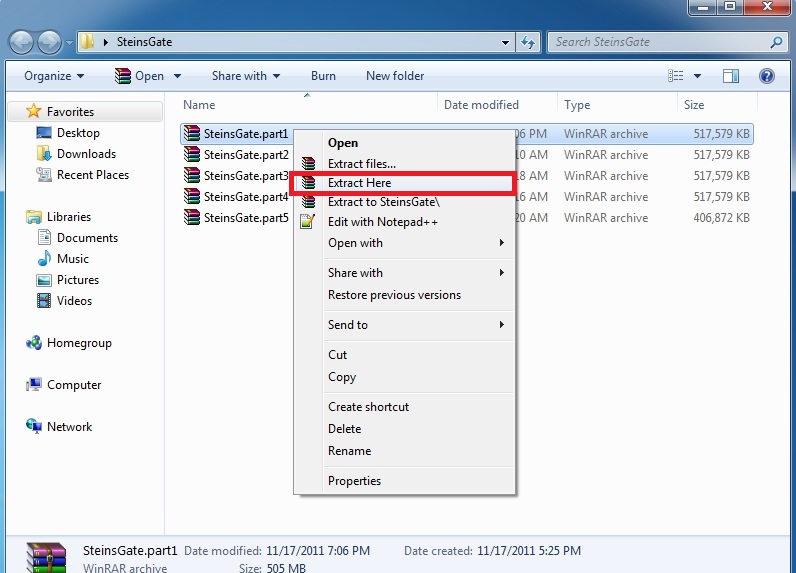
3.Right-click on SteinsGate.part1.rar and select “Extract here”.
SteinsGate Install 2

4. Once extracting process finishes, you’ll be presented with two files: SG.mdf and SG.mds . Mount the SG.mds

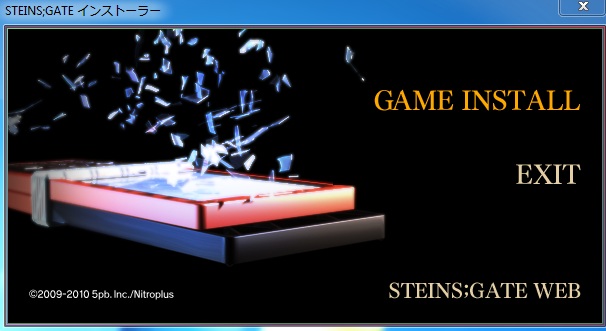
5. Setup window will appear. Choose “GAME INSTALL”
SteinsGateInstall-4

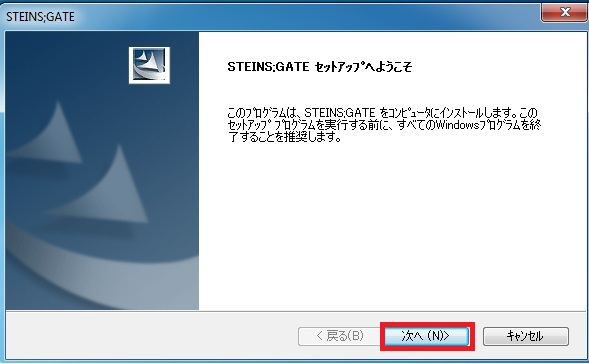
6. New setup window will appear - just click “Next”
SteinsGateInstall-5

7. Accept the license terms and click “Next”
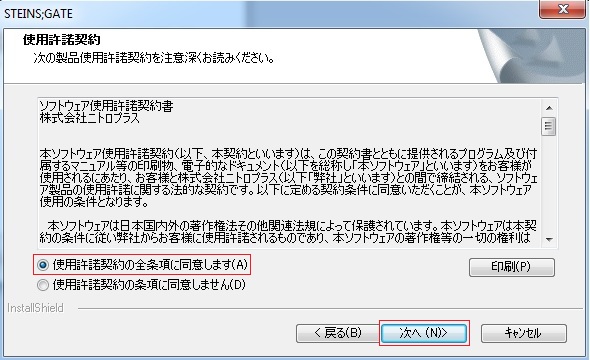
SteinsGateInstall-6

8. Choose installation path and click “Next”
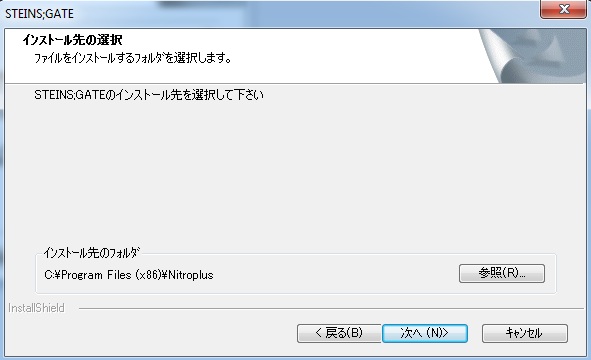
SteinsGateInstall-7

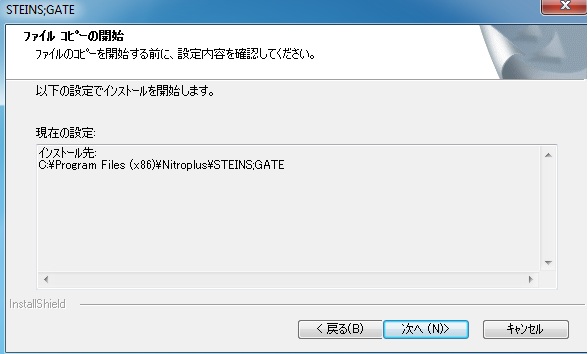
9. Click “Next”
SteinsGateInstall-8

10. Wait while the game is being installed.
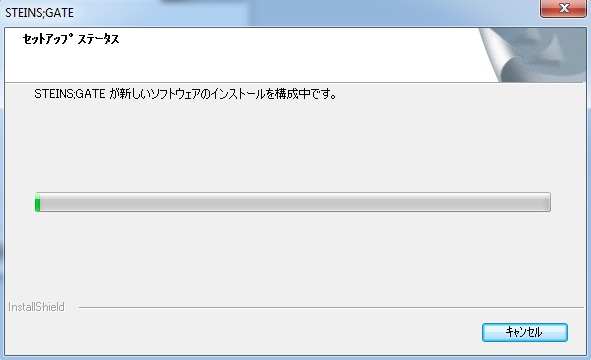
SteinsGateInstall-9

11. Now you’re asked if you want to create desktop shortcut. Answer “No”.
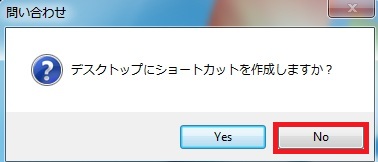
SteinsGateInstall-10

12. Uncheck the tick-box (you don’t want to run the game yet) and finish the installation.
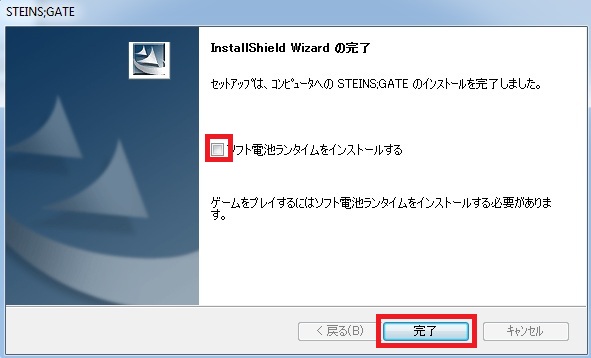
SteinsGateInstall-11

13. Run the 1.20 patch now. Select the path you installed the game to and click “Ok”
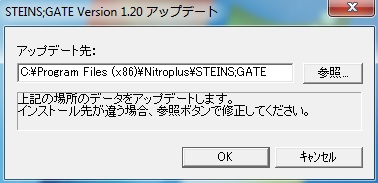
SteinsGateInstall-12

14. After few seconds you’ll get message that the patch was successfully installed.
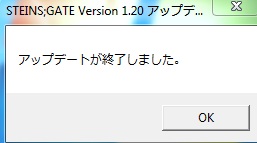
SteinsGateInstall-13

15. Finally you need the English patch. Download and extract it.
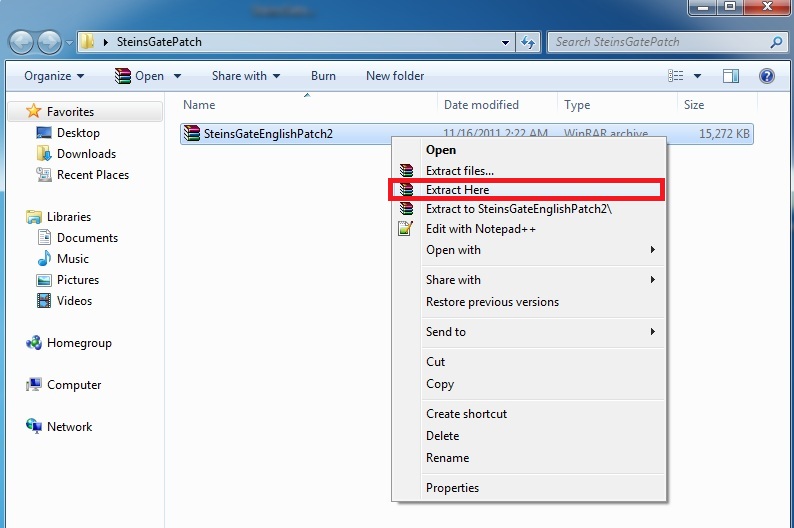
SteinsGateInstall-14

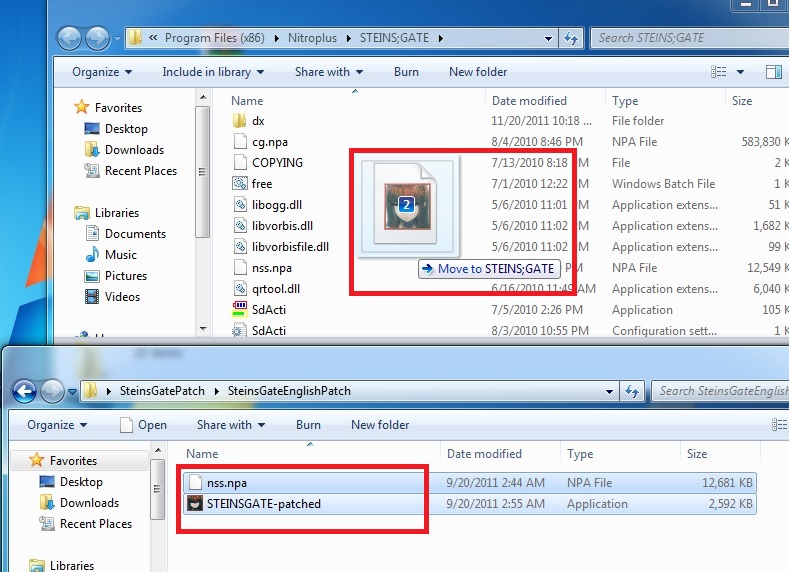
16. Move the patch contents (two files: nss.npa and STEINSGATE-patched.exe) to the game directory.
SteinsGateInstall-15

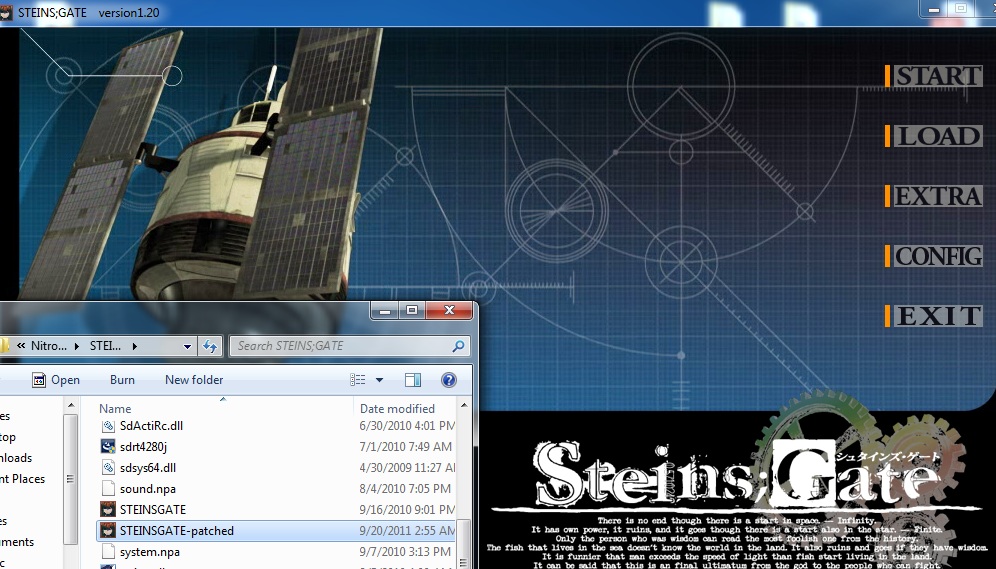
17. Start the game with “STEINSGATE-patched.exe”.
SteinsGateInstall-16

206 comments

javarisReply
Note: The directions here aren't quite correct because the wrong file is uploaded.

Instead of the 1.20 update patch, the actual link is to the 1.10 update patch.
As such, it isn't updating to the 1.2 version, but instead the 1.1 version (and that might be causing some issues).

The correct update patch can be gotten at http://www.nitroplus.co.jp/support/sp20/201009171745.php
NekomeReply
for the people with the start menu problem i instaled HF pApploc and then u run STEINSGATE-patched.exe as Run with Japanese locale as administrator problem solved u should know that woked when u see Steins gate logo in the start menu.
alexReply
well I have seen that website but I can't download the patch, it's all in japanese and I don't find a download

I have the game in japanese and the patch doesn't work

help
lionReply
Can anyone help me? Every time a video is supposed to play, i can hear the first few seconds of it and then the screen is kept black and it freezes. If I click anywhere the video is skipped and I continue playing. I located the files on the game folder and I can play them without problems.
ficha13Reply
How do you set fullscreen? :S
KnightReply
Is there a 64 bit version of this? Apparently my laptop won't install it since it is not compatible with my 64 bit Windows 7.
keiraReply
the game keep crashing at cahpter 2, any suggestion on this?
KoalaReply
I installed the game with everything, but when I click the game it tells me that I'm missing the libvorbis.dll
Can anyone help me???=(
KoalaReply
also when I try to reinstall the game it says the file name is incorrect.
Lewis JReply
Does anybody have a clue on how to sort this 'vorbis_window' thing out? It's driving me insane, been trying for hours now.
CarnageReply
I overwrited the files in the english patch folder to the game folder, but the game it's still in japanese....what should I do??
GustavReply
the game still in japanese text when i extract and drag to the game folder, anyone can help me?
onaReply
with this installation guide you have only installed the SteinsGateEnglishPatch2.rar, you must install SteinsGateMovies.rar and
SteinsGateCGPatch.part1.rar
SteinsGateCGPatch.part2.rar
SteinsGateCGPatch.part3.rar to have the complete game in english.
SuperOtakuReply
but i dont want to play is as movie. i want the options to stay. any other solution?
SomeKidWhateverReply
Do these all have to be in the same nitroplus directory or? Because like the opening and the menu system options is all in the japanese language..
sashaReply
I click start game and nothing happens not what do I do?
KaancemReply
32 bit needing for graphics options :D

I fixed that problem
gggReply
"sasha says:
December 15, 2012 at 8:14 pm

I click start game and nothing happens not what do I do?"

How fixed this problem?
FladReply
Hi,

I have the same problem. When I'm on the main menu and I press "Start" I back to the main menu.... help pls thx.

I'm on seven 32bit
boboronReply
ignisterra gave the answer to this below:

November 19, 2013 at 12:32 am
A little tip for future users: If you press start and nothing happens, dont forget to set you non unicode language to Japanese.

you can do this by going to control panel -> clock, language, region -> region and language -> administrative -> change system locale
AlexReply
About the 'start' problem
You need to change system locale ( japan ) which is in Regional and Language --> Administrative
And my problem is the game is still in japanese
MuazReply
you need copy and paste the dx folder to the game directory : D
ottkajiReply
When I start the game I get an error message with the heading SdAch.exe -Unable To Locate Component and in the message it says qrtool.dll was not found.

Specifics. Win XP 32 bit. Language local already set from Chaos Head install. Had to Google how to do that in Windows XP. After attempting to to run install I made the mistake of selecting yes to the add desktop icon and not un-checking the box at the end. I then uninstalled and reinstalled according to the guide. I than ran the update install a second time to make sure. Finally I assume the game directory to copy the 2 language packs to is the program files folder C/ProgramFiles/Nitroplus/SteinsGate. If not let me know.

The final result was said error message. Hopefully my information was thorough and any help on a work around would be appreciated.
GershonReply
I am in windows 7.. 32 bit... how to ix the game.. after i click start, it goes back to main menu
guepeReply
I just installed it and VOILLA !! it works
You just need to follow instruction guide to make it happen
SomeoneElseReply
How did you make the English patch work?
SomeoneElseReply
I installed the game successfully, installed the update and opened the english patch, but the game is still in japanese, what should I do?
doesntreallymatterReply
So I am having an issue playing back cutscenes. I get a black screen and a split second of audio before it gets cut short. The game does not respond until I click, at which point it skips the scene. This happens for both of the opening cutscenes. I am running Windows 7 64 bit. Everything's installed correctly, the locale is set. I haven't progressed more than a minute passed the start but as far as I can tell everything runs fine otherwise.

Any suggestions?
ShadowNDReply
Thx,it works
Kanadefan01Reply
Whenever i press Start
It goes back to the main menu.
Help!!
tiya novlitaReply
I successfully installed it but it gives me blue screen manymanymanymany times and I give up playing right now lol. I guess it's because my RAM memory is only 1 GB, and this damn game takes a lot of memory when playing. I consider upgrading my RAM since it won't allow me to enjoy this game without blue screen
tiya novlitaReply
Ummm...so after several blue screen my computer refused to open this game
I repeatedly install and uninstall, still no luck, and I don't know what to do
After I installed properly, and open the English patch the following message always pop up :

Runtime Error !
Program :

This application has requested the Runtime to terminate it in an unusual way
please contact the application's support team for more information

It doesn't apply to the other programs. Any help would be appreciated. I want to read this VN so badly
JewelReply
I followed all of the steps correctly but when I run the game it's still in Japanese. My system Locale is set to Japanese and I've tried reinstalling the game several times but to no avail. Help please?
JewelReply
Wait, actually the game is in English, but when you first run the game and that guys is talking, that part is still in Japanese. How can I fix that?
michael foxReply
(Forget everything you just saw dammit so not going to help)
read this install the game normally
jesus guys look first run the games exe file in administrator mode that will solve all your problems if your local is set to japanese right click the exe file for the game and select properties go to the compatibility tab and and click the button that says change settings for all users now check the box that says run this program in compatibility mode (this option is definetly on windows 8 comps) if you dont have that option than dont worry about it now in the same window there should be something that says priviledge mode check the box that says run this program as an administrator (this is the ultimate fix for any game that fails to open files) this will give the game more rights over all its files and allow it to open them without interuption, interuptions that usaully cause the issues you are seeing
michael foxReply
also run the installation file in admin mode as well so there are no errors when it installs
janeReply
hey i followed all the steps correctly but for some reason it still comes up in Japanese i changed the locale to japan installed it and the bottom of the menu screen says steins gate in english but when i start the game its japanese audio and japanese words i tried running the patch as an administrator but it's still all in japanese does anybody have a solution?
janeReply
ok so it works i lied but the intro scene recap doesnt have subtitles which is why i thought it didnt work is it supposed to sub the recap?
SlothuaReply
so just got tis downloaded and installed, followed all the steps, set applocale to japan. installed game ran patch and set up all my patches but still when i run the game in administrator mode when i press start it just goes back the menu like what i see is posted on here a lot. any reason for tis bug? also the file on the download says 110 for the update but i see there's a 1.2 update should i go find a copy of that?
SlothuaReply
disregard my previous post a friend helped me through my problems thanks anyways
UniReply
Hi everyone. Im following this guide trying to install sucessfully the game, I have follow all the steps but in step 5 after clicking on GAME INSTALL nothing happens, athe next window doesn't appear.

If anyone can help me I would be grateful I have the system locale in japanese because if anyone asking
DarkNessReply
yeah...same here.. ._.
it's just a blank screen.. *sigh..
i really want to play SG VN, so..anyone, pls help me D:
SomeoneReply
Hi when I try to start the game I get an error messege saying


" STEINSGATE-patched.exe - Entry Point Not Found


The procedure entry point _analysis_output_always could not be located in the dynamic link library libvorbis.dll."

Does anyone know how to fix this? Any help whatsoever would be appreciated
wdsdReply
The link for the 1.2 patch updater seemed to give me the updater for patch 1.1, specifically the file is called SgUpdate110 and the file version is 1.10.0.0, is this the right file? If not, where might I find it?
SodaReply
I too have the, "The procedure entry point _analysis_output_always could not be located in the dynamic link library libvorbis.dll" problem.
I still can't play this game.
erosanReply
me too T_T pls someone help
RKReply
I get to step 5 and the new setup window doesn't pop up. In it's place pops up a small black window for a split second before leaving again. Yes, I have my system locale set to Japanese, and yes I downloaded DAEMON tools, so I don't know what the problem is.
KhonrReply
Can someone please help me everyone time I try to run the Steins;Gate Patched.exe it comes up either saying..

'The promgram can't start because libvorbis.dll is missing from your computer. Try reinstalling the program to fix this problem.'

or..

'The procedure entry point_analysis_output_always could not be located in the dynamic link library libvorbis.dll'

Please help Steins;Gate is my FAVORITE anime and I will be devistated if I can't play the VN.
ignisterraReply
A little tip for future users: If you press start and nothing happens, dont forget to set you non unicode language to Japanese. But those who dont want to do that, you can also run the VN with AppLocale, it's working :D

Leave a comment