Steins;Gate – Installation/Error troubleshooting

1. Download Steins;Gate game, 1.20 patch and English Patch

2. Change locale to Japanese (XP Vista 7)

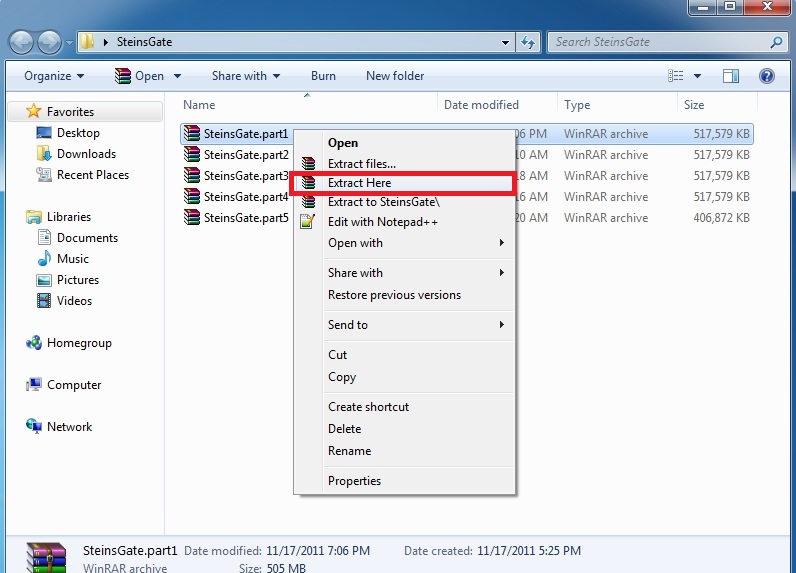
3.Right-click on SteinsGate.part1.rar and select “Extract here”.
SteinsGate Install 2

4. Once extracting process finishes, you’ll be presented with two files: SG.mdf and SG.mds . Mount the SG.mds

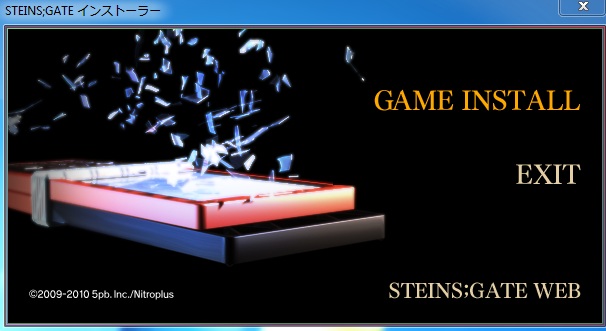
5. Setup window will appear. Choose “GAME INSTALL”
SteinsGateInstall-4

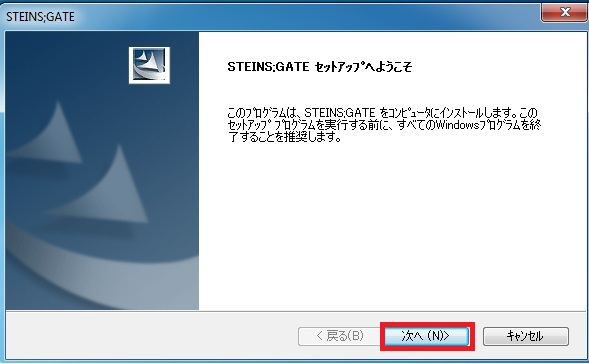
6. New setup window will appear – just click “Next”
SteinsGateInstall-5

7. Accept the license terms and click “Next”
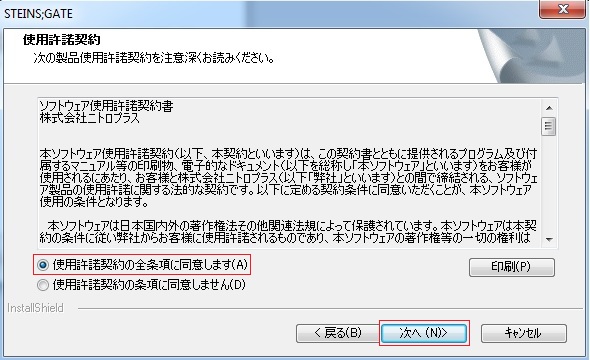
SteinsGateInstall-6

8. Choose installation path and click “Next”
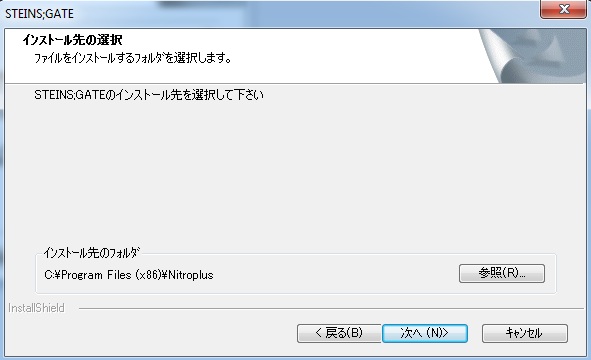
SteinsGateInstall-7

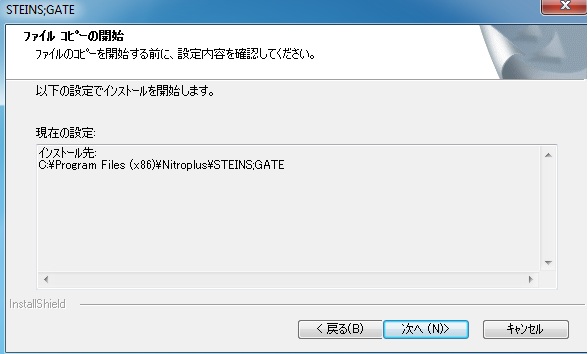
9. Click “Next”
SteinsGateInstall-8

10. Wait while the game is being installed.
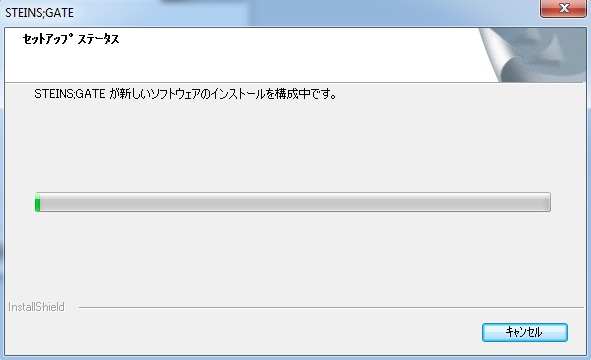
SteinsGateInstall-9

11. Now you’re asked if you want to create desktop shortcut. Answer “No”.
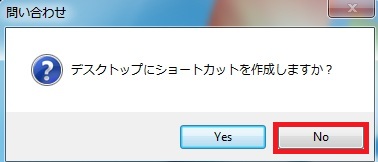
SteinsGateInstall-10

12. Uncheck the tick-box (you don’t want to run the game yet) and finish the installation.
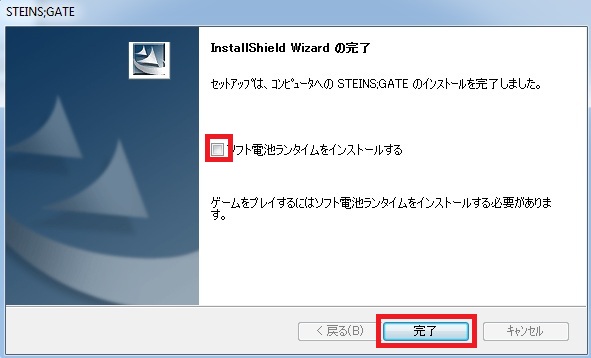
SteinsGateInstall-11

13. Run the 1.20 patch now. Select the path you installed the game to and click “Ok”
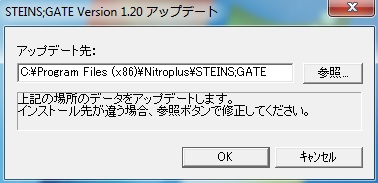
SteinsGateInstall-12

14. After few seconds you’ll get message that the patch was successfully installed.
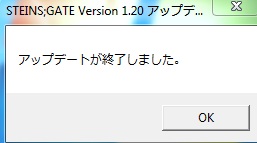
SteinsGateInstall-13

15. Finally you need the English patch. Download and extract it.
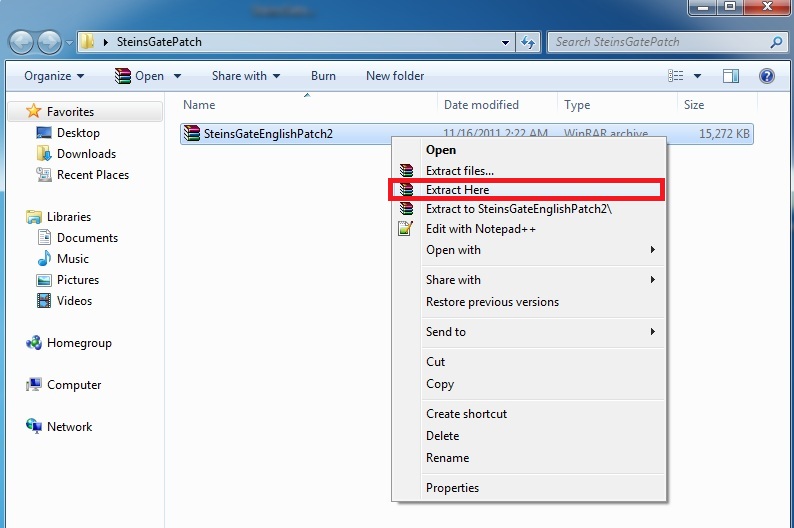
SteinsGateInstall-14

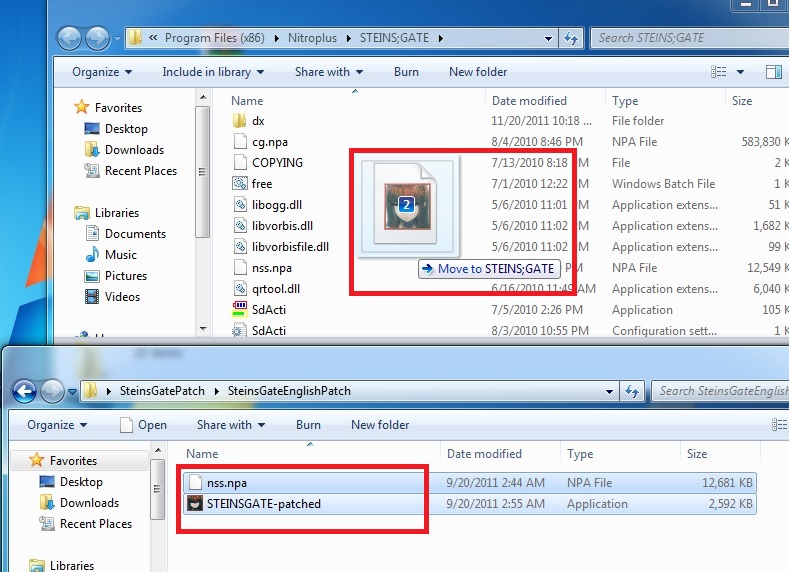
16. Move the patch contents (two files: nss.npa and STEINSGATE-patched.exe) to the game directory.
SteinsGateInstall-15

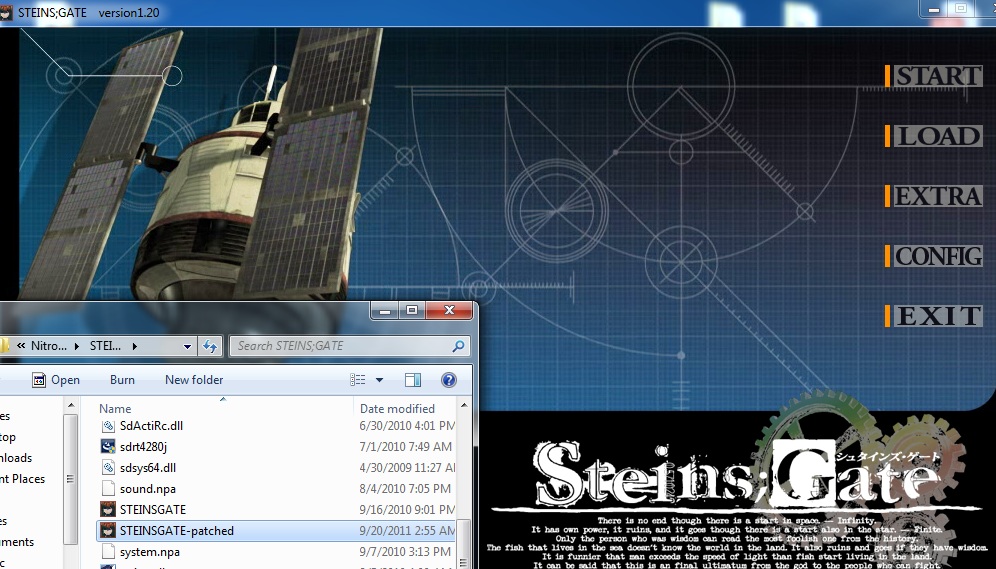
17. Start the game with “STEINSGATE-patched.exe”.
SteinsGateInstall-16

206 thoughts on “Steins;Gate – Installation/Error troubleshooting

  1. Hey, I’m having a bit of trouble with the game. I’m running Windows 7 on Bootcamp, and I did everything the guide told me to do. But whenever I try to start up the game, it says that the app crashes. My locale is changed to Japanese so I really don’t know what’s wrong.

  2. i installed everything and the game starts up fine but when i press start it just takes me back to the menu!

          1. i had the same problem but after i instaled “HF pAppLoc” the game run without any problems ^^/

  3. I’m trying to extract SteinsGate.part1.rar with WinZip but it says that there is an incongruenze CRC (?!?!) with SG.mdf.
    I’ve tried everithing! Please help me! do i have to use another program?

  4. Hi I’m using a mac and installing with Crossover Games but when i select the same pathway for the 1.20 patch i just get a message in japanese and thats it, does anyone know what my problem is and how to help?
    Or did any one els using a mac use some other app that worked for this?
    Thanks

  5. hi i have a problem, everytime i try to start the patch 1.20 there is a error message saying: “vorbis.dll doesnt have vorbis_window”
    where can i get vorbis.dll with vorbis_window?

  6. Every time i try to extract SteinsGate.part1.rar it say that it is broken or split file is needed i already have the rest of the files needed what should i do to fix this and thank you for helping me

  7. hi. I installed all what I can download and I have a strange problem. I click start , I wait a moment and game back to menu please help ;(

  8. I got the same problem as here.
    I click the START menu but it’s only take me back to the main menu. But other options such as LOAD, CONFIG etc. are fine the way they are… oh, and is some words (like config, etc.) will still be written in Japanese?

    I would appreciate any of your answer/solution. Thanks for your time =)

  9. I’ve changed my local but it didn’t work.
    I mean, I succeeded the installation part, but when I click “START”, it just came back to the main menu over and over… .__.

  10. Just like most people are getting im stuck at the main menu. Changing local to Japan did nothing. Help please =)

  11. when i start the english patched exe it says it can’t be started because libvorbisfile.dll cannot be found and i reinstalled it twice already..

      1. yah that didn’t work for me it comes up with:

        the procedure entry point analysis_output_always could not be located in the dynamic link library libvorbis.dll

        1. I know it’s stupid but the way to fix that is to rename the STEINS;GATE folder to STEINSGATE.

          Windows does NOT agree with the ” ; ” …

  12. To the guys who are stuck at the main menu, I had the same problem on Vista and running it on compatibility mode for XP and as administrator fixed the problem.

  13. ok everything works but… THE PHONE
    WHY WON’T THE PHONE TEXT BE IN ENGLISH??? WHY IT IS PISSING ME OFF!!!! AGGGGGGHHHH I’VE BEEN AT THIS FOR HOURS!!!! I SPENT LIKE A HUNDRED BUCKS ON THIS GAME I WANT TO PLAY IT!

  14. as many others i’m stuck in the main menu. i click start it goes back to main menu again, runnig as administrator won’t do the trick. i’m using windows Vista. if someone could help me i’d be the most gratefull person in the world D=

  15. Yes, I’m also having the same problem while trying to start the game. I’ve tried all the given solutions but nothing seems to be working. I was really looking forward to this game so if someone can help, I’d really appreciate it.

  16. I have downloaded a patched version 1.20, but now it crashes instantly after starting.
    I have changed the language to Japanese in Windows 7 and restarted the computer before running the game.
    Could it be that I don’t have the game under program files?

  17. Sorry for double post, but when I “reinstall”, in my case just extracting all the 2Gigabyte of files to another folder 7-Zip told me there were failure:
    it shows me this for basicaly every file:
    can not open output file C:¥Program Files¥NitroPlus¥STEINS;GATE
    and so on.
    I am very confused know. I’ll try changing my language back from Japanese and then to Japanese AGAIN.

  18. I think I accidentally mounted the wrong file. But it looked the same as in the pictures still, so I continued the steps like that. I finished all the steps but when I click the game to start playing, it said “The program can’t start because liborvisfile.dll is missing from you computer. Try reinstalling the program.”

    Any tips that don’t involve reinstalling? The installation process was very slow, it took three days to finish.

  19. Can anyone help me?

    Whenever I start STEINS;GATE the screen goes black and nothing is happening. If I click anywhere the game skip the first prologue goes to the 2nd and freezes there(I can see only the stars)and if I click again it goes the beginning of the story.
    (Same thing with all video from extra menu.)

    I am using Japanese regional settings and i update my video codecs. (I can see them without problem if I used VLC)

  20. Hello, I just tried to install this game but when I had finished mounting it and clicked the install button a windows message asking me if the program was installed correctly or if I wanted to install/repair it again with the recommended settings appeared.
    I clicked “install again” which made the game crash and now it just blackens out every time I press the install button.

    Anyone knows how to fix or reset it?
    (I’m running 32-bit Windows Vista by the way)

    1. sometime windows as as jerks….
      ( Notionally I just ignore it >> and program will start normally.)

  21. Please help me, im sure you have all heard the same problem but i simply cannot start the game, everything else seems to be clear but the start just brings me back to the menu, ive changed my region time and location, and ive ran the game as admin but it doesnt seem to clear it up, Please i love this series and id love help.

  22. How to install the English messages/menu screen patch? When extracting the second one, it says that the file is the same as the file from the first one.

  23. can i please get some help…?

    So, i did the first two steps correctly(downloading the game and changing my location) but when i right click the file the extract option dosent appear!

    and a secons question- what do i run it on? internet explorer…?

  24. it says i need a license ID to use it :p and it says there’s no room for the english patch :p can someone help me?

  25. I’ve followed the steps one by one, and everything ran smoothly, until I ran STEINSGATE-patched.exe to run the game. Microsoft Visual C++ Runtime Library window pops up, with description saying:

    Runtime Error!
    Program C:\Progr…

    This application has requested the Runtime to terminate it in an unusual way.
    Please contact the application’s support team for more information.

  26. I have it downloaded and everything and the game gets me to the main menu and when I finally click the button to start a new game then It simply won’t start.

  27. Please help!
    Its been 1 year since i’ve post my question and it doesn’t have been solved.When i play,all is fine,but when Okabe Rintarō (Hōōin Kyōma) send the message to “Daru” and return to the alternate timeline,a big white “vortex” or “shining” light appear then… nothing.Its black.The escape button still work (the screen with exit and option on it) but nothing appear.

    1. A year? Damn. Can you register at erogegames.com and go to the tech support section and explain this problem? Some of the users can help you out over there and it’ll be a bit easier to trouble shoot your problem.

  28. For those who got the “libvorbis.dll, libvorbisfile.dll” error when starting up the game, i found a way to fix it:
    1.(IMPORTANT) Create System Restore Point since DELETING DLL FILES from Windows directory are risky
    2. Find “libvorbis.dll” and/or “libvorbisfile.dll” in C:/Windows/System32/
    3. Delete the .dll file(s) mentioned in Step 2
    4. Run the Game
    5. Enjoy
    i tried it and the game worked for me

    1. Go to your Windows directory folder? Or search the files,Delete,Play (but create System Restore point first <3)

  29. For everyone that keep looping back to the menu.
    Go to your control panel => region & language => Administrative => modify regional parameters (language for non-unicode software) => japan , it will ask you to restart your Comp, do so and you are all set.

  30. for the people with the start menu problem i instaled HF pApploc and then u run STEINSGATE-patched.exe as Run with Japanese locale as administrator problem solved u should know that woked when u see Steins gate logo in the start menu.

  31. well I have seen that website but I can’t download the patch, it’s all in japanese and I don’t find a download

    I have the game in japanese and the patch doesn’t work

    help

  32. Can anyone help me? Every time a video is supposed to play, i can hear the first few seconds of it and then the screen is kept black and it freezes. If I click anywhere the video is skipped and I continue playing. I located the files on the game folder and I can play them without problems.

  33. Is there a 64 bit version of this? Apparently my laptop won’t install it since it is not compatible with my 64 bit Windows 7.

  34. I installed the game with everything, but when I click the game it tells me that I’m missing the libvorbis.dll
    Can anyone help me???=(

  35. Does anybody have a clue on how to sort this ‘vorbis_window’ thing out? It’s driving me insane, been trying for hours now.

Leave a Reply

Your email address will not be published. Required fields are marked *