English visual novel downloads

Steins;Gate - Installation/Error troubleshooting

1. Download Steins;Gate game, 1.20 patch and English Patch

2. Change locale to Japanese (XP Vista 7)

3.Right-click on SteinsGate.part1.rar and select “Extract here”.
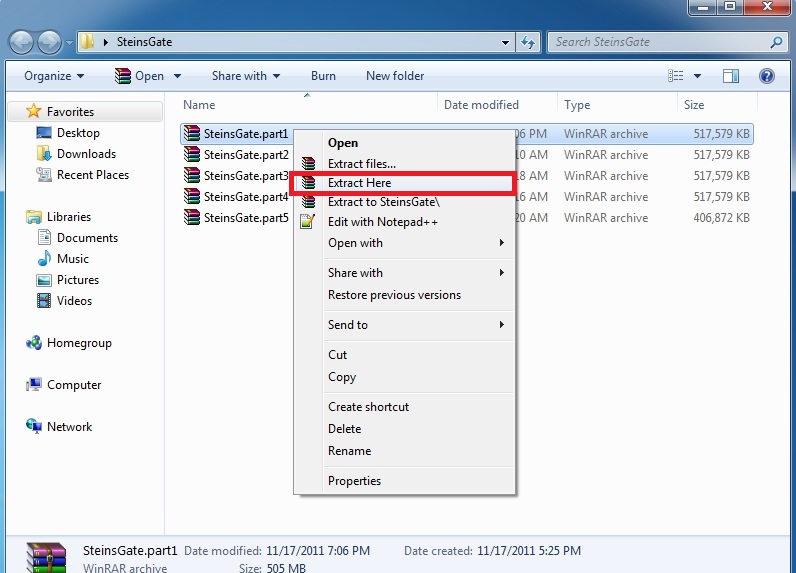
SteinsGate Install 2

4. Once extracting process finishes, you’ll be presented with two files: SG.mdf and SG.mds . Mount the SG.mds

5. Setup window will appear. Choose “GAME INSTALL”
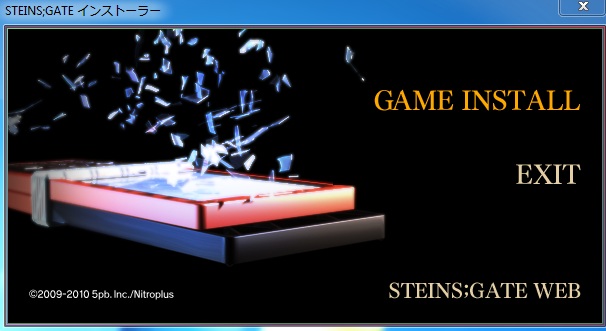
SteinsGateInstall-4

6. New setup window will appear - just click “Next”
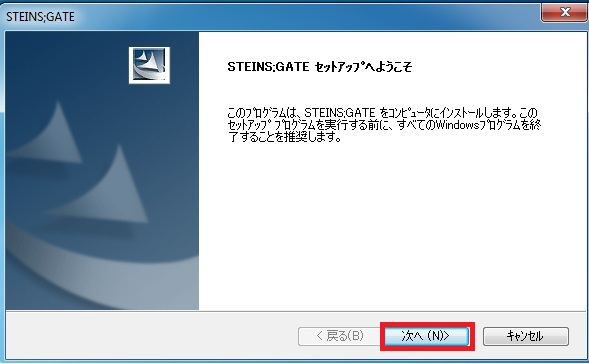
SteinsGateInstall-5

7. Accept the license terms and click “Next”
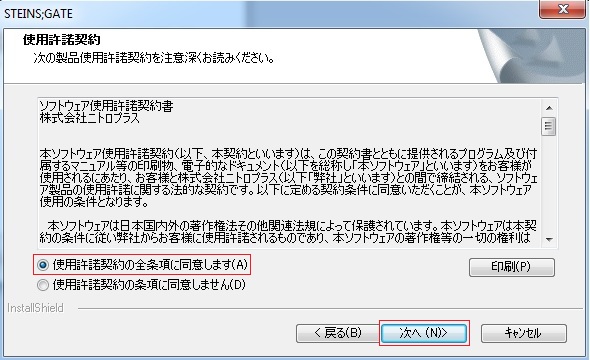
SteinsGateInstall-6

8. Choose installation path and click “Next”
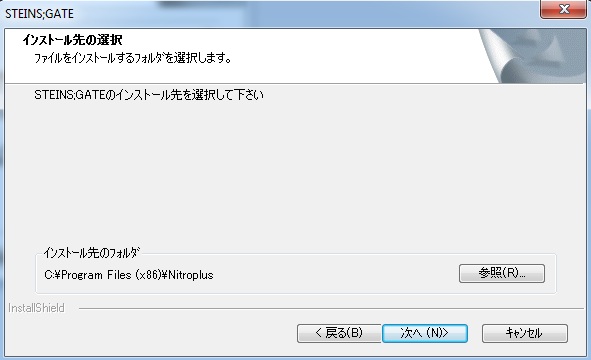
SteinsGateInstall-7

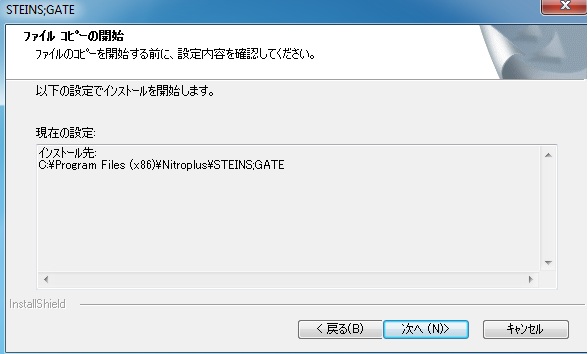
9. Click “Next”
SteinsGateInstall-8

10. Wait while the game is being installed.
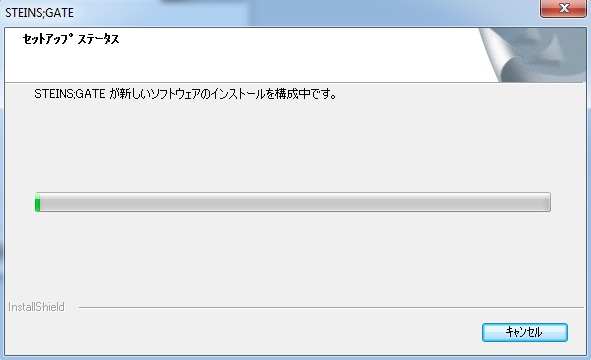
SteinsGateInstall-9

11. Now you’re asked if you want to create desktop shortcut. Answer “No”.
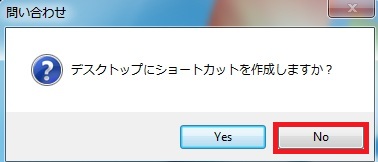
SteinsGateInstall-10

12. Uncheck the tick-box (you don’t want to run the game yet) and finish the installation.
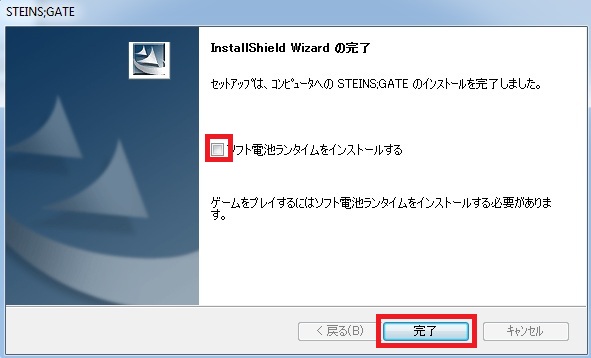
SteinsGateInstall-11

13. Run the 1.20 patch now. Select the path you installed the game to and click “Ok”
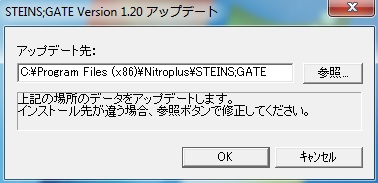
SteinsGateInstall-12

14. After few seconds you’ll get message that the patch was successfully installed.
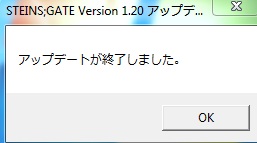
SteinsGateInstall-13

15. Finally you need the English patch. Download and extract it.
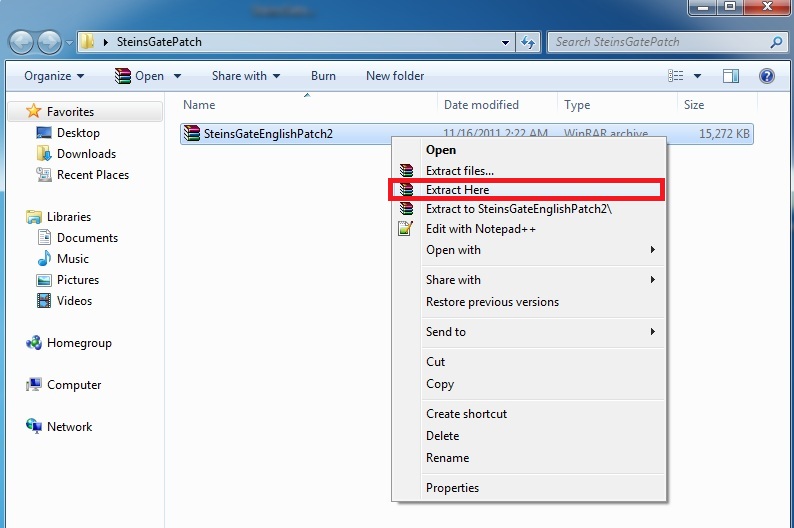
SteinsGateInstall-14

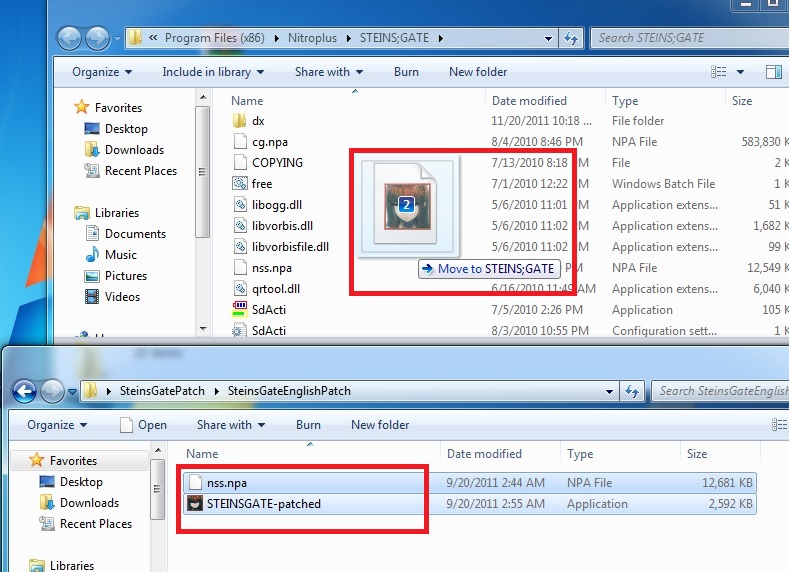
16. Move the patch contents (two files: nss.npa and STEINSGATE-patched.exe) to the game directory.
SteinsGateInstall-15

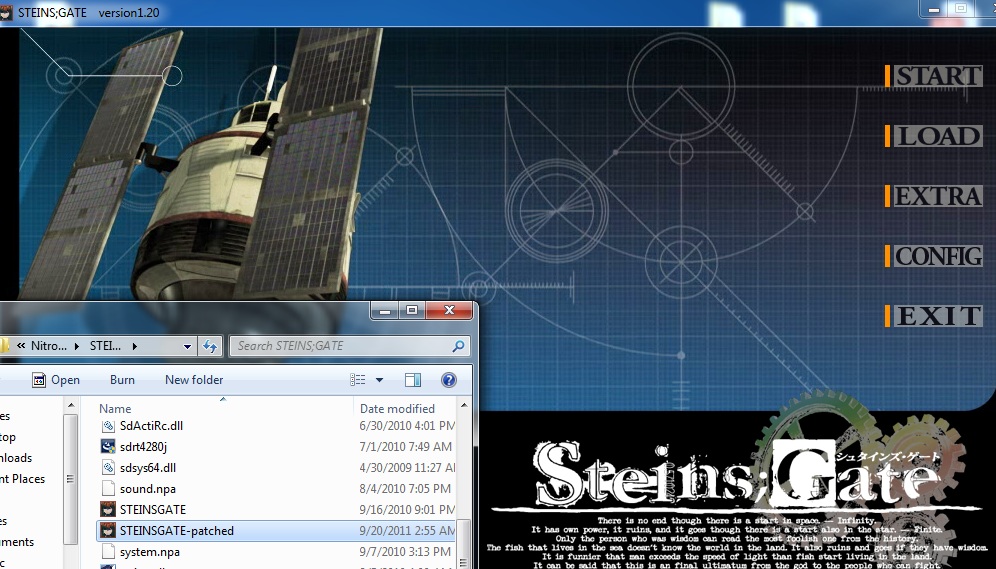
17. Start the game with “STEINSGATE-patched.exe”.
SteinsGateInstall-16

206 comments

DLeeReply
Hi, I just started installing this game but when I'm at step ten it says that the file name, the directory name, and the volume label name is different and it doesn't continue onto step eleven. What should I do?
DLeeReply
Also on step nine picture it says C:yenProgram Files (x86)yenNitroplusyenSTEINS;GATE but mine doesn't have the (x86) included. I'm just wondering if this may be the reason why it's not continuing onto step 11.
adminReply
"(x86)" exists only on 64-bit systems (they have two separate "Program files" folders for 32 and 64 bit programs. You can just install the game in any other location, like "C:/SteinsGate".
SkyReply
Hey admin I'm having a problem with running the 1.20 update. when I try to run it I get an error saying "The requested operation requires elevation." .. I uninstalled it once already so it's my second try I tried to run the previous update 1.10 exe but that didn't help.. so I was wondering if you could help me out with that... Thanks :)
adminReply
That's the windows vista/7 thing - they need your corfirmation if not-digitally signed apps want to modify filesystem. Right click on patch exe and use "run as administrator".
SkyReply
Thanks I'll try that as soon as I get home :)
crrstleReply
I used AppLocale and set to Japanese language but the game turns black when I press the start and it will stop working when I press the tips from the EXTRA bar
KReply
For some reason i have a pop up box wit "the procedure entry point analysis_output_always could not be located in the dynamic link library libvorbis.dll" everytime i try to strat the program. Any solutions?
DLeeReply
@admin: I'm a amateur on these kind of stuff so do you mind rephrasing about the "You can install the game in any other location, like C:/SteinsGate" I still don't get what to do when it says that the file name, the directory name, and the volume label name is different on step ten.
adminReply
This is location where the game will be installed to. You can choose any place on your hard drive you like.
DLeeReply
I tried as you said but it keeps on repeating "The file name, the directory name, and the volume label is different."
GrandiaReply
I tried as every step as you said.

Install completed, but the game won't run.

When I Start the game with “STEINSGATE-patched.exe” as step 17, nothing happened.

Anyone know how to fix this ?
Silent.Evil.88Reply
can u please explain step 16 to me? i dont get where the game directory is...
HazardousReply
Yea, I dunno where to find the game directory.. could you give me a hand?
Silent.Evil.88Reply
nevermind i got it ^^
VoodooReply
Hello. The game was installed as says in this post, and everything went fine. The game opens, the options menu works fine, but when I click "start", the screen turns black, and it returns to the initial screen. There's no way to beggin the game. Why?

Another thing that happens: when I exit the game, a window appear saying that the game crashed. I've tried to run the game as administrator and with compatibility mode, but is the same thing.
Friendly GuyReply
Yeah, same problem here
someoneReply
same problem here too
crrstleReply
same here :(
ApocistReply
I have a solution when I recieve the issue in my case....it may change depending on how u install/run the game. I use Win7 and I didn't set jap as my locale, instead I used Microsoft AppLocale to emulate a jap environment...if u do this you also need to run the game using AppLocale or things just dont work properly
crrstleReply
so I don't have to redo the installation and just play with the AppLocale?
DrGonzoReply
Download Applocale from Microsoft. Google search it. When installing AppLocale in Win 7 you may need to run initial setup using compatibility mode with exempting version check.
For Windows 7 users run compatibility mode as Windows XP SP2 to use AppLoacale.
Use AppLocale to run program. Should work from there
MijouReply
Same problem, but when i try using Applocale to open the game,it open a black screen and show an error message ... (With windows XP)
crrstleReply
Figure out the problem. After changing the locale to japan and if it give you a black screen instead of returning to the main menu when you start the game, try going to the game files then the folder dx and change the name of prologue01.ngs > prologue1.ngs and prologue02.ngs > prologue2.ngs
MirrorReply
I tried changing prologue01.ngs > prologue1.ngs and prologue02.ngs > prologue2.ngs, and it didn't work.
BlaznKiraReply
I did it and it worked just fine, my only prob now is the tips are still in japanese, can i change them?
SaskiReply
Hi, i have a little problem, when I try running the game the next massage a pears:

The sistem doesn´t found the entry of the prosses vorbis_windows in the library of dynamic links libvorbis.dll.
simplasticReply
hey admin im really new with this for some reason the 1.20 patch wont install it keeps saying something like a error im usuing windows 7 nd wen i was installing the game some of the things looked different from here is their any advice you could give me on how to get this to work?
DonnieDarkoReply
I have the same problem of many people:
Install => clear
Lunch the game => clear
Start the game => impossible, I turne back to the main menu when I click on "start"
(I'm on windows seven 64bit)

there is any solution ? :/

(sorry for my english, i'm french and I don't speak very well english ><)
DonnieDarkoReply
For the problem of Voodoo, I find the solution on an another post (and that's work !)

Download applocal for you pc, and lunche the game with him.
When Applolac ask you to choose the language, choose japanees, and thath's work !

And really thanx for thise game ^^
randylaehyReply
I'm at the last step but when I try to run steins gate patched it tells me I don't have libvorbisfile, I already downloaded this but what am I supposed to do with it? Any help would be greatly appreciated.
randomReply
copy libogg.dll libvorbis.dll and libvorbisfile.dll from your install folder to either c:\windows\system32 or c:\windows\sysWOW64 (shouldn't matter). It should work then.
lawlyReply
Tried it,a screen pops up with the error: steins;gate pc has stopped working.im on windows 7 64 bit
lawlyReply
ahh lol i fixed it.i tried to run the "STEINSGATE-patched" file instead of the exe.
medoli900Reply
Hi,
i have installed the 5 part of the game but its tell me the SG.mdf is corrupted.
Anyone can help me?
medoli900Reply
I can now play...
For anyone who will have this problem,i've used Jdownloader.
AonReply
I have a problem; Installed fine and all, played for a bit. I get to a part where Okarin is using the phone microwave. He is looking for his cellphone

"now where did i put it"
i look through the pockets of my trousers and lab coat

But then when I click to continue, a message comes up, and if i click again, it goes back to "now where did i put it". I'm in this loop, and i can't read the message that comes up because it's in Japanese.
namreReply
ummm... you need to use the phone ("p" key or put the cursor on the right side of the screen)
medoli900Reply
sigh...
I have an other problem.
When he look at the radio tower where the "thing" (i don't want to spoil) crashed for the first time,after the white spiral,the screen turn black then nothing.
dbsReply
I'm having the same problem as well. After the white spiral, a black screen appears with a sort of gray-ish line in the center. Anybody have a solution for this?
nekomimisReply
same problem here.
anyone that can resolved it, plz kindly guide us.

;DD
MarioReply
SAME PROBLEM HERE YAY!
SimplyLuckyReply
hi im just wondering what program do you use to open the SG.mds file? Alcohol 120% or?
adminReply
Personally i'm using daemon tools lite.
SomeguyReply
I followed the instructions, have my locale set to Japan, but when I ran the STEINSGATE-patched file, the game is still in Japanese. Anyone know why this might be?
SomeguyReply
Oh, and I should mention, I can't uninstall the game. When I try I get an error saying the filename, directory name, or syntax is incorrect. The path it shows is STEINS;GATE\?\
SomeguyReply
Nevermind, looking back over the comments in the download page, I see we aren't supposed to have that translated. Sorry about that.
randompersonReply
i dont get what you mean it wasnt suppost to be translated? i have the same problem that it still in japanese. and i dont know how to fix it

Leave a comment