1. Download “Little Busters!” Game
2. Change locale to Japanese (XP Vista 7)
2. Right click on first part and choose “Extract”
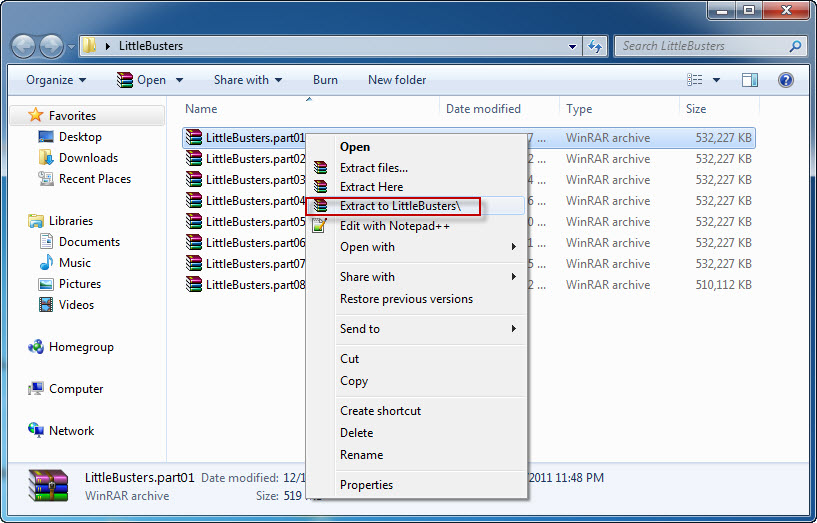
4. Once extracting process finishes, you’ll be presented with new folder, containing two files: LB.iso and LB.mds . Mount the LB.mds
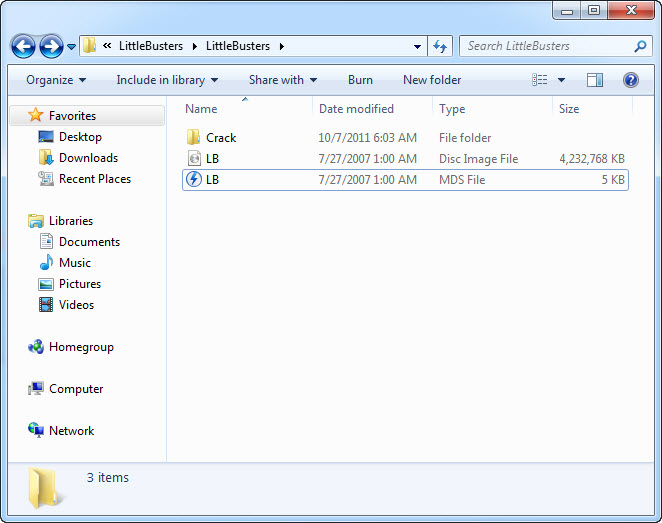
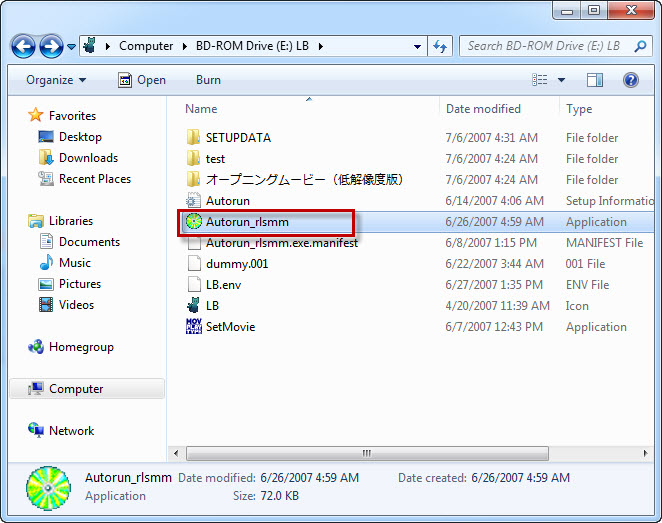
5. Open your virtual drive and run “Autorun_rlsmm.exe”
6. In autorun menu, click button in bottom-left corner.
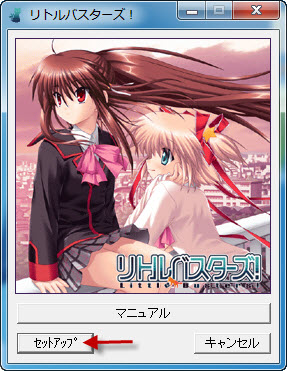
7. You will be presented with menu, where you can change installation location. You can leave the default one here. Just click button in bottom-left corner here.
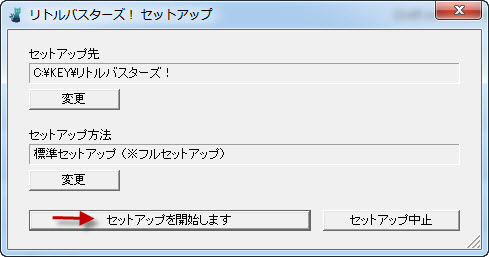
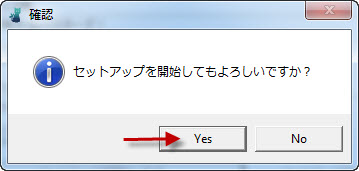
8. Pointless question now: “Do you want to begin installation?”. Of course, click “Yes”.
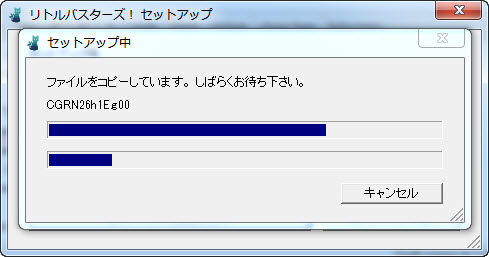
9. Installation might take a while. Just be patient.
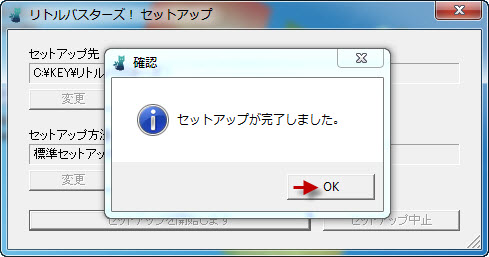
10. “Setup is complete”. Click “Ok”.
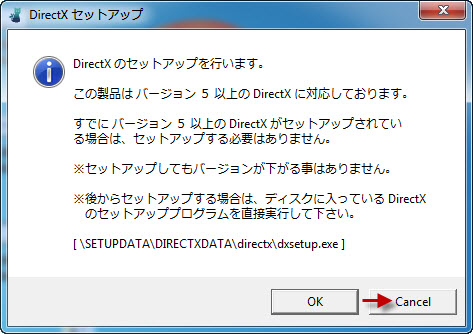
11. You might get asked if you want to install DirectX now. As the version provided with the game is very old, click “Cancel”
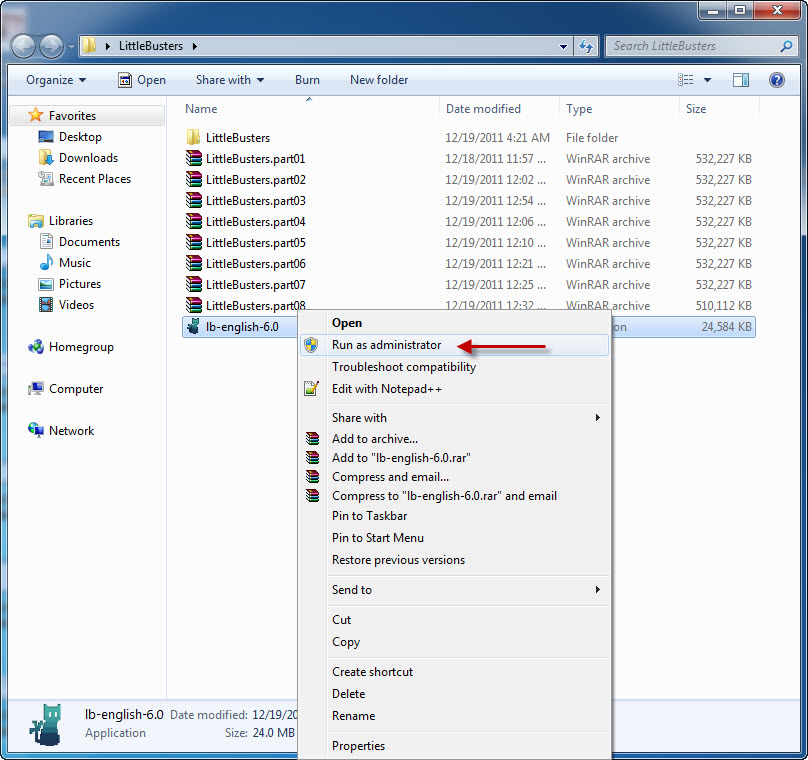
12. Now it’s time to run english patch. Download english patch, right click on it and select “Run as administrator” (you might get some problems with fonts otherwise)
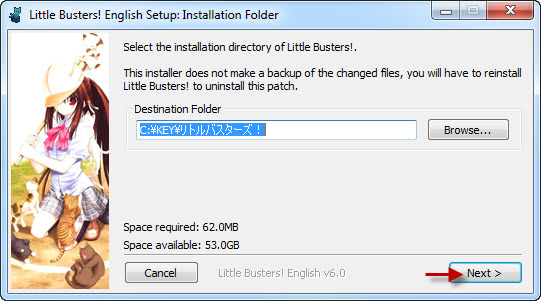
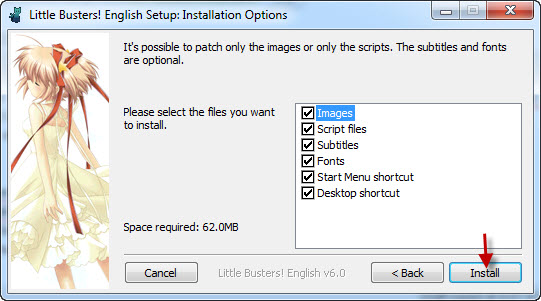
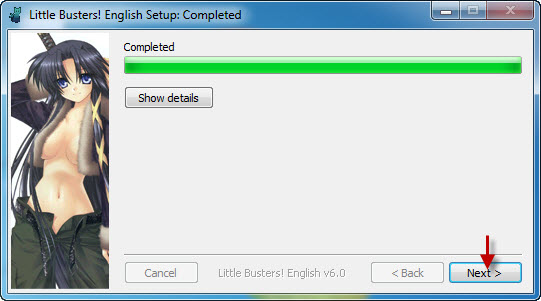
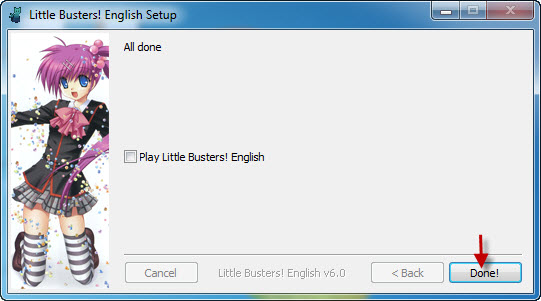
17. Move file “REALLIVE.exe” from “Crack” folder to game directory.
18. Enjoy the game!


What do you do if you have deleted REALLIVE.exe and cant undo it?
I keep getting the reallive 1503 error.
dude, you just need to download the cracked version of reallive.exe (search it up), and put it into the game folder.
What do you mean by “Move file “REALLIVE.exe” from “Crack” folder to game directory”?
What is the game directory? because I keep getting a black screen every time I try to start the game and the font has not change.
I have the same problem that Jason.
Please help…
In the first Little Buster part 1 there is a crack file, move this to the game directory. The game directory (assuming you haven’t changed any file settings)is KEY and will be found like this
My Computer > C DRIVE > KEY > リトルバスターズ!
From there move the crack from the first part and drop it into リトルバスターズ. It should work after.
Hey, thanks for the help. It was very clear! For those having the same prob, follow this!
I need help!
I’ve done exactly what that ‘help’ guy said. I transferred the Crack folder into the リトルバスターズ!but I still keep getting the 2100 Error.
Please help me. I’ve been trying to figure this out but I can’t.
when i run autorun_rlsmm.exe something notice coming up and i can go into autorun menu please help me to this conclusion..
sorry i mean i can’t go intoa autorun menu
Have you tried mounting the disc and then installing it, and then you use the patch
hello there .
i can’t extract the files in link NO 2,3&4 it is broken
what to do if i have F:\SetupData\..\fAfNfZfTfSW\index.html follow by a few japanese words follow by Ctrl+C mind help?
i need help finding the KEY thingy because when i mount the lb.iso the key is not found please help meeeeeeeee !!!!!!!!!!!!!!!!!!!!!
how can i extract the files when my winrar trial has ran out and i have no money to buy it with?
Try using other software like 7zip
Good guy winrar. Doesn’t charge you for free trials. Just keep using it. Mine has expired long time ago but I can still continue to use it.
I get a “process was illegal – please restart your computer!” message whenever I start up the game. How do I fix this?
If you didn’t already figure it out than here the solution. When you install little buster or change your system setting your unicode/locale was not in japan. You need Unicode/locale in japan before you install little buster. You have to uninstall little buster than have it Unicode/locale in japan than reinstall little buster. If you mess up the order your laptop become confuse and won’t work properly.
That error popped up for me when I closed the VN abruptly (clicked on the red ‘x’, exist/close sign while in window-mode) — and managed to successfully relaunch the game after simply launching it with admin’s authority. That is: “run as administrator”.
Can someone put up the EX patch? I installed the original version.
Does anyone have a cracked version for REALLIVE.EXE version 1.6.5.8? I have the PE version of LB, but I can’t play it because it’s japanese windows restricted.
what do i do with this:Little_Busters_ExEx_1.0.rar – 79.4 MB…is that for ecstasy,or do i apply it to the original LB to get the ecstasy with the h scenes+3 heroines?
I’m confused too. Should I extract that ExEx patch as well or just leave it as it is?
I have no idea how to do this. Half the downloads, when downloaded come out at 10kb, no idea what to download, what tools i need, what to extract etc. So bascially i could use a a full start-finish guide that i may be to understand. plz help. thank you
aside from the guide, the programs you need:
to extract downloaded files: winrar or winzip
to mount the extracted image: daemon tools, magic iso etc.
game directory is where is your game installed. if you have problems finding it just right-click game shortcut and choose ‘open file location’. then you copy whatever files in the crack folder to the game directory.
*and just learn how to use a computer. everybody asks same questions just google your prolems, spend few hour and learn whatever you need to know. if you still can’t find anything, come here and ask. before posting a comment just be sure to check previous comments. it is most likely that you will find what you are looking for…
when i try to extrace littlebusters.part1 7zip tells me that CRC failed in ‘LittleBusters/LB.ISO’ File is broken. not sure what to do
You should download all part from Part 1 – Part 17
Sorry if my bad english
i got error when kengo and masato fight,, when masato attack with scratches cat..
reallive stoped working..
help please
when i get past the part where kyousuke decides to form a baseball team the opening doesnt play. What did I do wrong?
I’m with problem with the english program, I can’t play it, it gets a ”NSIS Error”
HEY! When I tried playing the first baseball practice minigame, it just crashed. None of the characters were there, the field was basically empty, and I don’t know what to do…. PLEASE HELP!!
Help! As soon as the installation bar gets in the middle, a message pops up and whenever i click ok it keeps popping up the exact same message over and over and ive tried clicking all options! I mounted the zipped disc1 and i ran the autorun application! Its the ex version!
Step 1: Download litle busters game.
*Downloads all links within
DA-1CLICK: Game Download
DA-free: Game Download
Da:English Patch Download*
Result: Opens folder with downloaded files in them
The name was called “Littles busters.part (01-17)
File Type: RAR File
Size: 10KB each
step 2: Extracts all files. Nothing was extracted.
Repeats process 4 times before coming to ask for aid.
So I want to ask, do I need a software for this error or are the links fucked up?
Guys, i got this problem when i tried installing the English patch, an error popup saying “Invalid file handle 32”. So what do i do? Please Help!
I got an error message in japanese when I tried to install it. It says something with CGKD31c.g00 in it. Anyone knows how to fix it? Help is very much appreciated.
Nevermind this. I am such a fool for mistaking the file to be mounted. The guide said LB.mds when actually it should be LB.iso
What the meaning of error 1503, and guide number 17 ?
guys can you help me? i cant open the Lb.mds file , i had no program to open this , can you help me to solve my problem? please
is alcohol 120% can do with my problem? about how to open LB.MDS file?
I have been wondering, which file in the game folder contains all progression/achievement so far (not save file)? save999?
Eg: if I need to re-install the game, I want to keep it therefore things I’ve unlocked so far won’t get lost.
Those people who didn’t completely follow the guide… How to help you? Try to restart from the first step, unless all the downloads are fine, then make sure the system locale is Japanese, then start from step 3 (it’s written as 2 not 3… Someone please fix it?). If not, change it (see the links for the Windows version you have–you’ll need a guide to see how to do it on Windows 8 in case you’re running 8, I’ll try to write it here*)
Anyway, my comment now: After finishing all 18 steps, are you sure changing the system locale back from Japanese is fine?
*Now the guide to change the system locale in Windows 8
1. Move the mouse all the way to the bottom left corner
2. Right-click it, click Control Panel
3. Click Region
4. The rest is in the Windows 7 version of the guide, starting from step 4
Okay dumb question what do i do with the .Iso file? I mean this says mount mds file but it doesn´t tell what to do with the .iso file
Just leave it. If you already have Daemon Tools Lite (DTL) installed, only .mds file have DTL’s logo (as instructed by admin to mount only .mds file)
I don’t know how to extract. I looked at the picture but when i right click it doesn’t have the extract at all. Please help, my first game. I have downloaded everything part 1-17 with the other two patches. rar file for all except \ib-english-6.0\(application). I don’t know what to do and i have a window 7. Already went to japanese locale.
In order to extract, you must have programs called WinRAR. Once you have it, the extract command will definitely appear when you right click the .rar file.
I’ve forgotten to say something. >.< Thanks admin. 🙂
Well now, I got quite a peculiar problem. The game works fine, and bgm works and can be adjusted normally. But all the character voices are weaker than a whisper even though it’s maxed in the sound settings.
Any idea of possible reason and/or fix for the issue?
The problem fixed itself. Dunno when or why, but it’s gone nevertheless.
When I tried to open Reallive.exe, the game wouldn’t start.
After a while, my Norton popped up saying that the program was a risk.
This was after I stopped playing it for a while.
Could somebody please help me with this?
do you only extract part 1 or do you extract all parts at the same time
haaaa i got it to work!!!!! in yo face
I installed this on the mac Lol it took so long and is impossible but with the right apps I did it! XD
Woah what applications?!?!
When i Open the english patch i always get an error 2100 how can you fix this error
When I try to install, I keep getting an error code 3… not sure why, I changed the local to japan and tried installing it to the default directory… this is windows 8
http://prntscr.com/4h6ag5
Help is greatly appreciated..
I got “Insert game disk” error. What should I do?
Hello guys, I have a problem. why I can’t resume my save data, the data is gone when I tried to Load. Please help.
So if we download all 17 parts from the free link, do we need to extract all of them or just the first part?
Ok so I’ve gotten all the parts downloaded and extracted and I have done every step up until I hip the 17th step. So thanks to \help\ I went to My Computer>C-Drive>KEY but then when I get into KEY folder I cant find リトルバスターズ!folder to put the crack in?? Does anyone have any idea why I don’t have the folder? I’ve changed the system locale to Japanese and everything I just don’t know what to do ive been trying to figure this out all day. If anyone could help it would be greatly appreciated!!
I’ve gotten everything downloaded and extracted properly(as far as I know anyway) but when I open reallive to play I only get a black screen and mouse cursor without any sound. Help? Thank you to all who do.
At the 12th step i ran as administrator, but i got a message box in japanese telling something about “Original Disc” or “err 2100”. I know no one will ever answer this, but let’s have hope in the humanity…
What will I do with this? “Little_Busters_ExEx_1.0.rar” Should I extract it in the installation folder or just run it in admin? If none, please give us the step by step process. Thanks!!
I+cant+figure+it+out,+ive+downlowed+other+Vns+like+Kanon+and+song+of+saya+and+they+work+but+i+cant+get+to+this+to+work+at+all+;-;
It wont let me add the crack file to リトルバスターズ, it says theres not enough space
If anyone is still having trouble, this is what I found out.
Instead of “KEY,” put the ‘REALLIVE’ into the GAMEDATA folder and command it to replace ‘RealLive.exe’. After that it should be fine.