English visual novel downloads

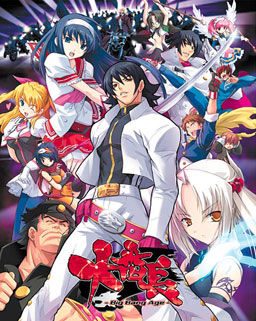
Daibanchou -Big Bang Age-

Daibanchou -Big Bang Age-

In year 200X, a black hole that would later be called “hellhole” appeared in the center of Japan. Shortly thereafter all contact between Japanese archipelago and the rest of the world got lost.

Giant crystal onyxes named “Crystal B” appeared. Contact with them increased human bodies “B power” and paranormal potential, “special student body” is used to describe those powers young people gained by this change. Emergence of such powers caused panic in the masses and a dark age of violence began.

A few years later a powerful organization appeared, gathering those with the “special student body” to form the nationwide “Students Union” to bring out Japan out of the dark. But the battle was just starting…

180 comments

simonReply
Can you play this game in applocale or do I have to use japanese settings?
BobReply
If you haven't figured it out already... applocale should work fine.
kazuyaReply
Hey I just finish downloading part 1-3 that has 400 Mb each I and the last part is left with the 280Mb but you replaced the links already why?... please bring it back...
krocolatosReply
damm the game is hard to play --!
to many character and to many choice to make.
but it's funny when u watch the character fight hahaha
GoemonReply
Really?? Now i'm interested with this game.. I LIKE IT HARD AND DIFFICULT gahahaa(Rance)
GoemonReply
Hi Admin..i was reading an article about DAI series. Dai series consist of Daiakuji, Daibanchou (which is already uploaded here), and Daiteikoku. I think Daiakuji has been translated am i right? If yes, can you please upload it here if you can :(
But Daiteikoku still in traslate project and i cant wait to see it here when the project is done hehe..
It would be a great collection if we have all the series.

Thanks for your attention Admin..just wanna give you more optional job :D
ReynaldoReply
CHEATS CHEATS CHEATS
Hi, ADM
Firstly I would like to thank you for sharing this great game.
I'm sorry for my bad English, but I'll try to teach how to use cheats in this game.

You will need:
1 - The game Daibanchou (oh, really ??...)
2 - A program called SpoilerAL (along with the files SSG)
3 - Use your brain ...

Note: Make sure to run the game you wanted to cheat first.

Ok. after installing the game, and download the SpoilerAL, extract the SpoilerAL in the game folder. Unfortunately the program is in Japanese, then enable japanese support for your system, or use the Appocale.

After opening the program, you should see a window with two white screens, and words in Japanese. You need to indicate where the folder SSG by clicking on the bottom of the window where it says SSG, along with Japanese words. Indicate where the folder is SSG.

Well, should now open a window with two white screens, with lists of names. You need to find the game Daibanchou in the right list, written in Japanese:大番長 Double-click it.

If everything works well, will open a window with two screens, one black and one white. In the black screen is a list of cheats. The white screen for Japanese words.

Time to use your brain ... I will give some examples of how the SpoilerAL ...

1 - Earn 9,999,999 BPs
Click BP in black screen. The right screen will turn a number pad. Click the MAX key. Now click the button in Japanese, just above the key BS. This key Japanese, is to activate the cheat.

2- Infinite Stamina
Ok, the next example is to have infinite stamina. In the list of cheats, click CharacterParams. Note that the SpoilerAL already detected your character list. (yes, you can use a saved game). Click the character's name, now click CurrentStam. In the numeric keypad, click the Max button, and click the activation key (in Japanese). Now note that above the numeric keypad, there is a word in Japanese, along with a white square. Click on the square, he makes his status always stay the same (infinite).
Learn the rest of the functions yourself.

I downloaded the SpoilerAL here:

http://www.mediafire.com/?34fe3s1iqdl5b7e

This file has already included the folder SSG with cheats.
handryReply
thx for the cheat it realy useful......
Maniac00Reply
dude thnx bt when i go to next turn my bp turns to 0 sometimes it turns 0 just goiing a few steps ...... i think i did exactly what u said bt is there anything more to do??? and not only that i cant build any buildings or anything .. would be helpful if u can tell me anything .....
IAmVQBReply
I also don't know how to locate the SSG file.
kazuyaReply
@reynaldo How do you activate it anyway?.........
ReynaldoReply
Is like a gameshark for playstation.
The cheat works when you press that key with the words in Japanese, on the screen that resembles a calculator. But the cheat will be activated only in the next load the game. For example, in a battle, if you turn on immortality, this will only work in the next fight. Start by using the cheat BPs, very easy to activate, and then you will understand how others work …
It’s hard for me to explain everything in detail, because my English is very bad, but I guarantee it works. If you want to send me an email, I send pictures with details of how to enable cheats.

ReynaldoSerra hotmail. com
kazuyaReply
I only need the DP cheat because that is the only hard thing to do in this game cause your debt kept filing up in each turn...
ReynaldoReply
Explain where you are having trouble ... you could open the SpoilerAL? You managed to load the SSG? You can find the name of the game (大番長) on the list? Please be more specific...
kazuyaReply
I don't know how to activate it like what you press to activate the SpoilerAL...
ReynaldoReply
I----------------------------------------------I
I I BP[?](Min:00000000 Max:000F423F) I I
I _____________________________________________I
I I
I _______________________ _________ I
I = [_______________________] [___ON____] I
I I
I I
I [ 7 ] [ 8 ] [ 9 ] [ BS ] I
I I
I [ 4 ] [ 5 ] [ 6 ] [ MIN ] I
I I
I [ 1 ] [ 2 ] [ 3 ] [ MAX ] I
I I
I [ 0 ] [ =/- ] [ . ] [ 16xx ] I
I I
I [ A ] [ B ] [ C ] [ D ] [ F ] I
I I
I______________________________________________I
ReynaldoReply
If you did everything right, you will see a screen like this ...

I----------------------------------------------I
I I BP[?](Min:00000000 Max:000F423F) I I
I _____________________________________________I
I I
I _______________________ _________ I
I = [_______________________] [___ON____] I
I I
I I
I [ 7 ] [ 8 ] [ 9 ] [ BS ] I
I I
I [ 4 ] [ 5 ] [ 6 ] [ MIN ] I
I I
I [ 1 ] [ 2 ] [ 3 ] [ MAX ] I
I I
I [ 0 ] [ =/- ] [ . ] [ 16xx ] I
I I
I [ A ] [ B ] [ C ] [ D ] [ F ] I
I I
I______________________________________________I
ReynaldoReply
oh, well... I could not show exactly what I wanted, but I think you can you understand ... If you need, send me an e-mail
IAmVQBReply
Help when i activate SpoilerAL and do the unlimited DP when i press the button above the BS button, There is an alert an it said: " Not Defined Error!" and then there is this blue window which said :" スクリプトを展開しました。ツリー上から、書き換えたい項目を選択してください。"
Plz help me.
ReynaldoReply
Send an E-mail. Reynaldoserra hotmail.com
AlexReply
I Keep getting a blank Setup utility Error tring to install this plz help
croPathReply
is it me or does this plot sound a hell of a lot like the one in needless
Say41PlzReply
Hi there~
Thanks as always for the hard work.
My question is if it is neccessary to set the system lenguage or it is possible to run ussing AppLocale.
Thanks in advance.
shadow00Reply
having problems with the game, cant install it, keep getting an error thats blank and it just says retry.
VanENTerrierReply
I've tried this n it seems that during the storyline, the characters (heroines) do not talk, i mean, there is no voice..But in the H-scene, there are voices along with the dialogue

Do they have (release) any full voice patch? Without the voice, the game kinda lack its flair n excitement...

I mean, theres a difference between visual novels n comics/book novels, without the voice, its like reading normal comic or books with tends to get dull sometimes...
darkhero666Reply
i have the quite same problem
in the play there's no bgm and no voice from the character
asking for some help please
GizanReply
I was also having the same problem many others are having with the setup.exe (after clicking to install) in the original game folder popping up with an exclamation mark in a blue circle (alone in the box) and alls it says is "Retry", which does nothing other than open a different box then re-opens the retry box shortly after, and cancel or close. When I tried what Seithis said, but that whenever I run the System40.exe it just opens the game screen with another pop-up that says DLL [Surface Factory] then some japenese text and after I close that box it is just a black blank screen. Yes my locale is japenese so that has nothing to do with it and yes I tried using applocale and that was also to no avail, if there is any tips/ideas that anyone has that could help me out it would be greatly appreciated, I tried to be as in-depth and informative as possible, but if you need any other info just ask. P.S. I do not know if the .ald or .ain files have any deep significance to their location in the GAMEDATA folder.
OEReply
Admin do you have any idea why the game can open the datafile.dll with out patch but cant with the patch.

Without the patch I can play just fine but once I patch it
it gives me a error box with datafile.dll as its header.
ComnislasherReply
You need to rename a couple of files.
OEReply
Would you be willing to tell me what I need to do to what files.
OEReply
Win 7 64 bit OS

tried:
copying F:\GAMEDATA folder to picked fold of my choosing but did not work after patched.

Checked:
Applocal is japanese.(3 times)
ComnislasherReply
You need to delete 大番長.ain, 大番長DA.ald and 大番長GA.ald. And then rename ‘å”Ô’·.ain into 大番長.ain, ‘å”Ô’·DA.ald into 大番長DA.ald and ‘å”Ô’·GA.ald to 大番長GA.ald. That work for me.
OEReply
Thanks for the help it seems to work now.
Hiya4321Reply
Thanks for the help =)
GodoffireReply
mine still doesnt work
AtaraxiaReply
just copy the file name of the (file).ain and (file).ald and paste it to the å”Ô’·DA.ald and å”Ô’·GA.ald and å”Ô’·.ain. make sure to delete the old file which had the (file).ain and .ald
antlan87Reply
Renamed and replaced the files, but still get the dll error. Any ideas?
kolosuReply
in system.ini replace every 大番長 you see with an alphabet name (i.e. "daibanchou"). then rename all files that has 大番長 in it's file name to the alphabet name (i.e. 大番長WA.ald to daibanchouWA.ald). then rename the game folder to the alphabet name as well. after that the game should work.
otabuoReply
i did what u said and now it has a msg called sys42vm saying J a b jap letters [大番長.ain] more jap and when i click ok another sys42vm thing comes up saying JAB and more japanese >.>
otabuoReply
ok sry i forgot to change the system.ini ones to eng but now now that i have its gone back to bringing up the datafile.dll thing >.>
antlan87Reply
That worked, just started the intro now, thanks.
MaxmakiReply
Thanks
jjohnson1992Reply
thanks really helped :)
aGilgameshReply
thanks man it works.
FanOfComnislasherReply
Thank you Comnislasher!

I even renamed my account after you.
RaidenReply
Thanks, that did it for me too.
The LiarReply
That really helped, thanks.

Also, I noticed something. If you just copy the first parts aka the kanji and add in the capital english letters by keyboard, it won't work. It gave me the JAB error thing.
otabuoReply
ok i found a dif source for the eng patch and it worked finally >.>
FrozenReply
Where did you find this other patch? Please tell me.
SinSKyReply
The Patch didn't work.... what should i do??

Leave a comment