
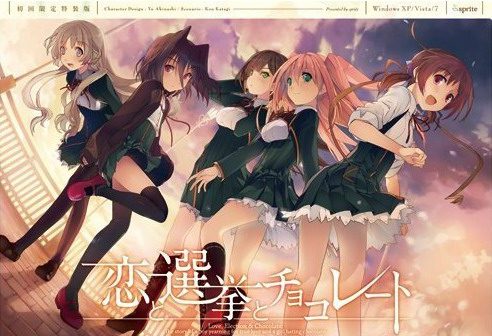
Yuuki, who wants to fall in love, and Chisato, who doesn’t like chocolates. They are lifelong friends and students of the same school. They both belong to the food club with Mifuyu, their classmate. Actually, they don’t do anything everyday, just enjoying chatting… But one day, Satsuki, president candidate of the student council, promises to close the clubs that do nothing. To stop it, they decide to run against her… But who will they send out..? Yes, Yuuki is forced to run for the election… To save the club, he will just need to be the next president!
Koi to Senkyo to Chocolate
- Koichoco.part01.rar - 200.0 MB
- Koichoco.part02.rar - 200.0 MB
- Koichoco.part03.rar - 200.0 MB
- Koichoco.part04.rar - 200.0 MB
- Koichoco.part05.rar - 200.0 MB
- Koichoco.part06.rar - 200.0 MB
- Koichoco.part07.rar - 200.0 MB
- Koichoco.part08.rar - 200.0 MB
- Koichoco.part09.rar - 200.0 MB
- Koichoco.part10.rar - 200.0 MB
- Koichoco.part11.rar - 200.0 MB
- Koichoco.part12.rar - 200.0 MB
- Koichoco.part13.rar - 200.0 MB
- Koichoco.part14.rar - 200.0 MB
- Koichoco.part15.rar - 200.0 MB
- Koichoco.part16.rar - 200.0 MB
- Koichoco.part17.rar - 162.9 MB
- Koichoco_English_Patch_1.0.exe - 33.1 MB






447 comments
so for my case start.exe seems to disappear after it gets extracted and in some cases it doesn't show up at all. First you may wanna keep trying to extract it until it shows up then keep opening it , make sure to not stop like u will keep having an error because all the files aren't extracted yet but after the exe closes due to the error make sure u launch it again ( i think this avoids the start.exe to disappear). Wait until you get all the files extracted then while its still open go delete the licence at the "config" folder (there should only be 1 thing to delete there so i doubt you'll get confused). then after that copy paste the serial number "Q6ZL-HRH8-PZJF-Q2RE" then paste it once u open it again because the game will ask for it.
take note that this is after i set the locale system to Japanese, this may also take a lot of do overs because start.exe sometimes wont show up , the main thing u need to avoid is for it to disappear.
ALSO THIS MAYBE ONE OF THE REASONS WHY IT WORKED BUT BEFORE I EXTRACTED THE FILE I RENAMED THE FILE"start.exe" to "koi.exe" i dont think it matters what name u put but i did that because when i renamed "恋と選挙とチョコレート.exe" (the exe that gives u the dvd error) to "start.exe" it vanished right away lol (same case for renaming "uninst.exe" to "start.exe" make sure u rename it at the RARfile and not at the folder ur putting it once it shows up. i think if u did all of this at once u will have a a great chance of launching it. it works like a charm for me so i hope this helps y'all and sorry for being confusing cause the way i solved my problem is really mess
so for my case start.exe seems to show up in a middle of extraction and disappears after all the files gets extracted and in some cases it doesn't show up at all. First you may wanna keep trying to extract it until it shows.then if u saw start.exe u must keep launching it even tho all files are not yet extracted , make sure to not stop like u will keep having an error because all the files aren't extracted yet but after the exe closes due to the error make sure u launch it again (i think this avoids the start.exe to disappear). Wait until you get all the files extracted then while start.exe is still open go delete the licence at the "config" folder (there should only be 1 thing to delete there so i doubt you'll get confused). then after that copy paste the serial number "Q6ZL-HRH8-PZJF-Q2RE" so later you can paste it because the game will ask for it.
take note that this is after i set the locale system to Japanese, this may also take a lot of do overs because start.exe sometimes wont show up , the main thing u need to avoid is for it to disappear.
ALSO THIS MAYBE ONE OF THE REASONS WHY IT WORKED BUT BEFORE I EXTRACTED THE FILE I RENAMED THE FILE"start.exe" to "koi.exe" i dont think it matters what name u put in, but i did that because when i renamed "恋と選挙とチョコレート.exe" (the exe that gives u the dvd error) to "start.exe" it vanished right away lol (same case for renaming "uninst.exe" to "start.exe") make sure u rename it at the RARfile and not rename it while extraction is occuring.(I DONT THINK THIS DOES ANYTHING BUT IM GONNA TELL U IN FULL CONTEXT OF WHAT I DID COS IM NOT REALLY SURE WHAT CAUSED IT TO WORK BUT IM MORE LEANING TO THE FACT THAT I KEPT LAUNCHING IT DURING EXTRACTION BECASE IT HAD NO TIME TO DISAPPEAR SINCE I KEPT DOING IT) i think if u did all of this at once u will have a a great chance of launching it.
THIS IS NOT A PERMANENT FIX YOU'LL HAVE TO DELETE EVERYTHING AND DO THE TRICK AGAIN BECAUSE START.EXE WILL GO AWAY.i think what i did here is open it before it goes away which makes no sense how i am still able to play it( but hey it works). so keep the rar file and make sure you put your savedata on a different path(before u delete everything) so u can return it later and not lose ur progress. Also u can add ur save data once ur on the menu of the game.It works like a charm for me so i hope this helps y'all and sorry for being confusing cause the way i solved my problem is really messy.
HERE IS A BETTER EXPLANATION
MAKE SURE YOU COPY THE SERIAL AND DELETE LISCENSE SO ALL U HAVE TO DO IS LAUNCH START.EXE( if start.exe Doesnt show up just keep extracting it and try it at different paths)
- Adds some CGs from the console port
- No longer locked into Chisato's route for the first playthrough
- Removes forced autoplay for certain parts of the game