English visual novel downloads

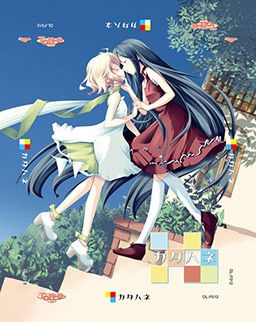
Katahane

Katahane

The story takes place in a world with 3 kingdoms, the Red, White, and Blue Kingdom. In this world, they have highly-advanced dolls with some closely resembling humans. These dolls occasionally need maintainence which done by a “tuner”.

A young playwright named Wakaba writes a controversial play about a traitor named Ein who killed a ruler of the White Kingdom, Christina. In Wakaba’s play, she presumes that Ein did not betray Christina, but was actually her loyal supporter.

When Wakaba’s history major friend needs to make a trip to get Coco, a genki doll that lives with Wakaba, maintainence, Wakaba and her brother Light travel with him. Wakaba travels in the hopes of finding some actors for her play. Along the way, they meet a beautiful doll with one wing named Belle and an aspiring actress named Angelina.
174 comments

Bigdaddygobl1inReply
Although, it obviously may be on my part, but i have the same problem as Spyder, it say the file is corrupt. I tried both mirrors, but as soon as it is about done, it has an error report. If there is a problem, i hope it gets fixed soon. I wannaplay this game so bad >.^o^)>
atsutaneReply
I fond how to resolve the problem.
when you open the .ISO with daemon (or other software, it will just load the file in the virtual DVD. Then go to "my computer" and open the DVD which is Katahane and you'll have the install menu.
SomeoneReply
Noooooooooooooo Not this game. When I install it there are no exe file. I did it like other game that come from admin.Tell Me Whyyyyyyyyy
GediminasReply
If when you install the game no exe file appears in game folder, then just copy exe file from /bin folder in mounted game folder/CD. I have tried and it works.
jrdp_18Reply
Is the contents just a copy of the installed game?
DamakunoReply
Is this good? I want to know before i download it cause i have my hands full doing other stuff and im running out of disk space..
CosplayJellyReply
hey which would any1 here suggest? the literal or natural translation. btw i know a good amount of japanese if you dont count kanji :P
PaullReply
i'd suggest literal for most fans of japanese media. you'll be used to it if you watch a lot of fansubbed stuff. it's the difference between seeing a name, for example, as "sana-chan" instead of something like "little sana".

only time literal translations bugged me was in persona 3 when the english voice actors actually spoke it aloud and it sounded rediculous
AxellisReply
Yes! Yes! Yes! My skill level has increased!
cenatuReply
18+ or all ages?
AznNoProblemReply
18+, says in the Tags
cenatuReply
thanks. i realized that after i posted the question
mothernightReply
sorry. i can't install update 1,10
i tried both japanese app locale and without app and still
won't work. what to do.
mothernightReply
Don't worry, i did it but when i run the game
and choose start it play first sequence and freeze.
I realy have no patience so i deleted the game
and all rar files from HDD.
I won't bother with this game any more.
I really don't blame the one who
uploaded this game. After all i am gratefull
for all other game from this fantastic site.
Thank you.
Igor
SbReply
So hey, I downloaded all the 5 parts, the update thing and translation patch. I tried to extract the 5 parts and I got errors about "unexpected end of archive" about the 5th part. And then it continued the extracting and at the end I got all kinds of other errors; CRC failed in Katahane KATAHANE.ISO. The file is corrupt.
Then I tried to first start the update thingy but only got some error thingy from that. I don't really understand any of this so I'd appreciate some help :D .
adminReply
One of parts (most likely 5th one) didn't download completely. Redownload it and try again.
SbReply
Thanks, no errors when extracting now. But still I've no idea what I should do next. I extracted the update thingy and tried to run it but doesn't work, then i extracted all stuff and tried to open all stuff. i was abe to install teh game and all but it wasn't translated. I'm so confused now !
SbReply
How do I intall the 1.10 update thing? I extracted it and tried to open it but I get some japanese error thing. I think that's the only problem now. Some help please ! ~~
SbReply
OH, I got everything working now. Still wondering about the last part -"5. Select “File” and “Font Config” in-game, and change the font to “S2GP月フォント” to fix wordwrapping."-
I've no idea what this is at all.
Tsubaki_14Reply
Hey, how did you fix the problem with the 1.10 update patch? I'm having the same problem
polo2005Reply
What exactly is 18+ rated in this game? i'm planning on playing it but i rather have the all age version if there is to many h-scens.

Could anyone confirm?
Tsubaki_14Reply
Hey, I need a lil' help please. I keep on running that 1.10 update installer thing, but it always errors on me and I can't read it to find out what's the problem, can someone help me please? It's not even japanese just random characters, probably because I don't have the language installed.
Tsubaki_14Reply
I installed the language and shifted to japanese locale still no luck :/ everytime I try to install any of these files it shows me an un-readable error -w-' can someone who installed it successfully help please? ;3; I'm really looking forward to playing this game
Tsubaki_14Reply
YESSS got it to work! Ok, I'm gonna post here the exact steps to take to make it work for anyone else that may end up having problems:

1. Download all the files
2. Change your default uni-code language to Japanese
- If you're on windows 7, follow these steps:
- Go to control panel -> clock, language and region
- Click on region and language
- click on administrative, there are two sections in it, the second one is titled language for non-unicode programs
- in there, click on change system locale button, then from the drop down choose japanese and restart
3. Mount the .ISO file of the game using any virtual disc mounter (I'm using magicISO which is a freeware) and run it
4. Click on the third button to install directX in case you don't have it, and then click on the top button and install in default directories
5. Go to where you saved the files and install katahane_update_v110.exe in the default directories as well
6. Do the same for the english patch
7. Now you're finally ready! Go to the folder where you installed it (if you followed default path, then it should be C:\Program Files\Tarte\カタハネ and run the katahane.exe (NOT the one titled in japanese, that one is original japanese text) and you're ready to play! you can substitute the shortcut icon on your desktop with this one for easy access.
8. While running it, as the admin have noted when it is in window mode (not full screen mode) you can see the tools bar, click on File on the far left then click on font config and from the drop down choose the one at the bottom which starts with S2GP

Hope this helped any lost souls :) now off to enjoying it!
MangaJooReply
Sorry to ask this kind of dumb question but I'm new to Eroges and hum... about ti non-Unicode thing, will this affect something on my PC except I will be able to install the game or will it change my pc's language or I won't be able to play my already installed games?

Thanks for the futur answer :)
Tsubaki_14Reply
It changes the language of non-unicode programs into Japanese. Well in most cases everything will still be in English it doesn't change your operating system's language, very few programs will be affected by this and those -other than these visual novels- you usually can change their language settings in the program itself.
WOLFGODReply
i cant do the number 5 D: BD rom thats were my katahane is saved and i clicked the set up and it didnt work
ServentSaberReply
Thank you so much for your step by step guide =). you are a life saver <3
AnonymousReply
Awesome! Thanks a bunch, it worked! The key was to change the AppLocale to Japanese, otherwise it won't work.
OtakuNinjaReply
I'm running on windows 8, but I can't install the game. At around 90%, it stops and I get some kind of corrupt text-explanation. :/
KarenReply
Some people have found that magic ISO and magic disk contain viruses. So do many other similar programmatically, so it's best to search '[name of programming] virus' and see what comes up before installing anything.
KarenReply
In the previous message, I meant [name of program] and virus. (Autocorrect problem.)
wowofdoomReply
Male or Female Protagonist?
UmmReply
It's yuri so the protagonist would probably be female... I dunno yet since i haven't started playing yet
WOLFGODReply
im getting promblems on mine i really want to play this game badly when i clicked the katahane file with the iso and my software daemon i cliked this http://gyazo.com/e878300519a9a6337b13feff181779f1 and when it was finished loading this kepts appearing
http://gyazo.com/c23142a17d6a4e68c46309b3b6df06a2
i tried the update and the ^link there happens too
and i try the english patch it says i should change the default language to japanese and i did and then i clicked the patch again it still the same thing D: somebody help me
ServentSaberReply
i cant get the english patch to work it says something about my side ny side configuration is incorrect. can anyone help?
ServentSaberReply
never mind i got it =)
MassEffectFreakReply
How did you get it to work? I'm having the same problem with the English patch :(
DixxxoReply
The files are deleted from mediafire reupload the files please admin

PD: Sorry for my english
DixxxoReply
oh sorry i mistake
MesaReply
this is the best eroge I had play. I just finish this game yesterday. thx admin

Here's the couple conclusion

Kurohane
Christina X Efa (include 3 ero scenes)
Ein X Dua (no ero scene)

Shirohane
Angelina X Belle (include 3 ero scenes)
Cero X Wakaba (include 2 ero scenes)
Tonino X Silvia (include 1 ero scenes)
Fabio X Marion (no ero scene)
boboReply
Does anyone have the drama CD of this game? pls share it on the reply
MyoreReply
If enyone has a problem with instalation, there's another solution. I'm not english but hope you'll understand:

1. Mount .ISO but don't run Instalation!
2. OPEN virtual drive where the game was mounted (for example: "D:") and run SETUP with AppLocale ("D:/KATAHANE/setup")
2a. Everything in AppLocale switch for japanese (the last language on the list)
3. If something was not coppied to game's destination folder, just copy it from mounted game folder/CD (especially, when you installed the game and no .exe file appeared) ;]
4. Move katahane_update_v110.exe and english patch to game's destination folder (where the .exe file is).
5. Run with AppLocale katahane_update_v110.exe and Install. If error appears, just browse destination folder ("C:\Program Files\Tarte\カタハネ") and accept. It worked for me ;]
6. Now run run english patch with AppLocale, and same, browse destination folder ("C:\Program Files\Tarte\カタハネ") and accept. Instalation may take a while.
7. Now you can play, just run katahane.exe :) If there's an error, run katahane.exe with AppLocale as well. (You can create a shortcut, to allways open katahane.exe with AppLocale).

Hope I've helped. Enjoy! :)
nymphadoraReply
So everytime I get to the part where Belle and Angelina are finishing the play and Angelina falls and then Belle catches her and says I love you from the bottom of my heart. I click the next txt and it always stops and brings me back to the Main Menu so I don't know how to get further in the game!
eragon22Reply
Hello everyone,when istalling the english patch i always get the message:

Cant write to katahane directory
re run this programm as administrator
check permission on the folder

can someone please tell me how to solve this:-(
shayeReply
I'm having the same problem as eragon22!

"Cant write to katahane directory
re run this programm as administrator
check permission on the folder"

is the message I get when I try to install the english patch TT~TT
shayeReply
btw I am the administrator of this computer!
eragon22Reply
Hey shaye, luckily i solved it yesterday^^

right-click on the english patch file and then choose "Run as administrator" option from the appearing menu (i use Win 7)

game runs perfectly now i hope that´ll help you too
shayeReply
YAAAAAAY! It worked :') I love you forever now xxxxxxx
eragon22Reply
glad i could help :-)

Leave a comment