
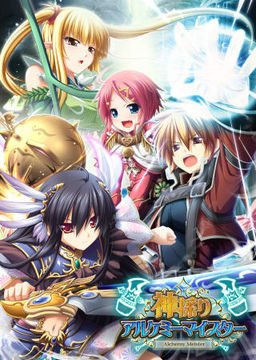
In the Setetori region of the southern part of the Raulbhach continent lies the Mikelti Kingdom. Among the seven major cities is the artisan city of Yuidora. This is where a young orphan named Wilfred lives, pursuing his dream of becoming an alchemist. As tensions between neighboring nations rise and a threat of war looms, three girls in distress come to his place and he helps protect them. Using a new technique that he discovered and with the help of other races, will they be able to restore peace to the lands?
Kamidori Alchemy Meister
- Kamidori.part01.rar - 199.3 MB
- Kamidori.part02.rar - 199.3 MB
- Kamidori.part03.rar - 199.3 MB
- Kamidori.part04.rar - 199.3 MB
- Kamidori.part05.rar - 199.3 MB
- Kamidori.part06.rar - 199.3 MB
- Kamidori.part07.rar - 199.3 MB
- Kamidori.part08.rar - 199.3 MB
- Kamidori.part09.rar - 199.3 MB
- Kamidori.part10.rar - 199.3 MB
- Kamidori.part11.rar - 199.3 MB
- Kamidori.part12.rar - 199.3 MB
- Kamidori.part13.rar - 199.3 MB
- Kamidori.part14.rar - 199.3 MB
- Kamidori.part15.rar - 199.3 MB
- Kamidori.part16.rar - 199.3 MB
- Kamidori.part17.rar - 199.3 MB
- Kamidori.part18.rar - 199.3 MB
- Kamidori.part19.rar - 199.3 MB
- Kamidori.part20.rar - 199.3 MB
- Kamidori.part21.rar - 199.3 MB
- Kamidori.part22.rar - 71.3 MB
- KamidoriPatches.rar - 346.1 MB
- Kamidori_1_1.zip - 30.4 MB




2336 comments
Step 1 and probably the most important - open control panel -> region -> administrative -> change system local (windows 8)(non-unicode programs) into japan (u need to restart your pc afterwards)(note that even if u install the game correctly and then u change it into what u had before, the game wont work)
- Extract the game in a folder u can easily find
- u need a virtual drive to install the game, the easiest way (for me) is to use Deamon tools lite (free program)
- after u install the game into the virtual drive u created, open the drive and run \Setup\
- the instrutions will be in japanese, try to install it as u would normaly install any game (next, next etc)(dont change the default folder) default location is :
(C:)ProgramFiles(x86)/Eushully/神採りアルケミーマイスター
- after it is done, extract the patches into a OTHER empty folder and run the patches in this order -> kami_ap01 -> kami_ap02 -> kami_200
- after u are done with the patches, copy-paste all the files from the english patch into the game folder (神採りアルケミーマイスター), run the \Kamidori English\ and enjoy
1. CHANGE YOUR SYSTEM LOCALE/LANGUAGE FOR NON-UNICODE PROGRAMS TO JAPANESE.
2. Unpack the disc image, append packages, 2.0 update and translation patch.
3. Mount the disc image and install the game by running the setup.exe inside the disk.
4. Run and install the append patches + 2.00 update patch in the following order:
kami_ap01.exe
kami_ap02.exe
kami_200.exe
5. Copy the translation patch to the game installation folder, run and install.
sorry for not being specific much. i ddnt read the dialogues 'cuz i skipped them
Please help
The issue I experienced was the above crash; the installation wizard text and the direct3D options text was also messed up, appearing as random vertical black bars.
I noticed the direct3d options menu said that I was running Windows 7 Home Premium. I was in fact running Windows 10.
The fix:
It seems the issue here is indeed a missing font file, but it cannot be fixed by simply changing the system locale to Japanese (I already had that set, and later tried changing the windows UI language to japanese as well--no luck). Rather, the problem is that Windows 7 (and 8) used a different font family to display Japanese text than Windows 10. Windows 10 uses Yu Gothic UI, while Windows 7 used Meiryo UI. To install Meiryo UI:
Windows button ->
Settings ->
Search: "Manage Optional Features" ->
Add a feature ->
Select "Japanese Supplemental Fonts"
After installation of the package finished, I restarted my computer and the problem went away. My system locale was still Japanese, but my display language was English. The game no longer crashed and the black vertical bars were gone.
Is there a way to download these on the internet somewhere? I did some research and nothing came up.
If possible either fix it (or if it's a problem with my pc explain pls^^)
I'm not sure if I can post links here, but this comment is for you anyway.
http://games.seiha.org/patches/Kami_Textfix_1_0.zip
I used to play with the 1.0 English Patch, so I'm really not sure if the 1.1 fix this. Couldn't find any log of the sort either. This happens in Chapter 2 NG+, so I may give it a look later.
I'm following this site for what? 5 years? Keep up the hard work. We all thank you for this.
Any+Help?
I+like+my+ero-games+to+be+actual+*games*+after+all.+Not+really+looking+for+VNs+except+the+*really*+special+ones.
So, I’m wondering how which of these other games have either an RPG element like this one, or a *VERY* in-depth and story like F/SN. Mostly because there are far too many games to sort through and they aren’t tagged that way.
I like my ero-games to be actual *games* after all. Not really looking for VNs except the *really* special ones.
please help, thanks
do i need an append disk for that?
p.s. i installed all those 3 from here