English visual novel downloads

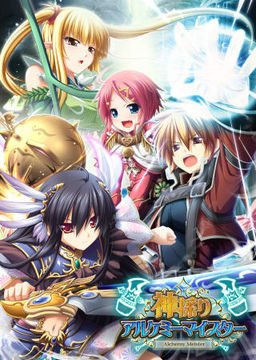
Kamidori Alchemy Meister

Kamidori Alchemy Meister

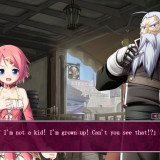
In the Setetori region of the southern part of the Raulbhach continent lies the Mikelti Kingdom. Among the seven major cities is the artisan city of Yuidora. This is where a young orphan named Wilfred lives, pursuing his dream of becoming an alchemist. As tensions between neighboring nations rise and a threat of war looms, three girls in distress come to his place and he helps protect them. Using a new technique that he discovered and with the help of other races, will they be able to restore peace to the lands?

2336 comments

SupReply
Can someone help me installing this correctly,first of all, I don't even know how to install it, how do people install hentai games in the first place, its so confusing. I don't know how to do anything, I have tried downloading so much eroge games, but i never know how to. Thank You so much in advance, this is the first time I thought of asking for help with this.
tasha alexReply
does this include all the expansions
adminReply
Yes, those are listed under "patches download" links.
ZohanReply
Can anyone give me the walkthrough for this game? I've lost mine.
asumaniacReply
help me please
when i install kami_200/kami_ap01/kami_ap02 it show me 2 japanese option, if i choose the left one it will shown me a error message, if i choose the right one the installer will be gone but nothing change. please tell me what should i do?
KyarusReply
Guys, how do store and workshop lvl ? Getting stuck in chapter 1 not being able to up rank >.<
Brandon ArnoldReply
could someone give me detailed but easy to understand instructions on how to get the English patch to work? I don't care if I gotta install it again. I just want to play the game
Hal-94Reply
I just checked around the web and apparently someone has recently released a interface translation for Himegari Dungeon Meister, saw it on vndb. I dunno if its good or works, but it seems promising for the translation of himegari. I'm extremely sorry if i'm wrong though, because i'm not sure if it's legit. I' gonna try it though, since the Kamidori game was fing awesome. Please notice and verify if it's true Admin.
adminReply
Yes, I saw it almost as soon as it got released. It's machine translation and it's not really readable.
Hal-94Reply
Damn, i almost got my hopes up. Anyways, thanks Admin.
CinderReply
admin do you have news if there are other eushully games that are being translated? (not machine translate) because I love kamidori so much and am itching to play their other games(specially madou koukaku and soukoku no arterial), thanks and sorry for the trouble
qwertyReply
Minna Daisuki Kozukuri Banchou is out, it was made by Eushully. It's a lot shorter than this, but I still enjoyed it greatly.
Soldier-81Reply
Can someone please check the source files,

I have download all the part twice but files fail CRC check with 6,7,8,9,10 and 20 report being corruption on archive testing

I used 7-zip testing, it reports 14 errors in Kamidori.mpf

While the file still unpacks it give windows sytem incompatibility errors which I think are due to the corrupted mpf.
Hououin KyoumaReply
INSTALLATION GUIDE!
You want to know how to install this game, because you suck with computers even more than i do? Then here is the installation Guide for Windows 7!

FIRST YOU NEED THESE PROGRAMS:
CCCP, Daemon Tools lite (You dont need deamon tools if you use Windows 8) and WinRar.
then You have to do this THIS:
http://windows.microsoft.com/en-us/windows/change-system-locale#1TC=windows-7
THEN YOU NEED TO DO THIS:
www.coscom.co.jp/learnjapanese801/japanesefont/nonunicode_win7.html (This should make most of the games that didnt work for you make run)

Everything done? Then lets start!
1. Download all the Stuff, make sure you downloaded everything, means: The 22 archives of the game, the 2 archives of the patches and finally the english patch.

2. Extract the archives you downlaoded under \DA-free: Game Download\, its names are Kamidori.part[1-22].rar (22 parts). You dont know what im talking about? Then here for the supern00bs: You need WinRar to be able to do something with these files, i explain it for Winrar, its free by the way. So, open ONE of the files with your WinRar!(Just doubleklicking it should be enough.)
It will show you a folder named \...\ and the \Kamidori\ folder, this on is unimportant. Click on the \...\ Folder, then you should see the directory you downloaded it in (normally the \Downlaods\ directory. Look out for your 22 Kamidori.rar archives.
Mark all 22 parts (so they look blue)and press the big \extraxt to\ button (the one that looks like the folder-icon)and then choose where WinRar shall extract it to.

3. When the extracting is done, Mount the .ISO file you get with Daemon Tools Lite, just doubleclick the .ISO file. It should open a window that shows you some files, click at the \Autorun\. A little window appears with 5 buttons, there is japanese written on them, click the second line to install the game. To get through the installation, just click whenever possible the \N\. When the game is installed you`re halfway done! Hurray!

4.Do the same you did with the 22parts of the game with the 2 parts called \Kamidori.patches.part1/2\. Extract them both somewhere, but NOT in the game directory! When the extraction is done, you should have a \KamidoriPatches\ folder. Open it and copy all the files(3)into your game directory (NOT the the \Eushullly\ but the folder called \神採りアルケミーマイスター\(its in your \Eushully\ folder)).

5. Run the 3 files in your game folder \神採りアルケミーマイスター\ in this order:
1. kami_ap01
2. kami_ap02
3. kami_200

6. Now you extract the Kamidori_1_1.rar archive somewhere, but NOT in the game folder. When the extraction is done, doubleclick the folder you got (Kamidori_1_1) so you can see its inside. Mark EVERYTHING inside the folder and copy it into your game directory \神採りアルケミーマイスター\. It will ask you if you want to overwrite files, allow it do overwrite every file.
7.You're fucking done it! It should work now and in english! To play the game run the \Kamidori English\.exe in your game folder!
Special thanks to me, for being the genius insane mad scientist, with an IQ of over 170, Hououin Kyouma!!
projectReply
I have a problem. Even though I followed your directions, the game will not open with the Kamidori English.exe. Do you have any ideas what it might be?
Hououin KyoumaReply
I don't know, information would be good
projectReply
Never mind. It works now.
SS80Reply
How ?
I think i have the same problem you had. I did everything that was said and i can start the game in japanese but not in english, the game doesn't open with Kamidori English.
It's maybe because there is no files in \神採りアルケミーマイスター\ so of course i can't overwrite them (since they aren't there).
And also, there is no difference between the two link in the instruction rigth ? It has the same result.

Please Help

PS: i am french so sorry if i don't speak well
SwordfishReply
How did you get yours to work because I'm having the same problem
RevitReply
I'm trying to install this game, but everytime I try, there's this error I keep getting that has the letters msi. I can't get past the installation part because of this error. Does anyone know what that means?
EkenzieReply
Me too dude.

i tried to install it through Autorun, there’s this error I keep getting that has the letters msi too.
DownsideUpReply
Used this to fix my game after transferring it to a new computer, worked perfectly. Thanks friend.
ZidoReply
The .rar file appears to be missing. It is what I originally used to install Kamidori on my previous computer. Recently, however, I switched to a new one, and I tried transferring all my data directly from my computer using an external hard drive, but it's not working. I assume this is because I originally installed it on a Windows 7 computer, and am now using XP. I didn't think it would be a big deal, since I could just download the disc image file again and reinstall it, then use my old save data - but now the file that contains the disc image file is missing. Any idea where I can find it or what else I could try?
ZidoReply
Okay, update. I found a download on the pirate bay with the file I needed so I could do the installation manually; after doing so, however, I got the same result. I figured it may have to do with my attempt to transfer the save, so I attempted to locate my save data to delete it (since I still have it on my external hard drive) and see if that helped. Oddly, I could not locate the folder that the save data is supposed to be kept in. I checked Application Data, but there is no Eushully folder there. Super confused right now.
SoraReply
I am having a problem when I play this game, after playing for more than 5/10 mins the menu on the workshop turns into white boxes, I can still click on it however but can't read any of it.

I can fix it by restarting the game, it also pops up in other players such as covering the buy temporarily on the church shop.

Any tips on how to fix this? Everything else works fine. I can't read the video settings since they revert to japanese when I open it. Is it a RAM/Graphics card problem?

Thanks in advance
TMSReply
It says \The file or directory is corrupted and unreadable.\ while halfway through the installation. I have downloaded everything without problems. I managed to extract all the parts without errors. So why does it say this?
TMSReply
Okay never mind, I solved the installation bit I think. What I did was, instead of mounting the .mdf file, I extracted it to a folder using 7-zip. And then I run AppLocale as Administrator and selected Autorun.exe.

I did all these without changing my System Locale and it installed without problems then. I'm now going to try applying the patches and finally, the English translation.
CarterReply
I cant install kami_app01, kami_app02, then kami_200.
After installation complete there some notice but, I dont know it. Then no folder from installation. Can anyone help ??
SachanReply
is this game not compatible with OS windows 7?
adminReply
Yes, I had no problem running it on Win7 x64. Make sure to use Japanese locale tho (refer to site's FAQ section for instructions).
PervertedBastardReply
This is one of the best eroge i have play. Even though i wish there was more optional H scene the gameplay is what make this eroge so great.
ShadowReply
Excuse me and i dont know if you have already answered, but i cannot save my game, it pops up an error, it doesnt crash the game but makes me unable to save the game, please help D:! thanks in advance, admin or whomever helps me out n.n
new guyReply
excuse me i downloaded the game and it works but i cant save my progress what should i do
rizutaReply
are the link still available??
Hamdy manReply
Hey so i installed everything into my system but i don't have access to the version 2.0 game changes that are in the new game option. I have the new playable characters part open though. Did i miss something?? Which file was meant to open this part?
bobReply
hello. I just finished the quest of giving the fox queen (girl with 9 tails) the 100 stones. got her H scene, but this seemed to do something that has stoped my game from proceeding past chapter 5. I would appreciate some help. I am also on yuela's route.
bobReply
also I would like to add that I cannot activate the minsashall mission even though I am way above level 22 and have all the required things it lists
TATUReply
its needed to download the game, the patches, and english patches?
Someone explain me please
James KingReply
Hello,
I am am having trouble applying the english patch to game. I am just not quite sure how to do it. I downloaded the file and put into the same folder and a .exe play in english file was created however it does not run does anyone know how to deal with this?

P.S. I did install the other patches in the correct order
James KingReply
and my system locale is Japan
James KingReply
Does anyone know the exact location the patch is suppose to go?
jairuz reyReply
I can't load but i can save
please help me !!!!
YakumoReply
It's possible you might have to run the game with admin permissions to save? The game might be trying to save but the computer won't let it, I've had that problem with games before. Not this one though so I'm not sure.
yerriReply
i cant install the patch it says error reading initialization file
allenhill2002Reply
How do I install the patches? Do I just double-click on them? Is there a particular order I'm supposed to do that? It game me 3 files that are applications.
kami_200
kami_ap01
kami_ap02
It's in Japanese when I click on them, so I have no clue what's going on.
ZarrosReply
When you have dobbel clicked on one of them, then it should run like normal, except it being in japanese, from there, there will most of them time be one option you can't choose, then two options you can choose, go for the first option you can choose, most of the time that is equal to the "next" option, doing it like this worked for me.
(I know this is a long time after the question was asked, but it might help any that have the same issue.)
XymmaReply
I'm getting a "missing .msi" error when I go to install it. Anyone have a possible fix for this?
XymmaReply
I found a solution to that problem, now I am encountering a new one. After I copy the english patch to the game directory I receive no prompt to replace any files, as there are only 6 total files in the directory the .exe a file with an Icon that resembles the .exe, assuming the uninstaller, an unknown application in japanese marked アンインストール and the three patches. Going through the other comments I've read many tutorial and one inconsistency between mine and those tutorials is many say the game should have been extracted as an .iso as mine was extracted as an .mdf. I have no idea if this would make any difference but it is the only thing I can find, if anyone knows a solution please help.
AnonReply
I installed the basic game, version 2.0, append 1 then append 2 before I installed the translation because that was the order that they were in in the download.

Did I cripple my game because of the way I installed things? Will I miss out on some of the things in those 3 patches?
KaytwiceReply
Hey Guys,

Quick question, doesn't it have the on/off option for voice skip on click? I played if a few times already and i do think i remembered that i played it with this option .. i doesn't like to play VN's where i can't set it off.

I'am really remembering it wrong oO?

Leave a comment