
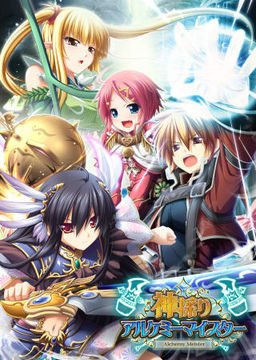
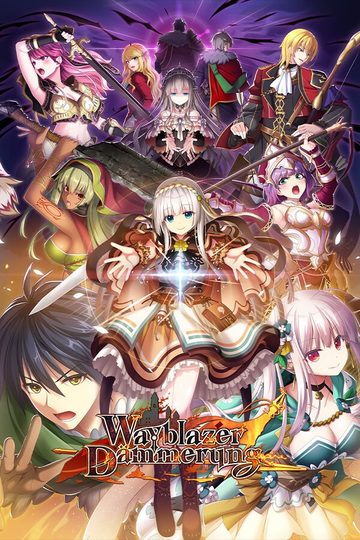
In the Setetori region of the southern part of the Raulbhach continent lies the Mikelti Kingdom. Among the seven major cities is the artisan city of Yuidora. This is where a young orphan named Wilfred lives, pursuing his dream of becoming an alchemist. As tensions between neighboring nations rise and a threat of war looms, three girls in distress come to his place and he helps protect them. Using a new technique that he discovered and with the help of other races, will they be able to restore peace to the lands?
Kamidori Alchemy Meister
- Kamidori.part01.rar - 199.3 MB
- Kamidori.part02.rar - 199.3 MB
- Kamidori.part03.rar - 199.3 MB
- Kamidori.part04.rar - 199.3 MB
- Kamidori.part05.rar - 199.3 MB
- Kamidori.part06.rar - 199.3 MB
- Kamidori.part07.rar - 199.3 MB
- Kamidori.part08.rar - 199.3 MB
- Kamidori.part09.rar - 199.3 MB
- Kamidori.part10.rar - 199.3 MB
- Kamidori.part11.rar - 199.3 MB
- Kamidori.part12.rar - 199.3 MB
- Kamidori.part13.rar - 199.3 MB
- Kamidori.part14.rar - 199.3 MB
- Kamidori.part15.rar - 199.3 MB
- Kamidori.part16.rar - 199.3 MB
- Kamidori.part17.rar - 199.3 MB
- Kamidori.part18.rar - 199.3 MB
- Kamidori.part19.rar - 199.3 MB
- Kamidori.part20.rar - 199.3 MB
- Kamidori.part21.rar - 199.3 MB
- Kamidori.part22.rar - 71.3 MB
- KamidoriPatches.rar - 346.1 MB
- Kamidori_1_1.zip - 30.4 MB








2336 comments
#who got the same problem as mine#
1. First download the main game..(kamidori.iso as example)
and install it, using power iso or else that compatible.
2. Then download kami_ap01.exe,kami_ap02.exe, kami_200.exe
and Kamidori English 1_0.exe......
Then,put all this four inside this folder..
C:\Program Files\Eushully\神採りアルケミーマイスター
install that patcher according the sequence, 01, 02, 200..
and last one is Kamidori English 1_0.exe
3. DONE FOR PLAY~
1. Download all parts of the game into a single folder. (If the download doesn't work and you get redirected try again it happens be patient).
2. Open the Kamidori.part01.rar and move the file to the place where you would like to install the game. (For instance I have a folder on my computer called v-novels where I store all my v-novels data).
2.5 You will need to change your locale to Japanese if you haven't already.
To do this go to control panel, then go to Clock/Language/Region (this name will vary depending on your OS just go to the one that says language. I'm using Windows 7 so that is how mine reads). Once you open there will be a tab that says Administrative. Click on this tab and then click change system locale and change it to Japan/Japanese. You may be prompted to restart your computer, if so let your computer restart.
3. Next you will need Daemon Tools Lite to mount the image. This is a free software just google it and download. Once You have Daemon tools installed on your computer double click the KAMIDORI.mdf file and it will pop-up an install wizard in Japanese. To install just click the buttons (just think of where the next button is in the English version of install wizard).
4. Now that that is done you will need to go to your C: drive on your computer. Go to C:\ProgramFiles\Eushully and there should be a file with its name in kanji. Move this file to the place where you want to launch the game from (the .exe file is inside of this folder so unless you want to go into your C: drive everytime you want to launch the game you will need to move it).
5. Now you will need to open the KamidoriPatches.part1.rar. Drag the patches folder into the file with the .exe. Next open the Kamidori_1_1.zip and highlight everything in the file. Drag everything into the game folder and replace everything when asked.
6. Launch the Kamidori English.exe and enjoy.
Hope this helped and don't forget to have fun ;)
The problem is when i go to start a new game (first time playing)
and it crashes and closes.
Any ideas?
the only things I do to play is :
I use Win 7 32 bit
Ram 1 GB
VGA 256 Intel
1. open control panel > region and language
2. go to administrative tab
3. klik change system locale
4. choose Japanese (Japan)
5. klik ok
6. restart windows
7. install game, 3 patches , and finally english patch (english patch must installed last)
8. Play...
I don't know if you can play it after change your locale to english back.
hope this works
If not, do any of you know all the registry files/folders for the game?
Problem that maybe someone can answer: Having played the game through, I eventually had the game freeze and it continues to do so every time I try to equip gear or abilities. I tried uninstalling-reinstalling everything and the freezing persists.
Anyone know how to fix this? Also if not, has anyone manually uninstalled in the registry, if so it could help me for the next time!
plus, the artwork suit my taste ^^
but from what i've read on VNDB, it's really easy ;l
o well, i'll give it a try :)
thank you admin ^^
and i find it funny how everyone are giving different solutions lol
hope i won't meet any problem :p
and its work play with jap langguage
download all patch
1. install kami_ap01
2. install kami_ap02
3. install kami_200
4. extract kamidori_1_1 to kamidori game folder
5. play with kamidori jap/englih patch
result jap and english language both of them works
when i go to runic foret ruin to defeat the reaper i got required unit unavailabel...
help
this is my second play with all clone character.....
i need help here
i got stuck in chapter 4 ng+
i don't know what to do
the remain mission is get promote to the next rank
IDK about emelitas route not into that stuff but pretty awesome game 8.5/10
the only thing i can read in the error is [...].msi[...]
Mounted .mds and also tried with mounted .mdf
i already change the language into japanese... and have virtual drive (daemon tool) but i still cant make it,,,there's always be a weirds word.... plz help me... want to play this game so bad....thx alot
Create a shortcut of Setup.exe with this address;
C:\Windows\AppPatch\AppLoc.exe "H:\setup.exe" "/L0411"
To enable AppLocale (download it form Microsoft if you don't have it) upon the installation.