
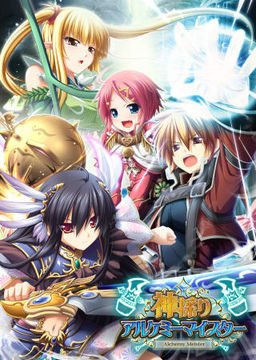
In the Setetori region of the southern part of the Raulbhach continent lies the Mikelti Kingdom. Among the seven major cities is the artisan city of Yuidora. This is where a young orphan named Wilfred lives, pursuing his dream of becoming an alchemist. As tensions between neighboring nations rise and a threat of war looms, three girls in distress come to his place and he helps protect them. Using a new technique that he discovered and with the help of other races, will they be able to restore peace to the lands?
Kamidori Alchemy Meister
- Kamidori.part01.rar - 199.3 MB
- Kamidori.part02.rar - 199.3 MB
- Kamidori.part03.rar - 199.3 MB
- Kamidori.part04.rar - 199.3 MB
- Kamidori.part05.rar - 199.3 MB
- Kamidori.part06.rar - 199.3 MB
- Kamidori.part07.rar - 199.3 MB
- Kamidori.part08.rar - 199.3 MB
- Kamidori.part09.rar - 199.3 MB
- Kamidori.part10.rar - 199.3 MB
- Kamidori.part11.rar - 199.3 MB
- Kamidori.part12.rar - 199.3 MB
- Kamidori.part13.rar - 199.3 MB
- Kamidori.part14.rar - 199.3 MB
- Kamidori.part15.rar - 199.3 MB
- Kamidori.part16.rar - 199.3 MB
- Kamidori.part17.rar - 199.3 MB
- Kamidori.part18.rar - 199.3 MB
- Kamidori.part19.rar - 199.3 MB
- Kamidori.part20.rar - 199.3 MB
- Kamidori.part21.rar - 199.3 MB
- Kamidori.part22.rar - 71.3 MB
- KamidoriPatches.rar - 346.1 MB
- Kamidori_1_1.zip - 30.4 MB




2336 comments
I tried to install the game but every time I get a window with the title "installShield Wizard" and some japanese on it. I tried to find this shield wizard but I only find "installShield" and nothing changed after I install it...
Does anyone know what I can do ?
Thanks in advance
1)Extract rare
2)MOunt image(im use deamon tools)
3)change langue to japan or game will be crash in 5 min
4)instal game, use appllocale program (i have problem with setup, but im use autorun and works fine)
5)after that extrakt 3 patches is absolutli not important wher
run the 3 patches with appllocale (if you running them normal they will not works) if they good instalet in directori when you instal game will be show new filles chek for uninstal files all patches make own so to right instal you will have 4 unistall .
6) now the triki parts rename game folder to kamidori copy the en patch and lunch:D
7)enjoin the game sory for my en and if you find problem or game crashed chek langue in pc gl hf
I finally achieve to install the game and run it BUT when I go to the first dungeon to take the alchemist exam and the examinator say to go on an item in the floor to watch by myself what it do I got another window pitch black and the whole game freeze -__-
Please help...
I have Daemon tools and got it to run, Im in Japanese Locale.
after 6 hours of downloading everything, kinda was looking forward to actually playing this.
any help is appreciated, if you need pictures (screenshots) of what im seeing lemme know, unless you can comprehend it.
BTW, the folder name is still in Japanese, idk how to change it, but every file/program inside of it is written in english.
the main application that launches the game is written as:
AGE
ARCGameEngine
ARC Software Laboratory
it says Eushully in English as well during the opening credits.
not sure how to proceed
....I'm fvcked.
i dont know how to install this shit.. >.<
Should fix problem.
Control Panel - Region and Language - Click the administrative tab - Should see "Change system locale..."
You may have changed either the format or location tabs to Japanese but all you really need to change is the locale via administrative tab.
Might be similar if you're using something other than Windows 7.
Whenever i try to install something like the game or the patch a icon pops up like this "Windows installer service could not be accessed.contact you support personnel to verify that it is properly registered and enabled"
this happens everytime i click a installer!
the installshield preparation wizard starts and in the middle of it this happens everytime!
So anybody please help!
this happens when i start the setup!
first the installshield wizard starts then in the middle of this starting process a window open saying 'your installer service is not registered and not enabled' or something like that!
help needed please!
Hey, I'm getting a "ACR Game Engine is not Responding" message when I try to go into "New Game". Does anyone know where i can get my hands on the codec sandoe41 needed?
--- Full Version ---
I'm using Win7 64-bit, and this is what I've done so far:
1) Downloaded the game download from the torrent, the v2.0 patches, and the English patch from the links provided by erogedownload to my "Downloads" folder in my profile.
2) Used 7zip to assemble/unzip the downloads into the .mds/.mdf game installer, the v2.0 patches (kami_200, kami_ap01, and kami_ap02), and the kamidori_1_1 English patch into "Kamidori", "Patches", and "Kamidori_1_1" folders respectively, all under a "kamdori" directory in "Downloads". These files did not move unless otherwise specifically stated.
3) Used the "administrative" tab in the "Region and Language" control panel to change the local to "Japanese (Japan)"
4) Mounted the .mds with Daemon Tools Lite, ran the installer.
5) Ran Patches>kami_200 (success here is assumed).
6) Ran Patches>kami_ap01 (success here is assumed).
7) Ran Patches>kami_ap02 (success here is assumed).
8) Copied the contents of Kamidori_1_1 into my C:\Program Files (x86)\Eushully\神採りアルケミーマイスター directory.
9) Ran "Kamidori English". Game opens, but i still see a lot of Japanese text I can't read in the CG screen, options screen, and the menu when I click "New Game"
10) Used "administrative" tab in "Region and Language" to go back to "English (United States)".
11) Ran "Kamidori English". Some kind of setup utility runs, but its in Moonspeak Japanese (special characters), so I can't read any of it. Closed util without changing anything.
12) Ran "Kamidori English" with Applocale. Setup util Ran, and I can read the Kanji and Hiragana. Clicked OK.
13) Ran "Kamidori English". Game opens in windowed mode. Opening Cinematic plays. Main menu opens (noted that buttons are now in English). Clicked "New Game".
14) New Game screen comes up, Game freezes. "ACR Game Engine Not Responding" (win 7 message box) appears.
15) Read Erogedownload.com posts (this page)
16) checked in my "Programs and Features" Control Panel, and see "神採りアルケミーマイスター", "神採りアルケミーマイスター Append02", and "神採りアルケミーマイスター Ver2.00 Update". (Unsure if that means that all the patches are installed correctly, but have no reason not to believe they are, other than that the game is crashing).
17) google "Kamidori Alchemy Meister codec", find someone at vn-meido.com saying that I need to un-install the codec to prevent the codec from trying to take over the decoding. Not sure if this is right since the opening plays fine, and it conflicts with what sandoe41 was saying about adding a codec.
any insight?
Thanks in advance
The "Text" and "Character" buttons in the "Options" menu cause the same "ACR Egine" Crash, as does going into "Eushully's Room" and "Extra Stories".
Windowed mode/Fullscreen mode seems to have no effect on the error coming up for "New Game".
My computer is in Japanese locale and I have downloaded other games and their patches and installed them all as well. Yet, when I try to download the patch for this game it doesn't work. I can get to the DA site but when it starts generating the download link, it never finishes it. I've sat around for 15 minutes waiting for this thing yet it never finishes downloading. So I was wondering if anyone has any method for fixing this. It's not due to slow internet cause when my internet is fast, it doesn't download. I have successfully downloaded other games, but this one just won't do it. If anyone has any suggestions or anything I'd really appreciate it. <3