English visual novel downloads

D.S. -Dal Segno-

D.S. -Dal Segno-

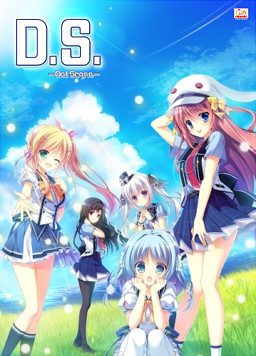
Kazana Island… A cozy, cool paradise where summer never ends.

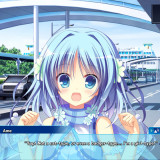
The protagonist finds himself stepping foot into this island paradise as a transfer student, greeted by a mysteriously glittering sky, as well as the energetic island caretaker Ame, a girl-type AI.

After a bit of a rocky start, he settles at the dorms where a handful of new female friendships await.

She’s a tomboyish beauty, but a bit of a loner: Himari Asamiya.

The manifestation of brains and beauty, and also student leader: Hazuki Murasaki.

The self-proclaimed “Daughter of Darkness”, with a normal side too: Io Kouzuki.

Always trying to act the grown-up, but still a tease (your cousin): Noeri Fujishiro.

And the girl who embraces her role of making everyone happy: Ame.

How will you sculpt your everlasting happiness here in paradise?

A new love is about to begin…
111 comments

KirReply
Anyone else having problems with it not launching. I see it running in task manager but it wont show up.
steepReply
also having this problem on w10
kiabee21Reply
me too , ive been saying that but , the admin keeps deleting my comments.
KlaisReply
I just have to wait awhile, it takes like 30min for the game to load for the first time it seems.
KirReply
Thank you for the reply I will try this out.
KirReply
Reporting back that this does not work for me. I too use win10.
I'm guessing this is a crack problem as someone else suggested as the jap crack does work but messes up the text.
any13thReply
It did work for me after some fiddling around. I'm also on Windows 10. I installed the font and the direct X inside the game folders and it still didn't work. I tried deleting it and my computer froze so I restarted it and deleted the files for real, since none of the processes using the files were open. Afterwards I took the game out of the zip files again and tried the Dal Segno game launch application. Smartscreen stopped me as usual, but for some reason, it worked his time.
Cirno09Reply
same's happening to me i tried running as ADM the game just runs on the bg and I already waited 30min and didn't work ... guess will have to wait for the crack or bug to be fixed I'm planning on buying this VN but before that i just wanted to know if its worth
RuumReply
Yep, same stuff happening here. Haven't found a fix yet.
kiabee21Reply
Apparently , the crack is not a problem but the game, i found a guy with teh same problem on steam who bought the game. He said in wasnt working on his pc but when he downloaded teh game to his laptop it works.
adminReply
This game doesn't use any crack - files posted here are exactly the same as the one provided to buyers. Mangagamer stopped using DRM in their games some time ago, since every release was being cracked within minutes anyway.
Cirno09Reply
I'm playing on a laptop and doesn't work either
Cirno09Reply
To ADM so will have to waitch for a patch to fix it? i tried steam solution but it doesnt work and i'm on a laptop
YkaruzReply
I fixed it here. My photoshop was open. After I closed it, the game started by itself just fine. See if there isn't any other program open.
Cirno09Reply
thanks
i had to restart the pc, every other programms are closed now it works
what a pain XD
RuumReply
Closing Logitech Gaming Software fixed my problem too. Seems like looking for some running incompatibilities is the way to go.
lolcatzReply
I don't know if it was part of the problem or not, but when i restarted my laptop and closed the guildwork app, it seemed to work fine. *shrug*
ValerianHDReply
sevenforums.com/bsod-help-support/122804-process-running-programs-dont-open.html

try this solution
drazzReply
dude that completely a different issue,
doing a cleanbooti will not help
NovaReply
i had the same problem but i found my issue,as you the proess was showing in the taskmanager but the game was not working,since after a restart the game was working i was sure one process/program was blocking the game.
to see what is blocking the game:
open task manager
performance
resource monitor
search DSAO(dal segno process)
analyze wait chain and check what's the problem

https://puu.sh/wBnif/f1bfb11a9e.png
lolmanReply
Wut it work. Not sure why my avira make it unable to launch. Thanks xD
KaiReply
This method works for me, give it a try!
lolcatzReply
Is there any point in changing the default name? I set it to something else, but the characters still refer to you as the default name lol
Red RiotReply
Yeah, basically that thing was useless from the start lol XD Even if you change the name, they will still call the mc atsuya-kun.
But, i don't dislike it.
YuyuteiReply
Thank for the upload admin, is this the All-age or the 18+ version?
FHReply
Check the files name
new memberReply
arrigatou
GuanoReply
That was fast admin ,, ., ., thanks v:V
Il GattoReply
been waiting for this one for age, thx a bunch admin
ValerianHDReply
Spoiler: the ero patch is free. So if you buy the steam version, you patch it with 18+. The patch is on mangagamer site (you need to log in). There is also the link on the officjal FAQ on the Dal Segno steam forums.
any13thReply
The windowed mode is way too huge, can someone tell me how to change the size of it ?My display is 1024 x 728.
hellmyhandReply
You will have to play it in the full screen mode. I don't think you can change window size. Drag up the game as much as you can, and go to config to change to full screen. Try changing your display settings to a larger resolution.
If the config button is too low for you to click even then, try ctrl+alt+(left or right arrow). The screen will be turned sideways, so you will be able to reach the config button. By ctrl+alt+(top arrow), you will be able to return to your original orientation. Once the game is in full screen, I think you should be able to play it with no problems.
hellmyhandReply
I just realized, you can get to the config by just using arrow keys and enter. Just get to the config and use full screen.
any13thReply
<.< Alright, I just wanted to change the resolution so I could be in windowed mode and switch between it and the guide I'll be using with ease. I didn't have any troubles switching to fullscreen by the way. The response, while unfortunately not the one I wanted, is appreciated regardless. ^.^
hellmyhandReply
You could always use Alt-Tab to switch between the guide and the game. That's what I did anyway.
MilkedReply
I don't really care about this.. i am waiting for Imouto Paradise 2 and Kyonyuu Fantasy Gaiden MWAHAHAHAAAAHAA!!!!!
kiabee21Reply
me im waiting for Princess Evangile w/happiness
MilkedReply
well that too, but it is kind of worrying, princess evangile has a story and it is pretty good for me, so if the fandisc is badm it could destroyed my whole image of the game. I just hope the Fandisc is the best junk ever.
kiabee21Reply
I doubt it will be good as the original, remember its only a fandisk, its a continuation of the original plus new routes. I just want to play the routes.
RevooReply
aww come on... is that one in the background wearing a little hat?... come on man...
goddamnReply
#discountsuginami in this game
goddamnReply
#discount da capo 3 newspaper club
FoRtIsS146Reply
How the quality? is it English? or ENGGRRIISSHHUUU?
goddamnReply
it's good enough for me, a native English speaker
2kinkyReply
I mean, Damn dude! I've downed like 300 games from here, and I'm like 25% thru Ryoko Sensai, and you just drop another "MUST HAVE" on me. You're heartless! But I love you! Thanks for all of your hard work. And the plus sign in the posts is pretty annoying. Five seconds to write a post, 3 minutes to delete the plus signs, but it's better than $642,000 to play a video game. Thanks Admin!
Qwerer22Reply
For those of you who can't launch the game, try disabling Nvidia share/shadowplay
worked for me
mnt125Reply
yeah guys, try disabling the nvidia shadow play on task opr start up. for me it was called Nvidia Capture server proxy. it should work
AnonymouseReply
If your having issues launching the game and the mentioned solutions don't work like I ran into. I had luck using sandboxie to launch the game.
AeionReply
Man another true end... *sigh*
Well, its a good one so worth it!

Leave a comment