
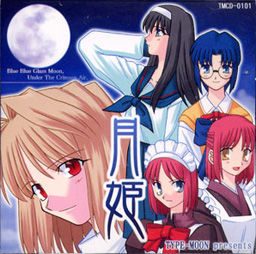
Tsukihime is a doujin visual novel, released in December 2001 by TYPE-MOON. It tells the story of Tohno Shiki, who since a life-threatening accident in his youth is cursed with the ability to see “lines” on everything around him. Lines along which objects can easily be cut.
Having lived with foster parents for seven years, Shiki is recalled to the household of his family. He had lost all contact with his family over this entire period, making it difficult for him to get used to the new situation. As he gradually learns more about his past, the situation becomes more and more unfamiliar and dangerous.
Tsukihime










205 comments
Then, run the patch 1.1 (this is the installer for the game, so you get to install the original game and the patch at the same time)
Anything else is just next - next....
Then, run the patch 1.1 (this is the installer for the game, so you get to install the original game and the patch at the same time)
Anything else is just next – next…
Then, run the patch 1.1 (this is the installer for the game, so you get to install the original game and the patch at the same time)
Anything else is just next – next…
Use whatever image burning software you have (i use ImgBurn) and burn the .ccd file to a disc. Then, open the first patch file and install the game, using the disc in your drive rather than the extracted .ccd files. Install 1.2 afterwards. Then use CDex to convert the files on the CD (go to track 11, then the Tsukihime with the red ISO icon) to OGG format by going into options > encoder and changing your encoder to OGG Vorbis. Convert the CD tracks to compressed audio files and put them in the CD folder of the game and named them track01, track02, etc.... the rest is in chapter 7 of the ReadMe. Actually all of it is.
I had a hard time using CDex because it wouldn't recognize either of the virtual drive software i have, so it made it way easier to just buy a few blank CDs and install everything from the disc.
I decided to just make a straightforward tutorial for anyone having my issue in which a virtual drive was not recognized in CDex. I followed other tutorials above but only came to failure. Plus, I had an issue after installation from using the extracted files of the .ccd, in which no image files would load during gameplay because they were not found (says the stderr.txt file that appears once you start the game for the first time). However, putting the image on a disc and installing from there fixed my issue. It must be my OS because I don't see this issue anywhere else in the comments and I'm sure the majority of commenters are on Windows 7.... I'm running Windows 8.1 64-bit. I honestly hope this helps in the future, and I really hope too that I'm not the only one with the issue...
Is win8 ust not capabale of mounting this particular image file for some reason? do I need to use daemontools or similar software?
I think I did read someone saying the files are corrupted in the comment.
Actually i know how to install it with daemon tools and such as thing other. But when i opened inst.exe インスタル (install) at program file, it said "because copy file is failure, it cant install" in japanesse.
Can anybody help me with this problem?
:D
Yaaaay
Is win8 ust not capabale of mounting this particular image file for some reason? do I need to use daemontools or similar software?
I think I did read someone saying the files are corrupted in the comment.
Pay attention to what drive you are mounting the game on, and when you start up the 1.1 patch and get to the arc.sar part, make sure you change the letter of the driver to the same as the mounted driver.
Ex.
Patch: \E:tsukihimearc.sar\ -> change the \E:\ to the mounted driver's (mine was Q) -> now it should look like this \Q:tsukihimearc.sar\
1. Download those shits (Tsukihime and Tsukihime_English)
2. Extract Tsukihime.rar
3. Just mount Tsukihime.cdd(using Daemon Tools etc) and do not run inst.exe.
4. Run English patch and it will ask u to locate a certain file. Just change the Disk Letter to your mounted image earlier.
5. Finish. Have fun.
After finished installing daemon tool. Open that shit up.
Go to "Add drive" within Daemon tool.
Virtual Drive: DT
DVD Region: not set
Mount to : Folder "for this one, create a new folder that's empty, then click that ... thing and choose the folder"
click "Add drive"
And then click that rectangle looking drive, just below, or bottom left the overall interface of daemon tool. CLick dat, go to the folder, open the tsuki hime.ccd one. Then you will see a music note on it. Click dat, if this open up a folder with stuff in it. Then you succeed. Now quit that shit.
Open "Tsukihime_English_v1.1", basically the patch of the game that you've downloaded. It will asks for "arc.sar". Then just simply go to that folder that you have just created. You will see that the folder of the new folder turns out to be a disk shape. Click into that folder, then go to "tsukihime" folder. Then double click, or just choose "arc.sar". Then you downloaded the first patch.
After you're done with that, you then download the "Tsukihime_English_v1.2_update"
Do the exact same thing. After you're done. Go to your game directory, or the folder that you've decided to download the actual game in. You will sees that there's no sound. Go to the read me notepad to figure it out by yourself ;)
So here's a way to have music in your game. Tho no VA coz, meh.
(http://www.mediafire.com/download/ei633e3gpi96qwo/Novela+Visual+Tsukihime+%5BEspa%C3%B1ol%5D.rar)
download this. Extract "CD" only. After doing that, copy and place those CD into the tsukihime folder that has "CD" folder as well. Replace it with those track1.ogg or some shit into the folder of Tsukihime with the application to access into the game. And there's sound now.
Thank You.
Hope all you future gamers will find this useful.
The image file is indeed weird. But you can open it with IsoBuster (a data recovery tool) and from here, you'll be able to extract the data required for the install.
You'll see 2 Tsukihime folder, one with japanese file name, and one with no japanese character in the files. The one without japanese character works, didn't test the other. Extract the entire folder somewhere and you'll then be able to access the arc.sar file required for the english install, located in the TSUKIH~1 folder.