
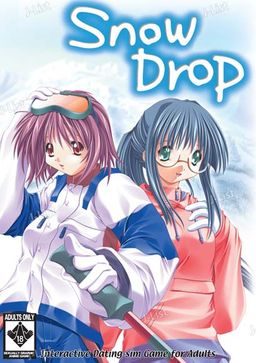
Snow drop is a beautiful European herb known for bearing nodding white flowers that often appear while the snow is on the ground, despite the cold of winter around it. Filled with symbolism of “hope” and “consolation,” the beautiful flower is the central theme in Snow Drop, the romantic wintertime bishoujo adventure from Peach Princess!
You are Minoru Sasazuka, age 19, a bit of a dreamer with a difficult tendency of not being able to make decisions when your heart is involved. A normal Japanese boy, trying to get into college, you’ve got a handsome physique that should make you popular with girls, but your occasional penchant for romanticism drives them away.
Invited on a winter dream ski trip with a group of friends, you head for a ski lodge for some winter skiing and fun. For you, it’s a journey home, since you frequented this particular lodge since when you were young. With you are Kyoka, a very special childhood friend of yours, her stylish sister Keika, and your sister, Honami.
At the lodge, you enjoy the hospitality of the owner, Kasumi, a competent woman with a tinge of sadness in her eyes. Also at the lodge is the lovely Shizuka, the mysterious helper who has many secrets.
As the story develops, you are confronted with the reality that Kyoka, your friend since childhood, loves you. You’ve suspected this, but haven’t ever been able to face this before now, with the magical and romantic winter snow all around you. At the same time, you are strangely attracted to the quiet and romantic Shizuka-chan – which will you choose? Although many erotic temptations are in store in the quiet mountain retreat, and there are many paths you can choose, you must be true to your heart.


45 comments
does this game works on windows 7 starter?
i've installed it but i have problems on running it.
no error message, just blank black screen.
do you have any solutions?
This game is kinda old - i remember playing it in high school - try to run it in XP compatible mode.
It can probably be fixed by recompressing the video, too. But who needs it?
i got problem....
when i want play this game it's show blank....
any patch for fix this problem please???
thank's
just like Pee Tee See said....
just rename the file brand.avi in game folder to something else then make new file with empty text file ....
change to brand.avi......
it's problem to windows xp too dude....
sorry for bothering admin....
:D
on Windows xp you will get a freeze up at the first avi file
the fix is very simple just
go in and rename the opening.avi(I think that's the correct one)
or you can delete the file from the program folder.
pro its works fine either method
con every time attempt the game will render a error message just push the button to ignore it and now its happy sailing from then on.
Thanks
Great stuff you got here! Mostly I have got most of your stuff to work... However, it seems I am having an issue with the "Voice Overs" as I get an error through each scene with a voice occurs... Does this come with the .wav files for each voice? Or is there a quick fix for this where I can play without voices so an error won't occur? Thank you again, And have a nice day.
- PS : Sorry for my way of speaking, but I'm not English.
Kudos!
If I got some help It would be great.
Definitely worth a try.
Everytime a female character speaks an error message appears saying they can't locate the .wav file for the voice. Has anyone ever encountered this problem? Please Help. I want to play with the voices
I'm new to this website (I stumbled upon it via Bing).
I was wondering, how do I download these games? I read through the forums for some for some of the games, and everyone keeps saying you need to download all the files. What does that mean?
Also, I see a lot of famous/well-known works on your site. Are these all the actual real games??? 0_0 If so, that's awesome!!! If not, that's disappointing. =(
Thank you!
Yes, all those post contain full and working games, lol. That's the point of this website, you know?
Wait, do I need any special software to extract these files? Or can I extract like normal (right-click, and extract)?
Also, are there certain computer requirements to play the games?
And one last question (sorry for making all this such a hassle): Can these games run on Windows 8?
I look forward to playing a lot of the games on this site. n__n
In short, the text has regular, annoying spacing in the middle of words. Going into a menu seems to fix it for the current line, but the next line to be viewed, the spacing returns. It makes the text nearly unreadable in several places.
I'm on Windows 8(Yeah I know) and Jappo locale. This problem is rather annoying, so any help would be appreciated.
If you go into options and set the text speed to the fastest, turn letter edge off and letter shadow on it'll start spacing correctly from then on and won't default back on the very next line. That was driving me crazy too until I figured it out. I'm on windows 10 in JP locale for reference.
This response is way late but there's the answer for anyone reading this in the future.
just change the text speed to fastest.
Admin thanks for your hard work running this site ...all the games i downloaded so far work perfectly
I think someone once told me it didn't.
So, does it?