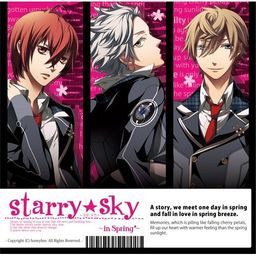
The first of the four Starry Sky games starring the characters from the drama CD’s of the same name.
Starry Sky takes place at Seigetsu Gakuen, a school which specializes in horoscopes, astronomy and other related topics. The main characters are all based on horoscopes.
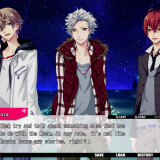
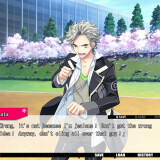
Starry Sky Spring features Suzuya Tohzuki (Cancer), Kanata Nanami (Pisces) and Yoh Tomoe (Capricorn).





![Tokimeki Memorial Girl's Side Premium 3rd Story [PSP]](https://i.erogedownload.com/wp-content/uploads/2014/06/Tokimeki-Memorial-Girls-Side-Premium-3rd-Story-PSP-360x540.jpg)
276 comments
Stick to english games.
Stick to being alone.
-First off, you will need the Japanese language package installed on your computer, it will be on your Windows OS disc.
-Go to your Control Panel > Regional and Language Options > Advanced(tab) > From the drop-down menu select Japanese then restart your computer. Now it will be in Japanese Locale.
-If the Game is a CD/DVD, mount it on a virtual drive using Daemon Tools Lite, just search for it on the web.
-After you mount it, if it doesn't automatically run, go to My Computer > "The virtual drive with the cd/DVD", Right Click to auto-play or open it up and run the setup program.
-Everything will be in Japanese, just guess your way through by clicking "Next" and accept any agreements, just keep the installation path as the default it suggests. The game should now be installed but you'll need the english patch.
-The patch can come in couple forms, if it's a setup type, it will usually have a preset installation destination, you'll want to install the files where you installed the game(Generally it's in C:/Program Files/"whatever the folder name is"). If it's just a bunch of files, you can drag and drop them in there as well. Typically put it in the same folder as where the game .exe file is, or in corresponding folders. Sometimes, it wants you to replace the current .exe, go ahead and do that and create a brand new shortcut of it and put on your desktop. Delete any old shortcut that was automatically created prior, because those won't work.
Without you, I could install this game.
Your rock! <3
Sorry if my english is bad, but I'm french ^^'
Hope you'll can understand me...
I need your help about the patch ... when I try to install it, it asks me to give a directory : I've tried all the possibilities but it doesn't work ! I've got messages like "invalid directory " and "This program cannot update the installed version of Starry Sky ~ In Spring ~ because the following reason :
The destination directory doesn't contain any files to update."
I've tried the directory of the game (in program files, asgard ...), the directory where is the patch ...
But there are some things in english when I launch the game ... but the text are not readable : not in japanese, not in english ^^'
Can you help me ?
Thanks a lot :D
If someone knows what is the problem i would appreciate some help.
Thanks in advance
To finish the English installation you need to go into your Asgard folder and rename Your Starry Sky folder to only have English characters, meaning you need to take out the TM and any other characters. I simply renamed mine "Starry Sky in Spring".
However upon starting up the game it does not seem to load it correctly and I'm still trying to figure out a solution to that.
Stupidly, I think we should have installed the Japanese language first and changed the settings in the Regional and Language settings to that of Japan's and then, proceed with the installation of the game so the Japanese characters would turn out correctly and not into meaningless symbols. After that, I think we can proceed to the English Patch.
I wrote "I think"s because I haven't tried it yet. I don't want to reformat my computer-----!
Can anybody tell me how to solve this?
Admin, thank you for the links :)
using MF will work i think
Hopefully you can start hosting some more Otome games on here. Don't get me wrong, I love games like Higurashi, Umineko and such, but sometimes nothing can beat a great Otome game. =3
The only missing games are Hakuoki and Togainu no Chi... I'd love to play those too. Hope we'll see them here soon!
I also vote for more Otome games!!
Please let us know when you can update this, admin, thank you~♥
As usual, thank you very much for your work ~
I would like to join those people just before me in asking you to reupload the mf link for the part1.rar please ~
Thank you !
Just wanna say thanks for your great work~
All the links worked for me :)
Although I seem to have broken the game. I ran the english patch, and anytime I try to start the game it gives me a pop up with a red X, and the game closes.. :( If anyone can help me, please let me know what I'm doing wrong.
It works perfectly for me. Sorry if my english sounds bad.
There's a shortcut of the game in that folder. copy the shortcut's name.
thanks!!!!!!
Thanks a lot for sharing otome x3
It also helps if you have
1)cpu's non unicode settings on Japanese.
2)the CD in the drive (virtual of physical) when you download the patches (or play the game)
I have installed the game (I think) and the english patch (with no problem, thanks to all of you) but... when I try to run it I got a window saying : DirectDraw kanji-something ni kanji-something shimashita. Is there anyone who can help me please ?
By the way : thanks for all your work !! I really love this website !!
I installed the game in Japanese and played it beforehand to make sure it worked. It did, and I guessed my way through the first bit of the game just to make sure nothing crashed. After feeling satisfied that everything was okay, I stumbled along through the installation of the English patch - that, also, worked out in the end. Now I am trying to play the game but, like others, I am faced with a pop-up box with a red X on it and Japanese characters that I can't read (I have a screenshot of this, if it will help). I doubt it's a DirectX problem, since the game worked fine in Japanese, and so I'm left scratching my head. If someone can assist, it would be greatly appreciated!
http://i174.photobucket.com/albums/w85/mysterious_silence/Untitled-2.png
i wonder could you please to add more season of Staryy Sky ?
Like : Starry sky ~after spring~ , In Summer, In autumn , In winter ?
Anyway thanks for the download link, this web is the best (^^d)
or just need to download one?
or maybe there must be an application needed (ex: adobe flash, etc.)
I can't wait to play the game! xD
I've install the game and it works wonderful. But as soon as I patch it, it don't start. An error messages is shown. I can't read it.
Could anybody help me?
Thx
But when I extracted the English patch, the game gives off an error box. Can you help?
sasugasugoi[dot]blogspot[dot]com.
anyyways i need some help here! :(
"This program cannot update the installed version of Starry Sky In Spring beacause of the following reason:
The access to the following file is denied:
F:\Chip.arc"
Please help!
I was trying to download the 3rd part of the english patch, but when I clicked the "download file" button I got a message from firefox saying that "the page could not be found". I've tried refreshing the page and I've tried downloading it in both google chrome and internet explorer. I'm not really sure what to do so I would really appreciate it if you could help me with this.
I just wanted to ask if this is free otome game~? :3
I'm kinda new with downloading and stuff...
Just wanted to say that this works perfectly fine on the vista~
Thank you for this admin!!^_^
You have to open the file site, not right click and save. That way, you actually download the file. 8D
I can't wait to play! xD
can anyone tell me why? i really want to play this game
What should I do? :(
"This program cannot update the installed version of Starry Sky In Spring because of the following reason: The destination directory dosent contain any files to update."
the hell> how can i put the patch right now if i burned it?
I've downloaded the English Patch.
When I install it a Program-File-something comes up.
Do I need to download something else ?
BTW, I'm quite new here, please help me
Thanks ^^
Were I should instal it?O.O (every thiem I try to do it in the game folder or in patch folder- witch I put in game folder- that say mi that possition is not good or there is nothig to upload)
I'm using this youtube video--
http://www.youtube.com/watch?annotation_id=annotation_982951&feature=iv&src_vid=B5IxhJDpXro&v=NhD1SH3LN5E
--and everything has worked exactly as it was shown up until the english patch part. I don't know what I should do. I even re-downloaded the English Patch files, but that hasn't worked either.
like hiiro no kakera and else ^^
(Yes my unicode is in Japanese)
My unicode is also in japanese,but I got the error only after patching.
Did you find a solution to the error message?
C:\Users\USERNAME HERE\Downloads\Starry☆Sky~in Spring~
Also, please note that the makers of the patch said, "For the Heroine's name the default should be Yahisa (Last name) Tsukiko (First name). We have only tested names with that many letters."
This means stick to 7 letter first names and 6 letter last names guys.
So the name's file has to be : Starry Sky ~In Spring~
I hope it'll help a bit :D
HORAY /O/
Thanks a lot. The game runs perfectly now *u*
It closed himself and when I tried to play again,it showed the same error.
Destiny dosen`t want me to play Starry Sky ._.
I fucked up the game.
I can't unnistall it.
Sweet.
I give up. I'm not going to redownload.
Good luck,guys.
If someone finds a solution,please do post it.
That way,maybe I can play the game again... ;3
Maybe it depends on the OS. I'm using Win7.
I have the game installed and have already patched it but now it has this message 'アプリケーツヨソ初期化エラ一です’ and i can't plated it...
I try uninstalling but it gives me problems again...
I don't know what to do anymore...
SOS!!!
Anyone care to help? ;-;
Then set locale in Control Panel for Unicode Programs to JPN.
Then install the game. Don't rename anything; I didn't have to.
Test it to see if it works w/o patch.
Try installing patch. You may have to manually find the directory even if it has it on the thing. Should be in Comp/Prog Files/Asgard/Starry_Sky*_in_Spring. or something, I know I didn't get the file name right.
It should work after the patch runs. Sometimes it freezes and stuff on me though. That's all I think.
To install just do what KF727 said.
Because of you I can finally be together with my Yoh-kun *.*
Will be there an english patch for the other routes (in Summer, in Winter, in Autumn)? I´d be really happy :D
Greetings (^u^)/
PLEASE HELP ME (T^T)
Please reply~~~ (pretty please)
Umm.. I have already downloaded it but I can't play ;A;
The file is ".iso" and I can't play.
I can only burn it in disc T^T
Who know how to play please help me -Thank you-
The destination directory doesnt contain any files to update
And I dont see any folder name likes "asgard" in C:\Program Files (x86)
Help :(
1. Download the game first. You will need a program like daemon tools. Mount and install.
2. Next go to your patch. IGNORE THE DROP DOWN! Do not pick a directory from the drop down.
3. Go to your actual program files folder. Follow it to asgard, then to the starry sky folder. Copy the directory name... if you can't find it, use this: C:\Program Files (x86)\asgard\Starry™Sky`in Spring`
Yours may be a little different, so you may wanna try it yourself first, but it will look generally the same.
4. paste that into the patch, and click next.
TADA~!
hope this helps and works for you... Because I have no errors and the game is working perfectly. =]
umm.. should I redownload the patch?
I finally did it buhuu..... I'm so proud of my self ^^
If no one can help me, then I can deal with it since the majority of it is in English. the symbols bug me though... I think I only encounter them when someone is talking to me (their name looks weird) and it looks odd when there are things like periods, commas and question marks...
is the patch corupted or something...?
why the patch isn't working?
(T^T)
i know maybe its must be program files (x86). but what is program files (x86)?? cant find it anywhere.
and in starryskyspring folder game theres 2 winrar names are data1.cab and data2.cab i try to extract but it said not archieves found. what should i do?
the japanese version is work smoothhly but theres still weird symbol in here and there.
must i mount it and play it after set locale in Control Panel for Unicode Programs to JPN?
Okay , for people who's patched the English one but got error (window pop)when open starrysky_spring.exe :
+ For people who can't uninstall the game: Go to Control Panel --> Region and languages Options ---> Change to English(If you have alrealy changed it to Japanese)---> restart window--->Uninstall it again----> Done.
+ For people who’ve downloaded the game, and successfully install and patched the game but when opened starrysky_spring.exe , a pop-up error window appeared :
You have to go to Control Panel --> Region and languages Options ---> Change to Japanese FIRST then install the game so that there will be a folder at C:Program FilesasgardStarry☆Sky~in Spring~
---> Remove the "☆" -----> StarrySky~in Spring~ so you can patch the (E)patch (it can't read weird symbol like:"☆" or "%$#" )
----> After you've done patched it (it still have the damn error)
- Copy file "Chip_S.arc" ,"Rio.arc" ,"Se.arc" ,"Chip.arc" then paste into a New Folder (you can creat anywhere you like)
-Go to My computer ----> Right click " SSDISC1 " (pink S☆S icon)----> Explore --->Click Setup.exe ---> Repair the game
*You still mount the Starry Sky in spring.iso * If not you can do it in "Add or remove programs" though.
-Okay , after you've repaired it copy "Chip_S.arc" ,"Rio.arc" ,"Se.arc" ,"Chip.arc" in that "New folder" paste into C:Program FilesasgardStarry☆Sky~in Spring~
----> Done ---> I've already tested and played the game succesfully .
******* I think the Starry Sky ~In Spring~ English Patch v1.0.exe got error , oh well x_x ***************
To make things easy on yourself, you need to install the game in a location that you yourself specify. That way you will know exactly where your file for patching is located.
I recommend that if you can, simply uninstall your game and re-install it in a folder that you yourself specify. Then when you patch the game, simply select the folder where you installed your game (the part with all the Starry Sky files.
Hope this helps.
1. Will downloading this and or Daemon Tools affect my computer such as having it slow down or anything?
2. How long will it take to download completely(including the English patch)?
That's it! Thank you if you answer them!
Hope this helps anybody else having patch trouble!!
so i cant play TwT how i can do please help me im on w7
C:UsersSANADownloadsStarry Sky ~In Spring
normaly it will be ok, but when i click on next i have got a pop up, it said invalid directory
i really want to play on this otome it makes me obsece about it
so if they are a charity soul please help me
WhatShouldIDo,WhatShouldIDo,WhatShouldIDo,WhatShouldIDo,WhatShouldIDo,WhatShouldIDo,WhatShouldIDo,WhatShouldIDo,WhatShouldIDo,
WhatShouldIDo..........
the english path doesn't work~!!
Someone please help me how to use it (_ _)
And try running in compatability mode with windows 7 or *shiver* vista if it still doesnt work.
Game has installed properly but I'm having difficulties with the patch. I'm trying to install it into the file the instructions say to do so but it keep tell me it's an 'invalid directory'. Tried other folders but then it says there's nothing to patch.
Worked.
The instructions on patch appear to be wrong.
You install the patch were the game files were downloaded instead of the other file that is created once the game is installed.
The instructions for the patch also said to install it AFTER the game was installed.
DIDN'T WORK AND MADE GAME CRASH.
This was solved by installing the patch BEFORE installing the game itself.
Took me some time to figure out but i got it done.
1. Install the game.
2. Install the patch.
3. When asked to select a directory, DO NOT select the directory you selected for the game. What I mean is this.
for example, for installing the game you chose the directory:
D:\OtomeGames\Starry Sky
when you install the patch, select this directory
D:\OtomeGames\Starry Sky\Starry™Sky`in Spring`
It works! Just sharing so that you guys can play it too. Thanks admin for uploading the game! :)
after further why there are patches maker??
please help me how to install it ..
I'm not understand with it
I also have some troubles installing it. I install the game before the patch. And, really, I don't understand...
And when I go back to install the patch again, it already says that the game is already patched up so I should play it now. Arrgh, the suspense and delay is killing me! Please help....
1. mount "starry sky in spring.iso" & install
2. navigate to install directory, i.e. C:\Program Files (x86)\asgard
note: the folder the game is installed in is called Starry™Sky`in Spring` (note the weird characters)
3. create a copy of the folder by copy and pasting (so we can modify it without messing up the original in case anything goes wrong)
4. first run the game in the copy folder to make sure it works *don't skip this step! when i skipped it in my first attempt, the game didn't work in the end*
5. then rename the copy folder to "Starry Sky in Spring" without the weird characters
6. again run the copy game to make sure it still works with the renamed folder
7. now run patch.exe and select the following pathway:
C:\Program Files (x86)\asgard\Starry Sky in Spring
The patch should install, and then it's all done! Now you can play the game in english. good luck!
P.S. if it didn't work or something went wrong, you can just delete the copy game folder you made and try again
I LOVE YOU
I'M GOING TO CRY
-u It already disappeared 'c'c
@And I was going to make a wish too 'B'v
It's not really annoying but I want to know ,if it's normal or I made a mistake ? Please answer me
Have a good time with it~
i have mine on english locale and it does the same...ah well
its annoying but you get used to it
I can't install the patch, I instaalled the game perfectly but when I try to instll the patch it doesn't let me. It asks for somewere to install but when I put the place it doesn't let me.
Help! Please! (Windows XP)
Here's what you need to do, to get it to work
(FOR WINDOWS ONLY, if you use XP, you may have to download east asian language)
1.) Go to Control Panel > Clock, Language, and Region > Region and Language > Administrative (tab) > Language for non-unicode programs.
2.) Click Change system locale. It may ask for an administrator’s password. (if not administrator)
3.)Choose Japanese (Japan) and click ok.
you may have to restart after it.
Your PC will now recognize japanese characters
You can mount/install the game, then run the patch and install it in the folder where your game is.
It worked for me when none of the above did.
I went to the control panel to try to uninstall then reinstall the game, but it wont disappear from my list of programs :C HELP PLEASEEEE
So, here is the way :
1. For example you installed the game to this directory :
C:\Program Files (x86)\asgard\Starry™Sky`in Spring`
Just copy this directory.
(The directory depends on your pc default)
2. Then run the patch, in this step just paste the directory you
copied before in the directory box.
(Do this instead of manually selecting the directory)
Well, it worked for me.. Good Luck
Alright, so.... I managed to successfully install the game (Windows 7 PC) and skipped through some of the game to check it was actually working. (And 'cause I was pretty excited, too. Even if it was all in Japanese. x'D ) Then I even managed to patch the game, using all the tips about the right folders and how the patch can't process the weird characters in the game's name. However now, here is my problem!
Whenever I try to open the game, it gives me a box with a red x and Japanese which reads 'registry errors.'
The game won't uninstall, I've changed my system locale to Japanese (which by the way is how to stop all the ?????? appearing everywhere and show the characters instead.) and I have no idea what to do now!
I was going to start from the beginning and try getting the unpatched game up and running before trying the patch again, but I can't even do that. Please, any help would be much appreciated, this game is amazing and I'm desperate to play!
~ Tsumiki
-unninstall the game (run the install wizard then choose "no" then choose the last option)
-make a new empty folder (i make it at data D i'm not sure if it worked on data C either)
-run the wizard again then install it at the new empty folder u make
-the folder "asgard" or whatever its called should be nowhere to found instead its replaced by the new folder u make
-then just install the patch normally
it worked for me thou :I
For those having problems with the patch (still in Japanese even after it says patch is success) you can try this:
Instead of clicking the file directory for the patch exe, just go to the program files in asgard and right click on the address, copy the address then paste it into the patch exe. This should start running. Worked for me!
Download all parts for the game, then download all parts for the patch as well.
1) Only extract Part1 for the game. Then extract the .iso using PowerISO or any app that might work for ISOs. Run the setup.exe for the game.
2) Copy this WITHOUT THE ASTERISKS here it is *C:\Program Files (x86)\ASGARD\Starry™Sky`in Spring`*
3) Extract the patch rar files. Then run the patch .exe file. When it asks for the directory, paste the one I asked you to copy from Step 2. It should run smoothly. Then it will say patch was successful.
4) Voila! You can now play the game in English.
Note: In my case, I set the Region to Japan. I had some weird characters in my first run for the game but that was because I didn't download the extra files for Japanese language in my Window settings. I suggest you check for that in yours, or do the same. But if you don't see weird characters in your game, then theres no need for it.