English visual novel downloads

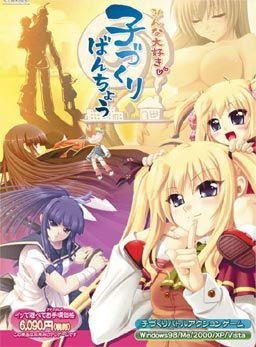
Minna Daisuki Kozukuri Banchou

Minna Daisuki Kozukuri Banchou

To counter the declining number of childbirths, government decides to activate a plan. All schools across the country will enter contests against each other. The losing school will be shut down and its students will enter the service of the winners. Thus re-igniting the spirits of the lost young generation and hopefully producing healthy couples capable of childbirth again.

The protagonist realizes that this is his chance to realize his dreams and makes a grand plan. First he “acquires” the help of the goddess of fertility, allowing his children to grow up in weeks instead of years. Then he starts leading the fight against other schools and “collecting” girls to grant him superior children on the battles to come…

Gameplay is divided into two modes:
Global mode plays like an adventure game where you talk, date and have sex with your followers. There is a minigame to make babies and also the simulation part is here as well in which you configure your troops and select which school to attack next.

Arcade mode is where you lead the contests and fighting against rival schools. Leading your hero, who doesn’t have any special powers at the start and making yourself a team with the mothers and children, who actually grant bonuses to mothers and special powers to you.

207 comments

RynerLutsReply
Hello guys!!! I would like to ask for some advice. I can play the game normally but after playing for a while, a text box pops up that is in japanese language. there are yes and no choices and when i select yes, game continues and if no, it closes.


Also, I am having problems in saving because the same thing happens- when i try to save, some partially in japanese text box pops up and then the game won't load any further. I cannot save the game.


Anyone knows how to fix this problem?
Special_KReply
Same problem I encountered, if I click yes the game keeps running but if I click no (i think thats what it says) it closes. what's going on?
RynerLutzReply
Anyone got the walkthrough of this game? ;) I was wondering how do you get the remaining CG for "Angelina Ishtar" adult version.


Thanks!
l0tuscrimeReply
there's no need for walkthrough, it's easy to get 100% of all CGs, for angelina ishtar, there's one CG for little ishtar, and one CG for adult ishtar, and there's one cg she sitting with whole family,,
JoshReply
I have the adult and little and family but I and still missing two of Ishtar's cg
Dark enigmaReply
I keep getting this box that comes up in teh middle of game play, if I say yes it dissapears but comes back, if I say no it closes the game. Anyone know how to fix?
DragarionReply
Hey can I get some help pls? I keep trying to play the game but when I click start or anything else a box appears and when I click yes the game freezes and when I click no it closes the game. The box is in Japanese so I dont know what it is saying.
ttqReply
the textbox is asking if u want to keep playing LOL
oriReply
hi, anyone knows how to save in this game? i cant seem to find the option to do it
RetriasReply
THe game still asked me of those japanesse text box every second even after I did the fix listed on the forum
is there a reason why ? fix ?
l0tuscrimeReply
it's already english, otherwise admin won't upload it here,,
JJReply
does anybody know how to get the baby/love meter access for roboko, sylphietta, and otohime? everytime i beat their school and go to the home menu it's not letting me access their love meter but it says its at 0%. I just don't get it.
bedadariReply
i think they doesn't have one, only baby making.
TheVeryBestReply
the characters are all crooked and shit, plus i cant save without the game lagging out
bedadariReply
Is anastasia the only character you get in NG+ ?

thank you for the game admin.
CirnoReply
can you do a walkthrough for this? :3
yakooReply
uh hello,while i'm extracting the file
i got a message that say
MinnaDaisukiKozukuriBanchou.part05.rar: CRC failed in MinnaDaisukiKozukuriBanchou\DATA4.ALF. The file is corrupt

is it normal or no?
anime_junkieReply
I tried all the ways to fix the random pop up box but none of them work.
I did beat the game with the box popping up at random times it is possible to do but kinda annoying lol.

And for some reason the link to the forum posted leads me to a way to fix what is suppose to be this game but it mention Tick Tack is that right or is it sending me to the wrong section of the forum?

Also thanks for the games i love this site.
Special_KReply
there is a new method posted on that page however the first step is to DL some file but when I do it I open the file because it's a .pdf file and it's some manual for heavy machinery, complete with schematics. I think the admin's have finally had it with the same questions being asked and are fucking with us.
blue.joker1506Reply
Used JapLocale from HF. Worked liked a charm. Np at all.
blue.joker1506Reply
Used Jap Locale from HF. Worked like a charm. Np whatsoever.
HelpmeplzReply
How do you unlock all the goddess's scenes?
WehzyReply
cant download part 6
illiaraReply
the text don't show properly well.
it makes me guess the conversation all the time.
eg:
my guess: i will live there in the next two months
the real text : iwi lllive ther ein then extt wom onths.

thanks in advance for your help
Rock KickassReply
I can't get the game to work. I click on the running file, and nothing happens. The \Uninstall\ file doesn't work either.

I've tried running as Administrator, I've set my locale to Japan (it's been that way for a while), I've deleted all the files and re-unzipped them (It keeps saying that it can't create an output file by the name of the game). I have no idea how to fix this.

Is there a fix, or should I just scrap it?
TYTYTYTReply
nice game.. thanks for the game admin
YonReply
For mine.....text didn't show property and even I cannot save...too
HikariNoYamiReply
Hi! For those who gets nothing everytime they press the exes, all you have to do is add them to the list in DEP ..

To get to DEP (Data Execution Prevention), press the windows icon in your taskbar, right click on \Computer\ then press properties .. An alternative route would be going to the Control Panel then clicking System ..

To know that you're where I want you to be the window needs to have the \basic information\ of your computer (i.e Windows Version, System, Rating, etc. etc.) .. Look for \Advanced System Settings on the LEFT side, then click it ..

A small window will come out with the title \System Properties\ .. Under the Advanced tab, clicking on the settings of \Performance\ will bring out another smaller window with the title \Performance Options\ .. Choose \Data Execution Prevention\ on the far right and select the second circle which has \Turn on DEP for all programs and services except those I select\ on it .. After you do that press \Add...\ and find the .exe of the crack and the game .. If it works then either you messed up following or I messed up instructing ..

P.S. You need to do this again everytime you move the game to a new location ..
AionisReply
can someone tell me why the text is all messed up and why can't i save/load the game?
and there is a pop-up message every time does anyone have any solutoins on this?
i can't play it well.
Kudo89Reply
My game won't start...
I've already add both exe and crack to DEP list but message sys3ini.bin followed by kanji keep pop out...
What should I do?
Thx
Kudo89Reply
It looks like folder c/user/.../appdata/local/anastasia is not there???
What should I do???
Thanks a lot...
NaitReply
The game is working great for me and is very fun but i can't find a save option anywhere in it could someone please tell me where to find it this is driving me nuts
qwertyReply
Does this version have the characters from the Tech Gian Edition?
RakhoolReply
the remove.bat is unavailable, can reupload it please?
Thekiller45xReply
Hi, well i come for the same thing than the guy before, can you reload remove.bat, is not available, please!
eroge_seekerReply
this eroge just made me JEALOUS...FTW...
GabrielReply
The link for the file Remove.bat is no longer active. Can someone be kind to upload again? I'll be giving just one more try on this one.
BivranReply
this game can be play on windows 8 ?
SeluviaReply
If anyone still needs the remove.bat, go to the link to the forum at the top of the comments here. Go to the last page of the thread there. Someone posted the file, and if you can't get the fix to work, follow that person's instructions, it worked for me when nothing else did.
DennanReply
anyone can help me?
i'm already download the file n extract it.
but after extract, i'm didn't fine file named SYS3RK.BIN.
so, after i'm run remove DRM.bat
cmd say \The system cannot find the file spesific\

sorry for the bad english :'(
nothingReply
same here i cant find that too
rzReply
i download but when i extract part 5 and 6 some part error crc i can still open exe but theres always pop up and i cant go to setting. i already follow every instruction but no use
adminReply
crc error = part didn't download properly. Check the filesizes of files and re-download the broken ones.
nothingReply
hey i already download it but i cant play it, when i click resume or begin show it crash, how i supposed to be do
BruhReply
Bruhz. It works just fine. As do every game I download off here. All I did was extract and run the app. I occasionally get some pop up in Japanese, but I just click it away and continue to play
gimmemoreReply
Please, I heard that Sylphietta, Roboko and Moeko are DLC characters. Are they included in this download? Thanks.
ralexReply
can anyone help me fix this error please.keeps pooping up every 2 minutes or so.really annoying during battle.I have the crack and remove.bat in my folder.but its not doing a damn thing.and also @slippie the link for remove.bat from forum is dead.when I apply remove.bat its saying crack.exe/TT_remove_drm.exe/ isnt recognised as internal or external command.move sys3rk.bin
system cannot find the file specified.admin please help.
HendraReply
Hey guys,i want to askevery time i play this game it's always popo up and very annyoing and i already see problem fix and the web already expired so i need new advice from u guys!!! please help me
HRelicReply
For any who still come across the pop-up window with yes/no every couple of minutes, I found the 1st option (crossed out at the top) on the problem/installation link still viable. Simply follow the steps as instructed up to number 4. Download the Remove DRM.bat but make sure NOT to store it in your game data folder (TickTack). I kept mine just outside the data folder and executed it with no problem. It may work from your download folder or wherever (I didn't test other locations) so long as the .bat reports that \1 file moved\ you should be fine like the instructions state.

The second or recommended option on the problems link is dead, possibly available in the later posts (I didn't check) but the option above should suffice.
Special_KReply
For some...
I followed you instructions but on step #2 I copied and paste the name "TT_Remove_DRM.exe" to the crack, followed through the instructions and the "Remove DRM.bat" when ran gave me a 'file path not found' message, did it 3 times, same thing. Then I deleted the crack name that I copy and pasted and this time TYPED IT IN MY SELF. This seemed to do the trick cause it worked and NOTHING else had been changed but now I got the message about '1 file being moved'. So, thanks!

Leave a comment