English visual novel downloads

Cross Channel

Cross Channel

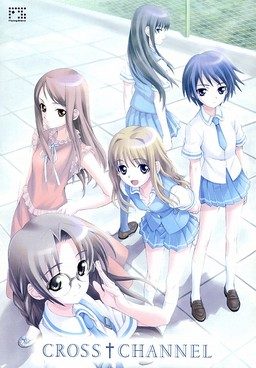
Gunjo Gakuen (Deep Blue School) is a facility designed to gather and isolate those students who got a low score on an adaptation coefficient exam (Scoring low on this exam indicates that the student is less likely to be able to be adapted to the society) mandated by the government.

After a failed summer vacation with other members of the school’s broadcasting club, Taichi Kurosu and some of the other club members return to the city, only to find that all living creatures within it except for the club members have completely vanished. In order to confirm the status of the outside world, Taichi decides to gather other club members to help Misato Miyasumi, the president of the broadcasting club, who is trying to set up a broadcasting antenna to contact any possible survivors. However, Taichi soon discovers that the world is actually repeating the week after they found the others vanished…

243 comments

VianciReply
Has this game any h-scenes? Becouse i'm already at 4th week and i haven't seen any... (even though Taichi had sex in every week)
count_montyReply
I've got some bad news. You installed the all ages patch when you patched it to english. When you do that it cuts out sex scenes.

I'm sorry, I'm so sorry.
anonymouseReply
Are you positive you didn't pick the all ages version during instalation?
JaveranaReply
When it asks to insert disc 1 what do I do exactly? Then what do I do after that?
GreedReply
Hey admin,i have some problems regarding downloading
from filserver.
They keep telling something about my IP address
which prevents me from downloading.

How can i solve this problem?
adminReply
You're sharing ip with someone.
You can either wait till he finishes downloading or simply use filesonic mirrors instead - both sources are interchangeable, meaning you can pick part 1 and 3 from fileserve, and parts 2 and 4 from filesonic and it will work anyway.
GreedReply
I didn't share IP address with anyone.
Yet i still can't download it.

My download works for only filesonic and not
fileserve.

I tried downloading all filesonic parts and
extracted it and used daemon tool on the file.
However i don't know how to download and play it.
KratosReply
Greed, you don't have to willingly share an IP address with someone for them to use it. All someone has to do is connect to your router using a wireless device of some sort (laptop, PSP, PS3, DSI, etc...) and boom, they are sharing your IP address.
calvinReply
admin, can u post a baby guide for me??
calvinReply
is these download same with the hongfire's website which is unable to download from there now??
EzaReply
Nvm, i re-installed it, and it worked perfectly...
StormReply
I tried installing it but all that comes up is a window with "???????" and all I can click is "OK" but it only closes the window What do I do?
adminReply
You need to change system locale to japanese, prior to installing this game. Check FAQ section of this website for instructions.
sad pandaReply
can someone tell me how to install the mature version... for some reason it always installs the all ages version >.<
count_montyReply
When you're given install options during the patching, there should be some boxes. One of them says "all ages". Make sure it isn't checked.

Geez, some people.
leonReply
do you have to download the English patch because it says the games already in english
NyahahahahReply
ouch, for some reason during Week 1 right after naming the Antenna and you're supposed to say the manuscript, right when you say your specific sentence the game freezes when it flashes white and I cannot pass this spot.I've tried uninstalling/reinstalling but nothing seems to work.
ChiiReply
Do you have the extra scenario Tower of friends?
ErebrosReply
OMG i can't bring up the menu during game help please !

i can't even save :(

just FYI i don't have mouse or keyboard using window tablet
however i finished like 20 game on this tablet already but can't figureout how2 bring the menu up in this 1
ErebrosReply
Okay i accidently found it on the top (it's hard when u can't move ur mouse around [why do they have to hind it :(] lol)
count_montyReply
It's hidden so you can see the screen stupid. It'd be pretty distracting if it was there all the time.

Also, what do you mean "can't move your mouse around" That should not be happening.
BlackReply
is tis for psp?
adminReply
No, i just used PSP cover, since it looks nicer. All games posted here are for PC ( unless stated otherwise)
ttrtReply
I used poweriso, but the disc 2 seems 2 be not readable.
I used the bin files(1 per disc).
I'm installing it using the english patch.
What should I do to fix this?
adminReply
You can't use poweriso for japanese game images - it can't load them properly. Use deamon tools lite.
ttrtReply
ok, thanks
I'll use that instead
ttrtReply
wait,is it daemon tools or demon tools?
Bo chanReply
It is demon tools if you're playing nukige lol.
NyarlathotepReply
I installed Cross Channel with the english patch and it worked fine until i rebooted my PC, now whenever i try to play it the text is messed up with all the spaces in the wrong places. Has anyone else had this problem or knows how to fix it?

I think this started when i rebooted my PC in japanese Locale, however rebooting in english locale hasnt helped at all.
A personReply
I have the same Problem. If anyone finds out how to fix it PLEASE say something because this makes it hard to enjoy the visual novel.
:(
saiefReply
Patch it again.
Some GuyReply
Is this a non sexual content game?
ttrtReply
Yes, but I think there's a all ages option
for this game during installation
AnoarithReply
Copy Inconsolata.ttf from your CC folder into C:\Windows\Fonts.
It worked for me :) .
ShikiReply
Copy the Inconsolata font file from the game's directory into your windows/font folder (path varies depending on your OS).
YangReply
Thanks man!
Your solution fixed my problem =D.
ttrtReply
There's a font file you need to install to correct that.
Try checking the folder you extracted the patch to.

If isn't there, I'll tell you what to look for:
What you need to find is the inconsolata true type font included with the patch(inconsolata.ttf). Once you install that font, the game shouldn't have that problem anymore.
DanielReply
Erm,,, how can I play this on my PSP?
adminReply
You can't. I just used PSP cover of japanese version since it looks better than PC one.
DominicReply
Okay, I have no idea how to install. Please help, with steps please.
channelReply
the game works fine when i launch it after installation, but whenever i try to run it from the desktop shortcut i get an error and it stops working. help please?
AnonymousReply
Run the game as admin, that worked for me.
howReply
how do you set it to admin?
NooneReply
Right click on the shortcut and run as admin is one of the top options
wawawawawaReply
when i downloaded the game, i extracted it like normal and after that i got vlc files instead. is that suppose to happen and if so how do i install?
Poke_FreakReply
They're iso files. Mount them in Daemon tools. Check the FAQ section on this site if you don't know how to do that.
It's just that VLC tends to hijack the icon for iso files, even when they aren't actually movies.
lesterReply
which files should I install? the CC_DATA.bin or CC_SYSTEM.bin or the Image files
ZorkerReply
It contains h scenes?
count_montyReply
Yes, unless you select "all ages" from when patching it.

Leave a comment