English visual novel downloads

Chaos;Head

Chaos;Head

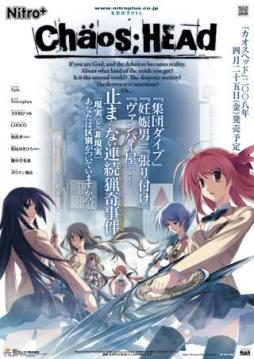
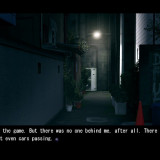
Takumi is a high school student. He is withdrawn and is not interested in 3D things. In his town, a mysterious serial murder case happens and people get panicked. One day, when he chats on the internet, a man suddenly contacts him and gives him an URL. He goes to the website and finds a blog image that suggests a next murder case…. On the next day, it really happens….

781 comments

ArcaneReply
When I have to create a new line after
"set /p myon=(Soft) or (Hard):"

Would it be like this?

set /p myon=(Soft) or (Hard):
cd C:\Program Files (x86)\NitroPlus\CHAOS;HEAD
sparenooneReply
Yeah, that looks right.

Make sure you save afterward though. Then run as administrator or else 12 (I think it's 12) files will fail to be moved (due to permission).

It may say something along the lines of "oh boy, an error has occured, ignore it?"

You'll want to ignore the error and continue installation.
SherineReply
Hi I am having the same problem. I added the line and it seems it was successful, but now another problem occurred. For some reason when I open the game I get a blank screen, I can still hear the audio, but nothing else is showing.
skyvoryReply
yes, I'm having the same problem here.
can anyone help??
skyvoryReply
Looks like I got it now.

While You're running Glorious Installation as Administrator,
at the end, it says 'Now this will look like it's frozen. It's not.'

At this rate, you can't do nothing except close it.
NO, DON'T CLOSE IT (close it and black screen is what you got). Just wait a little longer and it'll continue, inserting scripts... Inserting CGs... etc
SherineReply
It finished for me but the game became blank, but I found another solution to my problem.
ArcaneReply
Nope, still doesn't work. =/

Any other suggestions? I also tried Sherine's patch and all I keep getting
"The game is not here. You must run the patch from the game folder"
And it IS in the game folder... I even tried moving everything to any Chaos;head related folder and it's all the same...

C:/Program Files/Nitroplus/CHAOS;HEAD
cerealkillerReply
Anyone got any tips on how to run this with Fedora or Kubuntu or am I just SoL?
SherineReply
I found a solution to the problem. The Chaos;Head English patch RC1 didn't go so well for me, even after I tried sparenoone solution the patch finished installing but then the game became completely blank. Later I found an updated version of the english patch on google. I downloaded it, installed it and then my Chaos;Head worked perfectly fine with the english translation. For people who are still struggling you can get the Chaos;Head English Translation RC2 here http://www.mediafire.com/?xkwwiqzwzm3
celine-chanReply
I had problem B too, I tried running it in App locale and now it works fine.
RyokuchaMochiReply
Hrm, so I did everything right (I hope) up to setting the English patch. I did read the readme and follwed the instructions, but where exactly do I put all those files so the game will actually be in English? And what files do I move?
bapoReply
how do i install this properly? i tried everything in the comments but none worked...
helpmeReply
I have a Real Problem here T^T I did all that stuffs, and now, when I run the game, I click start button, but a black screen appear, and after it I have only the main one, with start another time :/
LReply
Is this the +18 version or the +15 version of the game?
darkriseReply
There is no 18+ version. Never was.
AnonymousReply
I keep on getting error 1512 anyone know why?
DaemonFlowReply
Hello guys.
Firstly I got the same prob mostly the same with all of u. I tried some of the suggestion above and succeed. this is the detail about how I did it.


1. Install the game
2. Copy ChaosHead.exe to your Chaos;Head folder, overwrite the .exe that’s already there.
3. Copy all the data in the english patch to your Chaos;Head folder
4. Edit the Antifail Installation.bat

find this line
set /p myon=(Soft) or (Hard):

Create a new line after that and enter:

cd C:\Program Files\Nitroplus\CHAOS;HEAD

Please note that since I was forced to fix the filepath in the script, IT MUST BE RUN IN THE CHAOS HEAD FOLDER.
Save and exit after you have finished editing.”

However if you’re using windows 7 it’ll look more like
cd C:\Program Files (x86)\NitroPlus\CHAOS;HEAD

5. Run ‘Antifail Installer.bat’
answer the question
? License
! "trick question"
? Softsub or Hardsub
! If you have the latest vsfilter answer "Soft" if you don't "Hard"
? npa_backup
! "No" if windows asks how to open a file, click "Cancel"
After that wait a while for the file to be extract
? Deleting RAR and extraction files
! "Y"

6. Play the game
Play the game in Applocale under 日本語 or use a Japanese non-unicode setting.

P.S Sorry for my english
FishiReply
Well I got the game to work finnaly... Im using wins 7 and the way I fixed it was move the whole entire chaos head folder to like the desktop. Then I ran the .bat file after that was finished I moved it back into the programs folder where i had originally installed it.
Elda KingReply
Had to do the same thing... however, it still isn't working perfectly well, as I can't save the game! Anyone knows how to solve this?
Elda KingReply
Just solved it... I had to run it as admin.
ArcaneReply
One problem after another *sigh*... Alright I somehow managed to get the english patch to work using sparenoone's RC1 ver but now I get a black screen with sound from the menu and when I try to exit, the exit menu is completely blanked out, it's just "Close the Game?" with no Yes or No...
SherineReply
Had the same problem with RC1. Go for RC2 http://www.mediafire.com/?xkwwiqzwzm3
LazyAznReply
Yea.... I'm having the same problems as Arcane. Using RC2 didn't really make a difference for me either.

When the game is loaded, the Caution text appears first, skipping the Nitro+ Logo. Then the black screen with the menu music appears, and nothing happens. Only can be closed through Task Manager afterwords.
TzzReply
excuse me... anyone, can i ask for help please?
i've installed the game, the no dvd.exe, then the patch RC2 version... the game works... but then, when i click the start menu... after a few dialogues... it all suddenly goes black... anyone can help?
TzzReply
sorry... it was my mistake... it only goes back for the "Intro Movie" somehow... (I mean the opening) anyonce can find me a solution? although i can still play the game... :) thanks so much! XD
adminReply
You probably don't have codecs installed. Install codec pack and it should be fine.
You Must Be New HereReply
Hey admin, want to change the directions in the article?

It's a little, outdated... so to speak.
divineReply
Excuse me can u help me... the game is showing gibberish... i can't find a translator for this game...
SherineReply
Download and install this http://www.cccp-project.net/ then it should work fine
TzzReply
thanks so much... :)
AnalogmanReply
Excuse me. I tried installing the RC1, then when I clicked start in the game menu, I just got back to the main menu. Then I tried the RC2 and just got the same problem. Help please.
anonReply
Use applocale, fixed the prob for me.

Download from the MS website: http://www.microsoft.com/downloads/en/details.aspx?FamilyID=8c4e8e0d-45d1-4d9b-b7c0-8430c1ac89ab

Install it, then run game in japanese (the three symbols under language) through applocale.

Hope this helps
ttrtReply
that link doesn't seem to work, so here's another:
http://www.microsoft.com/download/en/details.aspx?id=13209
no working!Reply
tell me, my chaos head (patched with either rc1 or rc2) both won't work under applocale, the applocale window closes and then nothing happens, any idea?
lilsly2flyReply
i installed it but i cannot find the directory to copy the patch. does any one know where it would be on a vista or whats it called?
ProtecterReply
In the folder containing Chaos;Head in Program Files on the c drive in my computer.
king98765Reply
i successfully install it, but when i click start it goes back to the same page. not matter how many times i tried it is still the same
king98765Reply
and i cant even do the in-game config
KazeReply
For any of you who just had trouble figuring out how to install this in general, follow this vid:

http://www.youtube.com/watch?v=6ViG6CYgQ6Q

It seriously helped me anyway... :3
king98765Reply
nope, it doesn't help at all, i have no problem at installing,
when i click start, it turn back to the main page.
Mystro-XReply
Have you set your regional settings to Japanese?
divineReply
@anon

excuse me but the installer isn't working.. it says it needs something else.. any other link..?
divineReply
hi. can u teach me how to run this right..?
VertinReply
I followed instructions and did everything precisely as it said but the game turn out to be still in Japanese, not in English. I installed the game, and I copied the crack into the folder where Chaos Head is installed. Then I tried to install the English patch of the game (The patch from TL Wiki). I ran the game again and saw the first few lines not in English but in Japanese. So I thought it didn't work and I tried redo everything up to the part where I have to install the English patch from TL Wiki but instead of that I used the Antifail patch. But everything pretty much stayed the same as the first few lines of the game are still in Japanese. Is this what its suppose to happen? Or did I do something wrong in the step where I have to install the patch.
HealingsmiteReply
I downloaded another version through a torrent and I get the game in full Japanese characters, I runned a English patch but since I'm on a vista even with running the BAT file on admin it still denies access to those certain files which I'm guessing is the English patch... everything else works flawlessly except for it not being in English (I tried hard and soft subs both don't work ((My sub filter is retarded)) anyone got a fix for this?
Mystro-XReply
Just Copy and overwrite the files yourself...
FolsenseReply
I just installed it and it was running fine until it stops playing. I'm looking at a close up on the main character's computer screen after you take a look around his place. What I see is the 'name', 'color', and 'reload' with 'current members'. I'm pretty confused, is it frozen for do I have to press some button for this?
LarissaReply
I just mounted and installed the first part and...it seems to be working just fine. What do the other parts do then?
RayReply
When I try downloading the 3rd part it keeps ending before the whole file is downloaded. Is the file corrupt or is it just my computer? o.o

Leave a comment