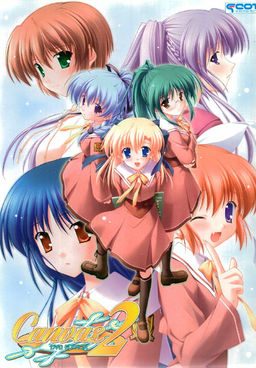
The series focuses on the lives of some students and teachers at Nadesico Academy both at school and their private lives. The main character of the series is Kamikura Hiroki, who lives with his younger cousin Elis. Hiroki is training to become a full-fledged art teacher while also trying to take care of Elis. When his childhood friend Kiri starts working at the school, drama begins to flare as he has to juggle his work, private life, and the feelings of these two important girls.
Canvas 2
- Canvas2.part01.rar - 199.3 MB
- Canvas2.part02.rar - 199.3 MB
- Canvas2.part03.rar - 199.3 MB
- Canvas2.part04.rar - 199.3 MB
- Canvas2.part05.rar - 199.3 MB
- Canvas2.part06.rar - 199.3 MB
- Canvas2.part07.rar - 199.3 MB
- Canvas2.part08.rar - 199.3 MB
- Canvas2.part09.rar - 199.3 MB
- Canvas2.part10.rar - 199.3 MB
- Canvas2.part11.rar - 97.4 MB
- Canvas2DVDPatch1.10.rar - 1.4 MB





318 comments
was the first canvas game untranslated?
also, would it be possible to get a copy of Majikoi here? I heard Yandere translated the prologue
Thanks~
I'm sure this will be definitely better than the anime..
and I think the art is better in the VN
try re-installing and make sure you do a full install with the mounted ISO
sometimes, part install or installation glitch happens
after its done installing, i would first copy the english patch and then the noDVD - good luck Lol
do you have daemon tools? did you make sure to mount? after that it should be self explanatory
just google daemon tools lite and you should get it.
If thats not the problem post problem below
btw sorry @ doublepost, dind't notice 2nd person requesting help @ w @
it worth downloading just to see that
i'm kind of lost with this many choices every day >.<
nice work.....
You can find Canvas 2 walktrough at http://erogedownload.com/walkthroughs/canvas-2-walkthrough/
By any chance do you have the OST of the game? I quite like the tracks played.
First thing i'm gonna say is that I DON'T have downloaded the game yet, but it won't be the first (far from it).
So the first thing you'll need is some app to mount the CD image (read it was an ISO), so for that you'll want to download Daemon tools (go for the lite version) or an other like PowerIso.
You can find daemon tools here :
http://www.daemon-tools.cc/eng/products/dtLite
-Install it say no to the toolbar (or yes if you really want it ...), after the installation it'll ask for a reboot, say no for now.
-After that go into the configuration panel, go to the language option, you need to (well i'm not sure if you need to but at least it'll do nothing bad, it SHOULD help and SHOULD resolve lots of problem) change the "unicode" to Japanese. This will need a reboot to, so do it now.
-Now it's time to mount the image, for that open the .iso whit daemon tools, or drag the .mds? (if there's one) file to the daemon tools window.
-Now just install the game normally
-You need to copy the NoDVD.exe to your game folder (where you installed the game) and launch it, of what i heard after that you just launch the game normally.
-Final point is to translate it, so just replace game01.mrg in root folder with the one in the english patch thingy.
I don't know for sure if your really need to be in jap local to play the game but it sure wouldn't hurt !
As for myself i do not use jap local much, i prefer using appLocal, which do the same but it need to be "activated" for each executable that is being launched.
As of what i know, it only work on XP, so here's a link anyways : http://www.microsoft.com/downloads/en/details.aspx?FamilyID=8c4e8e0d-45d1-4d9b-b7c0-8430c1ac89ab&displaylang=en
For those who wish to use it (for this game or any other which require it), Japanese is Nippon (or something like that) for those who only got the sound of japanese (such as myself...) in any other case the japanese should be the last choice, it's written in kanji.
If any more question were to occure, or if this just don't work, just post it here, i'll try to find a solution
Varatnar
I'm still in the progress of downloading, so i can't help that much for now, still that was the only thing that poped into my head XD
I can't say for sure i know what the problem is, have you tried to reinstall it ? Have you switched your computer to japanese local ?
And do you see the voice sound file ? (they could/should be hidden so it doesn't mean much, but if you do see them, then something is really wrong ...)
I'll finish the download and i'll come back here !
I'm really busy whit school those days, so ain't got much time to download !
I just finished downloading + installing.
For me everything is doing good !
Except that the starting menu haven't been translated (well edited, you get the translation into the "document" subfolder in the ENG patch).
Frank, i don't know if you've resolve the problem yet, but if it can help i'll just write down what i did ... (kinda a resume of the step by step i've written earlier)
I started by mounting the image (as u probably did..) then since i am not in japanase local i just canceled the installation (which was written whit lots of "??" and other weird symbol XD). After that i choose to "explore" the CD, and boot the LAUNCHER.exe whit appLocal (here if you had put you're computer into jap local you wouldn't need to do that, and you would've seen beautiful kanji and hiragana when i told ya that i got "??"). So now i see the installation panel and click the second choice (which mean install or something) and i choose again the second choice (2.2 go ? the bigger one XD). "Someone said that you needed only this game for the installer, damn, true XD, it's beautiful !!".
Well after sometime the installation is done (i haven't but, since you got problem whit the voice you should just run the game here (be sure to still have the CD mounted since the noDVD crack is not yet active) if you hear the voice, than continue, else heum... i realy don't know what you're problem is XD). Now you only need to put the noDVD executable into your game folder and run it and put the game01.mrg whit it too (just delete the one that was there first or change it's name so you still have it, just in case...).
At that point everything's fine for me, i won't be playing it yet since i got a bunch of other one to read, (gota finish fate stay/night one of those days XD and got a 2-3 other, hm.. for those interested and not following the first part of the muv luv new VN have just been released)
Have fun,
And ask for question if you have any
XD
Well glad you got it to work even though we didn't really found what was wrong ...
What is japanese in applocale?
thanks a lot for the upload..
currently playin...
Mirai no Kimi to, Subete no Uta ni
a short story about miku from vocaloid..
there is an english patch
Nippon is writing in japanese, so it's 日本語.
It's suppose to be the last choice ^^
Hope it help !
@ drixx what type of error?
Nvm fixed it
google "applocale japanese"
and you'll get the files you'll need to add onto your applocale to run locale japanese
gambaru~
mangagamer just release the capo innocent finale
and as expected i cant find any download link yet except to buy from mangagamer so i'll be waiting in here =p
thanks...
I've been trying to get my hands on it since yesterday evening...
all that's left to do is wait for somebody with kind heart to share the game to all the hungry souls on the net
Thank you =)
That's all. =)
But the admin still work on that adv32 error which is produced by that game01.mrg.
So pls wait a little bit.
because i have already mounted the image and now my computer cognizes the image as a device.
and when i want to replace game01.mrg it says: the device is write protected bla bla..
and just one more question. im sorry, but what is ment with canvas 2 main folder? where do i find it?
do i have to start the game and copy the files somewhere into it? please help, i'm a newcomer with things like that...
You need co copy files over before starting game.
now nothing works anymore.
i dont get it anyway, but however, thanks for all your help..
looks like i have to watch the anime! :)
For me all works fine but after 5min of playing there was that fucking adv32 error.
f***!!! =D
-when lauch the game , try click on system info and change CPU Utilization Settings to mid before game menu come up.
Know how you install the game to /dir/Canvas2/cv2_dvd/allthefiles ?
Well, I'm one of those picky people that just _can't_ live with the extra /cv_dvd/ folder, so I copied all files from that folder "one step back" making it /dir/Canvas2/allthefiles and here the advwin32 error started happening.
Meaning, the /cv2_dvd/ folder _has_ to be the root folder.
I haven't played it yet in order to confirm the error with Kiri, as mentioned above, but there won't be any errors on game startup at least :)
Whats the next step im totally confused!
1) Make a folder on the desktop (or wherever on your hard disk) & rename to 'Cvs2' (or whatever name you want). This will be the main folder
2) Copy the entire content of the Canvas 2 dvd game into the 'Cvs2' folder
3) Open 'C2_DVD' folder & find the advwin32.exe. Copy & paste this into the main (Cvs2) folder.
4) Download & save the Canvas2_DVD.exe (no DVD patch) into the main (Cvs2) folder.
5) Download & save the game01.mrg (translation patch) into the main (Cvs2) folder
6) Double click the Canvas2_DVD.exe
7) Double click advwin32.exe & the game should run.
at first i thought it didnt work as the menu and name choice were untranslated but after continuing i found that it was translated i dont no how many errors may come up after this so just enjoy what you can
Ya I tried that but It keeps on crashing with a different Advwin32.exe error so both options so far have not helped. In the first attempt the game window pops up but not a second latter (like as soon as the game window pops up) an "Advwin32 Launch error" pops up. And with the second one as soon as I click "Advwin32.exe" It pops up with this "advwin32.exe has encountered a problem and needs to close" message so thats whats happened so far....... any thoughts?
is the crash about something like a trojan attack?
if so, then we have the same problem, but the solution for it is to add it in the exception list.
I got the same problem that you have a few weeks ago. What I did was I re dl'd a another .iso file from some site.
After installing it the next problem for me was that it was said to be a virus attack (Trojan)and erogedownload already said that it is a false positive reaction. I tweaked my virus scanner a bit and after a while I got it to play.
did I not just say it had nothing to do with a Trojan or Virus attack?
and @Bakaneko
Could you pleas explain.. If It will help me play the game I will do ANYTHING just tell me what to do!
I believe its the auto button
I can't hear the voices
someone have the same problem?
and more important, someone know how fixed it?
actually the voices data is not installed, its in the iso files, you have to copy it manually into the installation folder, the filename is "voice.mrg"
just copy that and enjoy Elis's annoying voice XD
Please! whoever is in charge i am dying to play this game
cant seem to download part 4 was able to download the rest can you plz fix
keepd saying page could not be loaded when trying to dl
1) Make a folder on the desktop (or wherever on your hard disk) & rename to 'Cvs2' (or whatever name you want). This will be the main folder
2) Copy the entire content of the Canvas 2 dvd game into the 'Cvs2' folder
3) Open 'C2_DVD' folder & find the advwin32.exe. Copy & paste this into the main (Cvs2) folder.
4) Download & save the Canvas2_DVD.exe (no DVD patch) into the main (Cvs2) folder.
5) Download & save the game01.mrg (translation patch) into the main (Cvs2) folder
6) Double click the Canvas2_DVD.exe
7) Double click advwin32.exe & the game should run.
I've read above there's an archive for the voices, "voice.mrg" but I can't find it anywhere. Anyone acan give me a hand with this one, please?
I don't know if deleting the stuff in the registry helped at all though, so if your having problems with that ADVwin32 error, I would first try installing on recommended settings, before you use the shotgun tactic I used. Deleting stuff in the registry is bad I hear, even though my computer works fine and Canvas2 also works now. Hope this was helpfull.
-AP
anyone can help me?
im using xp btw
the problem is just because i failed earlier install,
then delete some keys in registry that related to this game
Can someone at least tell me what it says on the error message?(i can't read it.)
I can't get this to install either, even after deleting registry keys. If you get it to install please let me know how you did it. Thanks
No offense to those who like it, though. Should I play it, anyway?
Also, emoticons. Apparently, there are some emoticons that only appear in Japanese locale. Without it, they appear as giberish. Ap Locale doesn't fix this.
You need to install the Microsoft ADPCM Codec!
reupload please.. i really want play this game
so if the story is long or it has many branch it would be bigger.
Can someone help me?
their lips move...it's kinda weird and scary...
For no DVD crack to work, place the no DVD crack.exe in the folder where you installed the game and run the exe.
That's beacuse the no DVD crack needs to patch the system.unt file in order for the game to be play without the DVD/ISO.
eroge that has no censor at all....
like amorous prof. cherry, virgin roster, tsuki posession, lightning warrior raidy, sagara family, chain, and many more!
i can install and run the game just fine,
but when i put the eng patch, the game just crash.
the picture become black the game stop.
what happen? is the patch did't work?
^ ahem.... *edger* not "edgar"
^ Poe?
someone say to me that canvas2 is eroge that has no censor at all, is that really true?
need help, pleasseeee!
Lol...sorry about my bad habit
Great game I will downloads now
Run Registry Editor and delete every registry entry that references the game (for me, searching for 'canvas' helped). After that you should be able to reinstall it properly.
me same problem, Help!!!
And also when i run the Program as Admin, ADVwin32 Execute Error.... what is that suppose to mean??? the First installation seems to be Okay but the second one is always big mess....... help!!!!!!!!
please re-upload them
i mounted the disc and then when the setup appears only the second button from the top can be clicked but when i click it, nothing happens. can someone help?
Nevertheless thank you Admin for posting this.
I'm talking about a really soft mood and no heroines being abused.
My specs are Ati 7970 Ovclocked / Fx 8350 @8x4,6
16 GB ram and bla bla...
Just some points to check.
1. What 64 bit system? Should be at least Win7
2. Try the compatibility mode (normally unneded for this game)
3. Have installed the 8.1 DirectX on the CD?
-Try installing the newest Direct X11 AND DirectX 9 AND the D8 on the disc.
4. Is your PC fully script updated?
5. You have CCCP and NO other video Codecs installed?
6. Your PC runs on Japanese Local?
7. You installed it properly?
-Mounting disc -Installing FULL (2.2 GB Option)
-Installing Crack (Moving into folder)
-Installing Translation (Moving into folder then installing)
I can only imagine that either your graphic driver is fucking with you, your DirectX is not installed (only D11 which is not fully compatible with this game and D11 only installes everything from first D11 on -not the D9 versions or D8 versions)
Or you made some stupid mistake.
And for all those not getting it to work -it's entirely your fault. Either your Hardware sucks or your Software sucks.
And I told you my Setup to not hear ''I have a super modern System -so it doesn't work''
You see, it's works awsomely fine on a modern High End machine. Thanks :) and have fun.
I kept getting 'Wrong IP'
Tried it for many times already but I always get that message
is the translation complete?
Maybe the patch is small because they didn't bother translating stuff that proved a hassle, guess the patch doesn't have much more info than the text itself. Translation quality is still decent, there are some typos here and there but I can't remember any major faults
They really could've gone a bit deeper with the painting subplot though I reckon.
I can't install the game..
I have DirectX so it's ok but i can't install the game anyway..
What can i do?
Can't rename the protagonist and can't input any comment in the save-files - the game simply doesn't accept any keyboard-input there, and sadly, i then can't even use the mouse to cancel my input, leaving me a bit helpless and with no other option than to button mash in hope to get out of the input-field somehow, or quit the game altogether.
Not really essential for the game-progress itself, but i'd like to fix it anyway, if anybody has any idea...?
* Main menu is not translated, since we were unable to edit any image file.
* On Kana's route, her book scene and epilogue are not translated due to the same reason as above. See "Documents\Canvas 2 Kana Book Scene.txt" to read their translations.
* It is not possible to enter English characters while changing the protagonist's name.
* It is not possible to enter English characters on the save function.
* For the backlog to work correctly, you shouldn't use any previously saved game file or change the protagonist's name at the beginning.
* Emotes in game are not displayed if you're using AppLocale instead of changing your system locale setting.
other issues to take note of are:
* On Kana's route, her book scene and epilogue are not translated due to the same reason as above. See "Documents\Canvas 2 Kana Book Scene.txt" to read their translations.
* It is not possible to enter English characters while changing the protagonist's name.
* It is not possible to enter English characters on the save function.
* For the backlog to work correctly, you shouldn't use any previously saved game file or change the protagonist's name at the beginning.
* Emotes in game are not displayed if you're using AppLocale instead of changing your system locale setting.
Translations are provided for on the patch under the folder "Documents".
So I was wondering if a kind-hearted soul here could please supply me with a save from just after the op? I would be very much appreciated!
You might also try changing the opening video with the subbed version. Get it here "http://www.mediafire.com/?z0q3cdte5p42tg4".
heres how i installed from the iso
1) Make a folder on the desktop (or wherever on your hard disk) & rename to 'Cvs2' (or whatever name you want). This will be the main folder
2) Copy the entire content of the Canvas 2 dvd game into the 'Cvs2' folder
3) Open 'C2_DVD' folder & find the advwin32.exe. Copy & paste this into the main (Cvs2) folder.
4) Download & save the Canvas2_DVD.exe (no DVD patch) into the main (Cvs2) folder.
5) Download & save the game01.mrg (translation patch) into the main (Cvs2) folder
6) Double click the Canvas2_DVD.exe
and as for the adv error part
(win 7)
in your start bar type regedit and run it
open up HKEY_CURRENT_USER - > software
find a file called F&C. when you open it up it should say advwin32 and inside that c2_dvd
delete the F&C folder and try running the game again
I appreciate the help you are trying to give though.
can someone help me ?
when i'm playing this VN there's no sound and voice also BGM...
Any idea?
Thank You,
Someone other guy told me to re-extracting it.
Still testing.
So in my Win7 laptop after re-adjust whatever i like in "game config":
i go to the loud speaker icon on the taskbar,
right click,
chose "open volume mixer",
turn "Cavas 2 ..." volume up,
????,
Character voices sounds clear and loud.
Hope it helps, my fellow hentai.
I don't know if the problem has been solved or not but this might help for those who still couldn't solve it.
You need to delete some keys in registry that related to this game, but there's a whole bunch keys so which one?
The keys is
--> HKEY_CURRENT_USER Software F & C ADVWin32 C2_DVD
HKEY_LOCAL_MACHINE SOFTWARE F & C ADVWin32 C2_DVD
Delete the C2_DVD only.
HKEY_CURRENT_USER - Software - F & C - ADVWin32 - C2_DVD
HKEY_LOCAL_MACHINE - SOFTWARE - F & C - ADVWin32 - C2_DVD
1. The patch itself (its icon is white or grey box I think)
2. Read Me file type (tutorial of how to install the english patch, but its in Japanese >.<)
3. I forgot what file it is, but AFAIR (R= remember) , it's not important).
AFAIR, I run the patch until its icon changed (similar to the game's icon). After that all you have to do is copy the patch to the game folder and the game's language become English.
Hope this help. If not, maybe the instructions at A Profile can help you. Good luck.
I tried all sound fixes but did not work. Then I installed the bottom installation and all the sudden it works beautifully. Full voice acting and the lips even move on screen (which is a little creepy).
No full screen fix though.
i can't install the game it always show some disc error when i click installation part(for 2.2gb one)it always show disc error or disc free although i have space for the game to downloaddddd ;((((