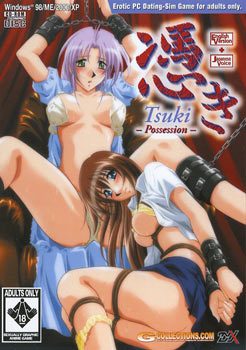
We are all not what we seem. Although we don’t want to consider the possibility, there is darkness lurking inside the hearts of all of us. If it is brought out through great pain, then terrible things can happen.
You are Yosuke, a Japanese young man, age 20. Your life has not been happy, after your mother’s death while you were a child, your father’s remarriage, and then his untimely death in a car accident recently. Now you live with your beautiful stepmother and her quiet, reserved daughter, and although you have known great pain, it seems that all the women around you are striving to do all they can to ease your sadness. Perhaps it was all these sad events that caused the darkness to come out…










65 comments
too little time....
hu hu....
but the problem is..... i can't stop downloading XD.
I WANT THEM ALL.....
I tried installing the game on Windows 7, replaced the executable file with the cracked version, and it wasn't installed under program files, but seems to be crashing every time I run it...whyyyyyyyy?!! :'(
Thanks for your help in advance!
And damn you've uploaded tons of games here! Wish I knew which ones were from which year!
THanks again!
I had the same problem (not only with this game, but with almost all old games I've tried to play on my Win7 64bits) and I just fixed it.
Install Windows Virtual PC (which is a free download from Microsoft web page) and then execute "Windows XP Mode". That creates a WinXP virtual desktop on your PC. Then install the game on that virtual machine and you'll be able to play with no issues at all.
Hope it helps.
THanks again!"
I second this opinion, it would be better if this site put an information for every game's launching years, I'm longing for an old eroge that I've played with my ex when I'm elementary, I forgot the name and provider but it's from 1991-1993
Would really like some help here, thanks :)
I can't install this. When I run the install I get a dialog saying Please eject and reinsert CDROM.
I've tried mounting in power iso as well as burning a CD. Results are the same.
Anyone have any ideas?
Thanks in advance.
What I used was a small program you place inside your sys32 folder (I could be wrong since its been a while I did this). You then use what the path the program gives and add the path of the game and type it in the start menu and run it.
What I did was just save the what i needed to type in a txt file and just copy it.
Still, thanks to Admin for uploading all VN in this site.
We are very grateful. :D
My computer is windows 7 with Intel core i3-2100 CPU 3.10GHz 3.10GHz processor, 6 GB ram,64-bit operating System.
Can any one help me get the game to work normally so i do not have to go into safe mode to play it?
2. If it runs in windowed mode, use it over FullScreen for less issues.
Dullahan mentioned dual cores, if the game doesn't freeze for a minute, you can go to task manager> processes> (game exe)> set affinity and uncheck some cpu cores to see if that works.
Note: I pass on this game so the hints above are completely in general tips.
For the better techs, dual booting is always an awesome alternative.
The exe needs to be at the same folder directory as the GGD file.
I use PowerIso to work on images
I use PowerIso to work on images.
My comp runs on XP
I also had that problem but i fixed it.
I installed a virtual PC (from microsoft’s own site)
Ran the XP mode (it opens a virtual version of windows XP on your computer)
Once I had gotten the XP mode to work, i installed the game on the virtual PC
It started up, but it sucked… it was lagging as hell and there wasn’t any fun in it so at that point i was about to quit.
Then i closed down the virtual pc, and i was actually about to try out another trick on the windows 7 pc, but when i started the game, it was working like a charm
I’m not sure whether you have to have the game installed on the virtual XP PC, or you just have to have the virtual XP PC installed. In any case, it’s working now. With both this game, and other games i have had the exact same problem with, they’re all working just fine now.
Hope it helps
Have anyone encounter the same problem as me?
Running the exe from program file doesn't seems to be able to save the game.
However,running the exe from the mounted disc works.
Old game always give trouble =P
Any help would be appreciated
I tried to install it with Demon Tools. It does not open a window, does not react. All it does is tell me that the program might have been installed wrong. And then when I look in programs it is not installed. It does nothing. I tried compatibility mode XP, I tried Japanese localization, nothing works.
When i just simply click the application it says "REgistration information is incorrect.Please install again" what do i do?
1. Copy the full disk to your desired installion folder (ie: C:\Tsuki)
2. Create a text file with this in it (replace install dir w/ yours, using double backslashes):
Windows Registry Editor Version 5.00
[HKEY_CURRENT_USER\Software\ZyX\HYOUIUS]
“InstallType”=dword:00000004
“SaveDir”=”C:\\Tsuki\\”
“DataDir”=”C:\\Tsuki\\”
“MusicDir”=”C:\\Tsuki\\”
“VoiceDir”=”C:\\Tsuki\\”
“VideoDir”=”L:\\”
“WndPos”=hex:7e,02,00,00,5e,01,00,00
“UserSetup”=hex:01,02,01,01,01,80,80,80,03,01
3. Change the text file to a .reg file and double-click to add to registry
4. Replace exe with crack and run.
I am not a computer expert and I don’t know if it will work for you, but I figured I’d post in case it helps.
also what you named that .reg file? I mean the name you gave to what was before the point
path: program files/ZyX/tuki
that's what worked for me
TLDR Solution:
https://drive.google.com/open?id=1fYmYD75QlH28dPWxiaTEEdixf_uS09xD
^ basically the Answer. Linking to my own google drive
Copy Paste the whole thing below:
(From here)
Windows Registry Editor Version 5.00
[HKEY_CURRENT_USER\Software\ZyX\HYOUIUS]
"VideoDir"=".\\"
"InstallType"=dword:00000004
"SaveDir"=".\\"
"DataDir"=".\\"
"MusicDir"=".\\"
"VoiceDir"=".\\"
“WndPos”=hex:7e,02,00,00,5e,01,00,00
“UserSetup”=hex:01,02,01,01,01,80,80,80,03,01
(To here)
Create a Txt file,
paste everything in,
rename the extension to reg,so that regedit will do its job. Press the cracked exe. Ta Daaah!
2) copy all image files to HDD eg c:\tsuki
3) replace crack file
4) create a .txt with contents:
Windows Registry Editor Version 5.00
[HKEY_CURRENT_USER\Software\ZyX\HYOUIUS]
"InstallType"=dword:00000004
"VideoDir"="C:\\tsuki\\"
"SaveDir"="C:\\tsuki\\"
"DataDir"="C:\\tsuki\\"
"MusicDir"="C:\\tsuki\\"
"VoiceDir"="C:\\tsuki\\"
"WndPos"=hex:7e,02,00,00,5e,01,00,00
"UserSetup"=hex:01,02,01,01,01,80,80,80,03,01
5) save the file, close the file, rename the file extension to .reg
6) run the file and add to registry
IMPORTANT!!! THE DOUBLE QUOTES ARE COMMON DOUBLE QUOTES NOT THE CURVED ONES FORM WORD. THE COMMENTS BLOW SHOW THE CURVED ONES, WHO DOESN'T WORK