English visual novel downloads

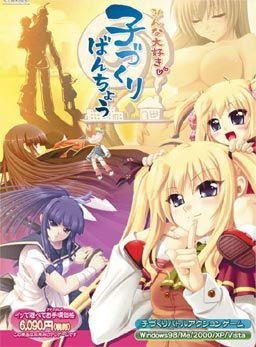
Minna Daisuki Kozukuri Banchou

Minna Daisuki Kozukuri Banchou

To counter the declining number of childbirths, government decides to activate a plan. All schools across the country will enter contests against each other. The losing school will be shut down and its students will enter the service of the winners. Thus re-igniting the spirits of the lost young generation and hopefully producing healthy couples capable of childbirth again.

The protagonist realizes that this is his chance to realize his dreams and makes a grand plan. First he “acquires” the help of the goddess of fertility, allowing his children to grow up in weeks instead of years. Then he starts leading the fight against other schools and “collecting” girls to grant him superior children on the battles to come…

Gameplay is divided into two modes:
Global mode plays like an adventure game where you talk, date and have sex with your followers. There is a minigame to make babies and also the simulation part is here as well in which you configure your troops and select which school to attack next.

Arcade mode is where you lead the contests and fighting against rival schools. Leading your hero, who doesn’t have any special powers at the start and making yourself a team with the mothers and children, who actually grant bonuses to mothers and special powers to you.

207 comments

barneyReply
how come i havent heard of this game being translated?
Anyone has any idea of the translator?
sangdenReply
seiha
GentlemanReply
Hello when I press any of the executables the game just crashes... "ARCGameEngine has stopped working." This i all I get I tried running has a admin tried using applocale and even turning my pc into japanese nothing worked. Could someone help me ?
GaribaldoReply
Hi disable the Data Execution Prevention for the exe it should work ^^
GuyReply
much obliged
PandaeMangReply
Be In*
DragonReply
Just scroll your mouse to the bottom of the screen.
CrzoReply
doenst work either... the game just turn black screen,
UserfrankReply
How do you save in this game? The top menu is still in japanese, i don't understand a thing.
Sorreah182Reply
its on the bottom. move your mouse to the bottom of the screen.

I have that pop up error too, but none of the "fixes" work so far, nor do I understand all of them.

Garibaldo says:
March 25, 2013 at 5:51 pm
Hi disable the Data Execution Prevention for the exe it should work ^^

how do I do that?
billy bo bobReply
uncensored?
PastareReply
Is it possible to get an english patch only link please?
I already have the game and I can't use the provided download links as I have no premium account (and 2 gigs on a free account is too slow :s).
Sorreah182Reply
why is it there is all these people asking for help about the pop up issue, then they say "oh nevermind its fixed" but don't tell anything to the others also trying to fix the problem T.T
HazardReply
disable the Data Execution Prevention for the exe doesnt work, any ohter ideas?
Richard DelancyReply
To get rid of the DRM do the following steps
1. open Command Prompt
2. Type cd What the file path your game is in
3. Type crack MinnaDaisukiKozukuriBanchou.exe
You may or may not need the .exe at end but that's how I got it to work.
Sorreah182Reply
thanks for this. Game is still working the same with that pop up every minute or two though, also the crack still didn't do anything/it just kinda pops up and shuts off immedately without doing anything. I am wondering if there really is a solution, but this was helpful at least~
RyanReply
A frigging pop-up keeps appearing every second. It's unplayable.

Does anyone know a solution?
HazardReply
i do it like Richard Delancy said, but nothing is happening... oh well, i can live with the pop-up
desiReply
go to the erogegames forum and look at the tech support section and you'll have the solution.
MirrorWizardReply
errr, the thing is...
I changed locate to japan, clicked on the game and a pop up appeared with just the "OK" option.
I then changed the location from japan, clicked on the game and i'm running it just fine, except for the overleaping text.
was it supposed to happen?
MirrorWizardReply
oh, and I can only play in the fullscreen mode, no idea why...
Twisted:_AngelReply
Saving game impossible, every time i try to save the
game freezes!
Anyone have some advice?
aceReply
thanks a lot!!!!!!!!!!!!!!!!!!
MoekouReply
Is crack.exe safe? Anti-virus detects it as a trojan called Virtumonde. False alarm?
ExxEReply
Thx for help Richard Delancy, but your explanation is quite undetailed, so many guys don't get it. I try to explain it as simple as I can.

In most cases you will see an Yen sign instead of . But don't worry it doesn't matter, just use Backslash or Yen. Important you mustn't mistake a Backslash for a Slash and the second thing is you can't copy and paste the text bellow.

1. push the windows button
2. type in cmd and click on it or simply push enter
3. Now you see C:UsersYourUserName>
4. type in
cd C:UsersYourUserName [the file path your game is in]MinnaDaisukiKozukuriBanchou

(example: C:UsersExxEDownloadsMinnaDaisukiKozukuriBanchou)

use your Enter-button.
5. type in crack MinnaDaisukiKozukuriBanchou.exe

now you did and its working fine. Just say thx if it solved your problem.
ExxEReply
Thx for help Richard Delancy, but your explanation is quite undetailed, so many guys don’t get it. I try to explain it as simple as I can.

Warning!
(can't post Backslash without the marks so forget the marks everywhere in this post).

In most cases you will see an Yen sign instead of "\" Backslash without marks.
But don’t worry it doesn’t matter, just use Backslash or Yen. Important you mustn’t mistake a Backslash for a Slash and the second thing is you can’t copy and paste the text bellow.


1. push the windows button
2. type in cmd and click on it or simply push enter
3. Now you see C:"\"Users"\"YourUserName>
4. type in
cd C:"\"Users"\"YourUserName"\" [the file path your game is in]"\"MinnaDaisukiKozukuriBanchou

(example: C:"\"Users"\"ExxE"\"Downloads"\"MinnaDaisukiKozukuriBanchou)

use your Enter-button.
5. type in crack MinnaDaisukiKozukuriBanchou.exe

now you did and its working fine. Just say thx if it solved your problem.
PopupReply
For the executable "crack.exe" to work, you need to give the current folder as argument.
McGruderReply
what font pack does this use?
anonReply
This plot.. My god, it's amazing. I MUST PLAY THIS NOW.
LifeOfTreeReply
admin... do have any tips or walkthrough to complete the game
and save some time from playing it :DD


it's a big help if you give us walkthrough


THIS SITE IS SUPER AWESOME!!! thanks a lot if you have any walkthrough
Livez EinzweilReply
I'm not an admin but I can tell you this... you don't need a walkthrough on this one its so easy that you could finish this in half a day...
JackReply
100% in 6 hours. Yeah, no walkthrough needed for this.
PhantomReply
This looks quite interesting, thanks as always Admin.
OtakuSekaiReply
Am I the only one having problems with downloading the 2nd part?
OtakuSekaiReply
never mind. Sorry for the trouble
-inFidelity-Reply
need help, cant seem to get to the endings since the game freezes after the fight with the mayor, any ideas?
AnonymousReply
well it got fixed increasing text read speed to MAX and running as Administrator, no japanese locale needed.
ultimumReply
thnx...been waiting for this game
Evil NoodleReply
Keep getting these error messages that has me either press Yes or No when I play... is that normal? not really a big problem but its annoying T_T... it shows up every minute or two! how do I fix?
sebastianReply
i got the same problem its really annoying
HACReply
Ok I'm going to need some help on this one.

First off, the Menu bar at the top of the screen is Japanese. How do you save?

Secondly I'm getting graphical artifacts. With applocale set to English there are black lines inbetween all the text. In Japanese mode, text in parentheses and narration look fine, but text that I'm assuming should have quotation marks has garbage on either end.
calninorReply
I have the same problems.
Any help would be great.
Sorreah182Reply
as I can't get rid of the annoying pop-up, I kinda gave up on this game until a fix for it happened. but to answer your question, the save/menu for those options is on the bottom, move your mouse to the bottom of the screen to make it appear. (can't do it in battle) as for your other error, I am not sure, I didn't encounter that problem. Just the stupid pop-up
jaonsaReply
wait a fix for it came out? cuz the message keeps coming up with yes and no option :(
and it freezes the game sometimes
dodoReply
one does not simply play a jap VN without jap locale...
HikariNoYamiReply
I play without AppLocale just fine .. All you need is Japanese settings in your computer and you're all set ..
Kyuu-chanReply
Kyaa~! finished downloading dengeki strykers,.

Haven't fix the problem with kamidori though :'(

Well Thanks for a new one Admin :D even though i'm new haha..!

:3
sad1Reply
the game is isn't working for me .. crashes before it even starts .. using windows xp + jap locale .. just extracted and playing it, its doesn't need anything more right ? any ideas ..
obakaReply
Seems like AVG is detecting it as some sort of virus, unknown classified as identiy protection. Will run then exit out and AVG will delete the exe.

Leave a comment