
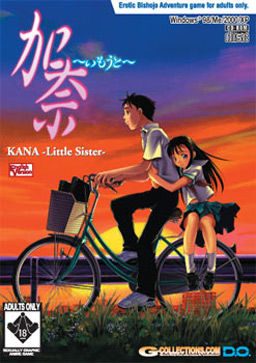
You have a sister two years younger than you. Her name is Kana. She has been ill all her life, and she spends more time in the hospital than at home. Because of this, Kana has always been a higher priority than you. In the past, you have experienced feelings of hatred towards her. However, this all changes one day, and you suddenly find yourself being more and more protective of Kana. Throughout her terrible ordeal, your feelings for each other slowly begin to change. You feel it’s your duty to protect Kana from all harm. After all, you love your sister, and would do anything to save your little sister Kana…even…
Kana Little Sister

234 comments
1. get DAEMON Tools Lite and find Kana -Little Sister-.ccd.
2. Go execute and change the place where it going to install, Install in where Kana Little Sister file is
( where Kana -Little Sister-.ccd is). and it will install it.
3 After finish Installing go Extract Kana_US_NoCD to where you installed it the Kana little sister file
(where Kana -Little Sister-.ccd is)and replace the KANAUS.EXE it apear when you extract the Kana_US_NoCD to kana little sister file and just say "yes".
4. when you made that far congratulation only problem now is the music sound doesent work but do not worry there is a solution. As one of the guy said in the comment.
Visit http://m0001.gamecopyworld.com/games/pc_kana_little_sister.shtml
and you can find below Kana Little Sister v1.0 CD AUDIO FIX which you have to download and when you done that extract the file to Kana little sister file ( where you installed the game ) and to be sure make sure mount Kana -Little Sister-.ccd or it wont work.
I wrote this as easy as possible.. ask if you still have problems.... shouldnt be neccessary.
anyway enjoy the game. :) im playing it right now.
the crack is not in this download, so you have to find a crack online google it its about 1.61mb approximate size.
paste but NOT replace in the installed folder VERY IMPORTANT
paste the music patch(bass.dll ,kanaus and Op.dom)only
most importantly you can only play if the image file is open in daemon or alcohol
enjoy this worked for me so hope it works for u guys
I'm going to include what should be blatantly obvious steps, but you never know who is new to this process and truly doesn't know.
Dumb assumption on my part: You know what a .rar file is and know how to use it.
Dumb assumption on my part #2: You read the FAQs on this site that talk about disc images. (I personally use DAEMON Tools.)
Optional but recommended:
Create a new folder somewhere convenient. I will continue under the assumption you did this and refer to it as your download folder.
(I made one a few layers into my C: Drive in an obscure place and gave it the hidden attribute to prevent accidental discovery by anyone I don't want knowing I have these files. Note, if you give your folder the hidden attribute, give it an easily remembered name for when you have to manually type in the address.)
First:
Download all three parts of the image file to your download folder. You can mix a match from the two different mirrors listed above and it should still work. Down load the crack File. Download the Audio Patch File. Download the Uncensored Patch File. (Again, all to your download folder.)
Second:
Select and extract part 1 of the three part .rar file that contains the disc image to your download folder. The result will be a folder titled "Kana" that contains three files, a .ccd, a .img, and a .sub. The .ccd file is the file you will mount as your image, but the other files are needed as well for the image to work. Leave the three files in their folder.
Third:
Extract the Crack .rar file to your download folder. There will be two files, a .exe and a .txt. The txt file is just some tech jargon about the .exe for anyone who is currious. The two files do NOT come in their own folder. Make one for them and place the two files into it. I refer to this as the crack folder.
Fourth:
Extract the Audio patch .rar file to your download folder. You will end up with three files (.exe, .dll, .dom) and a folder called CD. The CD folder contains 16 .off files numbered 2 to 17. (Don't ask, I don't know.) These for items do NOT come in there own folder. Create an "audio" folder in your downloads folder for these three files and the CD folder and stick them in it.
Fifth:
Extract the Uncensored .rar file to the download folder. You will get two untyped files and another .exe. These files do NOT come in there own folder. Create an "Uncensored" folder for them and place the three files into it.
Note:
It is important that you extract the three patch/crack .rars one at a time and stick there resultant files into there own folders, or the .exe files will try to overwrite one another.
Sixth:
Amend the names of the two .exe files in the Audio and Uncensored folders so you end up with three distinctly titled .exe files. Leave the .exe file in the Cracked folder alone.
Seventh:
Mount the image file and install the program. Make note where the game is actually being installed so you can find the folder later. (I forgot this step and spent ten minutes hunting through "Program Files" to find it.) Find the KANAUS.exe file and delete it. Note, your anti-virus might squawk about this file being a trojan/worm/virus etc. If it does, let your anti-virus delete it. As to whether or not it really is mal-ware, I don't think so, but you'll need to talk to Admin for the final resolution on that argument.
Eighth:
Copy the KANAUS.exe file from your crack file to the place where the original KANAUS.exe was. We'll call this place the program folder for future reference.
Ninth:
Attempt to run KANAUS.exe. You may need the image mounted. I have yet to try to run the game without the image mounted as of when I typed this. If the program loads and appears to be working, then so far, so good.
Tenth:
Copy the Contents of the Audio Folder to the Program folder. Make sure you renamed the audio .exe file so they don't try to overwrite each other. I don't remember for sure, but other than the .exe files, there should be no attempt to overwrite anything. Try loading the game from the audio .exe. There should now be sound in the game when you get to the first background image of a new game. (before there wasn't any background music). From this point forward, you should be able to use the crack .exe file to start the game. Also, the start menu shortcut should also still be functioning.
Eleventh:
Copy the contents the uncensored folder to the program folder. Again, make sure you renamed the .exe so as to avoid an overwrite. Not counting the .exe, there should be one file overwrite. Let it happen. Try loading from the Uncensored .exe I don't know if the patch actually uncensored anthing, as I have yet to actually play the game.
Conclusion:
At this point you should be good to go. You should be able to use the start menu short cut or the Cracked .exe (which the shortcut should be pointing to) to start the game. I don't know if you need to keep the the other .exe files but as they don't appear to do any harm, you might as well keep them.
So far I can only get background music to play if i start the game using .exe file that came with the sound patch. I can not get any of the other .exe files to play background music. This do not seem to affect the uncensoring patch however. I was playing use the sound .exe and reached an H-scene involving Yumi Kashima and there was nothing I would consider to be censoring.
I followed the given instruction exactly and I don't know what else I can do.
Any help?
1a: Mount the image file and run the installer (You might have to run it as an administrator) if it doesn't run, run KANAUST.exe in windows 95 compatibility mode.
1b: Install it to the same folder as the image file. (You'll get no errors if you do this)
2: Copy the music patch to the game folder.
3: Done! The game works and the music is playing!!!!!!
Now this worked for me although I didn't bother with the uncensoring patch and the crack but I'm not playing this game for some fucking nude cartoon porn!
/ObviousOne
Do yourself a favor, play it.
Send the exe to AVG so that they can verify it and update their databases.
Hope this helped you.
I only hear the music.
Can someone provide me a save game in window mode?
The game itself works perfect except my screen displaying BACKWARD for images and everything in full screen mode.
Is anyone have same problem with me? fix and suggestion will be much obliged
i'm using XP SP3