
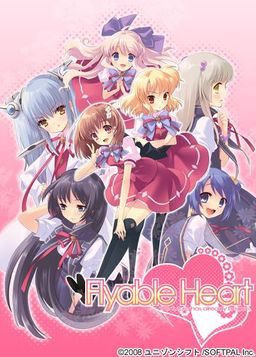
One day, Shou, who is always hungry, receives a letter. It contains a student ID issued by a famous school and the ID says “All school restaurants are free of charge.” He immediately decides to transfer to this school. The school, however, is divided into two groups…. Also, what welcome him are a strange fortuneteller, a huge explosion of fire works, and his room at school dormitory for girls…. What will happen to Shou? What will happen to love romance between Shou and six female students? His new school life now starts….
“Watch out, boy. Various misfortunes will happen to you….”
Flyable Heart
- FlyableHeart.part01.rar - 199.3 MB
- FlyableHeart.part02.rar - 199.3 MB
- FlyableHeart.part03.rar - 199.3 MB
- FlyableHeart.part04.rar - 199.3 MB
- FlyableHeart.part05.rar - 199.3 MB
- FlyableHeart.part06.rar - 199.3 MB
- FlyableHeart.part07.rar - 199.3 MB
- FlyableHeart.part08.rar - 199.3 MB
- FlyableHeart.part09.rar - 199.3 MB
- FlyableHeart.part10.rar - 69.6 MB
- FlyableHeartEnglish1152.rar - 14.6 MB



511 comments
Just be warned - it was more of a troll project, it uses machine translation, so quality is very poor.
I am really curious what software they used, b/c even if this is not a super polished translation, I wasn't aware that any machine could translate anywhere near this well.
I think it was more machine assisted translation, where translators weren't fluent enough, but understood japanese enough, that assisted with mangled machine translation could spit out readable english text.
IF not, then, I need to get the name of this software, b/c it would make all the Eroge in Japan playable.
Copy this to the Flyable Heart Directory.
Run (as Admin if using Windows 7) and select Shou unvoiced. All night i have been trying to figure that out. Hope that helps.
Anyone download this yet that can tell me if the quality is too shit to enjoy the story?
still didnt work even if i run as administrator D: oh btw i use windows 7 if that helps
another problem would be that the flyable heart folder is permission protected. to see what i mean, try copying a file into the flyable heart folder, it will ask for administrator permission to do so. << for this problem, im not yet quite sure how to go about it, sorry.
Who can I find one ???
i have tried running as admin
I install the game, it works perfectly.
When i install the english patch and start the game i get the game window comes up black, together with an error message in japanese, i click it the window dissapears and thats that.
I use vista,
Play as admin,
Same thing no matter were on the computer i install,
I use japanese locale.
I got the font generic203 mentioned.
Anyone got a solution id be really thankfull.
In the Application Data folder. look for a folder named "SOFTPAL". In it you will find the FH.ini.
Open it and make sure that beside "INSTALLFOLD" is the correct installation path of your game. (Where you installed it)
It atleast fixed it for me.
still didnt work even if i run as administrator, I use windows XP
and the unnecessary and gratuitous use of the f word in places where it is not only out of character, but isn't even in the original text. I am having trouble reaching Suzuno's ending even though I finished all the other endings.
This is a notice that we do NOT support the renaming nor mirroring of our releases as it
1. Does not properly represent the origin of the Materials
2. Does not retain date and version information.
We are NOT responsible for any issues arising out of the use of or inability to use such unofficial releases. Any and all support requests for such issues shall be ignored. Please review the terms and conditions set forth in the License Agreement for Pre-Release Software located in the file FHTRANS_README.TXT in an official release.
Using original release link enables project management to more accurately gauge your interest in our products and make decisions to serve you better through a more informed decision-making process. We remind you that official release is available at http://flyabletrans.megabyet.net/
**Please note this product is currently on Extended Support period, meaning we will provide best-effort support on a per-request basis, but further development has been discontinued.
----------
Dmitry Markovic
PR Assistant
REtrans International, Leading-Edge Localization Technologies
can anyone help me.
Anyway problem solved I played the game while I accidentally erased something on the PC with "Deep Freeze" installed...just don't try it
I can't seem to find it on this site, or on google either.
well...not in english anyways.
(B.T.W Downloaded Mirror 2 if that helps).
then when i go to play it crashes on meeeeee why is the world so cruel
1. install it to C:\Program Files\Flyableheart
It will install to C:\Program Files\Flyableheart\ユニゾンシフト\FlyableHeart
2. Put the folder C:\Program Files\Flyableheart in the exclution list of your antivirus
3. MOVE C:\Program Files\Flyableheart\ユニゾンシフト\FlyableHeart < folder to C:\Program Files\Flyableheart\FlyableHeart
4. Run the patch in admin mode.... it should work *also if you are using vista/win7 make the go to the security tab of the folder and "Allow all" for your user*
i tried it many times but it still won't patch...
what schould i do? : /
It will install to C:\Program Files\Flyableheart\ユニゾンシフト\FlyableHeart
2. Put the folder C:\Program Files\Flyableheart in the exclution list of your antivirus
3. MOVE C:\Program Files\Flyableheart\ユニゾンシフト\FlyableHeart < folder to C:\Program Files\Flyableheart\FlyableHeart
4. Run the patch in admin mode…. it should work *also if you are using vista/win7 make the go to the security tab of the folder and "Allow all" for your user*.. basically its the folder "ユニゾンシフト" that screws with the patch...*also download the font*
But now it crashes when i try to save T_T
1. problem with installation(setup) use "Microsoft AppLocale" to help install.
2. problem with patch (fatal error when patching)
you must change the name of game folder ユニゾンシフto "FlyableHeart" i think japanese language is the cause of patching problem.
I had the same problem as you, took me a while to figure out.
There are two solutions I believe.
First you should try making the directory to C:\Program Files\Flyable Heart\FlyableHeart then click on the FH.exe
The default for the installation makes the "Flyable Heart" part a Japanese name, therefore the installation for the patch cannot access it.
Second, you can open the fhinst.exe file using AppLocale. To do this search AppLocale in the start menu. However, before you click it hold ctrl+shift first(this is very important, it took me quite some time to figure out that I had to do this). The second way will for sure work. The first way will make it so you don't have to use AppLocale to open FH.exe.
I suggest you do both.
I finished downloading all of the files...
When I extract them, at 96 - 100%, it says: Data error in 'FlyableHeart/FLYABLE_HEART.mdf'. File is broken.
Please Help Me...
Now my problem is it won't install the program.... There's some weird message that I ,of course, can't read when I try to install it.
I reached to the point where I choose where to install the program, after that this message appears :
C:\Program Files\???????\FlyableHeart
YES/NO(I selected YES because if i selected NO it closes)
then
The weird message appears with an OK button....
when I click OK it closes.
The weird thing is that I can run the program without installing it by opening the installation disk...
When I unmount the installation disk, it won't run.
PLEASE HELP ME!!!!!!
When you finished extracting the files, there should be TWO files there.... One that has .mdf file extension and one that has .mds file extension...
1 - 7 should have 257.49 mb
8 should have 60.97 mb
When does the error occur?
During the extracting process or the installation process?
i got stuck at where Souryu and Kei having conversation about the main character just after the zombie event. font goes all crazy with "4763847$#^@#%" letters then crashes when souryu talks
Send the detected file to your antivirus vendor so they can verify it and remove warning from database.
My game crashes as soon as I try to go there? Any ideas what is wrong there? I dont have any other problems but this <_<
coz in vndb it say partial patch mean not completed yet?
when i want to open cg viewer, when saving, in certain scene so cant continue..
must mount the cd image while playing also eat much memory ==a
after install the font file the game run just fine..
maybe you can upload the font file admin..?
the problem leave is i can't found nodvd patch that work with the translation..
what is the problem?
I could do it with the other without the deamon tool or other software.
thanks in advance
the real one is around 4.2gb
is this the real flyable hearts the future has begun
or is it just the fandisk?
though the translation patch is right....
Thank you and Good work :)
I have Applocale but it wont allow me to run the Setup.exe with it, I can however run the game from the disc but I cant add the translation patches then which defeats the point.
Any help as I see others have had similar problems?
I don't know if this will work for you but have you tried mounting the game disc then opening a folder under "my computer" and directly copy pasting the files into your own folder? That's how I installed it and it seems to work fine.
Maybe placing the patch in the same folder as the game and then excluding the specific program folder from your antivirus program will help? I've heard some of the files in the english translation patch are read as viruses and immediately blocked by antivirus programs.
Hope this helps... I'll try to think up some other things in the meantime.
However I'm getting a new problem, that being that the game crashes on the first scene with Shou's Dad so I'm not getting anywhere. It also crashes when trying to view the CG menu.
Has there been any solutions to this problem yet as I see I'm not the only one having it with this game?
http://www.ank.com.ar/fonts/MISCFS__.TTF
everything worked fine after that.
Hope it helps.
Really thanks for your patience!! =)
Also how do i get rid of Shou's wierd voice?
But text is so small any ideas to make it larger?
When all the characters speak like yoda it may be amusing for a while but it begins to get annoying after a while.
When ATLAS isn't enough, bring in Mecab. That helps a lot.
Of course this was only possible through all the efforts of many hard working translators and admin for bringing all the games together.
But my point is once you have gotten used to properly translated games this level of translation just doesnt cut it.
i heard it's english patch is already 99%.
IVE BEEN WANTING TO PLAY THIS GAME FOR 3 YEARS!! SO HAPPY!!!
this keeps coming up:
Error occurred during upgrade
bgm.pac
dll\PAL.dll
WTH please can someone help me?
This is bullshit -__-
Is there just not one to be found as I cant even find anything except for other people asking where to find one.
I ask because this site is normally really good for getting walkthroughs up, even on stuff thats newly translated.
Anyone with a workable one should post it here for the rest of us.
Yui
(Save 1)Yes
Leave it alone
(Save 2)To the dining room of course
Go to the student council room
(Save 3)Look towards Yui
(Save 4)For now…now, what time is it?
Look towards Kururi
Protect the base
Don’t pursue too far
He can be defeated anytime. Leave him alone.
Go to the school building with Inaba
Find him and challenge him to a duel
It may be better to stay still in the classroom
Join in beach volleyball
Receive with full strength
Go to the Ryouran Committee
Escape straight ahead through the corridor
Escape through the dining room area
Return towards the classroom
Yes
Go towards the stairs
Leave as is. Leave her alone.
After all, leave it
Hide in a classroom just to be sure
Return a reply
Accompany together
Yes
Act Alone
Temporarily take refuge in a classroom somewhere
Don’t choose any
~Yui End~
Amane
(Load from Save 1)No
Go check with student council
Leave the student council room
Go to the student council room
Look toward Amane
(Save 5)For now…now, what time is it?
Look towards Amane
Protect the base
Don’t pursue too far
He can be defeated anytime. Leave him alone.
Go with Amane and the others to exterminate the chairman
Serve as rear guard
Challenge with teamwork
In any case, escape somewhere?!
Look for Amane
Go to the Ryouran Committee
Escape straight ahead through the corridor
Go towards the stairs
Leave as is. Leave her alone.
After all, leave it
Hide in a classroom just to be sure
Return a reply
Act Alone
Temporarily take refuge in a classroom somewhere
Amane’s cake
~Amane End~
Sakurako
(Load from Save 2)Take a detour
Go to the student council room
Look toward Sakurako
Doesn’t anyone help me?
Look towards Sakurako
Attack is the greatest defense
Run away from here
When it has to be done, it must be done.
Skillfully coax
Skillfully coax
It may be better to stay still in the classroom
Look for Sakurako
Ask Sakurako
Go to the Ryouran Committee
Escape straight ahead through the corridor
Go towards the stairs
Leave as is. Leave her alone.
After all, leave it
Hide in a classroom just to be sure
Return a reply
Act Alone
Temporarily take refuge in a classroom somewhere
Sakurako’s cake
Go outside the school building
~Sakurako End~
Mayuri
(Load from Save 5)Doesn’t anyone help me?
Look toward Sakurako
Independent regiment
Pull out from here at once
When it has to be done, it must be done.
Cry for help
Ask for help
Find him and challenge him to a duel
Try to hide in the student council room?
Join in the beach volleyball
Block with full strength
Ask Mayuri
Go to the student council
Escape straight ahead through the corridor
Go towards the stairs
Leave as is. Leave her alone.
After all, leave it
Hide in a classroom just to be sure
Return a reply
Act Alone
I don’t know. I should run away quickly here.
Escape to another level
Mayuki’s cake
Go to the exhibition classroom
~Mayuri End~
Kukuri
(Load from Save 3)Look towards Kukuri
For now…now, what time is it?
Look towards Kururi
Protect the base
Chase and certainly bring down
Protect Inaba first
Present a united front
Challenge with teamwork
Try to hide in the student council room?
Go see the state of Kujo and Gumi-chan
Go to the Ryouran Committee
Escape to the entrance
Force through without minding
Escape to the dining room area
The donut is right! Advance.
Aproach and look
Silently tolerate this
Hide in a classroom just to be sure
Return a reply
Act Alone
Drag and take to another place.
Kukuri’s cake
~Kukuri End~
Suzuno
**Suzuno’s path can only be attempted when all the other endings have been done.**
(Load from Save 4)What were those sounds?
Look towards Sakurako
Independent regiment
Challenge from the front
Go to the school building with Inaba
Find him and challenge him to a duel
Try to hide in the student council room?
Go see the state of Kujo and Gumi-chan
Help up
Go to the Ryouran Committee
Fight with copper sword equipment
Hide in a classroom just to be sure
Return a reply
Act Alone
Just run away in the corridor
Don’t choose any
~Suzuno End~
***After the credits, choose “Die zukunft hat schon begonnen” from the menu to view Suzuno’s epilogue.***
I had issues with the game but i got around that by just opening it and copying the files to program files.
Every time i click on the patch my antivirus comes up and I can't directly copy the files to the folder the game is in, can some help me please?
I couldn't get it installed to begin with at first. I had to open it and copy all the files then so install the patch I had to turn off my virus protection. After all of that the game has been working fine for me.
COOKIES FOR YOU ALL! HURRAY!
Anon says:
December 1, 2011 at 5:21 am
Already solve this…..
Now my problem is it won’t install the program…. There’s some weird message that I ,of course, can’t read when I try to install it.
I reached to the point where I choose where to install the program, after that this message appears :
C:\Program Files\???????\FlyableHeart
YES/NO(I selected YES because if i selected NO it closes)
then
The weird message appears with an OK button….
when I click OK it closes.
The weird thing is that I can run the program without installing it by opening the installation disk…
When I unmount the installation disk, it won’t run.
PLEASE HELP ME!!!!!!
http://www.ank.com.ar/fonts/MISCFS__.TTF
And apply the hotfix:
http://www.mediafire.com/?q3z7dmnhg5gy0r6
(Some anti-virus softwares see it as virus, do something about that first)
So could someone tell me how to correct this or how to install it properly?
i think im doing something wrong here lol can someone help me please
if you already solved it, please reply
ok srry for that rant, this shit just boggles my mind.
need help too
fatal error patching file dll\PAL.dll
and then
fatal error patching file bgm.pac
what did i do wrong?
anyway i got the patch done but now the game is kinda slow and i cant save -_- the game crush always
go to you tube. com /watch?v=UaeKUvtRlLo. follow the guide, and make the new folder because it helps.
Any help?
Any ideas?
If you don't have the font, saving crashes the game.
Is that normal?
If you use megamanager to download from mediafire it download's at like 1mb per second
When I run English Patch I got fatal error patching dll/PAL.dll and bgm.pac.
What must I do ?
can someone reupload that part
I dunno if you can play immediately, but I choose to autorun and install the game first, applying the patches, then play.
lol sorry I just couldn't resist :)
"Windows cannot acess the specified device,path,or file.You may not have the appropriate permissions to access the item"
how to fix it ?
it said fatal error patchingfile dll/Pal.
what should i do to solve it?
I really glad for translation but this translation is crap and Why translator use this stupid narration voice ?!?!?!?
"As a matter of fact, I got this in the post 1 week ago, put it in my pocket as it is, and went on a stakeout. Therefore, I woke Shou-kun in a hurry."
Can anyone help?
Opend the game and "blam" microsoft sam in my face -_-
Write the captcha, wait 4 mins and then please feel free to download "Site is currently not available." message!
And I'm getting that crap shoveled on my face too often... Is there gonna be any more torrent links? Those seem to work wonders here.
PLZ someone help me T.T ill post pics if needed
Please someone help, i have never had problems installing patches before and it's really frustrating me.
Example: A part where one character got scared and said "Mommy!" got translated as "Motherfucker!".
Example 2: "Are you mad at me?" got translated as "U MAD?".
Example 3: A tongue-click (tch) got translated as "Shit".
Those are by no means special exceptions, those are the norm.
To top it off, most the game seems machine-translated. Even if you sit there re-reading certain parts to try to understand it, you'll still find yourself stumped. I'm only scrapping by because I'm translating the audio for myself.
The game seems good (from what I can tell) and it even gets a good laugh out of me from time to time, but unless you're willing to endure hours of frustration at the translation, I'd suggest finding a different game.
please help me!!!
thank you so much
How can I use the english patch then?
if you already solved it, please reply
I try to instal it but? it's sayy welll like this???? ??? ??????????
what's the problem? why I can't instal it?
however~ if I click the game it can play.
can you guys show me how to intsalll thiss? game?
Someone please make a translation for Flyable Candyheart. I don't even care if it's a shitty machine translation like this one. :(
(Don't mind about my lousy english)
what am i suppose to do after download all part of the file
is it corrupt?
man i download and i just regret it
Do i really need to install the game?
cause i can play from the image
but when i tried to install the patch it asks me the inst. place
pls reply i need to know what i do to play this one pls
it always comes with error message with yellow triangle on it
please help!
Help please!!!!
i already download all, but when i extracted it shows part 10 is corupt. i alredy redownload 5 times. it still not fixed. pleas give me help.
i've downloaded all the files and extracted them
now when i try to run the english patch
there are two exe files fhinst.exe and shouvctl.exe
fhinst works fine up until the end and it stops and says bgm.pac is corrupted/PAL.dll is corrupted
shouvctl.exe staight up says could not open FH.exe
is there any resolves or fixes?
how can i prevent this from happening?
http://www.youtube.com/watch?v=UaeKUvtRlLo
1. Mount the image and install as per normal.
2. Open fhinst.exe and install the patch to where you installed the game to.
3. Drag shouvctl.exe to the installed folder and double click on it. This is to unvoice Shou(The main charater) if you don't like the machine voice.
4. You have to mount the disc every time you wanna play it. Go search for a noDVD patch if you don't want to mount the disc every time.
because I get crashed even in the begining of the game after I instal the english patch
but when install the patch my bgm.pac is corrupted/PAL.dll is corrupted. so the patch is not working, what can i do?
someone help me please
Avast!, it says the rar is free of viruses. Who to trust, I wonder...
-The english patch is machine translated one, while some parts have some unnecessary addition by the translator, the translations are largely understandable.
-If your game crash, the number 1 reason is the missing window font: http://www.twoevils.org/files/fonts/MISCFS__.TTF download and install this.
-There is no crack in this, when you play mount it on daemon tool or etc.
I downloaded the patch again and before you install the patch the game must be mounted and run the patch as administrator then it should work
BTW the game is brilliant
The game is installed and runs and everything but when I want to patch it I can't.
The symbols just dissappear when I extract them so I can't click on them or anything and I can't patch it.
What should I do?
I can't open the file in winrar too.
\ERROR coudnt open the program due to the fact that you dont have the authorisation to open or run it\ iv tried everything. rnning it as admin, moving it to different folders. trying to run it from the zip but it still dont want to work. so here's my question to the admin of this.
is this game even translated? how can i get the patch to work and why didnt you put a inscription in how to install the patch in the first place to avoid al these problems?
i would love if i could get an awnser to any of my questions and ofc i dont blame you personally but its a bit anoying when this happens and when its a first.
//itami
I don't know how long it took the others to install then ultimately gave up but me, I downloaded everything the day before yesterday and first thing in the morning I tried to install it, It was 7 and how long did it take me to surrender? I started at seven and I stopped at seven.... THE NEXT FUCKING MORNING!!!!! FUCK THIS IS MAKING ME CRAZY!!!! I redownloaded ever fucking file 4 times and its still giving me shit... until someone fines a solution I'm gonna back off for a while. BUT I WANT TO PLAY THIS VN!!!!! T_T
any idea how to fix that?
And even when I read the game directly from ISO to play, the word has not been translated as it should.
But know that I am in no hurry so take the time to answer my query and beyond if possible, resolve the problem that seems too persistent to others, please. : )
because i couldnt mount the disc with ultraiso
It was admittedly pretty boring to start out in that order at first but got a lot better as more of the overall plot was revealed.
I've reinstalled and kept doing things to fix it but nothing works. anyone can help please
Dear admin, please post a version of the patch, which is not corrupt.
First+of+you+should+have+Daemon+tool+(or+a+program+the+is+similar)+as+once+the+files+have+been+extracted+they+should+come+out+as+MDF+files.+
After+clicking+on+the+file+it+should+go+through+the+installation+process.+Once+your+installing+it,+when+the+menu+of+where+you+have+to+put+the+files+into+a+location,+you+have+to+make+sure+that+the+top+drop+down+bar+says+the+program+files+of+your+system+and+then+install+it+into+said+location.+
After+finishing+the+install+it+should+make+a+new+disk+drive+(D:+or+E:)+with+the+game+in+as+well,+you+don't+want+to+open+the+game+from+here+as+it+will+open+the+Japanese+version+only,+but+you+also+don't+want+to+get+rid+of+it+ether+as+you+won't+be+able+to+play+at+all+if+you+remove+it.+
Once+you+have+downloaded+and+extracted+the+English+patch+move+the+files+that+came+from+it+into+the+location+of+the+game+in+your+program+files+and+then+click+on+the+fhinst+file.+
Go+through+the+install+and+then+to+play+Click+on+the+FH+File+in+the+same+location+and+it+should+play+the+English+version.
Remember+DO+NOT+remove/delete+the+disk+drive+as+you+won't+be+able+to+play+it+all,+if+you+do+don't+worry+as+you+can+just+reinstall+the+file+from+the+MDF+file+extractor+that+you+used.
I+hope+this+helps+anyone+and+everyone+wanting+to+play+the+game.
For those that still don't know how to get the English patched version to work, I figured out how to get it working.
First of you should have Daemon tool (or a program that is similar) as once the files have been extracted they should come out as MDF files.
After clicking on the file it should go through the installation process. Once your installing it, when the menu of where you have to put the files into a location, you have to make sure that the top drop down bar says the program files of your system and then install it into said location.
After finishing the install it should make a new disk drive (D: or E:) with the game in as well, you don't want to open the game from here as it will open the Japanese version only, but you also don't want to get rid of it ether as you won't be able to play at all if you remove it.
Once you have downloaded and extracted the English patch move the files that came from it into the location of the game in your program files and then click on the fhinst file.
Go through the install and then to play Click on the FH File in the same location and it should play the English version.
Remember DO NOT remove/delete the disk drive as you won't be able to play it all, if you do don't worry as you can just reinstall the file from the MDF file extractor that you used.
I hope this helps anyone and everyone wanting to play the game.
Hope Flyable CandyHeart (fandisk) also be published here :D
I really enjoyed reading the weird translation.
Also, are there other games from the same developer on this site? Can't seem to find other games.
1. Just download the game.
2. Open the MDS file with Daemon Tools, it mounts the game disc.
3. Install the game using the Setup.
But it showed error, so couldn't install.
4. If you open FH.exe, the game will start but in Japanese Language.
5. Copy the Game Disc onto your desired location.
6. Open English Patch, follow the instructions to install the English Patch.
Game will crash, in start due to a missing font.
7. Hence, Download the file MISCFS_.TTF(a Font file) from internet(a common file, so you won't have any trouble), copy it to Font Folder in the Windows Folder in C Drive.
8. Enjoy the game!!!.
jesus, anime sharing didnt give the crack in the file