1. Install DAEMON Tools
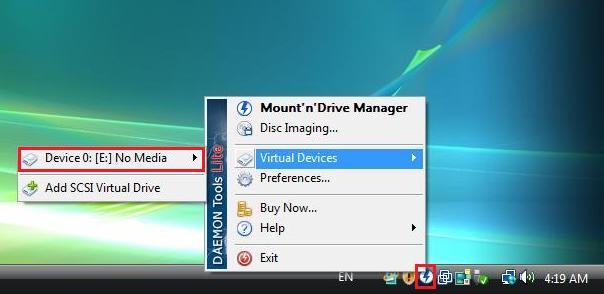
2. Right click DAEMON Tools icon in system tray and select “virtual devices” -> “Device 0”
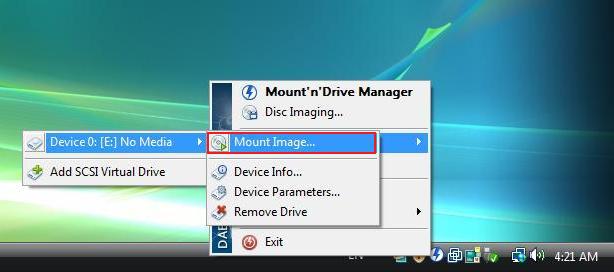
3. Choose “Mount image”
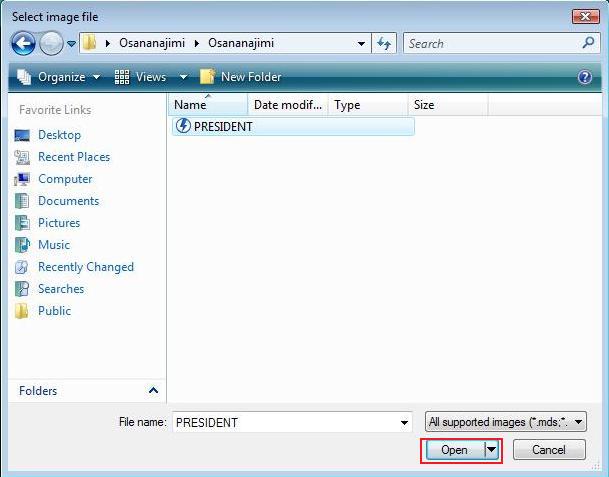
4. Select image file you want to mount and click “Open”

Steins;Gate – Installation/Error troubleshooting
1. Download Steins;Gate game, 1.20 patch and English Patch 2. Change locale to Japanese (XP Vista 7) 3.Right-click on SteinsGate.part1.rar and select “Extract here”. 4. Once extracting process finishes, you’ll…
Sono Hanabira 7 – Installation/Error troubleshooting
1. Download “Sono Hanabira ni Kuchizuke o: Amakute Hoshikute Torokeru Chuu” game 2. Right-click on downloaded archive and sellect “Extract here” 3. Run “HANA7.exe” 4. Enjoy the game!
Forest – Installation/Error troubleshooting
This guide will show you how to install English version of Forest.


how do you change your computer to japanese locale? … sorry for my bad english
if you have a pc, go to control panel>region and language> change location
Help! Every time I use Daemon tools, the setup comes up but it isn’t setting up correctly it says “fail to copy the file”. Please help!
Hey people, I’m trying to download Daibanchou, and one of the instructions is to mount the image, but none of the instructions here are helping me. Can someone give me a hand?
I’m not getting an icon on my toolbar. I need to use this thing to play Little Busters! so what can I do?
When you’re in daemon tools, when it says in the program opened “No Image Added” right click that, and hit open. Hope this helps 🙂
~Amaya
i am also new here and i dont understand how thinks work and i need help, i downloaded G-senjou no Maou (6 parts + English patch) thoses 6 parts have 2 files on them: the .mdf and the .mds files and the english patcher is the launcher file (setup) when i run the english patch (since i cant run the others 2) it ask me the save directory and after that it ask me to insert CD, i have download DAEMON tools but i dont understand how it works (i have to run the english patch with DAEMON? | the mdf – mds files are in the same file as the english patch | do i realy need the CD? | i read somewhere i have to change mine region, do i realy have to in order to work? plz can some1 tell me step-by-step what i have to do?
I’ve used daemon tools countless times in the past & never had a problem but recently whenever i mount h-games they don’t work. Mostly english ones like Come See Me Tonight 1-2, Kango Shicyauzo etc. The program always opens but when i hit play the game goes to full screen and just turns black and nothing happens. Also my resolution changes to the lowest level. Can someone please help me on this matter.
Try’d downloading Swan Song. When i get to the setup, it shows me %#6 things like that, as if it’s trying to copy the words into the english alphabet. i have tried installing the english patch yet the installation barely takes any time at all and the text remains garbled.
Hello guys i download a game it has 2 CD’s when i click on CD1 and mount it after 50% it ask me to insert game disk and click ok CAN ANY ONE TELL ME HOW CAN I SOLVE THIS PROBLEM ??
I have a problem as well. Tried installing Animamundi using Daemon tools lite. I was able to mount the ISO file and it told me the installation was successful, but there are no short cuts to enter the game, no buttens and the system does not find it, when I try searching for it.
Then again, if I mount and run the set up again, it keeps asking me if I want to change anything. So it HAS been installed, but for whatever reason it is invisible. What can I do to fix this?
Thanks
how do i install the english patches?
It keeps giving me a message please insert disk
Im not even sure if I installed it right or the crack doesnt work
When I download the game files theyre unopenable and not compatible with daemon, how do I change the files so that they run?
7zip converts .rar files well
I have everything set up in the Daemon program but once I start getting into the installation it freezes on the installation loading bar. It fills a little more than half way then says not responding. I tried restarting but that doesn’t work and also tried waiting for it to respond but no luck with that either.
I have already installed DAEMON Tools Lite, opened that Device 0 (DT-0), and mounted the image file, but I still can’t play. What’s missing ?
just installed the game, extracted with winrar, mounted with daemon tools copied and pasted the crack over, launch the game, select new game and it gets stuck on the first screen, sitting there looking at an empty room, a text bubble up with nothing in it but a single \
anyone having similar issues?
I get a blue screen error when I try to activate the program! Can someone explain to me in a very easy to understand way what to do, since I got confused?
I want needed help! In my taskbar(?) there is no image like the one the user above clicks. What do I do? Please help!
UMM new person here. To play the downloadable games do i NEED to get these Daemon Tools, and will it harm my PC in anyway?
So, I downloaded Otomaid Cafe, but instead of a .cue or .bin i there is a .exe that crashes on startup. Any Help?
I download the Daemon tools & can start the game, but how I do to make the game be in English? I already download the English patch.
Downloaded tsukihime and mounted with daemon but when i try to run it says that the disc is not supported
do you anyone have any idea about this kind of problem ?
Imidiate reply please.. do i need to download the applocale? I properly changed my system locale in japanese,but i think applocale is needed, tell me do i have to download it or just leaved it?
No, applocale is not needed if your locale is set to Japanese.
Hi, whenever I try to extract a game I’ve installed using 7-zip, it always has a “data error” midway and completely stops the process. Is there anything I can do to get around this?
Use winrar
hey new here and i may have over looked something but no matter what i do i cant mount the image for \do you like horny bunnies\ i am using daemon tools ultra, and daemon tools light, and neither one works, i get no symbol or anything in my system tray and when i try to mount it on Ultra all i get is \please insert the correct cd-rom. help please, i have tried making a virtual device but nothing i do seems to work
Do I extract the files first or do I mount them?
very late reply but i believe you should unrar them together and then mount as that sounds like the more logical option
Umm so i already extracted the “do you like horny bunnies 2” file and had 3 files and a crack folder. So i mounted it and when i open the program there was the Do you like horny bunnies 2 set up menu, normal yes and installed it. However whenever i press play from the menu, it never opens. Regardless if i installed it or not, it never opens. I pressed play but thats the last thing it pops up until you press it again. Plz help
Hi, kind of a noob with computers so can i ask for help? I see all these comments saying they mounted the .mds file but the game i downloaded (yandere) when extracted only has a .bin and .cue file. Which one should i mount? and do i paste the english patch before or after mounting?
Dameon Lite has changed its interface and installing instrucitons completely since this tutorial was posted. I am utterly unable to use it.
hey guys, im new here
how can i install files, that i partially download? like 200mb-200mb-100mb.
windows 10
So I’ve been wondering after seeing both of these for a while, should I mount the mdf file or the mds file?
I just got DAEMON Tools and it’s a new version, and it’s changed a lot so this guide no longer works… this stuff is really to be honest a bit over my head and I tried but can’t seem to get it to work. Help? :C
i’ve been trying to download Ever17 for the past 2 hours but it wouldn’t accept me mounting the disk even after the please insert pop-up. I finally figured out how to solve this with Daemon Tools Lite. Here are the instructions, credits to BusyCat below since these are his original instructions (his method no longer works that’s why I’m commenting an updated step by step)
1. Download all parts, put them in a folder and extract the first folder, which is part 1. it’ll extract the 4 iso images out from all 11 .rar files together.
2. Install Daemon Tools. When you got it go to the folder that has the 4 iso images you extracted. Double click on CD1. This will mount the image for you. Normally other cracks have separate installer for you so you can mount all 4 at once and just run setup but this one you need to go step by step.
3. After it mounts you’ll get the autorun popup, either accept the autorun or open the folder and manual click the setup.exe (looks like a dolphin icon)
4. You’ll get a small popup with a picture on it and an option to install. Click install and go ahead put it wherever you want. Then it’ll start installing.
5. Part way it’ll stop and ask for you to insert disk 2 in [F:\] (or whatever letter it lists for you), now go back to the folder you have with the 4 iso images, hopefully you didn’t close it already – saves you a hot minute opening it again. Double click on CD2 – this will mount CD2 – wait till its done and then go back to the Daemon Tools window and right-click disk 1. Click device parameters and under Drive, select any other letter except F: (or the letter it asks disk 2 to be inserted to) then click OK. Now, right click disk 2, click device parameters, under drive set it to F: or the letter it asks you in the please insert pop-up. CLick OK and go back to the installer window and click Retry. Viola it continues to install. Repeat till all 4 are done.
6. Congrats now click play and then you’re good to go. Also FYI, the folder you installed it to has manual folder – click on the index file and it’ll take you to a website that shows you all the controls and what not.
Hello, how do I join the different rar files of a game? I tried with daemon but it seems to be all paid. any other guide?