1. Install DAEMON Tools
2. Right click DAEMON Tools icon in system tray and select “virtual devices” -> “Device 0”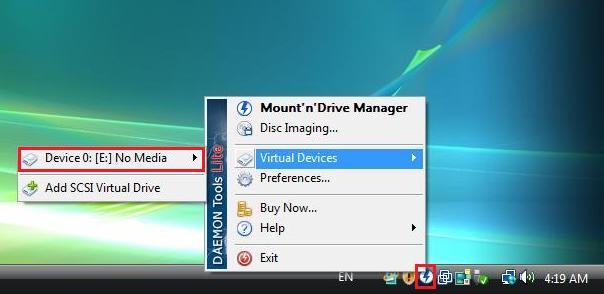
3. Choose “Mount image”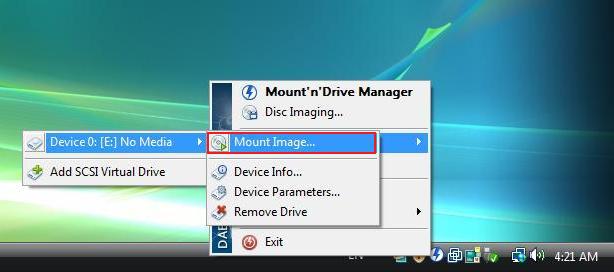
4. Select image file you want to mount and click “Open”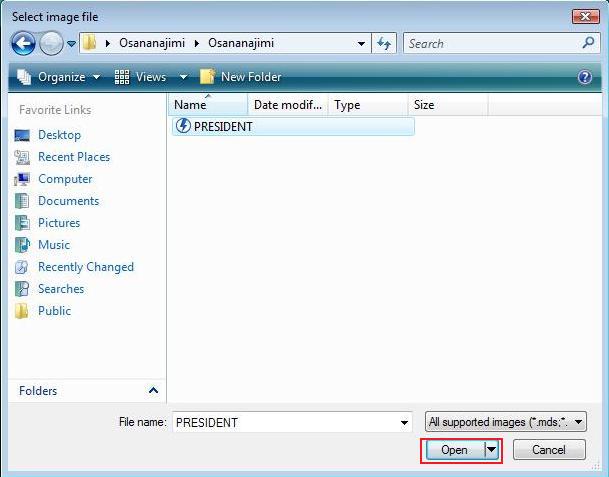

1. Install DAEMON Tools
2. Right click DAEMON Tools icon in system tray and select “virtual devices” -> “Device 0”
3. Choose “Mount image”
4. Select image file you want to mount and click “Open”
117 comments
Please help me T_T
I am a new user of eroge and would like to know how to download eroge properly so I can play it.
When you download games from Internet you have no physical DVD that you can insert into your drive - all you have is a copy of data that was contained on retail DVD, so you need a way to make computer think you have inserted DVD into drive, so that it should run game setup from it - that's what mounting is.
Alternatively - you can just burn those images as physical DVD and insert it into CD-ROM drive - this way it works exactly the same like inserting DVD you bought from shop.
right click the daemon tools icon just like the first image in the top of this page select Mount'n'Drive Manager and a window will pop up...
(It should be easy from here). Now to mount the image (usually either .mds , .mdf or .iso ) double click the device ( mine is E:) in the lower part of the window then select the cd file you want to mount (if there's two file of the same name appear choose the one with the daemon tools icon)
hope this helps
I'm currently reuploading them, but it takes some time, since i'm making them more "user friendly" - for example most of games have over 1,5 GB of promo movies on .iso images - so instead of 2,2 GB of data you now have to download only 600-700 MB. I'm also making bigger rar files, using better compression, so you have to download 2*400 MB parts instead of 7*380MB or 15*100 MB. Where it's possible i also replace original game .exe in installer with already cracked one, so there will be less people asking for "cd-key" or "activation code".
I'm reuploading the oldest games first, and i'm currently about 30% done. If current links aren't working then check out http://new.erogedownload.com/ - it's new version of site i'm working on. The chances are that game is already updated there, but not yet on main page ( http://erogedownload.com/ )
Beat the crap out of JAST !
im pised
P.S. oh and a, Admin this site is awesome man, i really love this site man. Really appreciate this site for having a lot of eroge. And it's free. Love you man.
ah, for ADMIN, if you ad this website I think this website can be popular!!! maybe you can affiliate this website with another anime site ( or maybe h-site.... ) or maybe you can make a forum in here.. that sure make this website popularity higher...
~R~
1. If you don't want to use Daemon Tools or it doesn't work for you, but still want the virtual DVD/CD you can use MagicDisk(http://www.magiciso.com/tutorials/miso-magicdisc-overview.htm), it's freeware, small, and works on all Windows platforms.
2. If the game allows for a "full install", and does not require a CD/DVD in the drive, you can run the install from your computer, and not bother with the image. You can use 7-Zip which is freeware(http://www.7-zip.org), once it's installed open the 7-Zip file manager, go to options, select "File Types" and associate with all file type listed. Once that's done simply right-click on the MDF/ISO etc.. file and you will have an option to Extract to.
3. If you don't know how to install the game, once you mounted the image or extracted the image, look at the autorun.inf file, whatever is in there is what you should run to start the installation. If it is untranslated, just press on the "next" button, usually whichever one is on the bottom-most right, until the install is complete.
Each game that's in multiple parts comes in a .rar that contains files that have the same name as each other. (In other words, Part 1 has the Name.iso, and Part 2 also has Name.iso.) Obviously they're both necessary, otherwise you wouldn't download both. But how do I extract them if they're in the same folder AND have the same name? It either asks for it to be renamed or to overwrite one. I don't want to change the name because I'm sure that would be a bad idea....
So what am I supposed to do?
Is that ok? should I remove and delete the file or should I keep it and continue with installation?
please help me.
nice tutorial :D