Canvas 2

Canvas 2

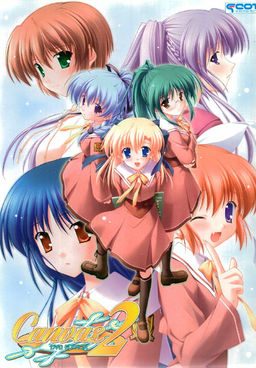
The series focuses on the lives of some students and teachers at Nadesico Academy both at school and their private lives. The main character of the series is Kamikura Hiroki, who lives with his younger cousin Elis. Hiroki is training to become a full-fledged art teacher while also trying to take care of Elis. When his childhood friend Kiri starts working at the school, drama begins to flare as he has to juggle his work, private life, and the feelings of these two important girls.

318 thoughts on “Canvas 2

  1. @unlady18

    Nippon is writing in japanese, so it’s 日本語.
    It’s suppose to be the last choice ^^
    Hope it help !

  2. I cannot seem to install the game. Using windows vista. changed to japan locale and mounted the installer, but when I clicked the install button only an error comes out. Anyone experienced this?

  3. I have a problem somehow the game always hangs during the op it jus displays a black screen and can’t continue. Does anyone know how to work around this the game plays fine before the op or can i get a save data just after the op?

  4. Does Anebody knows to make games whit Japansk locale to work in applocale? When i begin open applocale and picke the game whit Japansk support it coms a skjerm there sto ”you havent Japansk support in your pc” What much i do for at Games whit Japansk support to work in applocale? I will be very happy whis somebody can hjelp me whit that problem.

  5. @ fantasygurl

    google “applocale japanese”

    and you’ll get the files you’ll need to add onto your applocale to run locale japanese

    gambaru~

  6. so… I tried to install it in my computer and it works. but when I move it to my external HDD and open it in my laptop, I can’t hear the seiyuu’s voice. help?

  7. @Neon yea that’s the same error i got… ADVWin32 error also. My Locale was japanese so I do not know what really wrong with it.

  8. ok admin pls read this one…

    mangagamer just release the capo innocent finale
    and as expected i cant find any download link yet except to buy from mangagamer so i’ll be waiting in here =p

    thanks…

  9. One more thing. I need some help figuring out how to get the english patch to run. Whenever I remove the game01.mrg file that adv win32 error shows up, and when I leave it, I can play the game but it’s all in Japanese. Can someone please help?

  10. still no luck finding the game
    all that’s left to do is wait for somebody with kind heart to share the game to all the hungry souls on the net

  11. Hello, this game seems good! But i have a big problem… I can’t even write my name T_T. Please someone help me!

  12. the game itself works but i dont know how to change the subtitles from weird japanese ( there are missing some signs ) to english.. can somebody pleease help me??

  13. 4. Replace game01.mrg in root folder with the one provided in English patch.

    That’s all. =)
    But the admin still work on that adv32 error which is produced by that game01.mrg.

    So pls wait a little bit.

  14. okay and how do i do this?
    because i have already mounted the image and now my computer cognizes the image as a device.
    and when i want to replace game01.mrg it says: the device is write protected bla bla..

  15. After you installed the game you have to unrar the english patch.rar and copy the files in the canvas 2 main folder. That’s all.

  16. ah okay thx ^^
    and just one more question. im sorry, but what is ment with canvas 2 main folder? where do i find it?
    do i have to start the game and copy the files somewhere into it? please help, i’m a newcomer with things like that…

    1. Main folder is the one you choose during installation, ie. the one where game .exe is located.
      You need co copy files over before starting game.

  17. ah f***
    now nothing works anymore.
    i dont get it anyway, but however, thanks for all your help..
    looks like i have to watch the anime! 🙂

  18. Lool nice. xD
    For me all works fine but after 5min of playing there was that fucking adv32 error.
    f***!!! =D

  19. can someone please help me find this game somewhere? Hotfile just doesn’t download, it goes at 4kb/s. And there are no torrents anywhere for it.

  20. for anyone that get ADV Win32 execute error try this:
    -when lauch the game , try click on system info and change CPU Utilization Settings to mid before game menu come up.

  21. Completed Mami’s route, but I got the bad end when doing Sumire’s because on that route the main character becames a whinny little bitch. Damn these emo male characters. LOL

  22. Hey admin, I’d like to donate. Can you put up a PayPal button or something? This site is awesome, and I think many others will donate too!

  23. Regarding the ADV Win32, which I happily produced myself, had one problem that I was able to track down instantly.

    Know how you install the game to /dir/Canvas2/cv2_dvd/allthefiles ?

    Well, I’m one of those picky people that just _can’t_ live with the extra /cv_dvd/ folder, so I copied all files from that folder “one step back” making it /dir/Canvas2/allthefiles and here the advwin32 error started happening.
    Meaning, the /cv2_dvd/ folder _has_ to be the root folder.
    I haven’t played it yet in order to confirm the error with Kiri, as mentioned above, but there won’t be any errors on game startup at least 🙂

  24. Help me please im really confused whats the next step? After i extracted part1-part6 a C2 DVD (ZIP FILE) appears i mounted it and now im really confused how to install the game? I also extracted Canvas2_DVD which is from the No DVD Patch/Crack and the Canvas2_DVDPatch1.01 which is from the English Patch in this page
    Whats the next step im totally confused!

  25. Ok so here is a BIG question…. I have successfully downloaded the game right,but now when I start up the installer and hit “Install” it will sit there for a minute and then the buttons will flash off and then suddenly turn rite back on again after they go off….. and the game installer does not pop up after I hit the “Install” button ether it’ll just flash the buttons off then on again and that’s it.. I dont know whats wrong with my game and I SERIOUSLY WANT TO PLAY IT!!! but I cant do ANYTHING unless someone helps me SOON!!! HELLLLP MEEEE PLEEEEEEAAAAASSSS!!

  26. heres what i done
    1) Make a folder on the desktop (or wherever on your hard disk) & rename to ‘Cvs2’ (or whatever name you want). This will be the main folder

    2) Copy the entire content of the Canvas 2 dvd game into the ‘Cvs2’ folder

    3) Open ‘C2_DVD’ folder & find the advwin32.exe. Copy & paste this into the main (Cvs2) folder.

    4) Download & save the Canvas2_DVD.exe (no DVD patch) into the main (Cvs2) folder.

    5) Download & save the game01.mrg (translation patch) into the main (Cvs2) folder

    6) Double click the Canvas2_DVD.exe

    7) Double click advwin32.exe & the game should run.

    at first i thought it didnt work as the menu and name choice were untranslated but after continuing i found that it was translated i dont no how many errors may come up after this so just enjoy what you can

  27. Sorry but that doesn’t seem to be working, but Ill keep trying maybe I’m just doing something wrong but if you have any more suggestions I would like to hear them… BECAUSE I REALLY WANT TO PLAY THIS GAME!!!!!!!!!

  28. WHY IS THIS HAPPENING!!! I KEEP GETTING THAT DAMN WINADV32 ERROR! AND I CANT FIX IT!!!!! DAMN!!!! THAT AND THE INSTALLER STILL DOESNT WORK!!!! GOOOOOOOOOOODDDDDDDDD HELLLLLP MEEEEEEEEE!!!!!!!!!!!!!!!!!!!! or at least an admin….

  29. @Galge-gamer12

    Ya I tried that but It keeps on crashing with a different Advwin32.exe error so both options so far have not helped. In the first attempt the game window pops up but not a second latter (like as soon as the game window pops up) an “Advwin32 Launch error” pops up. And with the second one as soon as I click “Advwin32.exe” It pops up with this “advwin32.exe has encountered a problem and needs to close” message so thats whats happened so far……. any thoughts?

  30. @SaberXJ:
    is the crash about something like a trojan attack?
    if so, then we have the same problem, but the solution for it is to add it in the exception list.

Leave a Reply

Your email address will not be published. Required fields are marked *