
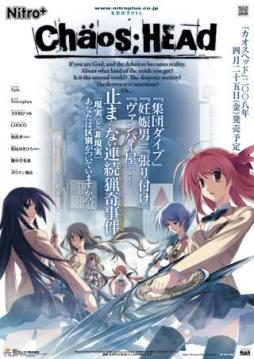
Takumi is a high school student. He is withdrawn and is not interested in 3D things. In his town, a mysterious serial murder case happens and people get panicked. One day, when he chats on the internet, a man suddenly contacts him and gives him an URL. He goes to the website and finds a blog image that suggests a next murder case…. On the next day, it really happens….
Chaos;Head









781 comments
The Serial Number is 000-702-000-114.
I've updated first post with this information aswell.
but something is wrong with the antifail instellar.bat
firstly the game works but it isn`t in english, except of the menu
secondly after the opening credits and the movie, the game crashs
I hope you can help me
Sorry for my bad English
BTW, this blog is actually great! Keep it up, : D
This is my problem too. ;__;
Thanx for this ^^
Anyways, I suffered the same problem as Gimlye-sama. So I installed VSFilter and opted for soft subs which seemed to solve the problem. I hope that helps anyone ^^
When I`m in the game and I press start, it just won't start!
Goes to a black screen for few sec and then back to menu...
How can I fix this?
ive been stuck on this for a long time
PLZ HELP
the only thing inside is "CHAOSHEAD-isofile-". I opened "Daemon Tools" and mounted the isofile.
You need to install Daemon tools in case you dont have it. Then just click the picture of the disk that says "add file" and find the folder where you extracted the game.
When you find the .iso file click open. Under image catalog, you will now see the file, double click it. You should now see a picture of a girl with pink hair at the bottom.
Now you can close daemon, then go to my computer. You should see a “BD-ROM Drive (E:) CHAOSHEAD”, double click it and the game installer will come up.
If you are using windows7 –DONT install it in (C:) disk. Anywhere else is fine, like desktop or my documents.
After you install it, you can try running the game but an error will come up. Now you need to get the noDvd.exe
Im not sure if you can get the noDVD.exe from the game download. I got mine from here
http://rapidshare.com/files/195162237/ChaosHead.exe
Get the "noDVD.exe", then copy it and paste it in the chaos;head folder. When you paste, be sure to replace the .exe that is there. (you are asked to replace)
You should be available to play the japanese version with noDVD.exe some of the beginning has english subs.
Anyways we want it in english, now we are gonna use the english patch.
Find the place where you downloaded it, then extract it directly to the "chaos;head" folder. The new files are: Antifail Installation, DO NOT TOUCH.rar, readme, unRar.
You can take a look at the readme file.It also got the instructions.
Now it says you can download the latest version of vsfilter for softsubs. Im not sure what "softsubs" are but if you know go ahead, just download it and paste it in chaos head folder.
Time to run the Antifail Installation. A win32 windows will come up. Read and then it will ask for the license of the game which is the giving here, 000-702-000-114, it will descompress the files from the "DO NOT TOUCH"rar. It will ask you if you have a folder "npa_backup" and is gonna ask for other files too. just answer yes or no then enter.
It will ask to delete the unRar, i clicked yes
It may take a while but wait until it says that the installation is done. The incompletes credits will be at the bottom.
now chaos head folder looks like this:
cg (folder)
dx (folder)
npa_backup (folder)
nss(folder)
Antifail Installation (batch file)
ChaosHead (noDVD.exe)
crass (compressed file, dont unzip)
mvINTER01.ass
mvOP.ass
Readme
sound.npa
system.npa
voice.npa
VSFilter.dll (i downloaded this then pasted)
--Im continuing in next post
You can open the exe. and a nitro logo comes up, then a black screen for a few secs. Then you get to the menu of the game, however if you click "start", a black screen comes up and then you are back the the menu... also you cannot change anything in config, and the load screen is also bugged.
The reason why the game doesnt run properly is because you need one last thing, "Applocale" which you can search to download it.
If you are using windows7 you need to do some extra work to install it. However, try installing it and if a message saying "the program couldnt be installed because a program needed is missing" (something like that) try the following.
Here’s how to install AppLocale on Windows 7:
1. Place the AppLocale installer (apploc.msi) in your C: drive.
2. Go to your start menu, type cmd in the search box.
3. Hold down crtl+shift and click on cmd.exe.
4. Select Yes when a dialog asks if you want the program to make chances to your computer.
5. The command prompt should show C:\Windows\System32.
6. Type cd\ and press enter to navigate to the C: drive.
7. Type apploc.msi and press enter, the installer will appear.
8. Install the application.
from -http://blog.wentoday.com/?p=136
You should be available to install it after doing this.
then you are done ^_^
To play the game, open applocale(go to start menu, search bar -applocale-, click it.
In the applocale wizard click next, launch an application should be selected, then click browse, go to chaos folder and select the noDvd.exe (isnt called that,"chaoshead applocation")
"chaoshead application"
then click next, it will ask for the language of the application next. Just check that the image matched this 日本語, click next, then it asks if you want to make a shortcut.Lastly click finish ^_^
The game exe will run, you will notice that where there was a long black screen before now there is a caution screen in english.
Also the menu has music this time and you can change things in config.
The most important thing is that when you click "start" it doesnt send you back to the menu screen.
Lastly, something not so important, when closing the game from the menu, click exit not the "x".
and those your folder looks like this ?
cg (folder)
dx (folder)
npa_backup (folder)
nss(folder)
Antifail Installation (batch file)
ChaosHead (noDVD.exe)
crass (compressed file, dont unzip)
mvINTER01.ass
mvOP.ass
Readme
sound.npa
system.npa
voice.npa
VSFilter.dll (i downloaded this then pasted)