
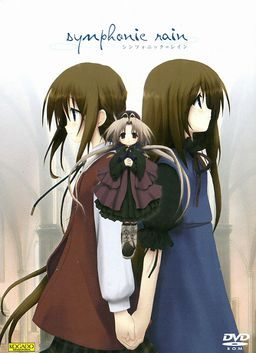
At the Scuola Comunale di Musica Piova school of music, there is a longstanding rumor. According to that rumor, a couple performing at the graduation examination will be forever bound by fate.
In a city which never seems to fall short when it comes to rain, this tale tells the story of Chris, a Fortell player in his final year, and his childhood sweetheart Arietta, with whom he has kept up weekly correspondence for nearly three years. Chris still hasn’t found a partner for his performance… Will their love wane before this trial, or conversely, will their relationship deepen, stronger than ever?
Symphonic Rain
- SymphonicRain.part01.rar - 199.3 MB
- SymphonicRain.part02.rar - 199.3 MB
- SymphonicRain.part03.rar - 199.3 MB
- SymphonicRain.part04.rar - 199.3 MB
- SymphonicRain.part05.rar - 199.3 MB
- SymphonicRain.part06.rar - 199.3 MB
- SymphonicRain.part07.rar - 199.3 MB
- SymphonicRain.part08.rar - 199.3 MB
- SymphonicRain.part09.rar - 199.3 MB
- SymphonicRain.part10.rar - 44.3 MB
- Symphonic_Rain_English_Patch_Beta2.exe - 43.6 MB




102 comments
install....ok
run patch....ok
run the game....ok
the problem is no text are apearing
so I hope you guys still check this thread.. :D
ok so suppose you have the Essai font, put that into your fonts section of your computer (in C drive => WINDOWS) and but the font in your game folder. then use Run program and run regedit. Look for H_KEY_CURRENT_USER i think then Borland, then Locales. right click to add a new string, and type your path that leads to the Symphonic Rain english .exe file. set the value as MOO .
After this I had no trouble with text. didnt start on account of exams... HOPE THIS HELPS EVERYONE!!!
Set everything in your PC to Japanese: formats, location, keyboard, administrative. I mean everything.
This solve in my case.SR for my bad english
I have changed my language for non-unicode programs to japanese, i also changed my standards and formats and location to Japanese/Japan and i changed my time zone to osaka,sapporo,tokyo but it still doesn't seem to work. Do i need to change anything else? please be specific if you can.
Also when i play SR.exe i can see the japanese text but when i play SR_qc.exe(the english version)i can't see the text at all.
Any effort at all to help me will be greatly appreciated!!
please and thank you.
It seems like you have to change the registry information with a text editor if you don't install it in the default directory.
I am sorry if i wasted anyones time.
Try reading here... I hope it helps >O< Even if it did me no good, give it a try... T^T
http://vndb.org/t561
tried it .... nope ...it didn't work for me DX
In my case, I can't even install it. I mount the image and open setup.exe, but an error message pops up saying "invalid win32 application". That happens with everything I try to open in the disc. I thought it was corrupted, but since evryone here seems to have accomplished the install, I wonder why I'm getting this error no one seems to get.
Hope this helps and best of luck!!
I installed the game, including the english patch.
I also experienced the same no text problem.
I tried using the method mentioned here to fix the problem.
But when I used the regedit, I can't fine the 'Borland' folder.
I might have done something wrong during the installment..I'm not sure
Somebody please help! :((
Go to the gamefile and find an archive called SR.reg
Double click it. It will create this path that did not exist before.
I didnt even need to go add the registry manually, it did it for me, and now i have the game with text.
You should see the path C:\Program Files\KOGADO\SRTE\SR_qc.exe
Right-click and rename this to C:\Program Files (x86)\KOGADO\SRTE\SR_qc.exe
It should work now.
Further issues:
- no SR.reg file present (looked for it)
- no Borland path found under regedit
- no regadd.bat file included with ISO
- already installed Essai font. This means - can't follow any of the steps above (including those pointing to an alternate site) - any idea where to get any of the needed files (sr.reg or regadd.bat)?
its always same ending,
how to change it with lise or fal ending?
The final ending is totally worth it though...
scroll up to my previous post...
Where? Another website by anjinforever
"Okay so I've made sure to read this entire thread looking for solutions to the English Patched version not displaying text. I still can't get it to work after having tried the following:
1. Made sure the Essai font was installed
2. Made sure the SR was installed into my registry (double-click SR.reg)
3. Ran everything associated with the program (patch install, shortcut, actual executable) as admin
4. Set everything to Japanese format including my keyboard and installed -everything- listed under the Japanese keyboard
I'm running a Windows 7 laptop. I can get the original game to display the text just fine... in Japanese. It's the translated version I can't get to display anything. Other than the text display there are no problems with the game running at all. Please help if anyone can think of a solution I haven't tried yet.
Edit: Solved it! For those of you who have tried everything else that I listed here, here's the final solution: Go into your regedit, open up your software listings and look for 'Borland' which should have 'Locales' under it. That's the folder with the SR registry. Make sure the listing for the SR registry is the actual file location and rename it if not. For example in my case my copy of SR was in my Program Files (x86) folder instead of in my plain Program Files, so as soon as I added the (x86) to the listing the game started displaying the text properly. This should solve it."
This should fix it, just make sure to do everything and itll fix it...
This is for WINDOWS 7
How can I fix this?
First, you get the Essai Font in your C:/Windows/Font folder. Copy and paste it into your SR folder (which by default is C:/ProgramFiles/KOGADO)
Second, use Run under Start Menu to open Regedit.
Open up HKEY_CURRENT_USER/SOFTWARE
from here, you are to CREATE the Borland key by R-clicking on Software and New->Key, type in "Borland". Then under "Borland", repeat and create the key "Locales"
Now, check on your SR desktop shortcut for the target directory (R-click-->Properties-->Shortcut tab-->Target)
Copy that entire link first.
(Again by my default, it should be C:\Program Files\KOGADO\SRTE\SR_qc.exe)
Third, R-click on Locales to add New->String Value
Paste that link onto the value name. (Use rename if you need to rekey in the value) Remember to remove the "" apostrophes.
Finally double click the key to add in "MOO" as value data.
You should be running perfectly. Cheers
When leaving the school on Natale with Fal, Chris just mentions something about the school being different when with Fal. Fal is just responding and the game crashes...
Is there a fix for this or patch or something with the settings to be changed?